EffectIO Account Funds for WooCommerce

Original price was: $79.00.Current price is: $12.99. / year

Drop-in compatible replacement & Licensed Product

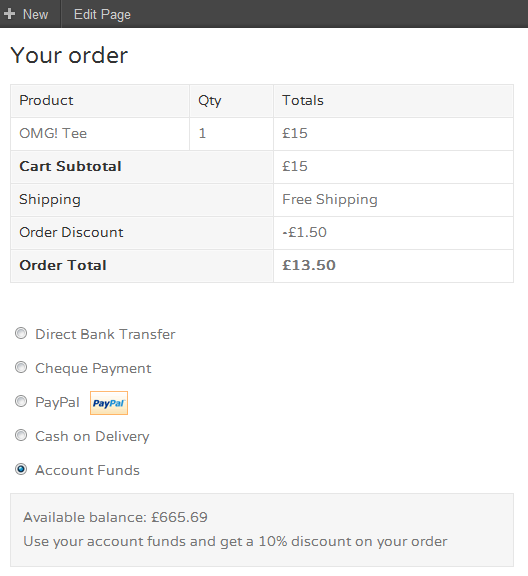
WooCommerce Account Funds extension helps build customer loyalty and repeat business by ensuring that your customers spend their funds only on your store! Version: 2.9.1 Allow customers to deposit funds into their accounts and pay with account funds during checkout.

Released on: 2024-02-12

Single License

Club Membership

17,99 / Month Membership

NEW Activate all licensed items with the free Dashboard

EffectIO Dashboard

Discover when we give away free Plugins

Find out when we give items for Free


Hey! 🎉 Monthly emails, tops. Snag exclusive plugins/themes for $0. They go quick, but you might just get a freebie! 😉

30 Days Money Back Guarantee

Guaranteed pre-activated plugins. Most items work immediately after installation. Open a support ticket to obtain the license keys for the ones that ask for activation.

Free support to install and setup on your site.

Find Out More About WooCommerce Account Funds

WooCommerce Account Funds extension helps construct client commitment as well as repeat business by guaranteeing that your clients invest their funds just on your shop. More than this, you can reward them by offering them unique discounts and immediate order processing if they pay utilizing their Account Funds.

In addition, Account Funds enables clients to deposit money into their accounts, and make use of them to buy products in your shop effortlessly.

Also, you can obtain detailed reviews on how much and how many deposits have been made by your clients over an interval of time.

How to Install Account Funds Plugin

  1. Firstly, you download the .zip file from your WooCommerce account.
  2. Secondly, you go to WordPress Admin > Plugins > Add New and Upload Plugin with he file that you have downloaded with Choose File.
  3. Then, you click Install Now and Activate the extension.

For any other information that you might need, you can go to Install and Activate Plugins/Extensions.

Settings

Discount Settings

Any time clients spend account funds in checkout, you can select whether or not to offer them a lower cost. How do you do this?

The first step is to mark the Give Discount checkbox. After that, you pick Fixed Price or Percentage from the Discount Type drop-down. Then, you type a number value in Discount Amount (there is no symbol or percent sign here). In the end, you click Save changes and it is all set.

The coupons must be allowed in WooCommerce so that the discounts can work properly. The configurations are in WooCommerce > Settings > Checkout.

Funding Settings

You can decide if you would like to permit clients to have the capacity to top-up in their My Account zone.

The first thing that you have to do for this is mark the Enable My Account Top-Up checkbox. Then, you type a number value for Minimum (if none, you can leave “0”). Also, type a number value for Maximum (if none, you can leave “N/A”).

Buyers are now capable to include funds via the Top-up field on the My Account page.

How to Create a Deposit Product

You can access the items to enable your clients to add money in their accounts in this way:

  1. Get to Product and select Add Product.
  2. Decide on the name, description, price and choose Account Funds Deposit from the Product Type drop-down.
  3. Submit to save and this is it.

4 reviews for EffectIO WooCommerce Account Funds 4.1.0

  1. tarikakgul97

    This product get detailed reports on how much, and how many deposits have been made by your customers over a period of time, great product!

  2. mario_nonevski

    This extension helps build customer loyalty and repeat business by ensuring that your customers spend their funds only on your store!

  3. jani.simon

    With this product you make sure your customers spend all their funds within your store, by allowing them to make deposits!

  4. petersendiana90

    My customers loyalty is much better, now, they are very thankful, thank you Effectio!

Add a review

Allow customers to deposit funds into their accounts and pay with account funds during checkout.

4.0.8 — 2025-11-17
  • Localization - Address a translation issue when using the provided Dutch translations in the rewards admin screens that caused a PHP error due to misplaced placeholder
4.0.7 — 2025-11-03
  • Fix - Address an uncommon issue where some customer metadata is not a string, but an array, causing a PHP error when handling a customer object
4.0.6 — 2025-10-28
  • Fix - Address an issue with WooCommerce Subscription when a customer pays a renewal with store credit
4.0.5 — 2025-10-20
  • Fix - When a user updates their email address from the My Account page, ensure their store credit balance is preserved
  • Fix - When a Subscription payment renewal fails, ensure that the subscription is set to failed
4.0.4 — 2025-09-30
  • Fix - Resolve a compatibility issue with WooCommerce Subscriptions when the customer switches from a subscription to another in some themes
4.0.3 — 2025-09-24
  • Tweak - Attach the customers' account funds balance to WooCommerce customers API responses
  • Fix - Address an issue where Subscription renewals could cause debiting the customer's store credit balance twice
  • Fix - Partial payments should be disabled at checkout if the main gateway becomes disabled as the result of third party code that disallows store credit payments
  • Fix - Address a framework issue where third party code may have the customer addresses stored in consecutive user meta resulting in array values instead of a single values
4.0.2 — 2025-09-03
  • Fix - Address an issue where a PHP error may have occurred in the My Account > Store Credit page in some circumstances
  • Fix - Ensure that eligible orders would persist categories when specified in the cashback configuration screen
  • Localization - Update translations and ensure the bundled translations also cover the translatable strings included in the plugin's framework components
  • Dev - Allow updating a user's store credit balance using the deprecated `update_user_meta()` function for backwards compatibility (not recommended)
  • Dev - Add a filter hook to allow negative store credit balances to account for some specific customization scenarios where this is desirable (discouraged)
4.0.1 — 2025-08-28
  • Fix - Prevent WooCommerce from accidentally creating a draft or pending payment order when displaying cashback information in the cart or checkout pages
  • Fix - Using comma as the decimal separator should persist the amount entered in the WordPress user profile edit screen store credit field
4.0.0 — 2025-08-27
  • Feature - Merchants can award customers with store credit based on customizable cashback or milestone rewards
  • Feature - Display cues for customers about the applicable store credit rewards they can earn in the product, cart and checkout pages, or the signup form
  • Feature - Merchants can define a custom label for store credit also in the plural form, from the plugin settings page
  • Tweak - The plugin settings and the new screens added in this release are now found within a top-level menu item for improved user experience
  • Tweak - The setting to allow "Partial payment" has been moved to the plugin's gateway settings for consistency and better organization
  • Fix - Various bugfixes and improvements to the plugin's functionality, user interface and user experience
  • Misc - Beginning from this version, the plugin will start changing some of its terminology and adopt "store credit" instead of "account funds" to better align with the new features and functionalities
  • Dev - Store credit will be stored inside a custom table instead of a user meta, with rows representing each transaction, forming a wallet ledger for each customer
  • Dev - Many legacy classes and functions are deprecated in this major release
  • Localization - Updated translations in all supported languages, added Chinese (simplified and traditional) translations
3.2.3 — 2025-07-24
  • Fix - Ensure the email object is not loaded twice when previewing an email while using the advanced emails feature in newer WooCommerce versions
  • Fix - Improve compatibility with PDF Invoices & Packing Slips for WooCommerce when handling refunds
  • Misc - Add an admin notice about the upcoming v4.0.0 release
3.2.2 — 2025-06-16
  • Tweak - Update styling of the Account Funds top-up button in the "My Account" page
  • Fix - Applied funds on checkout should not double when changing shipping details when automated tax rates are enabled in WooCommerce Tax plugin
  • Localization - Add Polish translations
3.2.1 — 2025-05-15
  • Fix - Ensure the account funds reports are loading properly
  • Fix - Remove deprecated usage of `wc_current_theme_is_fse_theme()` in favor of `wp_is_block_theme()`
3.2.0 — 2025-04-29
  • Feature - Add setting to assign a product image to top-up products shown in cart when topping up account funds
  • Tweak - Make partial payments enabled by default in new installations
  • Tweak - Add a setting to enable receiving funds on account registration
  • Tweak - Update the system status report data
  • Tweak - Display notice or redirect to cart when topping up funds
  • Fix - Ensure orders paid with account funds can be refundable to the customer's account funds
3.1.1 — 2024-09-25
  • Tweak - Update the block integration stylesheet to use a prefix
  • Fix - Do not load block assets when the checkout block is not in use
3.1.0 — 2024-07-10
  • Feature - Add support for the WooCommerce Cart and Checkout blocks
  • Tweak - Disable partial payments if the account funds gateway is disabled and the funds available are greater than the order total
  • Fix - Ensure partial funds can be used on cart page without having to trigger a page reload
  • Fix - Ensure funds can be applied when the order total would drop to zero when applying a discount
  • Misc - Deprecate the account funds discount feature in favor of funds top up sales
  • Misc - Prevent the plugin from being activated if WooCommerce is not active
3.0.3 — 2024-05-22
  • Fix - Allow account fund discounts in combination with an individual-use coupon
  • Fix - Improve compatibility with WooCommerce Shipping & Tax plugin when automated taxes are enabled
  • Fix - Address a PHP issue upon plugin upgrade or new activation
3.0.2 — 2024-03-26
  • Misc - Change plugin name to Account Funds for WooCommerce
  • Misc - Update brand to Kestrel
3.0.1 — 2024-01-17
  • Fix - Fixed error when generating a funds discount code before the `WC_Session` object is initialized
  • Dev - Improved compatibility with PHP 8.2 by not declaring dynamic properties in classes
  • Misc - Tested compatibility up to WooCommerce 8.5
3.0.0 — 2023-11-30
  • Feature - Use funds as a payment method on orders manually created
  • Tweak - Declared incompatibility with the WooCommerce Cart and Checkout blocks
  • Tweak - Updated the plugin URLs to the new woo.com domain
  • Dev - Dropped `woo-includes/` files
  • Dev - Dropped deprecated code from versions 2.x
  • Dev - Dropped deprecated filter hook `woocommerce_account_funds_get_settings`
  • Misc - Tested compatibility up to WooCommerce 8.5 and WordPress 6.3
  • Misc - Require WooCommerce 4.0+, WordPress 5.0+, and PHP 7.4+
2.9.1 — 2023-04-12
  • Tweak - Display the "Refund via Account Funds" button for orders paid with a different payment gateway only on WooCommerce 6.4 and later
2.9.0 — 2023-04-12
  • Feature - Added automatic refunds via 'Account Funds' for any payment method
  • Tweak - Tested compatibility with WooCommerce 7.6
  • Dev - Allow filtering of the funds' discount data before applying the discount
2.8.0 — 2023-03-28
  • Feature - Use a different name to refer to the account funds
  • Tweak - Register the increase funds email as a transactional email
  • Tweak - Added setting for customizing the message of the increase funds email
  • Tweak - Include the additional content in the increase funds email
  • Tweak - Added placeholder {funds_amount} to the increase funds email
  • Tweak - Use the store locale when sending customer emails
  • Tweak - Added setting for customizing the payment gateway description displayed in the checkout form
  • Tweak - Improved performance by initializing the payment gateway description only when needed
  • Tweak - Register the plugin integrations when all plugins have been loaded
  • Tweak - Reduced the plugin text strings by re-using strings from the WooCommerce core
  • Dev - Add the 'tax_status' value as the first argument of the filter `woocommerce_account_funds_topup_get_tax_status`
  • Dev - Update plugin templates
2.7.3 — 2022-11-16
  • Tweak - Declare compatibility with WooCommerce High-Performance Order Storage (HPOS)
2.7.2 — 2022-11-10
  • Tweak - Check if the funds are still applicable to the cart when its items are updated
  • Fix - Funds were not being removed from the cart after adding a deposit product
2.7.1 — 2022-10-17
2.3.7 — Skip the v2.3.7 migration script when updating from a version older than 2.3.0.
  • Misc - Tested compatibility up to WooCommerce 7.0 and WordPress 6.1
2.7.0 — 2022-06-14
  • Tweak - Validates the format of the funds' amount in the edit user screen
  • Tweak - Updated link to get support in the plugin list
  • Misc - Tested compatibility up to WooCommerce 6.6 and WordPress 6.0
  • Dev - Added filters for customizing who can view and edit the users' funds
  • Dev - Deprecated methods `WC_Account_Funds::add_funds()` and `WC_Account_Funds::remove_funds()`
  • Misc - Require WooCommerce 3.7+, WordPress 4.9+, and PHP 5.6+
2.6.5 — 2022-04-28
  • Misc - Tested compatibility up to WooCommerce 6.5
2.6.4 — 2022-03-09
  • Tweak - Update the cart session after applying the funds
2.6.3 — 2022-02-23
  • Tweak - Use the order's currency symbol to format order prices
  • Misc - Tested compatibility up to WooCommerce 6.3
  • Fix - Fixed warning when displaying the funds used in the edit order screen and the plugin WooCommerce Payments is active
2.6.2 — 2022-01-26
  • Tweak - Don't restore the funds automatically when an order is marked as 'Refunded' (use partial refunds instead)
  • Misc - Tested compatibility up to WooCommerce 6.2 and WordPress 5.9
  • Fix - The restored funds' amount cannot be greater than the "Net payment" amount when canceling an order that contains partial refunds
2.6.1 — 2021-12-17
  • Fix - Fixed wrong Order balance in the Square dashboard when partially paying the order with funds
  • Misc - Tested compatibility up to WooCommerce 6.0
2.6.0 — 2021-11-23
  • Feature - Add funds to the customer account on registration
  • Tweak - Moved the 'Partial Funds Payment' setting to the top of the settings page
  • Tweak - Validate the price type fields on the settings page
  • Tweak - Toggle visibility of the dependant settings fields
  • Dev - Deprecated filter hook `woocommerce_account_funds_get_settings`
  • Misc - Tested compatibility up to WooCommerce 5.9
  • Misc - Require WooCommerce 3.4+, WordPress 4.7+, and PHP 5.4+
2.5.4 — 2021-10-20
  • Tweak - Added plugin info to the WooCommerce System Status Report
  • Misc - Tested compatibility up to WooCommerce 5.8
2.5.3 — 2021-09-01
  • Misc - Tested compatibility up to WooCommerce 5.7
2.5.2 — 2021-07-20
  • Tweak - Don't return zero when the customer funds balance is negative
2.5.1 — 2021-07-01
2.5 — only from version 2.5
  • Misc - Tested compatibility up to WordPress 5.8
2.5.0 — 2021-06-28
  • Feature - Sell deposit products at a sale price
  • Feature - Support recurring deposit products with the extension "All products for WooCommerce Subscriptions"
  • Tweak - Tested compatibility up to WooCommerce 5.5
  • Dev - Added class autoloader
2.4.4 — 2021-04-28
  • Tweak - Remove the discount applied by the "Account funds" payment gateway when this one stops being available
  • Tweak - Remove the applied funds if after updating the cart the "Account funds" payment gateway is available
  • Tweak - Set the minimum Top-up amount to 1
  • Tweak - Tested compatibility up to WooCommerce 5.3
  • Fix - Don't add to cart a Top-up product with zero funds
2.4.3 — 2021-04-19
2.4.2 — reverts the fix from version 2.4.2
2.4.2 — 2021-04-16
  • Fix - Fixed wrong discount when giving a percentage discount for using funds
2.4.1 — 2021-04-13
  • Fix - The 'Account funds' checkbox didn't work on the cart page when modifying the cart at the same time
2.4.0 — 2021-04-08
  • Feature - Added support for "Refunds" to the "Account Funds" payment gateway
  • Tweak - Funds are restored after canceling or refunding an order
  • Tweak - Don't set the order total to zero when the payment gateway is "Account Funds"
  • Tweak - Display the "Funds used" row in the Order details before the "Payment gateway" row
  • Tweak - Hide the "Funds used" row in the Order details when the payment gateway is "Account Funds"
  • Fix - Unlock the used funds when canceling the PayPal payment process
  • Fix - Fixed warnings thrown for using the deprecated method `WC_Order->get_product_from_item()`
  • Misc - Tested compatibility up to WooCommerce 5.2
  • Misc - Updated the minimum requirements to WooCommerce 3.2+ and WordPress 4.4+
2.3.11 — 2021-03-23
  • Tweak - Always display the 'Account funds' payment gateway when there are enough funds to pay the Order
  • Tweak - Hide the 'Account funds' checkbox field when the payment gateway is available
2.3.10 — 2021-03-16
  • Tweak - Top-up the customer funds when an order with deposit products is marked as processing
  • Fix - Fixed jQuery selector for detecting changes on the Account Funds checkbox field during checkout
  • Misc - Tested compatibility up to WooCommerce 5.1 and WordPress 5.7
2.3.9 — 2021-01-26
  • Fix - Order status keeps pending after using funds for renewing a subscription
  • Misc - Tested compatibility with WooCommerce 4.9
2.3.8 — 2020-12-30
  • Tweak - Set the subscription renewal to manual when a renewal paid with funds fails
  • Fix - Fixed the not available payment gateways error when paying a failed renewal order of a subscription purchased with funds
2.3.7 — 2020-12-28

Testimonials

Benny O'Brien@benny_obie

The quick response from a friendly team member at @effectioshop honestly caught me off guard.
Nice work!


Stuart Boyle@stuart_boyle

@effectioshop As an eCommerce developer, effectio.org has enabled me to reach higher expectations and my clients are very happy.


22,000+ Users · 180 Countries
Trusted by freelancers, agencies & store owners worldwide

How It Works

Install the free EffectIO Dashboard plugin on your WordPress site. It connects to the EffectIO catalog, detects every premium plugin and theme you own, and gives you a single hub to manage licenses, run updates, and keep your admin panel clean — all from one screen.

One-Click Updates
Update any premium plugin or theme instantly. No manual downloads, no FTP — just click "Update Now."

🔑

License Manager
View, activate, and manage all your license keys in one place. No hunting through emails or vendor dashboards.

🔇

Notification Blocker
Blocks intrusive admin nag screens, upsell banners, and ads that clutter your dashboard. Re-enable anytime.

🛡️

Vendor Request Control
Prevents redundant license-check pings to third-party servers for items you already manage through EffectIO.

📦

Bulk Activation
Club members can activate all eligible plugins and themes at once — one button, zero hassle.

🆓

100% Free
The Dashboard itself costs nothing. Install it and it auto-activates on your domain — no key required.

Get Started in 3 Steps

1

Download & Install

Download the EffectIO Dashboard zip and install it via Plugins → Add New → Upload.

2

Browse & Activate

Open EffectIO → Catalog in your admin panel. The dashboard auto-detects your installed items and matches them to your licenses.

3

Update & Manage

Keep everything current with one-click updates. Manage licenses, block nag notices, and enjoy a cleaner WordPress experience.

Licenses

All WordPress derivative work is GPL-licensed. Most items are pre-activated and ready to use. Some require an activation key — we provide it with your purchase, and the Dashboard lets you apply it in seconds.

Club members enjoy bulk activation: activate every eligible item at once with a single click. No more entering keys one by one.

✅ Money-Back Guarantee

Every item is tested and ships with full features. If something doesn't work and we can't fix it, you get a full refund. We believe premium tools should be accessible — that's why we offer a low-cost subscription so freelancers, small businesses, and agencies can grow without a large upfront investment.

Manage and Update all your sites

17.99 $ / Month Membership

2900 Plugins and Themes. Install, Update, Activate and Delete any plugin. Unlimited Sites. Best WP Agency Deal.

Clean Items

NGO Mission

Always Updated

SSL Connection