EffectIO Instagram for WooCommerce

Original price was: $29.00.Current price is: $7.99. / year

Drop-in compatible replacement & Licensed Product

With the WooCommerce Instagram plugin, showcasing how customers use your products has never been easier. Purchase it on EffectIO! Version: 4.4.1 Connect your store with Instagram. Upload your product catalog to Instagram and showcase how your customers are using them.

Released on: 2024-02-12

Single License

Club Membership

17,99 / Month Membership

NEW Activate all licensed items with the free Dashboard

EffectIO Dashboard

Discover when we give away free Plugins

Find out when we give items for Free


Hey! 🎉 Monthly emails, tops. Snag exclusive plugins/themes for $0. They go quick, but you might just get a freebie! 😉

30 Days Money Back Guarantee

Guaranteed pre-activated plugins. Most items work immediately after installation. Open a support ticket to obtain the license keys for the ones that ask for activation.

Free support to install and setup on your site.

With the Instagram extension, showcasing how customers use your products has never been easier.

Woocommerce Instagram is a powerful way of connecting with your customers. In fact, Instagram is one of the most used social media platforms and it’s growing. Fast. Don’t miss out the opportunity of being shown on this platform, as you will be missing a lot of new potential customers. May you be working in the marketing industry or fashion, it doesn’t really matter. All that matters is that you have to connect with your audience and you have to do this as soon as possible. Begin now showing them your product catalogs with Woocommerce Instagram!

How to get started

Simply create an account on EffectIO and pay for the products in your cart. In this scenario, you have to add Woocommerce Instagram in your cart and simply pay for it through our checkout. Then install the EffectIO Dashboard and get started! In the right part of the plugin’s name, you can see the “Install” button. Click on it, then go to Plugins-> Activate and that’s all! 

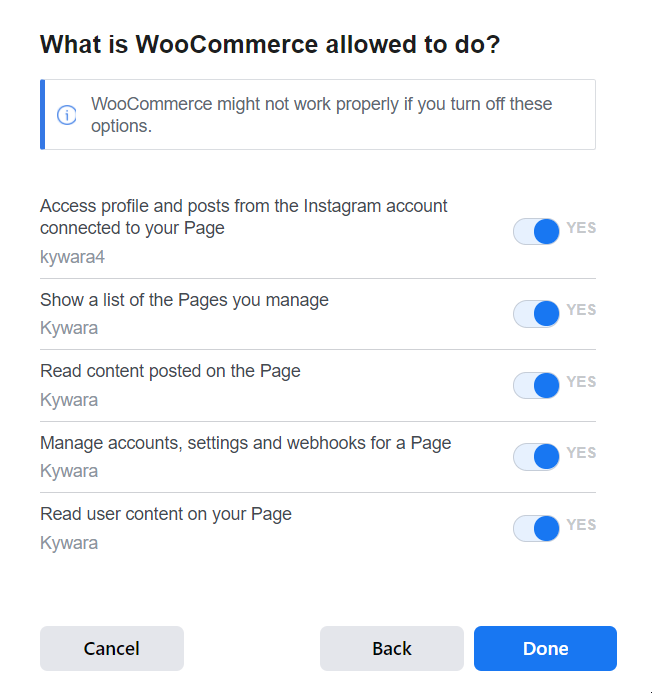
In order to find Woocommerce Instagram and begin using it, you have to go to Woocommerce -> Integrations -> Instagram. Then you have to connect your Facebook and click on Continue. At some point, this will show up: 
woocommerce instagram

This means that you have to allow it some permissions in order to get started. If you don’t enable all of them, the plugin might simply not work properly and you don’t want that. So make sure everything is checked, then click on “Done”.

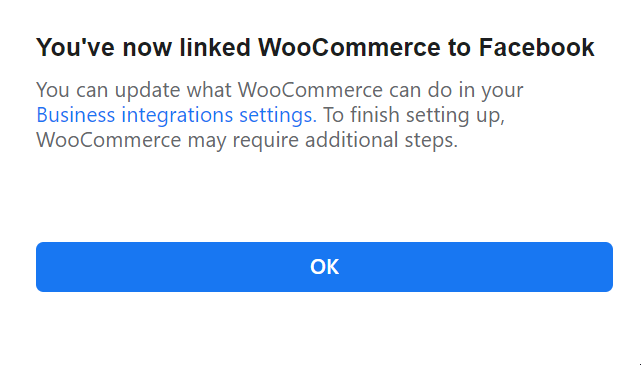
If everything went alright, the successful notification will show up:
notification woocommerce instagram

How to actually use Woocommerce Instagram

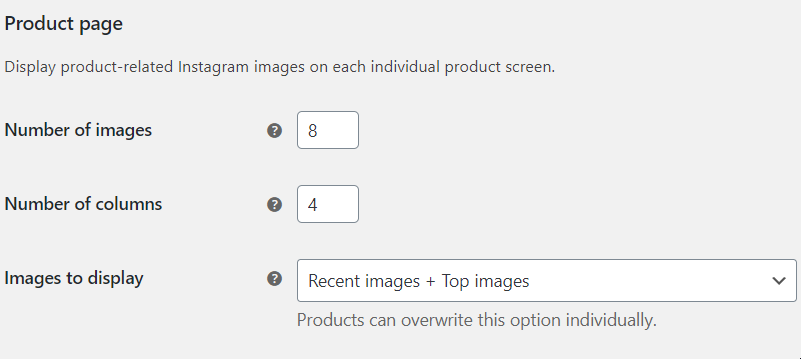
Begin with the Product Page Settings. Here you can choose the number of images and columns to be shown and in which order. Regarding their order, you have 3 options: Recent Images + Top Images or each of them, separately.
product page

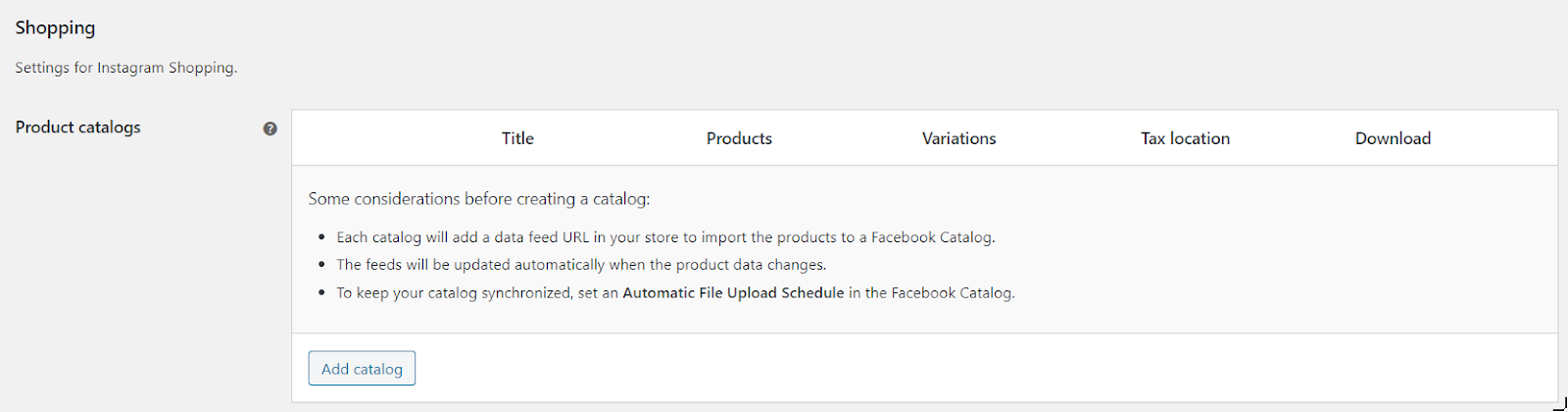
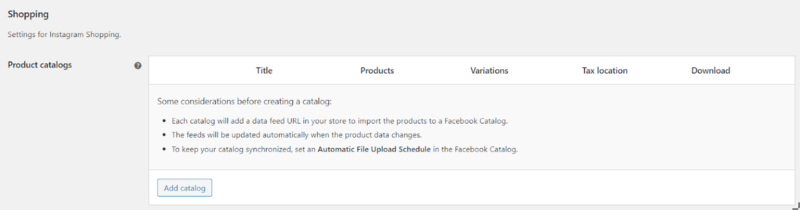
Then go for the Shopping Section of Instagram settings. If you haven’t added a catalog before, you should see this screen:
catalog instagram woocommerce

Click on “Add catalog” and the browser should open another page. 

The first thing you should do is to fill the catalog name. After doing so, a permalink will appear.

test catalog

Then you have a lot of options to include or exclude, depending on your business. Remember, what goes well for one might go awfully for another. So simply be sincere with yourself and ask if the settings you set are going to really help your business. 

At the end, don’t forget to choose the Google Product Category, to help yourself and your business be seen in a specific category and be shown to more relevant people who are actually interested in buying your product.

To conclude

To sum up, this plugin is extremely useful when it comes to showing your audience the products you’re trying to sell. Woocommerce Instagram will definitely help you do the job and in much less time than you might actually expect. Start using it today at an uber discount by using the EffectIO Dashboard and get the most out of your website!
Release Date

7/6/2016

Reviews

There are no reviews yet.

Be the first to review “EffectIO WooCommerce Instagram 4.6.2”

Connect your store with Instagram. Upload your product catalog to Instagram and showcase how your customers are using them.

4.6.2 — 2024-03-25
  • Fix - Pages created or linked to a Meta Business Portfolio can now be used by manually entering page ID
  • Tweak - Change connect server to Kestrel
  • Dev - add wc_instagram_auth_host filter
  • Misc - Update brand to Kestrel
4.6.1 — 2023-12-05
  • Tweak - Tested compatibility up to WC 8.4.
  • Fix - Fixed Google Attribute save in the custom product attributes.
4.6.0 — 2023-11-22
  • Feature - Declare compatibility with WooCommerce Cart and Checkout blocks.
  • Tweak - Check if the catalogs directory is writable in the System Status Report.
  • Tweak - Added trailing slash to the `WC_INSTAGRAM_CATALOGS_PATH` constant.
  • Tweak - Updated the plugin URLs to the new woo.com domain.
  • Tweak - Tested compatibility up to WC 8.3.
  • Dev - Fixed the default value provided as the third parameter in the filter hook `wc_instagram_product_parse_format`.
  • Dev - Renamed function parameters with reserved keywords to improve the compatibility with PHP 8.0.
4.5.0 — 2023-10-18
  • Feature - Added compatibility with 'WooCommerce Additional Variation Images'.
  • Tweak - Updated plugin author.
  • Tweak - Tested compatibility up to WC 8.2.
  • Tweak - Tested compatibility up to WP 6.4.
15.0 — Updated Instagram Graph API version to v15.0.
  • Dev - Added hook to filter the additional images of a product.
  • Dev - Dropped deprecated filter hook `wc_instagram_product_catalog_download_formats`.
  • Dev - Dropped deprecated filter hook `woocommerce_instagram_google_product_categories`.
4.2 — Dropped deprecated plugin code up to version 4.2.
  • Dev - Updated the minimum requirements to WC 3.7, WP 4.9, and PHP 5.6.
4.4.1 — 2023-08-21
  • Tweak - Uniquely register the scheduled actions.
  • Tweak - Tested compatibility with WC 8.0.
  • Tweak - Tested compatibility with WP 6.3.
4.4.0 — 2023-07-13
  • Feature - Associate Google product attributes with custom product attributes.
  • Tweak - Tested compatibility up to WC 7.9.
  • Tweak - Tested compatibility with WP 6.2.
  • Dev - Dropped `woo-includes/` files.
4.3.4 — 2023-03-02
  • Tweak - Tested compatibility up to WC 7.4.
4.3.3 — 2022-12-12
  • Tweak - Tested compatibility with WC 7.2.
  • Fix - The catalog feed dialog never refreshes until the process of generating the feed finishes.
  • Fix - Fixed lock-in the process of generating the catalog feeds when at least one product fails.
4.3.2 — 2022-11-24
  • Fix - Multi-word product attribute terms were not included in the catalog data feeds.
4.3.1 — 2022-11-02
  • Tweak - Declare compatibility with WooCommerce High-Performance Order Storage (HPOS).
  • Tweak - Tested compatibility up to WC 7.1.
  • Tweak - Tested compatibility with WP 6.1.
4.3.0 — 2022-08-03
  • Feature - Include the WooCommerce product categories in the catalog data feeds.
  • Feature - Added tool for clearing all cached Instagram images used in the product hashtags.
  • Tweak - Tested compatibility with WC 6.8.
4.2.0 — 2022-07-11
  • Feature - Added option to interrupt the process of updating a catalog data feed.
  • Tweak - Add a default description to the products without any description when generating the catalog data feeds.
  • Tweak - Selecting a Facebook Page on the settings page is no longer required for using the product catalogs.
  • Tweak - Hide the settings related to the product hashtags when there is no Facebook Page selected.
  • Tweak - Moved the product catalogs settings to an upper position in the form.
  • Tweak - Renamed the settings section 'Shopping' to 'Product catalogs'.
  • Tweak - Renamed the settings section 'Product page' to 'Product images'.
  • Tweak - Renamed the column 'Downloads' to 'Data feeds' in the product catalogs table.
  • Tweak - Redesigned the dialog content of the catalog data feeds.
  • Tweak - Removed link to the 'Shopping' doc in the plugin list.
  • Tweak - Added a link to get support in the plugin list.
  • Tweak - Tested compatibility with WC 6.7.
  • Fix - The 'Data feed' dialog stopped refreshing after the second AJAX request of the update process.
  • Dev - Deprecated filter hook `wc_instagram_product_catalog_download_formats`.
4.1.9 — 2022-06-21
  • Tweak - Reduced to 25 the number of products to process per batch when generating a catalog file.
  • Fix - Fixed the lock of the process for generating a catalog file when it's interrupted for exceeding the execution limits.
4.1.8 — 2022-06-08
  • Fix - Fixed duplicated products in the catalog files when including specific products in the catalog.
4.1.7 — 2022-06-06
  • Fix - Fixed duplicated products in the catalog files when excluding specific products from the catalog.
4.1.6 — 2022-06-03
  • Fix - Fixed fatal error when formatting a product with no price in PHP 8.0+.
4.1.5 — 2022-06-02
  • Tweak - Improved the log texts of the process for generating the catalog files.
  • Tweak - Include the catalog feed URL in the System Status Report.
  • Tweak - Tested compatibility with WC 6.6.
  • Tweak - Tested compatibility with WP 6.0.
  • Fix - Fixed the interruption of the catalog files generation when excluding products from it.
4.1.4 — 2022-04-28
  • Tweak - Tested compatibility with WC 6.5.
4.1.3 — 2022-04-20
  • Tweak - Tested compatibility with WC 6.4.
4.1.0 — The 'Stock Quantity' option of the already created catalogs was set to zero when updating the extension from a version prior to 4.1.0.
  • Fix - Fixed the interruption of the catalog files generation when the load of a product fails.
4.1.2 — 2022-03-16
  • Tweak - Improved product catalogs table in the System Status Report.
  • Tweak - Include the last modified date in the catalog XML file.
  • Fix - Fixed duplicated error notice on the settings page when the selected Facebook page doesn't have an Instagram account connected to it.
4.1.1 — 2022-02-28
  • Tweak - Unregister scheduled actions on plugin deactivation.
  • Tweak - Unregister custom post types on plugin deactivation.
  • Tweak - Tested compatibility with WC 6.3.
4.1.0 — 2022-02-07
  • Feature - Include the stock quantity in the product catalogs.
4.0.1 — 2022-01-27
  • Tweak - Refresh the XML file when the catalog settings change.
  • Tweak - Tested compatibility with WC 6.2.
  • Dev - Don't trigger the action hook `wc_instagram_product_catalog_updated` when a catalog file status changes.
  • Dev - Store the status of a catalog file as a transient instead of catalog metadata.
4.0.0 — 2022-01-20
  • Feature - Generate files for the product catalogs.
  • Tweak - Process the products of a catalog in batches.
  • Tweak - Reduced the load time of the product catalog feeds.
  • Tweak - Improved performance when exporting a product catalog to an XML or CSV file.
  • Tweak - Redirect to the settings page after creating a product catalog.
  • Tweak - Product catalogs are no longer sortable in the settings table.
  • Tweak - Delete a product catalog on the settings page without the need to save the settings.
  • Tweak - Replaced deprecated jQuery functions.
  • Tweak - Clear cache after removing the plugin data on uninstalling.
  • Tweak - Updated documentation links.
  • Tweak - Tested compatibility with WC 6.1.
  • Tweak - Tested compatibility with WP 5.9.
  • Dev - Allow querying products from a catalog.
  • Dev - Store the product catalogs in the WP Posts table as a Custom Post Type.
  • Dev - Use a WC background process to handle the plugin updates.
  • Dev - Use a trait instead of a class for implementing the Singleton pattern.
3.6 — Dropped deprecated plugin code up to version 3.6.
  • Dev - Dropped classes `WP_Async_Request` and `WP_Background_Process` from core.
  • Dev - Updated the minimum requirements to WC 3.5, WP 4.7, and PHP 5.4.
3.7.1 — 2021-12-16
  • Tweak - Tested compatibility with WC 6.0.
3.7.0 — 2021-11-03
  • Feature - Include additional information such as color, size, gender, etc. in the product catalogs.
  • Tweak - Tested compatibility with WC 5.9.
  • Dev - Deprecated filter hook `woocommerce_instagram_google_product_categories` in favor of `wc_instagram_google_product_categories`.
3.6.2 — 2021-09-28
  • Tweak - Tested compatibility with WC 5.8.
12.0 — Updated Instagram Graph API version to v12.0.
3.6.1 — 2021-09-01
  • Tweak - Added plugin info to the WooCommerce System Status Report.
  • Tweak - Tested compatibility with WC 5.7.
3.6.0 — 2021-08-24
  • Feature - Define the "Google Product Category" at the "Product Category" level.
  • Tweak - Improved performance of the Google Product Category field.
  • Tweak - Enhanced responsive styles for the Google Product Category field.
  • Tweak - Tested compatibility with WC 5.6.
  • Fix - Exclude out-of-stock product variations when the catalog only includes in-stock products.
3.5.1 — 2021-08-03
  • Tweak - Use the product name instead of the title in the content displayed on the product page.
  • Tweak - Tested compatibility up to WC 5.5.
  • Tweak - Tested compatibility up to WP 5.8.
  • Dev - Updated template `single-product/instagram.php`.
3.5.0 — 2021-06-17
  • Feature - Define a product catalog only with specific products.
  • Tweak - Added a "Filter by" field to the product catalog form.
  • Tweak - Simplified the product catalog form when filtering by product categories.
3.4.6 — 2021-05-27
  • Tweak - Tested compatibility up to WC 5.4.
  • Fix - Fixed the selection of subcategories for the "Google Product Category" field in the catalog settings form.
  • Dev - Replaced the usage of the library `select2.js` by `selectWoo.js`.
3.4.5 — 2021-03-18
  • Fix - Fixed fatal error when the Instagram settings page is loaded as the default integration.
3.4.4 — 2021-03-08
  • Tweak - Open hashtag images in a new tab.
  • Tweak - Tested compatibility with WP 5.7.
  • Fix - Catalog forms were accessible although there wasn't any Facebook account connected.
3.4.3 — 2021-02-22
  • Tweak - Tested compatibility up to WC 5.1.
  • Fix - Catalog feeds were accessible although there wasn't any Facebook account connected.
3.4.2 — 2020-12-29
  • Tweak - Replaced deprecated jQuery functionality.
  • Tweak - Use the short description as a fallback for the large description in the product catalog.
  • Tweak - Improved the description fallbacks for product variations in the product catalog.
  • Tweak - Tested compatibility with WC 4.9.
  • Fix - Fixed error 404 on the feed URL when the catalog slug is a numeric value.
3.4.1 — 2020-11-26
  • Tweak - Improved PHP 8 support.
  • Tweak - Tested compatibility with WC 4.8.
  • Tweak - Tested compatibility with WP 5.6.
3.4.0 — 2020-11-18
  • Feature - Added compatibility with WooCommerce Product Bundles extension.
  • Tweak - Tested compatibility up to WC 4.7.
  • Tweak - Tested compatibility up to WP 5.5.
3.3.2 — 2020-10-28
  • Tweak - Tested compatibility up to WC 4.6.
8.0 — Updated Instagram Graph API version to v8.0.
3.3.1 — 2020-07-28
  • Tweak - Use the full-size image instead of the thumbnail as the primary image in the catalog products.
3.3.0 — 2020-07-20
  • Feature - Include the Google product category in the product catalogs.
  • Tweak - Tested compatibility with WC 4.3.
  • Fix - Fixed the values of the product brand and condition for product variations in the catalogs.
3.2.0 — 2020-06-15
  • Feature - Include all the product images in the catalog.
  • Fix - Fixed the default value of the field used as the product description in the product catalogs.
3.1.1 — 2020-06-01
  • Tweak - Strip HTML tags from the product description.
  • Tweak - Tested compatibility with WC 4.2.
3.1.0 — 2020-05-18
  • Feature - Define the brand and the condition per product.
  • Feature - Choose the field used as the product description.
  • Tweak - Added hook to filter the product availability.
  • Fix - Fixed fatal error when the product catalogs setting is an empty string.
  • Dev - Modified template `single-product/instagram.php`.

Testimonials

Benny O'Brien@benny_obie

The quick response from a friendly team member at @effectioshop honestly caught me off guard.
Nice work!


Stuart Boyle@stuart_boyle

@effectioshop As an eCommerce developer, effectio.org has enabled me to reach higher expectations and my clients are very happy.


22,000+ Users · 180 Countries
Trusted by freelancers, agencies & store owners worldwide

How It Works

Install the free EffectIO Dashboard plugin on your WordPress site. It connects to the EffectIO catalog, detects every premium plugin and theme you own, and gives you a single hub to manage licenses, run updates, and keep your admin panel clean — all from one screen.

One-Click Updates
Update any premium plugin or theme instantly. No manual downloads, no FTP — just click "Update Now."

🔑

License Manager
View, activate, and manage all your license keys in one place. No hunting through emails or vendor dashboards.

🔇

Notification Blocker
Blocks intrusive admin nag screens, upsell banners, and ads that clutter your dashboard. Re-enable anytime.

🛡️

Vendor Request Control
Prevents redundant license-check pings to third-party servers for items you already manage through EffectIO.

📦

Bulk Activation
Club members can activate all eligible plugins and themes at once — one button, zero hassle.

🆓

100% Free
The Dashboard itself costs nothing. Install it and it auto-activates on your domain — no key required.

Get Started in 3 Steps

1

Download & Install

Download the EffectIO Dashboard zip and install it via Plugins → Add New → Upload.

2

Browse & Activate

Open EffectIO → Catalog in your admin panel. The dashboard auto-detects your installed items and matches them to your licenses.

3

Update & Manage

Keep everything current with one-click updates. Manage licenses, block nag notices, and enjoy a cleaner WordPress experience.

Licenses

All WordPress derivative work is GPL-licensed. Most items are pre-activated and ready to use. Some require an activation key — we provide it with your purchase, and the Dashboard lets you apply it in seconds.

Club members enjoy bulk activation: activate every eligible item at once with a single click. No more entering keys one by one.

✅ Money-Back Guarantee

Every item is tested and ships with full features. If something doesn't work and we can't fix it, you get a full refund. We believe premium tools should be accessible — that's why we offer a low-cost subscription so freelancers, small businesses, and agencies can grow without a large upfront investment.

Manage and Update all your sites

17.99 $ / Month Membership

2900 Plugins and Themes. Install, Update, Activate and Delete any plugin. Unlimited Sites. Best WP Agency Deal.

Clean Items

NGO Mission

Always Updated

SSL Connection