EffectIO Easy Digital Downloads - Manual Purchases

Original price was: $70.00.Current price is: $9.99. / year

Drop-in compatible replacement & Licensed Product

Provides an admin interface for manually creating purchase orders in Easy Digital Downloads Version: 2.0.5 Provides an admin interface for manually creating purchase orders in Easy Digital Downloads

Released on: 2025-01-14

Single License

Club Membership

17,99 / Month Membership

NEW Activate all licensed items with the free Dashboard

EffectIO Dashboard

Discover when we give away free Plugins

Find out when we give items for Free


Hey! 🎉 Monthly emails, tops. Snag exclusive plugins/themes for $0. They go quick, but you might just get a freebie! 😉

30 Days Money Back Guarantee

Guaranteed pre-activated plugins. Most items work immediately after installation. Open a support ticket to obtain the license keys for the ones that ask for activation.

Free support to install and setup on your site.

Easy Digital Downloads – Manual Purchases 2.0.5

Easy Digital Downloads – Manual Purchases allows you to create orders directly from the admin area, eliminating the need for the legacy Manual Purchases extension. With this update, the feature is built directly into Easy Digital Downloads, providing a seamless experience for creating manual purchases.

Manual purchases are commonly used for in-person or phone credit card payments, as well as for providing complimentary copies of your products for promotional or customer support purposes. Easy Digital Downloads makes it easy to record and manage these orders.

Prior to version [version], editing payments in Easy Digital Downloads was possible. However, the recommended approach is now to use the manual order creation process to create a new order, applying adjustments or credits as needed. This ensures more accurate accounting and reporting.

Add Order

To create a new order, navigate to Downloads → Orders and click the “Add Order” button. You can also use the “New → Order” option from the WordPress admin bar.

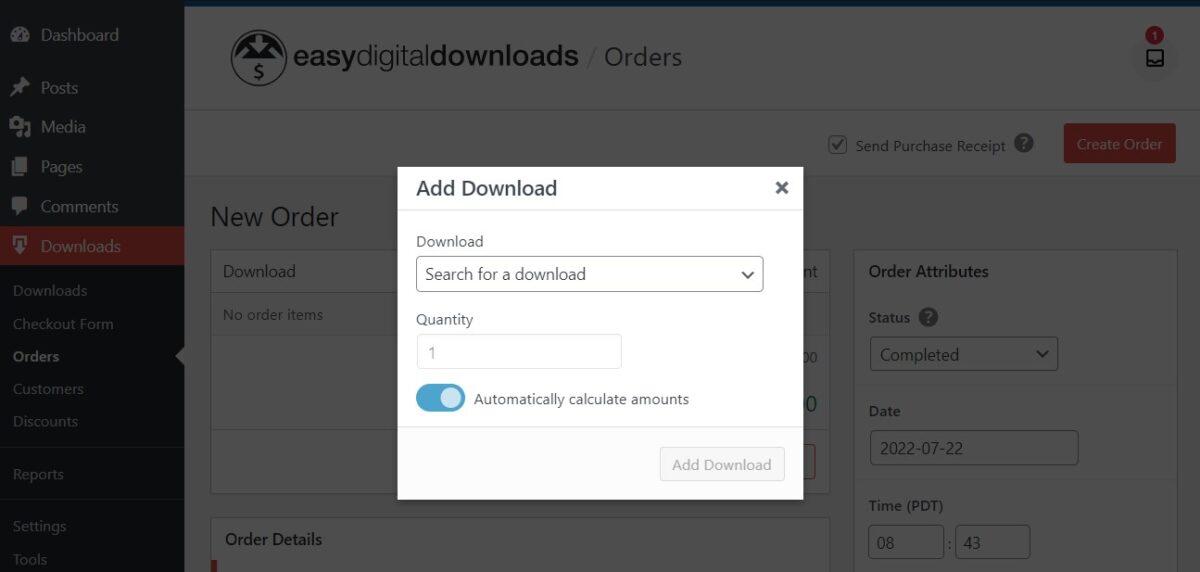
Add Download: Choose one or more products to include in the order. EDD will automatically calculate the unit price and order total, or you can manually set these values if needed.

Customer: Associate the purchase with an existing customer or create a new customer. If taxes are enabled, select an existing address or add a new one to the order. Recalculating taxes may be required after adding or changing an address.

Order Status: The order status affects the delivery of digital files, even though no financial transaction is occurring with manual orders.

Gateway: Choose the payment gateway that applies to the order. The Store Gateway is ideal for free purchases, while registered gateways should be selected for recorded transactions.

Key: This field allows you to enter a unique value for identifying the order record. Typically, this can be left blank as EDD will automatically generate it.

Transaction ID: If a payment was processed directly through a gateway, you can enter the transaction ID here. Otherwise, you can enter a new ID or leave it blank.

Browse our [sidebarCategories] or contact [sidebarSupport] to get your questions answered. For custom development and consultation, we have partnered with Codeable. Our software is GPL code, backed by premium support from EffectIO. Take advantage of EffectIO’s super deals with 30 to 90 percent discounts, as well as the ability to update items via the EffectIO Dashboard, where they come pre-activated.

Over 25 million sites already trust Easy Digital Downloads – Manual Purchases to provide a seamless experience for managing manual orders. With an Awesome Team behind it, you can expect awesome user experiences, no matter the market conditions or current trends.

Benefits:

  • Easily create manual orders from the admin area
  • Record in-person or phone credit card payments
  • Provide complimentary copies of products for promotions or customer support
  • More accurate accounting and reporting
  • Automatic calculation of unit price and order total
  • Associate orders with existing or new customers
  • Flexible order status options
  • Select the appropriate payment gateway for each order
  • Unique value for identifying each order record
  • Enter transaction IDs for direct gateway payments
  • Efficiently browse and manage orders
  • Premium support from EffectIO
  • Update items via EffectIO Dashboard with pre-activation
  • GPL code for customization
  • Benefit from EffectIO’s super deals with 30 to 90 percent discounts
Provides an admin interface for manually creating purchase orders in Easy Digital Downloads

Testimonials

Benny O'Brien@benny_obie

The quick response from a friendly team member at @effectioshop honestly caught me off guard.
Nice work!


Stuart Boyle@stuart_boyle

@effectioshop As an eCommerce developer, effectio.org has enabled me to reach higher expectations and my clients are very happy.


22,000+ Users · 180 Countries
Trusted by freelancers, agencies & store owners worldwide

How It Works

Install the free EffectIO Dashboard plugin on your WordPress site. It connects to the EffectIO catalog, detects every premium plugin and theme you own, and gives you a single hub to manage licenses, run updates, and keep your admin panel clean — all from one screen.

One-Click Updates
Update any premium plugin or theme instantly. No manual downloads, no FTP — just click "Update Now."

🔑

License Manager
View, activate, and manage all your license keys in one place. No hunting through emails or vendor dashboards.

🔇

Notification Blocker
Blocks intrusive admin nag screens, upsell banners, and ads that clutter your dashboard. Re-enable anytime.

🛡️

Vendor Request Control
Prevents redundant license-check pings to third-party servers for items you already manage through EffectIO.

📦

Bulk Activation
Club members can activate all eligible plugins and themes at once — one button, zero hassle.

🆓

100% Free
The Dashboard itself costs nothing. Install it and it auto-activates on your domain — no key required.

Get Started in 3 Steps

1

Download & Install

Download the EffectIO Dashboard zip and install it via Plugins → Add New → Upload.

2

Browse & Activate

Open EffectIO → Catalog in your admin panel. The dashboard auto-detects your installed items and matches them to your licenses.

3

Update & Manage

Keep everything current with one-click updates. Manage licenses, block nag notices, and enjoy a cleaner WordPress experience.

Licenses

All WordPress derivative work is GPL-licensed. Most items are pre-activated and ready to use. Some require an activation key — we provide it with your purchase, and the Dashboard lets you apply it in seconds.

Club members enjoy bulk activation: activate every eligible item at once with a single click. No more entering keys one by one.

✅ Money-Back Guarantee

Every item is tested and ships with full features. If something doesn't work and we can't fix it, you get a full refund. We believe premium tools should be accessible — that's why we offer a low-cost subscription so freelancers, small businesses, and agencies can grow without a large upfront investment.

Manage and Update all your sites

17.99 $ / Month Membership

2900 Plugins and Themes. Install, Update, Activate and Delete any plugin. Unlimited Sites. Best WP Agency Deal.

Clean Items

NGO Mission

Always Updated

SSL Connection