EffectIO LearnDash - Slack

Original price was: $79.00.Current price is: $7.99. / year

Drop-in compatible replacement & Licensed Product

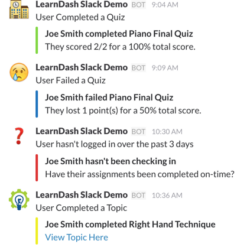
LearnDash Slack allows e-learning site owners to configure detailed notifications from their WordPress site to their team’s Slack channels. Version: 1.4.0 Slack Integration for LearnDash

Released on: 2025-01-14

Single License

Club Membership

17,99 / Month Membership

NEW Activate all licensed items with the free Dashboard

EffectIO Dashboard

Discover when we give away free Plugins

Find out when we give items for Free


Hey! 🎉 Monthly emails, tops. Snag exclusive plugins/themes for $0. They go quick, but you might just get a freebie! 😉

30 Days Money Back Guarantee

Guaranteed pre-activated plugins. Most items work immediately after installation. Open a support ticket to obtain the license keys for the ones that ask for activation.

Free support to install and setup on your site.

Description of learndash-slack

🔥 Looking for a powerful way to enhance your LearnDash experience? Introducing learndash-slack, a top-notch WordPress plugin designed to streamline communication and collaboration within your e-learning platform.

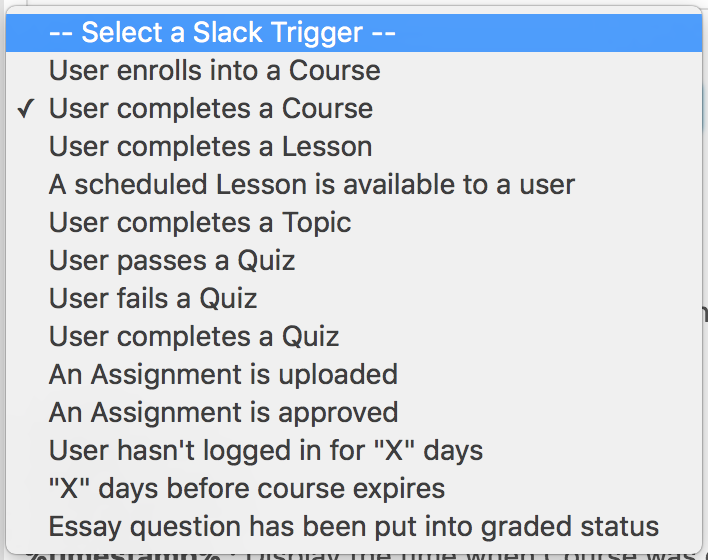
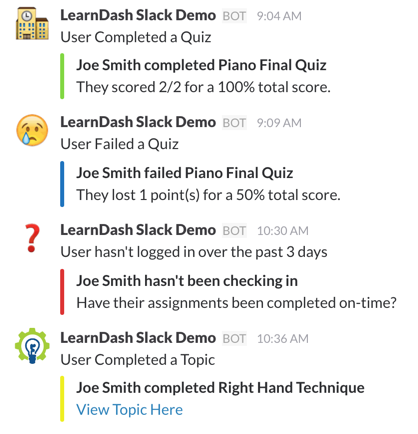
With learndash-slack, you can seamlessly integrate LearnDash with Slack, the popular team communication tool. This integration allows you to effortlessly send notifications, updates, and reminders directly to Slack channels or individual users, keeping everyone in your e-learning community informed and engaged.

But here’s the best part: rethink your plugin update strategy with 🔒 EffectIO, the ultimate alternative for cost-saving updates and premium support.

🌟 Why Choose learndash-slack via EffectIO? 🌟

  • 🚀 Supercharge your LearnDash experience with effortless integration with Slack.
  • 💌 Keep your e-learning community informed and engaged with notifications and updates sent directly to Slack channels or individual users.
  • 🔐 Gain access to cost-saving updates and premium support through the EffectIO Dashboard.
  • 💯 Leverage the power of GPL code and unlock the potential of learndash-slack.
  • 📈 Enhance collaboration and communication within your e-learning platform.
  • 🎯 Save time and effort with automated notifications and reminders.
  • ⚡️ Improve learner engagement and motivation with real-time updates.
  • 💪 Streamline your workflow and manage your e-learning community more effectively.
  • ✨ Enjoy pre-activated items that are ready to use right away.
  • 🥇 Experience the exceptional quality and reliability of learndash-slack.
  • 🔒 Secure your LearnDash platform with reliable plugin updates.
  • 💸 Unlock amazing discounts with EffectIO super deals, offering 30 to 90 percent off.
  • ❓ Get expert advice and assistance from EffectIO’s premium support team.
  • 🌍 Reach a global audience with multilingual support for learndash-slack.
  • 📺 Benefit from a responsive and user-friendly interface.
  • ✅ Ensure compatibility with the latest WordPress and LearnDash versions.

👉 Update Your LearnDash Experience Today with EffectIO! 👈

Slack Integration for LearnDash

1.4.0
  • Moves the License Field to a sub-page under LearnDash LMS -> Settings -> Slack -> Licensing as the LearnDash Hub Plugin (automatically installed when updating to LearnDash v4.3.0.2) removes the LMS License Tab from view
1.3.1
  • Fixes incompatibility with the Quiz Complete/Pass/Fail triggers and LearnDash versions 3.5.1.1 - 3.6.0.2.
  • Updates our Licensing and Support module to the latest version
1.3.0
  • Previously, all %timestamp% replacements would use UTC as the timezone. Now it will respect the timezone set for your website.
  • Fixes an undefined index notice when creating new Notifications
  • Fixes a deprecated PHP warning in the upgrade routine
  • Update Licensing and Support module to the latest version
  • Now the Changelog will show directly within your website
1.2.6
  • Fix issue where the Groups field wasn’t showing for some triggers, causing the notification to silently bail before sending
  • Fixes a PHP Notice for the usage of date_default_timezone_set()
1.2.5
  • Fix issue where LearnDash v3.x’s page header would overlap our Notification Settings Modal
  • Fix issue where the Default Webhook URL and Timestamp Format fields would sometimes not save correctly
1.2.4
  • Add %timestamp% to Topic Complete and Lesson Complete Triggers
  • Remove Course Point Related Merge Tags from Lesson, Topic, and Quiz Triggers where they did not do anything
1.2.3
  • Quiz Triggers: Adds %questions_pending_grading% Replacement Text so that any Questions pending manual Grading can have Edit Links for them added to the Slack Notification.
  • Updates our Licensing and Support module to the latest version
1.2.2
  • Show the %course_name% and %course_link% merge tags for the Assignment Upload trigger
  • Fixes Course Point-related Merge Tags for Expiring Courses Uses LearnDash’s new methods for obtaining Course Settings
  • Added a checkbox below the License Key field at LearnDash LMS -> Settings -> LMS License to opt-in to Beta Releases.
1.2.1
  • Fixes PHP error on upgrade
1.2.0
  • Groups are now supported for any Trigger having to do with a Student (Most of the Triggers)
  • The “Group” Field does not show if no Groups exist
  • LearnDash Gradebook integration
  • Adds itself into the Quiz Triggers, Assignment Triggers, and a new Trigger is added for adding manual grades to the Gradebook
  • Requires LearnDash Gradebook v1.2.0 or higher
  • Multiple Webhooks Support. You can now save multiple Webhooks URLs and assign them Names to quickly access within your Notifications via a Dropdown. This helps you keep straight which Notifications are going where if you’re using multiple Webhooks to send to a completely different Slack Team for example.
  • Any previously defined Webhook URLs will be copied into the new system. Their Names will match the Notification Identifier of the first Notification that it finds using it.
  • Added the ability to select multiple items from Dropdowns when making a Notification
  • You can also exclude results from most of these if you choose “All”
  • All the Webhook URL fields and the Timestamp Format field save automatically once you click outside of them. A little icon will appear to indicate it is saving, and it will flash green briefly once saved, similarly to how the Notifications do.
  • Textarea for Notification Message now auto-expands as you type When editing a Notification, hitting “Back” in your Browser will ask you for confirmation. This is mostly helpful on MacBooks or other devices with swipe gestures that are easy to accidentally use.
  • Support Form has been added
  • Support Form is on the “LMS License” page
  • Markdown now allowed within Notification pre-text and text
  • %points_earned% and %points_possible% added for Assignment Triggers
  • Delete Button now matches Admin Theme
  • Labels in the Notification Form now show above the fields instead of below
  • Fixes bug with detecting Active/Valid Notification status
  • Fixed a bug where defining an alternate Webhook for a Notification would use the Default Webhook instead
1.1.0
  • New Notification creation workflow
  • All of your old Notifications are preserved
  • LearnDash v2.4 support
  • Course Points Merge Tags are added if LearnDash version is greater than or equal to v2.4
  • %awarded_course_points%
  • %student_course_points%
  • %access_course_points%
  • Text Domain is no longer a Constant
  • Ampersands don’t break Notifications if they are in any of the Message Fields
1.0.6
  • Update Plugin Updater to Latest Version.
1.0.5
  • Prevents a PHP Error from showing for Non-Admin Users.
1.6.2
  • Adds Gradebook ID to ld_gb_gradebook_data Filter
  • Adds ld_gb_gradebook_list_table_grade_display Filter
  • Adds ld_gb_get_user_grade Filter which allows overriding the returned value of ld_gb_get_user_grade() before anything is processed
1.0.4
  • Notifications were able to cancel each other out. Now they no longer do.
  • Example: A Notification for all Completed Quizzes would get canceled by a Failed Quiz Notification that wasn’t being triggered by the correct Quiz.
1.0.3
  • Fixed an issue where Notifications would send when they weren’t supposed to.
  • Example: A Notification for Failed Quizzes that was set to only send for a specific Quiz would instead send for all Quizzes.
1.0.2
  • Fixed potential fatal error if there are no Quizzes available
1.0.1
  • Included translation files
  • Added help text and resource link for Webhook URL setting
1.0.0
  • Initial release

Testimonials

Benny O'Brien@benny_obie

The quick response from a friendly team member at @effectioshop honestly caught me off guard.
Nice work!


Stuart Boyle@stuart_boyle

@effectioshop As an eCommerce developer, effectio.org has enabled me to reach higher expectations and my clients are very happy.


22,000+ Users · 180 Countries
Trusted by freelancers, agencies & store owners worldwide

How It Works

Install the free EffectIO Dashboard plugin on your WordPress site. It connects to the EffectIO catalog, detects every premium plugin and theme you own, and gives you a single hub to manage licenses, run updates, and keep your admin panel clean — all from one screen.

One-Click Updates
Update any premium plugin or theme instantly. No manual downloads, no FTP — just click "Update Now."

🔑

License Manager
View, activate, and manage all your license keys in one place. No hunting through emails or vendor dashboards.

🔇

Notification Blocker
Blocks intrusive admin nag screens, upsell banners, and ads that clutter your dashboard. Re-enable anytime.

🛡️

Vendor Request Control
Prevents redundant license-check pings to third-party servers for items you already manage through EffectIO.

📦

Bulk Activation
Club members can activate all eligible plugins and themes at once — one button, zero hassle.

🆓

100% Free
The Dashboard itself costs nothing. Install it and it auto-activates on your domain — no key required.

Get Started in 3 Steps

1

Download & Install

Download the EffectIO Dashboard zip and install it via Plugins → Add New → Upload.

2

Browse & Activate

Open EffectIO → Catalog in your admin panel. The dashboard auto-detects your installed items and matches them to your licenses.

3

Update & Manage

Keep everything current with one-click updates. Manage licenses, block nag notices, and enjoy a cleaner WordPress experience.

Licenses

All WordPress derivative work is GPL-licensed. Most items are pre-activated and ready to use. Some require an activation key — we provide it with your purchase, and the Dashboard lets you apply it in seconds.

Club members enjoy bulk activation: activate every eligible item at once with a single click. No more entering keys one by one.

✅ Money-Back Guarantee

Every item is tested and ships with full features. If something doesn't work and we can't fix it, you get a full refund. We believe premium tools should be accessible — that's why we offer a low-cost subscription so freelancers, small businesses, and agencies can grow without a large upfront investment.

Manage and Update all your sites

17.99 $ / Month Membership

2900 Plugins and Themes. Install, Update, Activate and Delete any plugin. Unlimited Sites. Best WP Agency Deal.

Clean Items

NGO Mission

Always Updated

SSL Connection











