EffectIO GP Limit Choices

Original price was: $29.00.Current price is: $4.99. / year

Drop-in compatible replacement & Licensed Product

Limit how many times a choice may be selected for Radio Button, Drop Down and Checkbox fields. Version: 1.7.13 Limit how many times a choice may be selected for Radio Button, Drop Down and Checkbox fields.

Released on: 2025-01-14

Single License

Club Membership

17,99 / Month Membership

NEW Activate all licensed items with the free Dashboard

EffectIO Dashboard

Discover when we give away free Plugins

Find out when we give items for Free


Hey! 🎉 Monthly emails, tops. Snag exclusive plugins/themes for $0. They go quick, but you might just get a freebie! 😉

30 Days Money Back Guarantee

Guaranteed pre-activated plugins. Most items work immediately after installation. Open a support ticket to obtain the license keys for the ones that ask for activation.

Free support to install and setup on your site.

GP Limit Choices 1.7.13 – Limit and Manage Choices in Gravity Forms

GP Limit Choices 1.7.13 is a powerful plugin for WordPress developers that allows you to easily limit the selection of choices in Gravity Forms’ choice-based fields, such as Radio Buttons, Checkboxes, and Drop Downs. With this plugin, you can prevent users from selecting exhausted choices for future entries.

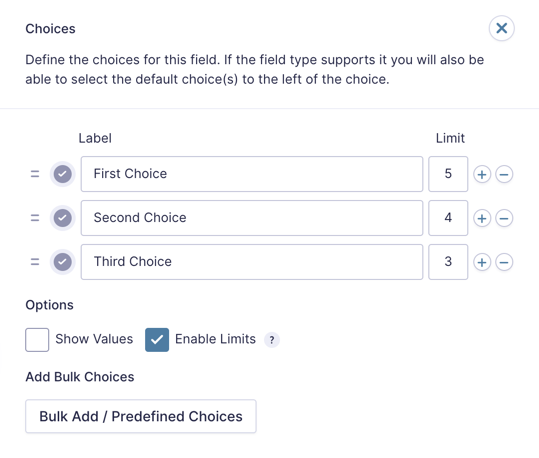
When installed and activated, GP Limit Choices integrates seamlessly with any supported choice-based field in Gravity Forms. Once a choice reaches its specified limit, it will no longer appear on the frontend of the form, but can still be edited in the Form Editor to adjust the limit as needed.

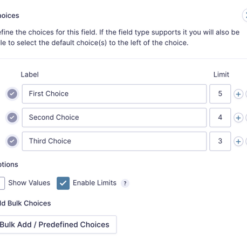
The number of choices in the Form Editor represents the total available choices and does not update as entries are submitted. If you want to make additional choices available after initially setting a maximum limit, you can simply adjust the number in the Form Editor.

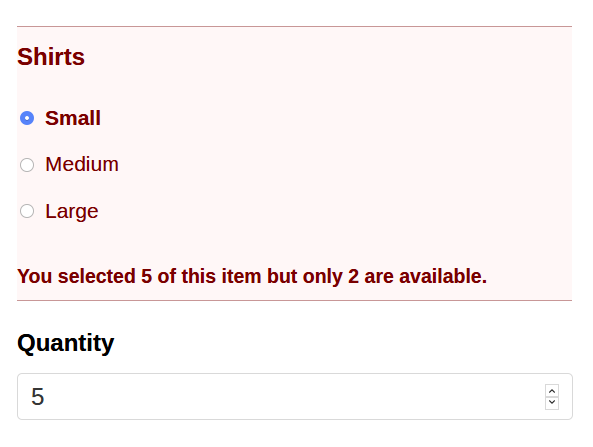
GP Limit Choices also works seamlessly with Product or Option fields that have a Quantity field associated with them. The quantity ordered will be counted towards the limit of choices available.

What sets GP Limit Choices apart is its ability to utilize remaining choices in conditional logic. Once limits are enabled for a field, the “Remaining” condition becomes available within the conditional logic rules, allowing you to show or hide a field based on the number of remaining choices.

To further enhance flexibility, the plugin provides the gplcdisablechoices hook, which allows you to disable exhausted choices while still using them for conditional logic purposes.

GP Limit Choices 1.7.13 is part of Gravity Perks, a comprehensive suite of 47 essential Gravity Forms addons. With this plugin, you can enjoy premium support from the experienced team at EffectIO and easily update it via the EffectIO Dashboard, where plugins come pre-activated for your convenience.

Key Features of GP Limit Choices 1.7.13:

  • Limit the selection of choices in Gravity Forms’ choice-based fields
  • Automatically remove exhausted choices to prevent future selection
  • Seamless integration with supported choice-based fields in Gravity Forms
  • Adjust limits and manage choices easily in the Form Editor
  • Count quantity ordered towards choice limits in Product or Option fields
  • Utilize remaining choices to trigger conditional logic
  • Flexible options to disable exhausted choices for conditional logic purposes
  • Part of the Gravity Perks suite with premium support and regular updates
  • Conveniently update via the EffectIO Dashboard
  • Comes pre-activated for hassle-free setup

With GP Limit Choices 1.7.13, you can efficiently manage and limit the choices in your Gravity Forms, providing a seamless user experience while maintaining control over form submissions. Get premium support and enjoy regular updates by choosing EffectIO, the trusted source for GPL code and exclusive deals with discounts ranging from 30% to 90% off.
Limit how many times a choice may be selected for Radio Button, Drop Down and Checkbox fields.

1.7.13
  • Updated "Enable Limits" tooltip for clarity.
1.7.12
  • Improved how exhausted choices are removed to prevent the input IDs of choices from changing.
1.7.11
  • Fixed issue where the "Enable Limits" checkbox wasn't showing with newer versions of Gravity Forms when used with the Quiz Add-on. Additionally, issues with the checkbox and limit column not showing in GF 2.4 have been addressed.
1.7.10
  • Fixed an issue where Javascript errors were thrown on Gravity Forms Admin for fields without choices.
1.7.9
  • Added German translations. Credit: Florian Rinnhofer of sportunion.at
  • Fixed issue where the "Enable Limits" setting would not be visible for some choice-based fields when using Gravity Forms 2.5 or newer.
1.7.8
  • Updated location of "Enable Limits" checkbox to be under "Options" in Gravity Forms 2.5 and newer. A tooltip was also added for the option.
  • Fixed issue where `gwlc-disabled` class would not be properly added to inputs.
1.7.7
  • Fixed potential PHP warning in `GP_Limit_Choices::apply_choice_limits()` if a field does not have any choices.
1.7.6
  • Fixed an issue where Remaining conditional logic based on exhausted fields did not evaluate correctly on submission.
  • Added "Update URI" to plugin header to improve security.
1.7.5
  • Fixed issue where remaining count conditional logic would not work with delayed payment feeds.
1.7.4
  • Fixed conflict with GP Inventory which also uses the "limits-enabled" class to style it's custom input column.
1.7.3
  • Updated how choice limits are fetched to use a standardized method.
  • Added [gplc_choice_limit](https://gravitywiz.com/documentation/gplc_choice_limit/) filter to allow filtering choice limits when fetched.
1.7.2
  • Fixed issue with Limit Choices not working with Conditional Logic as expected.
1.7.1
  • Updated filter used to disable choices from `gform_field_content` to `gform_field_input` so choices were correctly disabled when hydrated by Populate Anything.
  • Fixed issue where conditional logic for remaining choices would not be processed when using the PayPal Checkout Add-On causing checkout to fail.
1.6.34
  • Improved support for Gravity Forms 2.5.
  • Updated Gravity Perks minimum required version to 2.2.3.
1.7
  • Improved support for Gravity Forms 2.5.
  • Updated Gravity Perks minimum required version to 2.2.3.
1.6.33
  • Fixed an issue where a vertical pipe in a Product field's value may cause GPLC to fail.
  • Fixed issue where choiceless message did not display for choiceless fields.
1.6.32
  • Fixed issue where evaluating if a field was exhausted always return true when no value was selected in that field.
1.6.31
  • Added error catching when invalid form is passed via GF filters.
1.6.30
  • Updated gplc_choice_counts filter so that the modified $counts variable is returned by the function.
  • Fixed typo in filter name (gplc not gpls).
1.6.29
  • Added [gplc_choice_counts](https://gravitywiz.com/documentation/gplc_choice_counts/) filter to allow sharing counts between different-valued choices.
  • Updated plugin author.
1.6.28
  • Fixed issue where only last choiceless field was correctly designated and rendered.
1.6.27
  • Fixed issue where disabling choices (rather than removing) was not working as expected since version 1.6.26.
1.6.25
  • Fixed potential performance issue when limiting choices on a form with a large amount of entries.
1.6.24
  • Fixed issue where multiselect fields were not correctly limited.
1.6.23
  • Added missing translation support for rogue string.
1.6.22
  • Fixed issue where choice counts for multi-input fields were not correctly retrieved in GF 2.3.
  • Added two new filters: 'gwlc_is_edit_view' and 'gwlc_selected_values'
1.6.21
  • Added support for GF2.3.
1.6.20
  • Fixed issue where value was not properly sanitized when fetching choice counts.
1.6.19
  • Fixed issue on Gravity View edit view where exhausted choices were not displayed though selected in current entry.
1.6.18
  • Fixed issue limiting choices in multiselect fields with newer versions of Gravity Forms; field value now saved as JSON string.
1.6.17
  • Fixed typo in localized string.
  • Updated POT file.
1.6.16
  • Added localization support.
1.6.15
  • Fixed issue on Gravity Flow Detail page where exhausted choices were not displayed even when selected.
  • Fixed issue where some 3rd party add-ons call gform_pre_render twice which can result in double-processing of choices.
  • Updated GP_Bootstrap to v1.2.
1.6.14
  • Fixed issue where Product fields with values containing special characters were not counted towards the limit correctly.
  • Updated how Product field values are sanitized.
1.6.13
  • Fixed issue where validation was not re-executed on final form submission for multi-page forms.
1.6.12
  • Fixed issue where Remaining-based conditional logic did not work with Product fields.
1.6.11
  • Updated minimum GF version to 1.9.15; resolves issue with dependency on gf_apply_filters() function.
1.6.9
  • Fixed backwards-compat issue with pre GF-2.0 versions
1.6.8
  • Fixed issue where selections from products with associated quantity fields hidden by conditional logic were not counted towards the limit
1.6.7
  • Fixed issue where GF2.0 changed how field values were escaped which caused some limits to not be correctly applied
1.6.6
  • Updated perk to use GP_Bootstrap
  • Updated "gplc_pre_render_choice" filter to include form and field specific versions
1.6.5
  • Fixed issue where deleting a field that another field depends on for (Remaining) conditional logic will cause a JS error
  • Added 'gplc_requested_count' filter
  • Fixed issue where conditional logic for (Remaining) check fields even when not applicable
1.6.4
  • Added caching support to get_choice_counts() method to improve performance
  • Fixed issue where re-submitting the form by refreshing the confirmation page bypassed validation
1.6.3
  • Fixed issue where options with no limit were incorrectly limited
1.6.2
  • Fixed issue where products/options with inline quantity input were not limited correctly
1.6.1
  • Fixed issue where items were returning out of stock error even when none were ordered
  • Fixed issue where fields were pages on subsequent pages were being validated prematurely
1.6
  • Added support for counting actual quantity ordered towards Product and Option field limits
  • Added two new filters, "gplc_out_of_stock_message" and "gplc_not_enough_stock_message"
  • Updated "gplc_remove_choices" and "gplc_disable_choices" to use gf_apply_filters() w/ support for field-specific versions
1.5.9
  • Fixed issue where choices containing ampersands were not counted towards limit
1.5.8
  • Fixed issue where options were not correctly disabled due to change in GF generated value for drop down pricing fields
1.5.7
  • Fixed issue when conditional logic is triggered before script has initialized (like when prepopulating a value)

Testimonials

Benny O'Brien@benny_obie

The quick response from a friendly team member at @effectioshop honestly caught me off guard.
Nice work!


Stuart Boyle@stuart_boyle

@effectioshop As an eCommerce developer, effectio.org has enabled me to reach higher expectations and my clients are very happy.


22,000+ Users · 180 Countries
Trusted by freelancers, agencies & store owners worldwide

How It Works

Install the free EffectIO Dashboard plugin on your WordPress site. It connects to the EffectIO catalog, detects every premium plugin and theme you own, and gives you a single hub to manage licenses, run updates, and keep your admin panel clean — all from one screen.

One-Click Updates
Update any premium plugin or theme instantly. No manual downloads, no FTP — just click "Update Now."

🔑

License Manager
View, activate, and manage all your license keys in one place. No hunting through emails or vendor dashboards.

🔇

Notification Blocker
Blocks intrusive admin nag screens, upsell banners, and ads that clutter your dashboard. Re-enable anytime.

🛡️

Vendor Request Control
Prevents redundant license-check pings to third-party servers for items you already manage through EffectIO.

📦

Bulk Activation
Club members can activate all eligible plugins and themes at once — one button, zero hassle.

🆓

100% Free
The Dashboard itself costs nothing. Install it and it auto-activates on your domain — no key required.

Get Started in 3 Steps

1

Download & Install

Download the EffectIO Dashboard zip and install it via Plugins → Add New → Upload.

2

Browse & Activate

Open EffectIO → Catalog in your admin panel. The dashboard auto-detects your installed items and matches them to your licenses.

3

Update & Manage

Keep everything current with one-click updates. Manage licenses, block nag notices, and enjoy a cleaner WordPress experience.

Licenses

All WordPress derivative work is GPL-licensed. Most items are pre-activated and ready to use. Some require an activation key — we provide it with your purchase, and the Dashboard lets you apply it in seconds.

Club members enjoy bulk activation: activate every eligible item at once with a single click. No more entering keys one by one.

✅ Money-Back Guarantee

Every item is tested and ships with full features. If something doesn't work and we can't fix it, you get a full refund. We believe premium tools should be accessible — that's why we offer a low-cost subscription so freelancers, small businesses, and agencies can grow without a large upfront investment.

Manage and Update all your sites

17.99 $ / Month Membership

2900 Plugins and Themes. Install, Update, Activate and Delete any plugin. Unlimited Sites. Best WP Agency Deal.

Clean Items

NGO Mission

Always Updated

SSL Connection