EffectIO WooCommerce Deposits

Original price was: $179.00.Current price is: $21.99. / year

Drop-in compatible replacement & Licensed Product

WooCommerce Deposits plugin allows customers to pay for products using a deposit or a payment plan. Purchase it from EffectIO! Version: 4.1.2 Adds deposits support to WooCommerce.

Released on: 2025-01-14

Single License

Club Membership

17,99 / Month Membership

NEW Activate all licensed items with the free Dashboard

EffectIO Dashboard

Discover when we give away free Plugins

Find out when we give items for Free


Hey! 🎉 Monthly emails, tops. Snag exclusive plugins/themes for $0. They go quick, but you might just get a freebie! 😉

30 Days Money Back Guarantee

Guaranteed pre-activated plugins. Most items work immediately after installation. Open a support ticket to obtain the license keys for the ones that ask for activation.

Free support to install and setup on your site.

Find out More About WooCommerce Deposits

WooCommerce Deposits allows customers to pay for products using a deposit or a payment plan. This plugin allows you and customers the ability to create custom payment plans, with variable percentages and intervals. Customers are guided through the process of paying for items as they browse and checkout, with easy-to-follow visuals.

WooCommerce Deposits Lets you:

WooCommerce Deposits

Allow customers to pay Deposits within your WooCommerce store

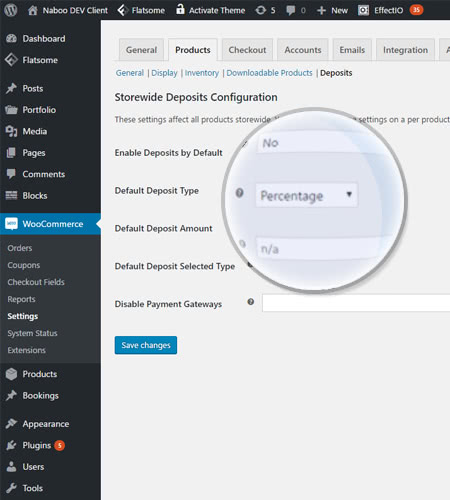
You can set a general type of deposit and amount. Set exceptions on a per product basis.

WooCommerce Deposits

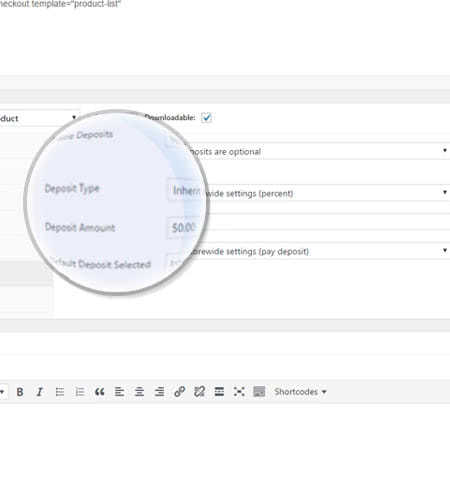
Choose to enable or disable Deposits in the Product Page

Here you can set the parameters for amount and type of a deposit. Go either with the default settings or set a new deposit.

WooCommerce Deposits

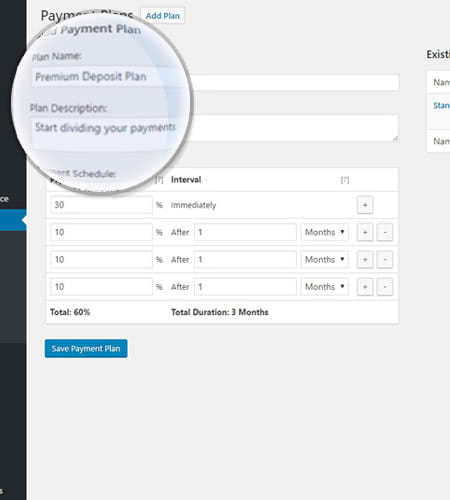
Add a payment plan to let customers divide payments into multiple parts

You can give your customers the option of paying an upfront fee and then a weekly or monthly amount. You can easily set a payment schedule!

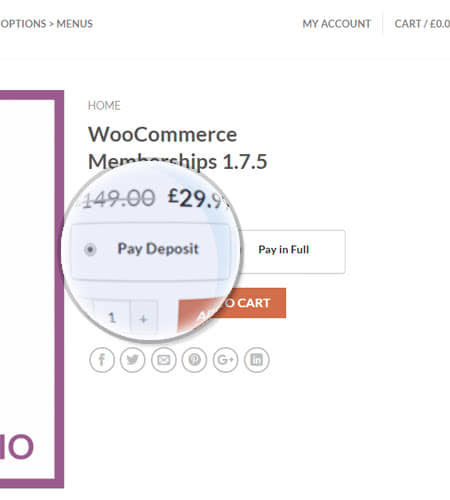
View a Deposit or Payment Plan on the Product Page and Checkout Page

Your customers will be able to see all their options After setting all the rules for each product on your shop.

How to Install this Plugin

  1. First, you have to download the .zip file from your WooCommerce account.
  2. Secondly, you go to Add New and Upload Plugin with the file you downloaded with Choose File.
  3. In the end, you click Install Now and Activate the extension and this is everything you have to do.

Payment Plans

Payment plans provide your customer with the alternative to pay a fee in advance and the reminder at a later date. They split the payments they have to make into various components over time. In some way, this thing is similar to a loan or credit plan.

If you didn’t apply Deposits “storewide”, each item can have a distinct payment plan.

How to Add a Payment Plan

In order to add a payment plan, you have to follow some steps. First step is to go to Products > Payment Plans. Then, you enter the plan name, plan description and plan schedule into the form on the left side. After that, all you have to do is click Save Payment Plan when everything is ready.

The current plans are outlined on the right part of the site. If you want to edit or delete one of them, you can find do this if you go hovering over one plan. You will find the options of editing and deleting there.

Administration of Coupons

Coupons are utilized in accordance to standard WooCommerce performance, explanation that you can find in Coupon Management. Furthermore, you can apply everywhere or on a per-product basis, as you like.

Fixed Coupons

For items with payment plans, discount a proportional quantity of the fixed discount now, then delay the rest for later.

For items with set and percentage-based deposits, defer the whole fixed discount to the last invoice. If the worth is higher than the sum of the final payment, the difference is added to the first payment.

Percentage-based Coupons

For items with payment plans, you have to make sure that discount is used to the present and future quantities.

You have to defer the whole discount to the ultimate invoice for items with set deposits. If, in any case, the price is greater than the quantity of the final payment, the difference is applied to the initial payment.

1.1.10 Update: Manual and automatic recurring payments are not supported in the current version, so credit card data is not stored.

4 reviews for EffectIO WooCommerce Deposits 4.3.1

  1. lipasimone

    If you want to allow you customers to pay with deposit, TRY THIS!!!!

  2. edendvatri321

    Allow your customers to pay using a deposit. This is perfect!!

  3. martindumas8

    Must have this product if you want to allow your customers to pay with deposit!!!

  4. sekstefani

    Paying with deposit??
    Must have this!!

Add a review

Adds deposits support to WooCommerce.

4.3.1
  • [update] updated woocommerce template "checkout/form-pay.php"
  • [fix] some scripts are not loaded in admin order page when HPOS is not enabled
4.3.0
  • Declared compatibility with Woocommerce 8.4.0
  • Declared official compatibility with HPOS
  • updates to internal reminder functionality
4.2.2
  • [fix] fixed a bug with new reminder updates
4.2.1
  • Declared compatibility with Woocommerce 8.3.0
  • [fix] fixed a bug with new reminder updates
4.2.0
  • Improvements to HPOS Compatibility
  • [tweak] added formal German translation files
  • [tweak] Made improvements to reminders functionality
  • [fix] fixed a bug with deposit calculation in some cases
4.1.17
  • [fix] fixed a bug with deposit calculation in some cases
  • Added HPOS Compatibility
4.1.16
  • Declared compatibility with Woocommerce 8.0.0
  • [fix] fixed a bug with deposit calculation in some cases
  • [fix] fixed an incompatiblity issue with WooCommerce PayPal Payments plugin
4.1.15
  • minor bug fix
4.1.14
  • [fix] recalculate deposit from admin editor caused total to be set to 0
4.1.13
  • [Tweak] Reduced the timeout for plugin update & purchase code verification API calls
  • [dev] added filter 'wc_deposits_order_item_deposit_data' which allows overriding deposit data
  • minor bug fix
4.1.12
  • [fix] Future payments settings tab was showing up empty in some environments.
  • minor bug fix
4.1.11
  • [tweak] Prevent partial payment emails from being sent out during deposit recalculation
  • minor bug fix
4.1.10
  • [fix] fixed an issue with adding deposit product to cart
  • [tweak] prevent plugin classes from being loaded twice in cause there is a bug caused by 3rd party
  • [tweak] Translations adjustment
  • minor bug fix
4.1.9
  • [tweak] removal of unnecessary development code
  • minor bug fix
4.1.8
  • [fix] Division by zero errors on product page
  • minor bug fix
4.1.7
  • minor bug fix
4.1.6
  • Declared compatibility with Woocommerce 7.2.0
  • [fix] fixed an issue with partial payment date not being stored correctly when deposit is recalculated
  • [fix] fixed a display issue in admin order editor
4.1.5
  • minor bug fix
4.1.4
  • Declared compatibility with Woocommerce 7.1.0
  • Updates to maintain compatibiltiy with "PDF Invoices & Packing Slips" Plugin" plugin
  • minor bug fixes
4.1.3
  • minor bug fix
4.1.2
  • [fix] fixed additional partial payment issue in some scenarios
  • minor bug fixes
4.1.1
  • [fix] fixed a calculation issue with taxable negative fees.
  • [fix] fixed a calculation issue with woocommerce subscriptions.
  • [fix] fixed a division by zero error in some cases.
  • minor bug fixes
4.1.0
  • [tweak] support of more html tags and attributes in deposit / full messages.
  • [tweak] updates to compatibility code for "WooCommerce PayPal Payments" plugin
  • [fix] fixed Division by zero in checkout mode.
  • [fix] Multiple calculation fixes for partial payments in order editor admin page.
  • Declared compatibility with Woocommerce 6.7.0
  • Minor bug fixes
4.0.21
  • [fix] fixed a bug with deposit calculations in order editor admin page
  • [fix] Fixed a compatibility issue with some plugins causing deposit emails to disappear from woocommerce settings
  • [fix] fixed missing translation strings issues.
  • Declared compatibility with Woocommerce 6.5.1
  • Minor bug fix
4.0.20
  • [fix] miscalculation in some cases where multiple coupons are used.
  • [fix] error saving some actions of varitaions bulk editor
  • minor bug fix
4.0.19
  • [fix] fixed the functionality of partial payment invoice downloads as part of compatibilitt with "WooCommerce PDF Invoices & Packing Slips" Plugin
  • Declared compatibility with Woocommerce 6.3.1
  • Minor bug fix
4.0.18
  • added action "wc_deposits_partial_payment_created" which is triggered after a partial payment is created
  • added function "get_order_balance_details" allowing 3rd party plugins to retrieve paid and unpaid balanced of an order
  • basic compatibility with WooCommerce Paypal Payments plugins ( beta )
4.0.17
  • [fix] product bulk editor issue when setting multiple payment plans
4.0.16
  • [fix] deposit amount being set to 0 in some cases when a coupon is set to apply to future payments.
4.0.15
  • [tweak] updates to the plain email template "wc-deposits-email-partial-payments-summary.php"
  • Minor bug fix
4.0.14
  • [tweak] updates to compatibility class with WooCommerce PDF Invocies & Packing slips plugin
  • Minor bug fix
4.0.13
  • [fix] improved calculation for discounts when discount amount is larger than deposit / future payments
  • [dev] added the filter "wc_deposits_checkout_mode_available_payment_plans" allowing the manipulations of available payment plans in checkout mode
  • Declared compatibility with Woocommerce 6.2.0
4.0.12
  • [fix] miscalculation in checkout mode fixed deposit situation
  • [fix] compatibility issue with ShopMagic for WooCommerce
  • [tweak] added filter "wc_deposits_product_disable_deposit_ajax_refresh" to allow disabling ajax refresh of deposit container
4.0.11
  • [fix] compatibility issue with Woocommerce Tm Extra Product options on product page
  • [fix] compatibility issue with ShopMagic for WooCommerce
  • minor bug fixes.
4.0.10
  • [fix] Admin new order email not being triggered in some cases
  • [fix] manually added discounts were being removed during deposit recalculation
4.0.9
  • [fix] PHP error for WooCommerce bookings "has_persons" functions fixed.
  • minor bug fix
4.0.8
  • Minor bug fix
4.0.7
  • Improved compatibility with WooCommerce Appointments by BookingWP
4.0.6
  • [Fix] date being displayed instead of Future payment even when no due date is set.
  • [Fix] display of placeholder {partial_payment_number} disappeared in some cases
4.0.5
  • [Tweak] Improved email triggers for partial payments.
  • [Tweak] Replaced is_ajax() with wp_doing_ajax() following WooCommerce 6.1.0.
  • Declared compatibility with Woocommerce 6.1.0
4.0.4
  • [Fix] Multiply deposit per persons for woocommerce bookings plugin was not always working correctly.
4.0.3
  • [Tweak] Added warning message when some functions are invoked directly to improve custom code backward compatibility.
4.0.2
  • Minor bug fix to checkout mode calculation
  • [Fix] false "payment failed" error on thankyou page in some cases
4.0.1
  • Minor fix to 4.0.0 database update process
4.0.0
  • Declared compatibility with Woocommerce 6.0.0
  • [Feature] Global Deposit options added.
  • [Feature] Fixed Payment Plans.
  • [Feature] Added a button to remove all deposit data from order.
  • [Feature] Added a setting to hide deposit UI when deposit is forced.
  • [Feature] Added a setting to allow having itemized partial payment instead of single line payments only.
  • [Tweak] Reworked deposit calculation functionalities to eliminate some rounding bugs.
  • [Tweak] Reworked plugin settings for better user experience.
  • [Tweak] Removed Setting for shipping taxes handling, for better calculation shipping taxes values are handled with shipping
3.2.12
  • Minor bug fix
3.2.11
  • Added notification for major upcoming update (v4.0)
  • Declared compatibility with Woocommerce 5.8.0
3.2.10
  • [Fix] Error making payment on order-pay page for some gateways
  • [Fix] Duplicate deposit email triggered in some cases
3.2.9
  • [Fix] issue was occurring with grouped products while being added to cart
  • Declared compatibility with Woocommerce 5.7.1
3.2.8
  • [Fix] Grouped products deposit values were incorrect in some scenarios.
  • Minor bug fix

Testimonials

Benny O'Brien@benny_obie

The quick response from a friendly team member at @effectioshop honestly caught me off guard.
Nice work!


Stuart Boyle@stuart_boyle

@effectioshop As an eCommerce developer, effectio.org has enabled me to reach higher expectations and my clients are very happy.


22,000+ Users · 180 Countries
Trusted by freelancers, agencies & store owners worldwide

How It Works

Install the free EffectIO Dashboard plugin on your WordPress site. It connects to the EffectIO catalog, detects every premium plugin and theme you own, and gives you a single hub to manage licenses, run updates, and keep your admin panel clean — all from one screen.

One-Click Updates
Update any premium plugin or theme instantly. No manual downloads, no FTP — just click "Update Now."

🔑

License Manager
View, activate, and manage all your license keys in one place. No hunting through emails or vendor dashboards.

🔇

Notification Blocker
Blocks intrusive admin nag screens, upsell banners, and ads that clutter your dashboard. Re-enable anytime.

🛡️

Vendor Request Control
Prevents redundant license-check pings to third-party servers for items you already manage through EffectIO.

📦

Bulk Activation
Club members can activate all eligible plugins and themes at once — one button, zero hassle.

🆓

100% Free
The Dashboard itself costs nothing. Install it and it auto-activates on your domain — no key required.

Get Started in 3 Steps

1

Download & Install

Download the EffectIO Dashboard zip and install it via Plugins → Add New → Upload.

2

Browse & Activate

Open EffectIO → Catalog in your admin panel. The dashboard auto-detects your installed items and matches them to your licenses.

3

Update & Manage

Keep everything current with one-click updates. Manage licenses, block nag notices, and enjoy a cleaner WordPress experience.

Licenses

All WordPress derivative work is GPL-licensed. Most items are pre-activated and ready to use. Some require an activation key — we provide it with your purchase, and the Dashboard lets you apply it in seconds.

Club members enjoy bulk activation: activate every eligible item at once with a single click. No more entering keys one by one.

✅ Money-Back Guarantee

Every item is tested and ships with full features. If something doesn't work and we can't fix it, you get a full refund. We believe premium tools should be accessible — that's why we offer a low-cost subscription so freelancers, small businesses, and agencies can grow without a large upfront investment.

Manage and Update all your sites

17.99 $ / Month Membership

2900 Plugins and Themes. Install, Update, Activate and Delete any plugin. Unlimited Sites. Best WP Agency Deal.

Clean Items

NGO Mission

Always Updated

SSL Connection