EffectIO GravityView – Maps 3.6.5

Original price was: $70.00.Current price is: $9.99. / year

Drop-in compatible replacement & Licensed Product

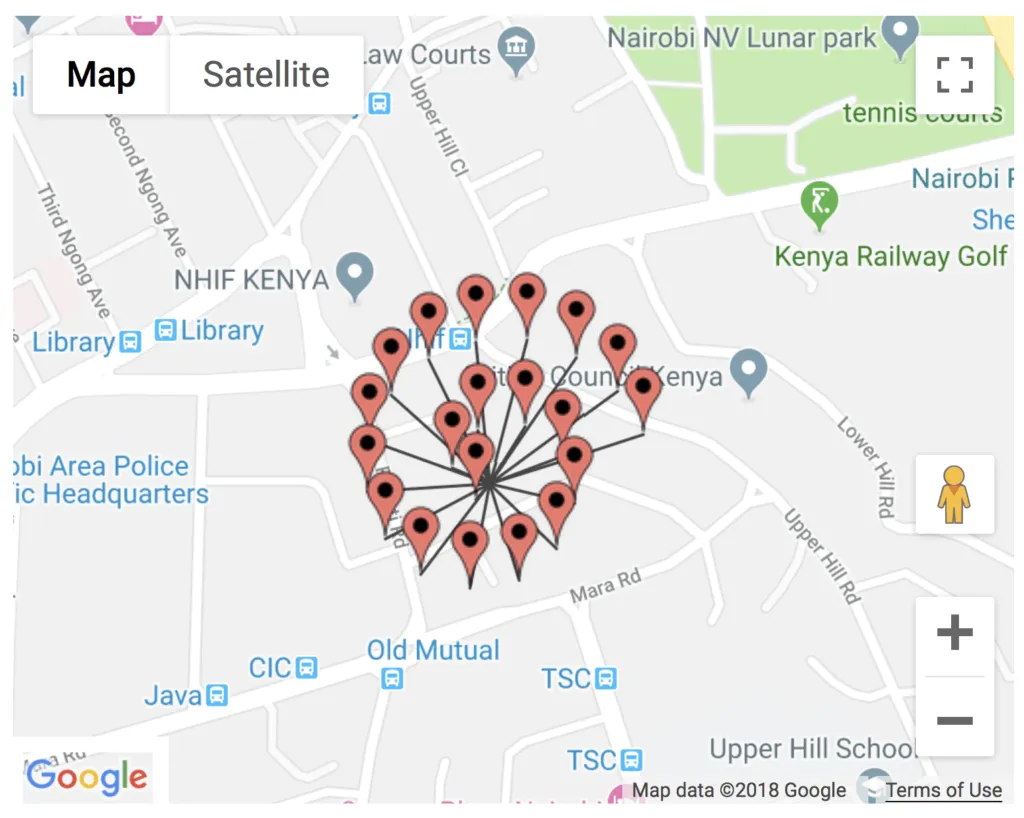
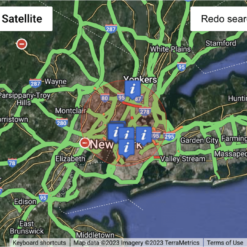
Display your Gravity Forms entries on a map. Version: 2.1 Display your Gravity Forms entries on a map.

Released on: 2026-02-23

Single License

Club Membership

17,99 / Month Membership

NEW Activate all licensed items with the free Dashboard

EffectIO Dashboard

Discover when we give away free Plugins

Find out when we give items for Free

Hey! 🎉 Monthly emails, tops. Snag exclusive plugins/themes for $0. They go quick, but you might just get a freebie! 😉

30 Days Money Back Guarantee

Guaranteed pre-activated plugins. Most items work immediately after installation. Open a support ticket to obtain the license keys for the ones that ask for activation.

Free support to install and setup on your site.

🌍 GravityView – Maps 2.0: The Ultimate WordPress Plugin for Interactive Maps

GravityView – Maps 2.0 is an essential WordPress plugin that takes your website’s maps to the next level. This powerful tool empowers WordPress developers to create interactive and visually appealing maps seamlessly.

With its latest update available on EffectIO, the leading alternative and cost-saving update channel for plugins, GravityView – Maps 2.0 offers a wide range of features and improvements. This update brings increased performance, enhanced compatibility, and a more user-friendly interface that takes the WordPress map experience to new heights.

🔥 The Benefits of GravityView – Maps 2.0:

  • 1. Effortlessly create stunning interactive maps on your WordPress website.
  • 2. Engage your audience with an immersive map experience.
  • 3. Highlight important locations, businesses, or points of interest.
  • 4. Seamlessly integrate with Gravity Forms for easy data visualization.
  • 5. Customizable markers, popups, and map styles to match your website’s branding.
  • 6. Responsive design ensures optimal map display on various devices.
  • 7. Display filtered result sets to tailor the maps to specific needs.
  • 8. Improve user experience with smooth panning and zooming capabilities.
  • 9. Advanced search functionality for locating specific places on the map.
  • 10. Access GPL code for further customization possibilities.
  • 11. Premium support from EffectIO to assist with any plugin-related queries or issues.
  • 12. Update items conveniently via the EffectIO Dashboard.
  • 13. Pre-activated items for hassle-free functionality right out of the box.
  • 14. Enjoy super deals with discounts ranging from 30% to 90% at EffectIO.

✨ The Power of Interactive Maps for your WordPress Website

Interactive maps have become an indispensable tool for businesses, travel blogs, event organizers, and many more. They bring life to your website and empower visitors to explore and engage with your content. With GravityView – Maps 2.0, you can provide an exceptional user experience by showcasing your data in a visually captivating and user-friendly way.

Adding interactive maps to your WordPress site has never been easier. The advanced features and improvements introduced in the latest update allow you to create and customize stunning maps that perfectly fit your website’s needs. Whether you want to display a single location or visualize a vast array of data, GravityView – Maps 2.0 is the go-to choice for WordPress developers.

So why wait? Access the latest version of GravityView – Maps 2.0 through EffectIO and unlock the full potential of interactive maps for your WordPress website. Benefit from GPL code, premium support, and incredible deals with discounts up to 90%. Elevate your website’s maps to the next level and captivate your audience with dynamic visuals today!
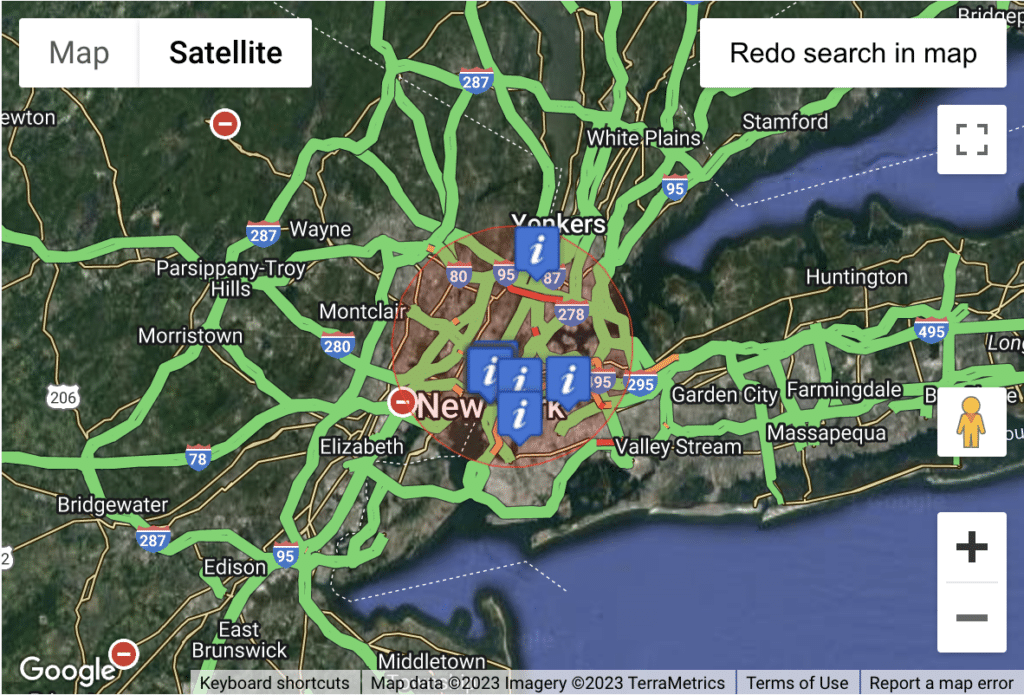
Display your Gravity Forms entries on a map.

3.6.2
  • This update fixes the Map Type setting not being applied on the frontend. #### 🐛 Fixed
  • Map Type setting (Satellite, Hybrid, Terrain) was ignored on the frontend, always defaulting to the road map view. #### 🔄 Updated
  • [Foundation](https://www.gravitykit.com/foundation/) to version 1.11.0.
3.6.1
  • This update addresses a search issue causing incorrect Map View results. #### 🐛 Fixed
  • Successive Map View searches showing incorrect results caused by duplicate URL parameters. #### 🔄 Updated
  • [Foundation](https://www.gravitykit.com/foundation/) to version 1.10.0.
3.6.0
  • This release makes Google Maps API key checks more reliable and fixes an issue where map state would not persist when switching between layouts. #### 🚀 Improved
  • Google Maps API key validation under GravityKit → Settings → Gravity Maps is now more reliable, with added checks to help confirm your key is configured correctly. #### 🐛 Fixed
  • Geolocation radius selection, map zoom level, and other map state is no longer reset when navigating between Multiple Entries and Single Entry layouts. #### 🔄 Updated
  • [Foundation](https://www.gravitykit.com/foundation/) to version 1.7.0.
3.5.0
  • This update adds integration with the [DataTables extension](https://www.gravitykit.com/products/datatables/) and improves navigation from single to multiple entries by preserving map state. #### 🚀 Added
  • Compatibility with the DataTables extension in server-side processing mode - the Multiple Entries Map widget and the table now remain synchronized in both directions. #### 🚀 Improved
  • "Go Back" link on the Single Entry layout with the Map view type now preserves URL query parameters when returning to the Multiple Entries layout. #### 🔄 Updated
  • [Foundation](https://www.gravitykit.com/foundation/) to version 1.6.0.
3.4.0
  • This update makes radius-based searches more consistent by always narrowing results and fixes the display of the Geolocation Radius label in the Search Bar. #### 🚀 Improved
  • Radius searches are now combined with other conditions using an `AND` clause instead of `OR`, ensuring results are consistently restricted by the geolocation filter. #### 🐛 Fixed
  • Geolocation Radius field label not displaying in the Search Bar when the "Show Label" option is enabled.
3.3.0
  • This release adds improved keyboard and display controls for radius search, and resolves multiple issues with map search actions, filter clearing, marker interactions, and spiderfy behavior. #### 🚀 Added
  • Keyboard support for selecting the top autocomplete suggestion and applying geocoded results to related fields (address, postcode, lat/lng).
  • "Hide radius search circle" setting in the View editor to remove the red circle overlay shown during radius searches. #### 🐛 Fixed
  • "Redo search" and "Search as map moves" actions not working in Views using the DIY layout.
  • Error triggered when pressing "Enter" in the Radius Search input.
  • Clearing filters in the Search Bar would not update the URL to remove location parameters.
  • The "Redo search in map" functionality no longer causes search fields and filters to break.
  • Overlapping markers now spiderfy correctly, making it clear when multiple pins are at the same location.
  • Marker click handling when clustering is enabled or disabled, ensuring clusters zoom correctly and info windows or single entry views open reliably.
  • Radius search not working when using custom latitude/longitude field mapping via the `gk/gravitymaps/markers/coordinates/fields-ids` filter. #### 💻 Developer Updates
  • Added `gk/gravitymaps/search/reserved-args` filter to modify the list of reserved URL parameters used by the Search Bar widget.
  • Added `gk.maps.radius_circle.options` and `gk.maps.radius_marker.options` JavaScript filters to customize the appearance of the radius search circle and center marker. #### 🔧 Updated
  • [Foundation](https://www.gravitykit.com/foundation/) to version 1.3.1:
  • New GravityKit global settings for logging configuration (level, type, cleanup schedule, retention);
  • A unified way to display admin notices across all GravityKit products;
  • Performance improvements and bug fixes.
3.2.9
  • #### 🐛 Fixed
  • JavaScript error introduced in 3.2.8.
3.2.8
  • This release improves compatibility with the Layout Builder and refines the search and location filtering experience. #### ✨ Added
  • Added: Support for the Layout Builder layout when using the Pinned Map setting. #### 🐛 Fixed
  • Search Bar clear button not properly resetting radius search and location filter parameters.
  • Geolocation autocomplete incorrectly adding a county into a city input.
  • Bounds search not always being treated as a search request when using "Hide Until Search" setting.
3.2.7
  • This update fixes a performance issue and resolves a PHP notice in WordPress 6.8. #### 🐛 Fixed
  • Fixed repeated asset enqueuing and redundant localization, which slowed down page load.
  • PHP notice in WordPress 6.8 related to early product translation initialization. #### 🔄 Updated
  • [Foundation](https://www.gravitykit.com/foundation/) to version 1.2.25.
3.2.6
  • This hotfix update addresses a non-critical PHP notice in WordPress 6.7 and newer. #### 🐛 Fixed
  • PHP notice in WordPress 6.7 caused by initializing product translations too early. #### 🔄 Updated
  • [Foundation](https://www.gravitykit.com/foundation/) to version 1.2.21.
3.2.5
  • This update fixes a compatibility issue with GravityView version 2.31 and newer. #### 🐛 Fixed
  • Compatability with GravityView version 2.31 and newer.
3.2.4
  • This release fixes a rendering issue and corrects the URL structure for markers linking to single entries in embedded Views. #### 🐛 Fixed
  • Zoomed-out map view showed both clusters and individual markers.
  • Map markers in embedded Views incorrectly linked to single entries using the View's custom post URL instead of the parent page/post URL. #### 🔧 Updated
  • [Foundation](https://www.gravitykit.com/foundation/) to version 1.2.20. #### 💻 Developer Updates
  • Added the ability to use `wp.hooks.addAction()` and `wp.hooks.removeAction()` for controlling marker functionality and other aspects of the Google Maps script.
3.2.3
  • This update fixes performance issues causing the View and View editor to time out. #### 🐛 Fixed
  • View and View editor timing out due to inefficient database queries. #### 🔧 Updated
  • [Foundation](https://www.gravitykit.com/foundation/) and [TrustedLogin](https://www.trustedlogin.com/) to versions 1.2.18 and 1.9.0, respectively.
3.2.2
  • This update addresses a fatal error related to the internal caching process. #### 🐛 Fixed
  • Fatal error that could occur during View loading due to a caching issue.
3.2.1
  • This update resolves a fatal error related to multiple geolocation data sources. #### 🐛 Fixed
  • Fatal error due to an undefined variable.
3.2.0
  • This release introduces support for [multiple geolocation data sources](https://docs.gravitykit.com/article/304-setting-up-geocoding-services#Support-For-Other-Geolocation-Add-Ons-MhQJ5), ensuring seamless map display of entries even when forms are updated to use different address autocompletion and geolocation add-ons. #### 🚀 Added
  • Support for multiple geolocation data sources configured for Address fields, including Gravity Forms Address Autocomplete by Gravity Wiz and the Geolocation Add-On by Gravity Forms.
  • Data migration between geolocation data sources, consolidating data when multiple form add-ons have been used for geolocation. #### 🚀 Improved
  • The Search Bar now includes additional radius search distance values. #### 🔧 Updated
  • [Foundation](https://www.gravitykit.com/foundation/) and [TrustedLogin](https://www.trustedlogin.com/) to versions 1.2.17 and 1.8.0, respectively.
3.1.7
  • This release addresses several bugs and updates internal components to improve performance and compatibility. #### 🚀 Added
  • Missing zoom levels 18–21 for the "Maximum Zoom" View setting. #### 🐛 Fixed
  • Fatal error when checking Google Maps API key on PHP 8.1.
  • Multiple markers for a single entry not displaying on the map.
  • Multiple address fields triggering geocoding when using address autocompletion add-ons from Gravity Wiz and Gravity Forms. #### 🔧 Updated
  • [Foundation](https://www.gravitykit.com/foundation/) to version 1.2.15.
  • Added an option to subscribe to GravityKit's newsletter from the Manage Your Kit screen.
  • Added a setting in GravityKit > Settings > GravityKit to specify the GravityKit menu position in the Dashboard.
  • Improved internal check for product updates that could still interfere with third-party plugin updates. Thanks, Aaron!
  • Fixed a bug that prevented WordPress from loading third-party plugin translations after their updates. Thanks, Jérôme!
  • Fixed a bug that hid third-party plugin updates on the Plugins and Updates pages.
  • Success message now shows correct product name after activation/deactivation.
  • Resolved a dependency management issue that incorrectly prompted for a Gravity Forms update before activating, installing, or updating GravityKit products.
3.1.6
  • This update fixes a PHP 8.2 deprecation notice and a fatal error when customizing themes or editing posts/pages. #### 🐛 Fixed
  • PHP 8.2 deprecation notice.
  • Fatal error when customizing themes or editing posts/pages.
3.1.5
  • This release addresses issues related to automatic address geocoding and merge tag processing, fixes JavaScript errors, and restricts the loading of extension's assets to specific locations. #### 🐛 Fixed
  • Automatic address geocoding no longer happens outside the View.
  • Merge tags are now correctly processed inside the marker's info window.
  • Form fields with latitude and longitude coordinates can once again be specified via the `gk/gravitymaps/markers/coordinates/fields-ids` filter.
  • JavaScript errors on Gravity Forms admin screens and when loading the View have been resolved. #### ✨ Improved
  • Extension's JavaScript files are now only loaded where needed.
3.1.4
  • This release introduces a new feature that allows for the automatic geocoding of entries. It also improves performance and addresses critical issues related to pagination, the saving of Views, and compatibility with the Multiple Forms extension. #### 🚀 Added
  • A setting to control the automatic geocoding of entries when they are missing latitude and longitude coordinates. #### 🐛 Fixed
  • Pagination links not working.
  • Fatal error when saving Views.
  • Performance issues.
  • Fatal error when the Maps layout is used in combination with the Multiple Forms extension. __Developer Updates:__
  • Added: `gk/gravitymaps/marker/auto-geocode` filter to control whether the entry is automatically geocoded if no latitude/longitude coordinates are found.
3.1.3
  • The release improves functionality by adding new features, resolving display issues, and updating internal components to enhance performance and compatibility. #### 🚀 Added
  • A setting to hide the Geolocation Radius Unit that is not the default one being used.
  • Google Maps API key check verifies if the Places API service is enabled
  • Pagination when using the "Search as map moves" feature. #### ✨ Improved
  • When available, coordinates from Gravity Wiz's Address Autocomplete perk are reused for entries not previously geocoded by GravityView Maps. #### 🐛 Fixed
  • An issue where Default Unit field was not being displayed when using List view or Table view.
  • Map disappearance when "Hide view data" was checked and no entries were found upon moving the map. #### 🔧 Updated
  • [Foundation](https://www.gravitykit.com/foundation/) and [TrustedLogin](https://www.trustedlogin.com/) to versions 1.2.11 and 1.7.0, respectively.
  • GravityKit product updates are now showing on the Plugins page.
  • Database options that are no longer used are now automatically removed.
  • Transients are now set and retrieved correctly when using object cache plugins.
  • GravityKit products that are already installed can now be activated without a valid license.
  • Fixed a JavaScript warning that occurred when deactivating license keys and when viewing products without the necessary permissions.
  • Resolved PHP warning messages on the Plugins page and Updates pages, and when deactivating the last active product with Foundation installed.
3.1.2
  • This update addresses issues with Multiple Forms and Autocomplete fields. #### 🐛 Fixed
  • A fatal error that occurred when using ZIP Code as the Join Field for Multiple Forms.
  • A JavaScript error that happened when using the Autocomplete field without the Places API enabled.
  • A JavaScript error related to using Autocomplete on the Address Form field.
3.1.1
  • #### 🐛 Fixed
  • Custom map icons based on specific field values, also known as [choice-based markers](https://docs.gravitykit.com/article/828-about-custom-map-icons-or-markers), were not displaying on the map.
  • JavaScript errors in the Gravity Forms form editor caused by GravityView Maps. #### 🔄 Updated
  • [Foundation](https://www.gravitykit.com/foundation/) to version 1.2.6.
3.1
  • Added: [Request a user's location to trigger a radius search](https://docs.gravitykit.com/article/973-radius-seach-request-location)
  • Added: "Request Location" setting, enabling a View to immediately request a user’s location when the page loads (defaults to disabled)
  • Created new "Radius Search Settings" settings section
  • Improved: Support for displaying multiple maps on the same page
  • Fixed: Fatal error when Views have custom info box content __Developer Updates:__
  • Added: `gk/gravitymaps/markers/coordinates/fields-ids` [Filter to use latitude and longitude fields](https://docs.gravitykit.com/article/300-how-can-i-use-the-latitude-and-longitude-form-fields-to-position-map-markers)
  • Added: `gk/gravitymaps/maps/service-factory/get-map-service-instance-for-view` filter to modify the map service instance for a View
  • Added: `gk/gravitymaps/maps/service-factory/get-map-service-class-for-view` filter to modify the map service class for a View
  • Added: JavaScript hooks for Maps and Markers
  • `gk.maps.controllers.marker.before_process_map`
  • `gk.maps.controllers.marker.after_process_map`
  • `gk.maps.controllers.marker.create`
  • `gk.maps.controllers.marker.after_create`
  • `gk.maps.controllers.marker.on_view_entry_mouse_enter`
  • `gk.maps.controllers.map.bind_observer_to_maps`
  • `gk.maps.controllers.map.update_data`
  • `gk.maps.controllers.map.get_data`
  • `gk.maps.controllers.map.update_settings`
  • `gk.maps.controllers.map.get_settings`
  • `gk.maps.controllers.map.create_map`
  • `gk.maps.controllers.map.after_create_map`
  • `gk.maps.controllers.map.set_zoom`
  • `gk.maps.controllers.map.set_center`
  • `gk.maps.controllers.map.get_maps`
  • `gk.maps.controllers.map.get_search_maps`
  • Deprecated: `gravityview/maps/markers/lat_long/fields_id` filter (use `gk/gravitymaps/markers/coordinates/fields-ids` instead)
  • Deprecated: `gravityview/maps/render/google_api_key` filter (use `gk/gravitymaps/map-services/google-maps/api_key` instead)
3.0.3
  • Fixed: Merge tags not working in the Map Info Box content field
  • Fixed: PHP 8.1+ deprecation notice
3.0.2
  • Fixed: Views created from the Business Map Listing preset did not have any fields configured
  • Fixed: PHP 8.2+ deprecation notice
3.0.1
  • Fixed: Business Map Listing preset not properly loading when creating a new View
  • Fixed: Incorrect image scaling in the marker info box
  • Fixed: Entry Map field not working inside the Single Entry layout
3.0
  • Fixed: UI elements not showing on the Map when JavaScript assets are not loaded in the correct order
  • Fixed: Entries and pins stop loading after seeing no results when using the "search as map moves" feature
  • Fixed: Server error when using the "search as map moves" feature if the View's "direct access" setting is not set to "public"
  • Fixed: CSS styling issue affecting map zoom controls
  • Updated: [Foundation](https://www.gravitykit.com/foundation/) to version 1.2.4 __Developer Updates:__
  • Added: CSS class `gk-hide-individual-entries` to the `gv-map` container when no fields are configured in the Map View
  • Modified:
  • Template files updated to use the GravityView 2.0 template structure
  • Templates now have access to the `$gravityview` and `\GV\Template_Context` global objects
  • Template location changed from `templates/` to `templates/views/map/`
  • Base template for the Map View renamed from `map-view.php` to `map.php`
  • Renamed hooks while maintaining backward compatibility:
  • `gravityview_entry_class` to `gravityview/template/map/entry/class`
  • `gravityview_map_body_before` to `gravityview/template/map/body/before`
  • `gravityview_map_body_after` to `gravityview/template/map/body/after`
  • `gravityview_map_entry%sbefore` to `gravityview/template/map/entry%sbefore`
  • `gravityview_map_entry%safter` to `gravityview/template/map/entry%safter`
  • `gravityview_map_render_div` to `gk/gravitymaps/render/map-canvas`
2.2.3
  • Improved: Support for RTL languages
  • Updated: [Foundation](https://www.gravitykit.com/foundation/) to version 1.2.2
2.2.2
  • Fixed: Geolocation search was not properly setting necessary mapping parameters for both "Any" and "All" search modes
  • Fixed: A search page with no results did not show a map, making it impossible for users to scroll the map to search different areas
  • Fixed: Prevent a couple of errors when using older versions of GravityView with Maps
2.2.1
  • Improved: Minimum, Maximum and Default Zoom setting fields now restrict each other's values to prevent invalid configurations
  • Fixed: Geolocation search params are properly respected on both Any and All search modes
  • Fixed: Geolocation Radius label was not displayed if the field is not empty
  • Fixed: Default Zoom is now applied to the map when the View is loaded
  • Updated: [Foundation](https://www.gravitykit.com/foundation/) to version 1.1.1
2.2
  • Fixed: A notice requesting REST API access shows up for all View types, not just Views with maps
  • Fixed: The front-end notice alerting administrators that the REST API setting is disabled was not worded clearly
  • Fixed: Using custom longitude and latitude values on forms without an Address field
  • Updated: [Foundation](https://www.gravitykit.com/foundation/) to version 1.1.0 __Developer Notes:__
  • Added: `Marker::from_address_field()` and `Marker::from_coordinate_fields()` methods to construct a Marker object from an Address field or Longitude/Latitude fields
  • Added: `base.js` file to the `assets/js` directory, used to handle global JS hooks
  • Added: JavaScript filter to modify the options used to build a Marker: `gk.maps.marker_options`
  • Added: JavaScript action after a Marker is added: `gk.maps.after_add_marker`
  • Modified: Renamed many JavaScript hooks to use standard GravityKit naming structure:
  • `gravitykit/maps/autocomplete_field_id` => `gk.maps.autocomplete_field_id`
  • `gravitykit/maps/autocomplete_input_id` => `gk.maps.autocomplete_input_id`
  • `gravitykit/maps/autocomplete_field_init` => `gk.maps.autocomplete_field_init`
  • 'gravitykit_maps_invalid_coordinates' => `gk.maps.invalid_map_coordinates`
  • `gravitykit_maps_after_process_map_markers` => `gk.maps.after_process_map_markers`
  • `gravitykit_maps_beforeInit` => `gk.maps.before_maps_init`
  • `gravitykit_maps_afterInit` => `gk.maps.after_maps_init`
  • `gravitykit_maps_init_maps` => `gk.maps.init_maps`
  • `gravitykit_maps_before_init_map` => `gk.maps.before_init_map`
  • `gravitykit_maps_after_init_map` => `gk.maps.after_init_map`
  • `gravitykit_maps_before_process_map_markers` => `gk.maps.before_process_map_markers`
  • `gravitykit_maps_after_process_map_markers` => `gk.maps.after_process_map_markers`
  • `gravitykit_maps_getMaps` => `gk.maps.get_maps`
  • `gravitykit_maps_getSearchMaps` => `gk.maps.get_search_maps`
2.1
  • Improved: Accessibility of the temporary notice displayed during the executing of an Ajax request
  • Fixed: Preview image for the "Business Map Listing" form preset in the View editor
  • Fixed: Incorrect map centering when geolocation radius value is left empty during search
  • Fixed: Incompatibility with some plugins/themes that use Laravel components
  • Fixed: PHP warning messages that occurred under specific conditions
  • Updated: [Foundation](https://www.gravitykit.com/foundation/) to version 1.0.12
2.0
  • We’re so excited to announce the release of Maps 2.0. [Read the Maps 2.0 announcement blog post](https://www.gravitykit.com/announcing-maps-2-0/). There are so many great new features:
  • [Geolocation radius search](https://docs.gravitykit.com/article/925-how-to-enable-radius-search) - Users can now search for entries within a certain radius of their current location or a specific location
  • [Draggable maps with "Redo search in map" and "Search as map moves"](https://docs.gravitykit.com/article/927-search-entries-as-map-moves) - Users can now search using the map itself! Map markers will refresh in real-time as you click and drag the map to different locations.
  • [Address field autocomplete](https://docs.gravitykit.com/article/926-enabling-autocomplete-for-the-gravity-forms-address-field) - Make it easy for users to enter addresses using address autocomplete. Enable this feature by editing your form and checking the new “Enable geolocation autocomplete” checkbox in the settings of Address fields.
  • Faster maps - We’ve rewritten our map rendering to dramatically improve performance
  • Added: "International Autocomplete Filter" setting to restrict the countries that are used for address autocomplete
  • Modified: Draggable maps functionality requires Views have REST API enabled
  • Modified: The "Redo search in map" and "Search as map moves" settings are now enabled by default __Developer Updates:__
  • Added: Wrapping `
    ` surrounds each View, matching the containers in Table and List layouts
  • Added: `templates/search-field-geo_radius.php` template file
  • Added: Javascript hooks:
  • Filters:
  • `gravitykit/maps/autocomplete_input_id` Modify the input ID used for address autocomplete powered by Google Maps
  • Actions:
  • `gravitykit/maps/autocomplete_field_init` Allows third-party inclusion of actions on initializing the field for auto complete
  • Added: PHP hooks:
  • Filters:
  • `gk/gravitymaps/geolocation_fields` - Filter which fields are considered geolocation fields
  • `gravityview/view/wrapper_container` - Modify the HTML wrapper container for the View; [see examples of modifying the container](https://docs.gravitykit.com/article/867-modifying-the-view-container-div)
  • `gk/gravitymaps/current_location_instant_search` - Change the default setting for the Current Location behavior: `true` will instantly search when the current location is allowed by the browser and `false` requires users click the submit button (default: false)
  • Modified:
  • `templates/fields/entry_map.php` template to fetch existing instance of object for improved performance
  • `templates/map-header.php` and `templates/map-footer.php` files to add the container wrapper (required for draggable maps)
1.11
  • *Note: GravityView Maps now requires PHP 7.2 or newer**
  • Improved: Unrestricted Google Maps API key is now stored encrypted in the database and is partially masked when displayed in settings
1.10
  • Fixed: PHP 8.1 notices
  • Fixed: Fatal error on some hosts due to a conflict with one of the plugin dependencies (psr/log)
  • Fixed: Address geocoding script being loaded on all admin pages
1.9
  • Added: You can now use Drop Down and Radio Buttons field choices to set an entry's map marker icon—you can show different icons based on the submitted value of the fields! [Learn more about choice-based marker icons](https://docs.gravitykit.com/article/889-a).
  • A huge thanks to [Jetsloth](https://jetsloth.com) for letting us use their excellent [Image Choices](https://jetsloth.com/gravity-forms-image-choices/) code as a base for this feature 🦥🤗
  • Added: A "Link the Title" View setting to control whether the info box Title automatically links to the single entry page
  • Improved: Optimize marker rendering on the map
  • Improved: Updated the default map icon to be a vector graphic instead of an image
  • Improved: Map zoom options now include some helper text to be clearer
  • Fixed: Fatal error on some hosts that use weak security keys and salts __Developer Updates__
  • Modified: `map-marker-infowindow.php` template now uses `link_open` and `link_close` placeholders and the anchor tag is passed into the template. A reminder: you can use the `gravityview/maps/infowindow/content/vars` to modify the info box content.
  • Modified: Markers in the `GV_MAPS` JavaScript object now pass an array for `icon`, instead of `icon_url`. This allows modifying the icon size, anchor, etc. before being rendered on the map.
1.8.2
  • Fixed: Critical error when rendering map in the single entry View
1.8.1
  • Improved: Reduced the plugin download package size
1.8
  • Added: New WordPress admin menu where you can now centrally manage all your GravityKit product licenses and settings ([learn more about the new GravityKit menu](https://www.gravitykit.com/foundation/))
  • Go to the WordPress sidebar and check out the GravityKit menu!
  • We have automatically migrated your existing Google Maps API key, which was previously entered in the Views→Settings page
  • Request support using the "Grant Support Access" menu item
  • Added: Maps settings are now available for network subsites in a multisite environment
  • Added: Ability for the network administrator to share Google Maps API keys with all subsites
  • Added: Ability to use a separate key for Geocoding that's never exposed to end users
  • Updated: Prevent a potential error when using the Divi theme without a Google Maps API key set
1.7.7
  • Updated: [GravityView (the company) is now GravityKit](https://www.gravitykit.com/rebrand/)
  • Improved: Google Maps API error notices
  • Fixed: Configuration notices were being shown when a search returned no results
1.7.6
  • Fixed: License key input not working with Gravity Forms 2.6+
1.7.5
  • Improved: Show a notice when the Maps layout hasn't been fully configured
  • Fixed: Maps not displaying properly when using block themes (in WordPress 5.9+)
  • Updated: Translations with best matches from similar locales (Spain Spanish and Mexican Spanish, for example)
1.7.4
  • Tested with WordPress 5.9
  • Fixed: Map icon not working when editing an entry via Gravity Forms
1.7.3.1
  • Fixed: 1.7.3 release was causing a fatal error due to some missing files
1.7.3
  • Fixed: Map not initializing when the View is embedded in a custom post type
  • Updated translations: Dutch (thanks Erik!), Russian (thanks Irina!)
1.7.2
  • Added: Support for Gravity Forms 2.5
  • Updated: Map zoom level settings to include 19–21
  • Fixed: Map not being initialized when the View shortcode is embedded via the [Elementor](https://elementor.com/) page builder
  • Fixed: Cached coordinates for multi-input fields would not clear when updating entries __Developer Updates:__
  • Added: Ability to center the map using the map options filter. [See sample code here](https://gist.github.com/zackkatz/cb1f52f563cb13fd7abe06b0553cdec2)
  • Added: `gravityview/maps/marker/add` filter to modify marker before it gets added to the map
1.7.1
  • Updated: Polish translation (Thanks, Dariusz Zielonka!)
  • Fixed: Locations not being updated when non-Address fields were used for coordinates
  • Fixed: Google Maps API-checking script being loaded on all admin pages
1.7
  • Improved: Allow input of latitude and longitude all the time for an Address field
  • Improved: Many enhancements to the API key setup
  • Maps now will show a warning to administrators when the API settings aren't valid
  • Maps will now not show to users if the API isn't configured properly (instead of showing a broken map)
  • Added API key validation in the Maps section of the GravityView settings screen
  • Simplified settings by removing less-used methods of geocoding addresses (they are still available via developer filters)
  • Improved error message language
  • Improved: Allow deleting geocoding results by saving empty latitude/longitude fields
  • Changed: If an address only contains default values (such as Default State/Province or Default Country), do not show a marker on the map
  • Fixed: Map Icon Picker field #97
  • Fixed: JS console error in Chrome
  • Fixed: When the Google Maps key isn't working for geocoding, it was preventing other providers from working
  • Fixed: Address wasn't being properly formatted when passed to geocoding providers
1.6.2
  • Fixed: Hide map when "Hide View data until search is performed" is enabled for a View
  • Updated: Turkish translation (thanks, [@suhakaralar](https://www.transifex.com/accounts/profile/suhakaralar/)!)

Testimonials

Benny O'Brien@benny_obie

The quick response from a friendly team member at @effectioshop honestly caught me off guard.
Nice work!


Stuart Boyle@stuart_boyle

@effectioshop As an eCommerce developer, effectio.org has enabled me to reach higher expectations and my clients are very happy.


22,000+ Users · 180 Countries
Trusted by freelancers, agencies & store owners worldwide

How It Works

Install the free EffectIO Dashboard plugin on your WordPress site. It connects to the EffectIO catalog, detects every premium plugin and theme you own, and gives you a single hub to manage licenses, run updates, and keep your admin panel clean — all from one screen.

⚡

One-Click Updates
Update any premium plugin or theme instantly. No manual downloads, no FTP — just click "Update Now."

🔑

License Manager
View, activate, and manage all your license keys in one place. No hunting through emails or vendor dashboards.

🔇

Notification Blocker
Blocks intrusive admin nag screens, upsell banners, and ads that clutter your dashboard. Re-enable anytime.

🛡️

Vendor Request Control
Prevents redundant license-check pings to third-party servers for items you already manage through EffectIO.

📦

Bulk Activation
Club members can activate all eligible plugins and themes at once — one button, zero hassle.

🆓

100% Free
The Dashboard itself costs nothing. Install it and it auto-activates on your domain — no key required.

Get Started in 3 Steps

1

Download & Install

Download the EffectIO Dashboard zip and install it via Plugins → Add New → Upload.

2

Browse & Activate

Open EffectIO → Catalog in your admin panel. The dashboard auto-detects your installed items and matches them to your licenses.

3

Update & Manage

Keep everything current with one-click updates. Manage licenses, block nag notices, and enjoy a cleaner WordPress experience.

Licenses

All WordPress derivative work is GPL-licensed. Most items are pre-activated and ready to use. Some require an activation key — we provide it with your purchase, and the Dashboard lets you apply it in seconds.

Club members enjoy bulk activation: activate every eligible item at once with a single click. No more entering keys one by one.

✅ Money-Back Guarantee

Every item is tested and ships with full features. If something doesn't work and we can't fix it, you get a full refund. We believe premium tools should be accessible — that's why we offer a low-cost subscription so freelancers, small businesses, and agencies can grow without a large upfront investment.

Manage and Update all your sites

17.99 $ / Month Membership

2900 Plugins and Themes. Install, Update, Activate and Delete any plugin. Unlimited Sites. Best WP Agency Deal.

Clean Items

NGO Mission

Always Updated

SSL Connection