EffectIO Download Monitor - CSV Importer

Original price was: $70.00.Current price is: $9.99. / year

Drop-in compatible replacement & Licensed Product

Mass import up to thousands of Downloads into Download Monitor with the CSV Importer. Version: 4.1.1 Mass import up to thousands of Downloads into Download Monitor with the CSV Importer.

Released on: 2024-08-29

Single License

Club Membership

17,99 / Month Membership

NEW Activate all licensed items with the free Dashboard

EffectIO Dashboard

Discover when we give away free Plugins

Find out when we give items for Free


Hey! 🎉 Monthly emails, tops. Snag exclusive plugins/themes for $0. They go quick, but you might just get a freebie! 😉

30 Days Money Back Guarantee

Guaranteed pre-activated plugins. Most items work immediately after installation. Open a support ticket to obtain the license keys for the ones that ask for activation.

Free support to install and setup on your site.

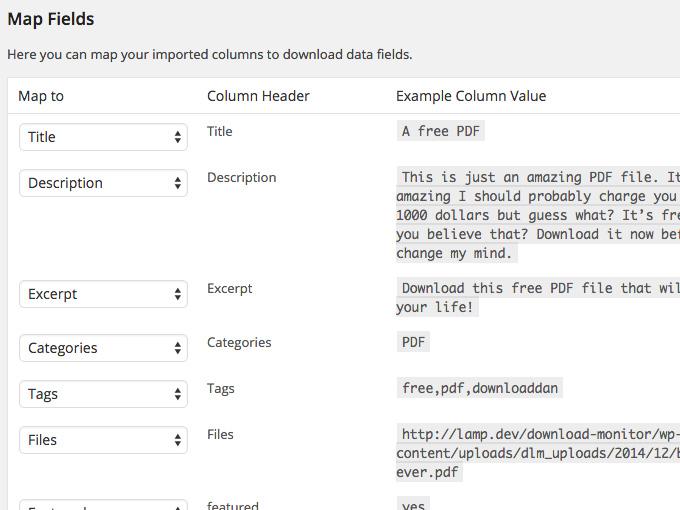
Download Monitor – CSV Importer 4.1.1 is a powerful WordPress extension that allows you to effortlessly import and manage your downloads. With its intelligent data mapping feature, you can easily match your CSV columns to the correct fields in Download Monitor. The preselected matching fields make the process even more convenient, requiring only adjustments for any missing information.

If you have any questions, we have included a list of frequently asked questions for your convenience. However, if your specific question is not covered, please feel free to consult our comprehensive documentation or reach out to our support team.

Benefits of using Download Monitor – CSV Importer 4.1.1:

1. Simplified download import process
2. Intelligent data mapping feature for easy CSV column to field matching
3. Saves time by preselecting matching fields
4. Streamlined management of downloads
5. Improved organization and categorization of downloads
6. Effortlessly update download information through the EffectIO Dashboard
7. Pre-activated items for instant use
8. Compatible with GPL code and supported by premium support from EffectIO

By choosing Download Monitor – CSV Importer 4.1.1, you can take advantage of the cost-saving alternative provided by EffectIO. We offer super deals with discounts ranging from 30% to 90%, allowing you to save significantly on your plugin purchases.

🎉🔥✨🌟💯🚀💪💼

FAQ:

1. Can I easily import my downloads with this extension?
2. How does the data mapping feature work?
3. What if a field in my CSV file does not match any Download Monitor field?
4. How can I access the documentation for this extension?
5. How do I contact the support team for further assistance?

Please note that Download Monitor – CSV Importer 4.1.1 is compatible with GPL code, ensuring its reliability and adherence to WordPress standards. You can also take advantage of the premium support provided by EffectIO to address any queries or concerns.

For exclusive deals and discounts on premium plugins, make sure to check out the EffectIO website, where you can access a wide range of products and enjoy substantial savings.

🔒🔌🎁💸💻🔧📈📊

Effortlessly Import and Manage Your Downloads

Simplify the Process with Intelligent Data Mapping
Mass import up to thousands of Downloads into Download Monitor with the CSV Importer.

4.2.0
  • Added: DLM PRO install feature
4.1.11
  • Added: Import download slug
4.1.10
  • Fixed: Importing published date issue
4.1.9
  • Fixed: Add download_count meta to versions
4.1.8
  • Changed: Notice informations
  • Changed: Stop functionality if license is not valid
4.1.7
  • Changed: Setting default version names to imported versions without name.
  • Added: Thumbnail( featured image ) import.
  • Added: Activation/Deactivation hooks for license
  • Changed: Populate published date from CSV column
4.1.6
  • Changed: Notices priority set to 8.
  • Fixed: Fix for PHP 5.6 error "unexpected '::' (T_PAAMAYIM_NEKUDOTAYIM)".
4.1.5
  • Fixed: Minor importing error with file_urls
4.1.4
  • Changed: Dismissable license notice & show notice only on dlm pages
  • Fixed: The importer doesn't create the version for the downloads.
4.1.3
  • Added: Plugin inline notifications
  • Fixed: Changed offset syntax from curly to square braces ( https://github.com/WPChill/dlm-csv-importer/issues/6 )
4.1.2
  • Changed: License and update checking system
  • Changed: Extensions markup
  • Changed: Notice display
  • Added CSV file type to supported mimes
4.1.1
  • Tweak: Fixed an issue where old versions still existed when overriding existing downloads.
4.1.0
  • Feature: It's now possible to add multiple meta data values with the same key. By default, these will be split on comma (,).
4.0.0
  • Tweak: Made plugin compatible with Download Monitor 4.0
  • Tweak: Replaced custom autoloader with Composer class map.
1.4.1
  • Tweak: Fixed a timezone bug that caused imported downloads to be scheduled instead of published.
  • Tweak: Check if data is set per row for given headers, preventing notices.
  • Tweak: Updated extension register method for better update support.
1.4.0
  • Feature: Downloads can now be overridden/updated based on download ID.
  • Tweak: Downloads can no longer be overridden/updated based on download title.
1.3.0
  • Feature: Downloads can now be overridden/updated if the CSV title equals an existing download title.
  • Tweak: Properly clearing transients after importing now, fixes bug where downloads needed a re-save after importing.
1.2.4
  • Tweak: Don't parse files on import because they're parsed on download.
  • Tweak: Set total version download as download count on import.
1.2.3
  • Tweak: Added the ability to have download and version in 1 row if the file only has a URL.
1.2.2
  • Tweak: Fixed asset enqueue bug.
1.2.1
  • Tweak: Added checks to non mandatory version data, fixes notices.
  • Tweak: Now displaying example version data in mapping screen as well.
1.2.0
  • Feature: Added possibility to add custom meta fields to downloads.
1.1.0
  • Feature: Added possibility to import (multiple) versions with all the version meta. Note to existing user: CSV format changed, see: https://www.download-monitor.com/documentation/csv-importer/
  • Tweak: Now displaying the amount of rows found at mapping screen.
1.0.1
  • Tweak: Improved mandatory title column check
  • Tweak: Fixed missing csv column data checks
1.0.0
  • Initial Release

Testimonials

Benny O'Brien@benny_obie

The quick response from a friendly team member at @effectioshop honestly caught me off guard.
Nice work!


Stuart Boyle@stuart_boyle

@effectioshop As an eCommerce developer, effectio.org has enabled me to reach higher expectations and my clients are very happy.


22,000+ Users · 180 Countries
Trusted by freelancers, agencies & store owners worldwide

How It Works

Install the free EffectIO Dashboard plugin on your WordPress site. It connects to the EffectIO catalog, detects every premium plugin and theme you own, and gives you a single hub to manage licenses, run updates, and keep your admin panel clean — all from one screen.

One-Click Updates
Update any premium plugin or theme instantly. No manual downloads, no FTP — just click "Update Now."

🔑

License Manager
View, activate, and manage all your license keys in one place. No hunting through emails or vendor dashboards.

🔇

Notification Blocker
Blocks intrusive admin nag screens, upsell banners, and ads that clutter your dashboard. Re-enable anytime.

🛡️

Vendor Request Control
Prevents redundant license-check pings to third-party servers for items you already manage through EffectIO.

📦

Bulk Activation
Club members can activate all eligible plugins and themes at once — one button, zero hassle.

🆓

100% Free
The Dashboard itself costs nothing. Install it and it auto-activates on your domain — no key required.

Get Started in 3 Steps

1

Download & Install

Download the EffectIO Dashboard zip and install it via Plugins → Add New → Upload.

2

Browse & Activate

Open EffectIO → Catalog in your admin panel. The dashboard auto-detects your installed items and matches them to your licenses.

3

Update & Manage

Keep everything current with one-click updates. Manage licenses, block nag notices, and enjoy a cleaner WordPress experience.

Licenses

All WordPress derivative work is GPL-licensed. Most items are pre-activated and ready to use. Some require an activation key — we provide it with your purchase, and the Dashboard lets you apply it in seconds.

Club members enjoy bulk activation: activate every eligible item at once with a single click. No more entering keys one by one.

✅ Money-Back Guarantee

Every item is tested and ships with full features. If something doesn't work and we can't fix it, you get a full refund. We believe premium tools should be accessible — that's why we offer a low-cost subscription so freelancers, small businesses, and agencies can grow without a large upfront investment.

Manage and Update all your sites

17.99 $ / Month Membership

2900 Plugins and Themes. Install, Update, Activate and Delete any plugin. Unlimited Sites. Best WP Agency Deal.

Clean Items

NGO Mission

Always Updated

SSL Connection