EffectIO Admin Columns Pro - WooCommerce

Original price was: $70.00.Current price is: $9.99. / year

Drop-in compatible replacement & Licensed Product

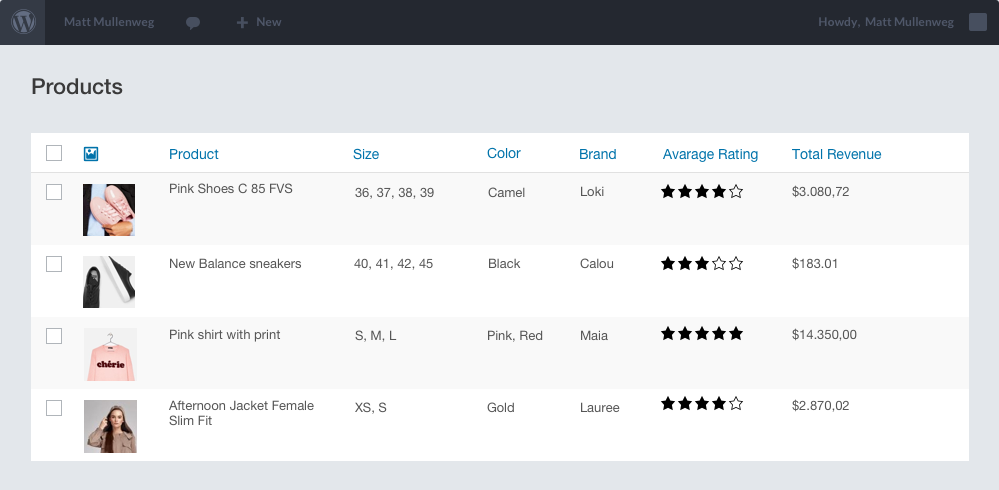
Admin Columns Pro WooCommerce 3.7.3 adds extra columns to products, orders, customers, and coupons for faster store management. Admin Columns Pro for WooCommerce adds powerful custom columns to product, order, customer, and coupon tables for faster store management.

Released on: 2025-01-14

Single License

Club Membership

17,99 / Month Membership

NEW Activate all licensed items with the free Dashboard

EffectIO Dashboard

Discover when we give away free Plugins

Find out when we give items for Free


Hey! 🎉 Monthly emails, tops. Snag exclusive plugins/themes for $0. They go quick, but you might just get a freebie! 😉

30 Days Money Back Guarantee

Guaranteed pre-activated plugins. Most items work immediately after installation. Open a support ticket to obtain the license keys for the ones that ask for activation.

Free support to install and setup on your site.

Admin Columns Pro – WooCommerce 3.7.3: The WordPress Plugin for Efficient Content Management

Are you looking for the best WordPress plugin to manage your content? Admin Columns Pro – WooCommerce 3.7.3 is here to help! With this powerful tool, you can create the perfect overview for your content, making it easier than ever to find, edit, and update your WordPress content.

Here are some of the key features that make Admin Columns Pro – WooCommerce 3.7.3 a must-have:

  1. Create insightful overviews: Easily find, filter, and update your content with intuitive overviews.
  2. Inline Editing: Make changes directly in the list table without the need for multiple screens.
  3. Bulk Editing: Update multiple items at once, saving you time and effort.
  4. Export to CSV: Create custom exports of your WordPress content in CSV format.
  5. Horizontal Scrolling: Enjoy the convenience of horizontal scrolling to view more content at once.
  6. Quick Add: Quickly add new content without leaving the list table.
  7. Conditional Formatting: Customize the appearance of your content based on specific conditions.
  8. File Storage: Easily manage your files and attachments within the list table.
  9. Saved Filters: Save and reuse filters to streamline your content management process.
  10. User Conditions: Display or hide content based on user roles or conditions.
  11. Multisite Support: Effortlessly manage your content across multiple WordPress sites.
  12. Custom Fields: Take advantage of advanced custom fields to enhance your content management.
  13. Advanced Custom Fields (ACF) Integration: Seamlessly integrate with ACF to display, edit, and search ACF fields within the list table.
  14. WooCommee Addon: Enhance your WooCommerce shop with additional columns for product order and coupon overviews.
  15. And more addons available!

Join over 150,000 websites that are already happy users of Admin Columns Pro. With our premium support and regular updates through EffectIO, you can stay up to date with the latest features and enhancements. Plus, our super deals offer discounts ranging from 30 to 90 percent, making it a cost-saving choice for your WordPress content management needs.

Efficiently manage your growing website with Admin Columns Pro – WooCommerce 3.7.3. Update your columns, addons, and more via the EffectIO Dashboard, where all items come pre-activated and ready to use. Take advantage of GPL code and get the premium support you deserve. Try Admin Columns Pro – WooCommerce 3.7.3 today and discover a better way to manage your WordPress content!

Benefit Highlights:

  • Create insightful overviews of your content
  • Edit your content inline without multiple screens
  • Save time and effort with bulk editing
  • Easily export your content to CSV
  • Convenient horizontal scrolling feature
  • Quickly add new content within the list table
  • Customize appearance with conditional formatting
  • Effortlessly manage files and attachments
  • Streamline your workflow with saved filters
  • Display or hide content based on user conditions
  • Efficiently manage content across multisite installations
  • Take advantage of advanced custom fields
  • Seamless integration with Advanced Custom Fields (ACF)
  • Enhance your WooCommerce shop with additional columns

Admin Columns Pro for WooCommerce adds powerful custom columns to product, order, customer, and coupon tables for faster store management.

3.7.3
  • [Fixed] Smart Filtering for the Payment Method column did not work anymore
  • [Improved] Added more columns to the Subscription list table
3.7.2
  • [Fixed] The Product Sorting mode in WooCommerce is not stored as a sorting preference anymore
  • [Fixed] Product sorting did not work correctly when Sticky Headers is active
  • [Improved] The Payment Method column now always shows the gateways
  • [Improved] You can now select the Order Status for the 'Orders' column on the User overview
3.7.1
  • [Added] Export for Tax column on Orders page
  • [Improved] UI improvements for WooCommerce specific overview pages
  • [Improved] Price calculations during editing are now rounded by 2 decimals by default.
  • [Added] New hook to change the decimals for rounding price calculations during editing `acp/wc/editing/price/rounding_decimals`
3.7
  • [Improved] Bulk Editing improved (add/remove) for the Product Columns: Cross Sells, Uppsells
  • [Improved] Bulk Editing improved (add/remove) for the Coupon Columns: Include/exclude Products, Include/exclude Product categories
  • [Added] Sales column added for Product Variations
  • [Improved] Order Notes column is now searchable and editable
  • [Dependency] Requires Admin Columns Pro 5.7
3.6.1
  • [Improved] Allow to add and remove attributes with Bulk Edit for the Product Attribute column (Taxonomy attributes only)
  • [Improved] More Display options for the Shipping Method column (Shipping method label and ID)
  • [Improved] More Display options for the Customer column on the Shop Order list table
3.6
  • [Added] The order Totals column is now separated in different columns: Refunds, Paid amount, Tax, Shipping costs
  • [Added] Quick Add support for Products and Coupons
  • [Improved] The (new) Refund column is now filterable
  • [Improved] The Product Sales column now only show the number of items sold for completed orders. It is possible to change the order statuses with this hook `acp/wc/column/product/sales/statuses`
  • [Improved] Refactor editing to make compatible with Admin Columns Pro 5.6
3.5.10
  • [Added] Smart Filtering for the Product Order Count column
  • [Added] Smart Filtering for the Low on Stock column
  • [Added] The description for Product variations can now be sorted and filtered.
  • [Fixed] Searching on SKU for the Product column on Orders page did not work correctly
  • [Improved] New icon for Variations in the Action column (Icons only)
3.5.9
  • [Fixed] Compatibility issue with Admin Columns 5.4.3
3.5.8
  • [Updated] WooCommerce tested up to 5.0.0
3.5.7
  • [Added] Product Variation column: Tax Class
  • [Added] Product Variation column: Shipping Class
  • [Added] Default Form Values column
  • [Added] Correct export for the First and Last Order column on the User list page
  • [Fixed] Make it possible to set a Shipping Class with editing when there is not yet a class set
  • [Fixed] Smart Filtering for the column Coupons Used did not work correctly
  • [Fixed] Smart Filtering drop-down box now searches correctly for the Product Taxonomy column on the Product Variation list table
3.5.6
  • [Fixed] The customer column gave an error since last update
  • [Improved] Smart Filtering for product variation works now for taxonomy attributes
3.5.5
  • [Changed] Leave the scheduled date the same if it is not selected during editing the (Sales) Price
  • [Fixed] The 'Link to' setting for the Customer column does now link to the correct page
  • [Fixed] Show all records for users in the Orders column
3.5.4
  • [Added] New Smart Filtering support for the Total Sales column on the User list table
  • [Added] New Sorting and Smart Filtering support for the Total Order Weight column on the Order list table
  • [Fixed] Check for existing product in the Total Order Weight column to prevent a possible error
  • [Improved] It is now possible to choose the order status for the Order Count column for Users
  • [Improved] The 'Full Name' display option was added to Shop Order Address columns
3.5.3
  • [Added] It's now possible to display the last order note instead of only the note count
  • [Added] The stock and sale price column for products are now sortable
  • [Added] The attributes column for products is now sortable when the attribute is a taxonomy
  • [Added] We added an attributes column for product variations and its filterable
  • [Fixed] The first order column for the User list table gave an error when the first order date could not be determined
  • [Fixed] Smart filtering the Orders page on country for the shipping address column now lists countries correctly
  • [Fixed] Smart filtering the Orders page on product did not list products that were missing a SKU
  • [Improved] Searching for products is faster when using the select2 menu in smart filtering or inline/bulk edit
3.5.2
  • [Added] Sorting support for Customer column on the order overview page
  • [Added] Bulk Editing for Shipping Class
  • [Fixed] Bulk Editing for Product Type did not work
  • [Fixed] Export for User Orders column
  • [Improved] Setting a flat price of '0' for Sales prices, removes the sales price
  • [Improved] Show the current site currency symbol for the price editing modal
  • [Dependency] Requires Admin Columns Pro 5.3
3.5.1
  • [Added] New columns for Order overview: Product Tags, Is Customer
  • [Added] New column for Product Variation overview: Product Taxonomy
  • [Improved] Disabled Quick Add for Product overview
  • [Improved] Better display for Purchased (orders) column
  • [Improved] The SKU and Stock column for product variations are now sortable.
3.5
  • [Added] Added a new smart filter that can filter users that bought a specific product
  • [Added] Added a new smart filter that can filter orders by product category
  • [Improved] Performance improvements when sorting products by "Type", "Variation", "Customers", "Visibility", "Backorders Allowed", "Dimensions"
  • [Improved] Performance improvements when sorting orders by "Date Created" and "Date Modified"
  • [Improved] Performance improvements when sorting users by "Products" and "Orders"
  • [Improved] You can now hide default WooCommerce filters, such as "Registered Customer", "Product Category" and "Stock status"
  • [Improved] You can now set the number of visible products for the "Products column on the orders table
  • [Fixed] The function `get_edit_post_link` will correctly link variation products to their parent product
  • [Fixed] Sorting orders by "Customer Since" did not sort descending
  • [Fixed] We renamed all `Numeric` classes to `Number` to comply with the reserved keywords for PHP 7
  • [Dependency] Requires Admin Columns Pro 5.2
3.4.2
  • [Added] WYSIWYG editing support for Product short description
  • [Added] New Menu Order column for Product Variations that represents the order inside the product
  • [Added] Search on Product count for the Purchased column (Orders)
  • [Added] Search on Product for the Product Details column (Orders)
  • [Added] Export the product count for Product Details column (Orders)
  • [Improved] It's now possible to search on an order that doesn't have a specific product (has not)
  • [Fixed] Null error during an export on Product Sales column
  • [Fixed] Product date value was empty when exporting
3.4.1
  • [Improved] Add Quantity to Order Items column (subscriptions)
  • [Dependency] Requires Admin Columns Pro 5.1
3.4
  • [Added] WooCommerce Subscriptions support
  • [Added] New Date search operators: more/les than x days ago, is within x days
  • [Added] Hook to disable ACP product variation overview `acp/wc/show_product_variations`
3.3.8
  • [Fixed] SQL error for Product Sales column
  • [Fixed] Null Object fatal error on Last Order column
  • [Added] Export models for Product Variation columns
3.3.7
  • [Improved] Coupon Used column now checks for WC 3.7 support
  • [Improved] Keep zeroes when entering prices in Inline Editing
  • [Improved] use wc_get_order() instead of instantiate the WC_Order directly
  • [Improved] use the 'codepress-admin-columns' text-domain for Variation Post Type
3.3.6
  • [Added] Smart Filtering for user country
  • [Improved] Code fixes and improvements
  • [Improved] Updated deprecated methods
  • [Dependency] Requires Admin Columns Pro 4.7.1
3.3.5
  • [Updated] Tested with WooCommerce 3.7
3.3.4
  • [Added] Product Column: Low On Stock
  • [Added] Product Variation Column: Shipping Class
  • [Added] Smart Filtering support for Number of Orders column (Users)
  • [Improved] Display of Variable Product Sales price
  • [Improved] Product Type display and improved editing
  • [Fixed] Smart Filtering support for Product Variation Stock column (works on manage stock on variation level only)
  • [Fixed] Possible Null Exception on Order Date
3.3.3
  • [Improved] New editing interface for Price and Stock column for bulk and inline edit
  • [Improved] Better export value for Product Variation Title
  • [Improved] Sale column will display the sale price and has an improved icon for a scheduled sale
  • [Fixed] Attribute (term) for products was not storing properly when it was the first assigned term
3.3.2
  • [Important] Made compatible with Admin Columns 4.5.6
  • [Added] Product Type Editing
  • [Fixed] Product Attribute Editing
3.3.1
  • [Improved] Smart Filtering for SKU on Variation overview
  • [Improved] Smart Filtering for Products on Variation overview
  • [Improved] Catalog visibility filtering improved with drop down
3.3
  • [Added] Bulk Edit
  • [Added] Editing and Smart Filtering support for Product Category Image column
  • [Added] Order Note column
3.2
  • [New] Added Smart Filtering. You can now smart filter your products and orders.
3.1.3
  • [Fixed] Stock Status editable fixed (now uses the stock editing model)
  • [Fixed] Hide prefix meta data for Order Product Details column
3.1.2
  • [Fixed] Export for Product Dimensions fixed
3.1.1
  • [Improved] Do not load integration if WooCommerce v2 is active
3.1
  • [Improved] Filtering on product categories on the order overview, now also includes hidden products
  • [Improved] Click on order row to open edit screen now also works when the WC Order column is not available
  • [Improved] Removed duplicate entries when filtering on Product type columns on Order overview page
  • [Improved] Dropped WooCommerce v2.* support
  • [Improved] Dropped PHP 5.2 support
  • [Fixed] Sales column now works with the correct DB prefix
3.0.7
  • [Added] Order column: Product Categories
  • [Improved] Placeholder added for User Address column
3.0.6
  • [Fixed] Filtering on Order - Product SKU works again
  • [Improved] Filtering for Order - Product column improved. Choose if variable product must be included or not
3.0.5
  • [Fixed] Export for Total Sales column fixed
3.0.4
  • [Added] User column: Address
  • [Added] New display property for Order - User column: Total Sales / Life Time Value
  • [Improved] Better variation support for Order Product column
  • [Improved] Column width for order screen now works as expected
3.0.3
  • [Added] Filtering re-added for Customer - Roles column
  • [Added] Export model for Order Date column
  • [Added] Order column: Reintroduced the old Status icon column (WooCommerce < 3.3)
  • [Added] Product column: Sales (shows the total sales for a specific product)
  • [Added] Coupon column: Limit (shows the coupon or user limit for a coupon)
  • [Improved] Coupon Usage / Limit column now sorts on Usage instead of limit which makes more sense
  • [Fixed] Customer Column was not working as expected for some display options
  • [Fixed] Clicking the inline edit pencil after just activating inline edit prevents from triggering the WC row click event
  • [Dependency] Requires Admin Columns Pro 4.2.4 3.0.2 =
  • [Added] Added additional post columns ( date, author, actions, slug, status )
  • [Notice] Only compatible with ACP 4.2.3
  • [Added] Convert default columns from 3.2.6 to default columns 3.3.x
3.0.1
  • [Fixed] Disable Variations support until WooCommerce 3.3
3.0
  • [Added] Product column: Average Order Interval
  • [Added] Product column: Average Rating
  • [Added] Product column: Coupons
  • [Added] Product column: Download
  • [Added] Product column: Customers who bought this product
  • [Added] Product column: Grouped Products
  • [Added] Product column: Menu Order
  • [Added] Product column: Parent Group
  • [Added] Product column: Purchase Note
  • [Added] Product column: Reviews
  • [Added] Product column: PriceSale
  • [Added] Product column: Short Description
  • [Added] Product column: Sold Individually
  • [Added] Order column: Billing Address
  • [Added] Order column: Currency
  • [Added] Order column: Customer Note with icon or text
  • [Added] Order column: Customer IP, shows the IP Address or IP Country code
  • [Added] Order column: Downloads
  • [Added] Order column: Totals
  • [Added] User column: Customer Since
  • [Added] User column: Ratings
  • [Added] User column: Reviews
  • [Added] User column: Products bought by this customer
  • [Added] User column: First Order
  • [Added] User column: Last Order
  • [Added] Coupon column: Product Categories
  • [Added] Coupon column: Exclude Product Categories
  • [Added] Comments column: Rating
  • [Added] Comments column: Product Review
  • [Improved] Product Type now also shows 'Downloadable' and 'Virtual' type
  • [Improved] Renamed Product 'Number of orders' column to 'Orders'
  • [Improved] Renamed Product 'Total order amount' column to 'Total Revenue'
  • [Improved] Renamed Product 'Visibility' column to 'Catalog visibility'
  • [Improved] Renamed User 'Total Sales' column to 'Lifetime Value'
2.2.1
  • [Improved] Improved export for some WooCommerce columns
2.2
  • [Added] Added Exporting
  • [Added] WooCommerce Email Restrictions Column added
  • [Fixed] Filtering for Product Visibility Column
  • [Improved] Don't show the attribute label for single WooCommerce attribute columns
  • [Improved] Enabled select2 on the WooCommerce Orders page
2.1.5
  • [Added] New improved column for Description
  • [Fixed] Deprecated error in Product Details column (Order overview)
  • [Improved] Made Ajax columns compatible with latest fix in Core
2.1.4
  • [Added] Subtotal column for orders added
  • [Fixed] Removed the parent column for WooCommerce v3
  • [Improved] Check for main query for specific filter functions
  • [Improved] Meta changes
  • [Improved] Changed access to from private to protected in Variations column to make extending more useful
2.1.3
  • [Fixed] WooCommerce featured product column editing, sorting and filtering improved
2.1.2
  • [Fixed] Sorting for coupon type
2.1.1
  • [Fixed] Fixed compatibility with select2 (version 4) js library
2.1
  • [Important] Made compatible with WooCommerce 3
  • [Important] Made compatible with Admin Columns 4.0.3
  • [Added] Reintroduced an improved WooCommerce purchased column
  • [Fixed] Product Custom Field column on Order overview now works as expected
  • [Improved] Product variation column now uses Ajax to get the variations (performance improvement)
2.0
  • [Important] Only compatible with Admin Columns Pro 4.0
  • [Added] New column for Orders: Customer Role
  • [Added] New column for Coupons: Maximum amount
  • [Improved] Values for WooCommerce Taxonomy and Category columns can now be cleared
  • [Refactor] Autoloader added
  • [Refactor] Moved all WooCommerce methods from Admin Columns Pro to the WooCommerce addon
  • [Refactor] This addon now requires Admin Column Pro 4 or greater to function
  • [Refactor] WooCommerce addon now contains their own xEditable templates
  • [Refactor] Each WooCommerce column now has it's own class for sorting, editing and filtering.

Testimonials

Benny O'Brien@benny_obie

The quick response from a friendly team member at @effectioshop honestly caught me off guard.
Nice work!


Stuart Boyle@stuart_boyle

@effectioshop As an eCommerce developer, effectio.org has enabled me to reach higher expectations and my clients are very happy.


22,000+ Users · 180 Countries
Trusted by freelancers, agencies & store owners worldwide

How It Works

Install the free EffectIO Dashboard plugin on your WordPress site. It connects to the EffectIO catalog, detects every premium plugin and theme you own, and gives you a single hub to manage licenses, run updates, and keep your admin panel clean — all from one screen.

One-Click Updates
Update any premium plugin or theme instantly. No manual downloads, no FTP — just click "Update Now."

🔑

License Manager
View, activate, and manage all your license keys in one place. No hunting through emails or vendor dashboards.

🔇

Notification Blocker
Blocks intrusive admin nag screens, upsell banners, and ads that clutter your dashboard. Re-enable anytime.

🛡️

Vendor Request Control
Prevents redundant license-check pings to third-party servers for items you already manage through EffectIO.

📦

Bulk Activation
Club members can activate all eligible plugins and themes at once — one button, zero hassle.

🆓

100% Free
The Dashboard itself costs nothing. Install it and it auto-activates on your domain — no key required.

Get Started in 3 Steps

1

Download & Install

Download the EffectIO Dashboard zip and install it via Plugins → Add New → Upload.

2

Browse & Activate

Open EffectIO → Catalog in your admin panel. The dashboard auto-detects your installed items and matches them to your licenses.

3

Update & Manage

Keep everything current with one-click updates. Manage licenses, block nag notices, and enjoy a cleaner WordPress experience.

Licenses

All WordPress derivative work is GPL-licensed. Most items are pre-activated and ready to use. Some require an activation key — we provide it with your purchase, and the Dashboard lets you apply it in seconds.

Club members enjoy bulk activation: activate every eligible item at once with a single click. No more entering keys one by one.

✅ Money-Back Guarantee

Every item is tested and ships with full features. If something doesn't work and we can't fix it, you get a full refund. We believe premium tools should be accessible — that's why we offer a low-cost subscription so freelancers, small businesses, and agencies can grow without a large upfront investment.

Manage and Update all your sites

17.99 $ / Month Membership

2900 Plugins and Themes. Install, Update, Activate and Delete any plugin. Unlimited Sites. Best WP Agency Deal.

Clean Items

NGO Mission

Always Updated

SSL Connection