EffectIO Admin Columns Pro 7.1.1

Original price was: $70.00.Current price is: $9.99. / year

Drop-in compatible replacement & Licensed Product

Admin Columns Pro 6.4.24 lets you customize WordPress admin columns, filter, sort, and edit content faster. Customize WordPress admin columns, filter, sort, and edit content faster with Admin Columns Pro 6.4.24.

Released on: 2025-12-08

Single License

Club Membership

17,99 / Month Membership

NEW Activate all licensed items with the free Dashboard

EffectIO Dashboard

Discover when we give away free Plugins

Find out when we give items for Free

Hey! 🎉 Monthly emails, tops. Snag exclusive plugins/themes for $0. They go quick, but you might just get a freebie! 😉

30 Days Money Back Guarantee

Guaranteed pre-activated plugins. Most items work immediately after installation. Open a support ticket to obtain the license keys for the ones that ask for activation.

Free support to install and setup on your site.

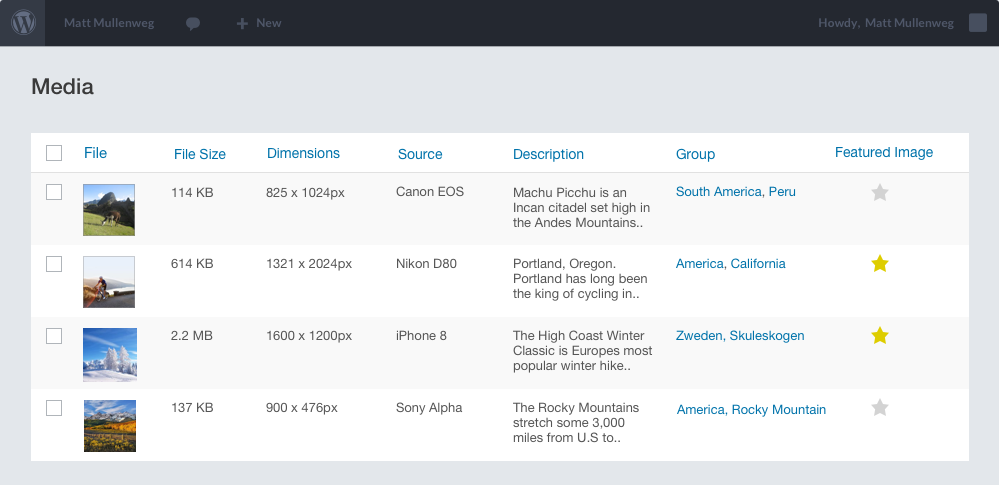
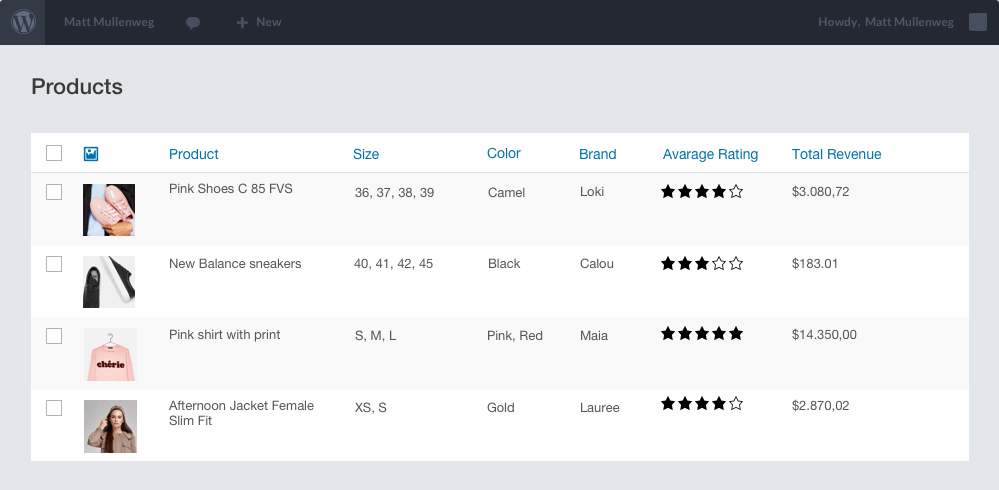
Customize columns on the administration screens for post(types), users and other content. Filter and sort content, and edit posts directly from the posts overview. All via an intuitive, easy-to-use drag-and-drop interface.

Customize everything you need to with Admin Columns Pro! Start using this amazing plugin for your Woocommerce and create the site of your choice. Easy-to-use and fast-working, this is the perfect plugin for you if you want to edit anything that’s WordPress pre-made, like images or products. Endless possibilities bring endless opportunities, so start now with EffectIO!

Starting with the plugin

In order to get started with Admin Columns Pro, you have to download the EffectIO Dashboard plugin. Install and activate it, then you will see in the right part of the screen, on the same line, the Install button. After that, go and activate Admin Columns Pro from the Plugins Dashboard.

Settings of Admin Columns Pro

If you go to Settings, you will see below the Admin Columns Pro tab. Click on it and the dashboard will open. From there, you can edit the main features of WordPress. Let’s click on Images, for example. 
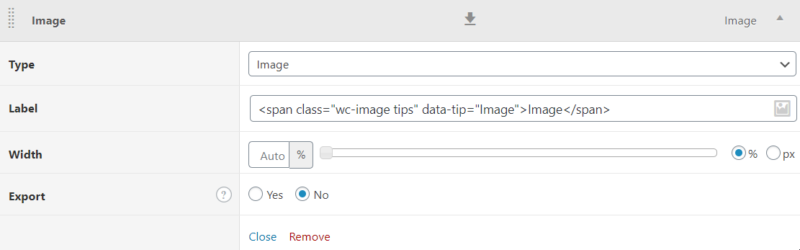
admin columns pro basic

From here, you can edit its type, label, width or even export it. If you really want to, you can also delete this section. After you finish editing, simply click on “Close”; then you can go on to the next section. 

Let’s take a look at another example: 

date

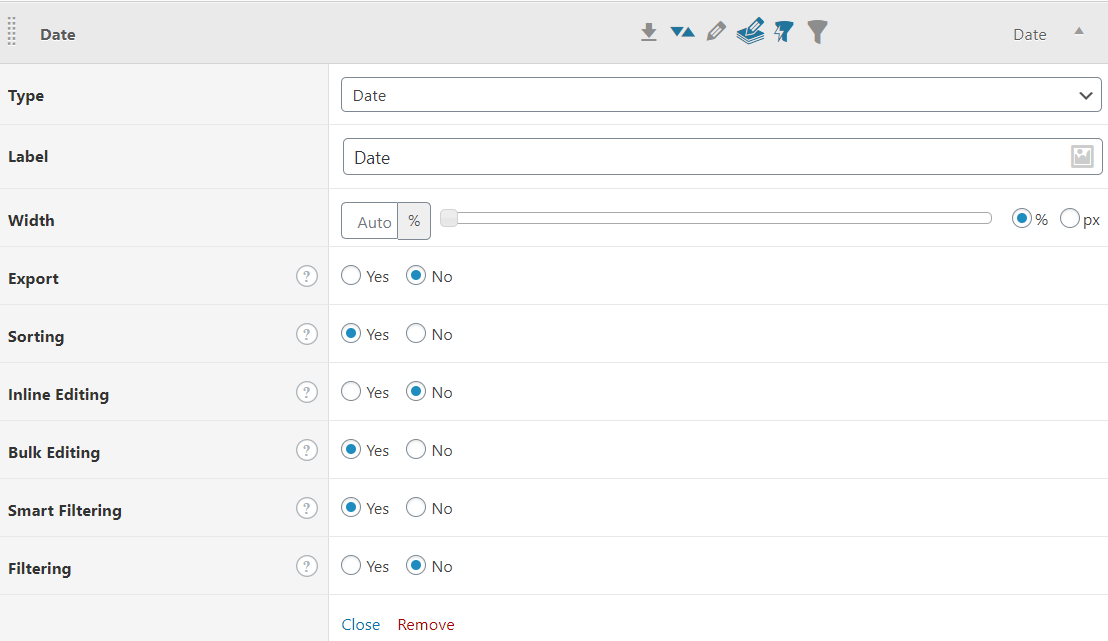
Here, things get a little bit more complicated: you can bulk edit, sort and even enable smart filtering. Cool, isn’t it so? Let’s see some more options:
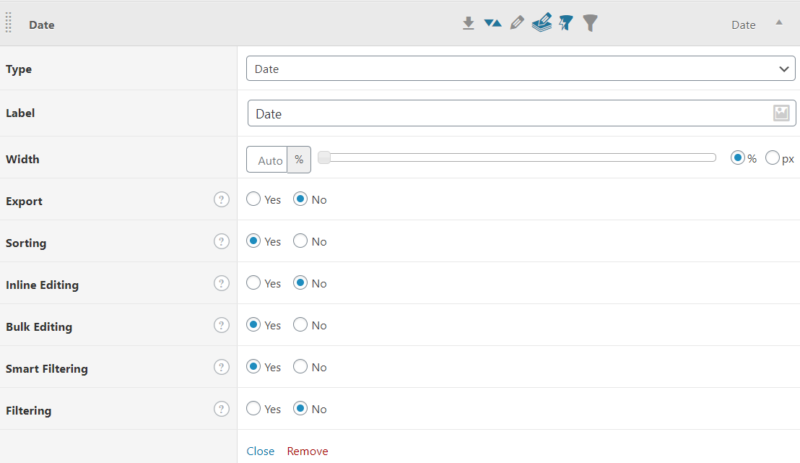
date admin columns pro

If you want to expand this section, click on “Edit” and this will show up. As you can see, there are plenty of options. Choose the ones that best fit your interests. For example, you can enable exporting or even filtering, or disable bulk editing.
settings

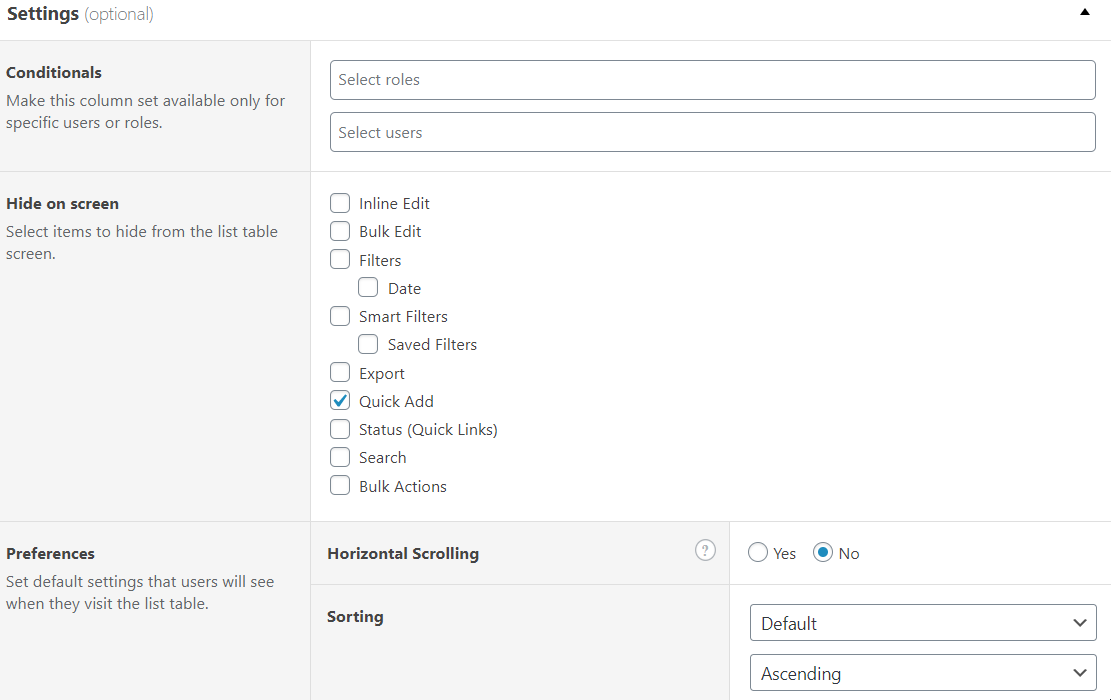
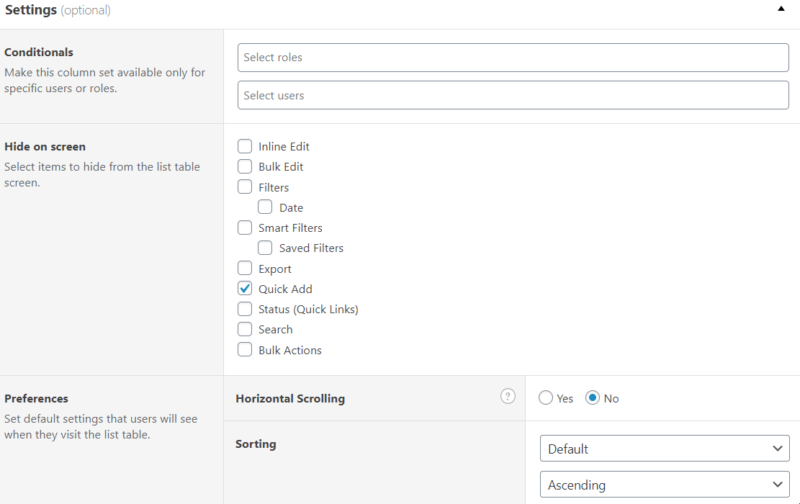
The optional settings are for the Admins. You can first of all select the users by their roles and names. Then you can hide items from the list. You can set the horizontal scrolling and the sorting type. In other words, any member team can work with Admin Columns Pro, but you should only leave this to those who are able to do so. So choose carefully.

If you click on Settings from the above section of the page, a new “world” will appear. 
general settings date admin columns pro

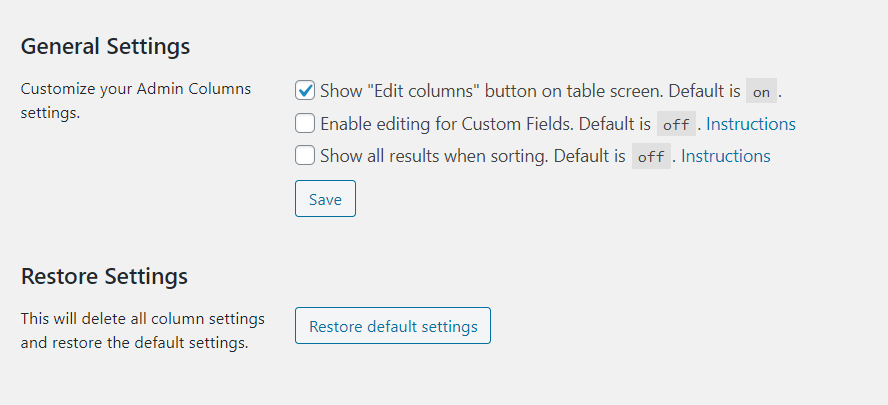
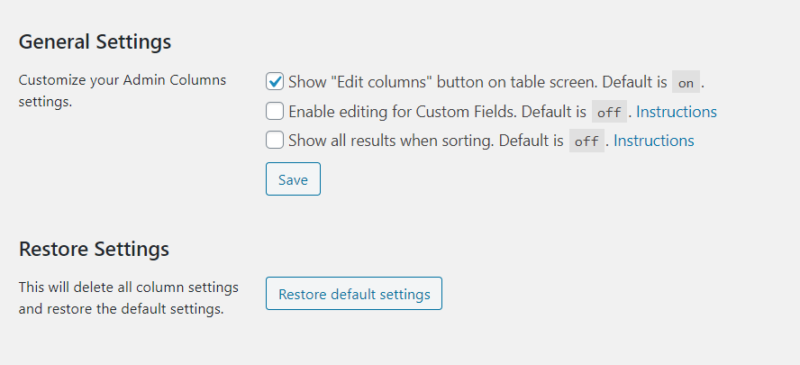
From here, you can show the “Edit columns” button on the table screen. Moreover, you can enable editing for Custom Fields or show all the results when you sort. 

If you want to delete all the settings you’ve made, you can do so by clicking on Restore default settings. Let’s say that you were just testing the features but you don’t want them to be permanent. You should have the option to restore everything. Back to basics, in other words.

In conclusion

To sum up, if you want to change WordPress settings, you will need Admin Columns Pro. If you feel like it doesn’t have enough features, you can always try its addons, which bring out even more functionalities. Start now building the type of site you and your team enjoy working on! Get even more plugins from EffectIO. The best is yet to come.
Customize WordPress admin columns, filter, sort, and edit content faster with Admin Columns Pro 6.4.24.

6.4.24
  • [Fixed] Update notice type bug
  • [Fixed] Incorrect SQL for Coupon Used filter
  • [Improved] WooCommerce: The Stock Status column now also shows custom statuses
  • [Updated] Admin Columns Core to version 4.7.20
6.4.23
  • [Improved] Author column can now also search on related meta (Custom Fields)
  • [Improved] Post Parent column is now always available for Post Type list tables
  • [Improved] Condition Formatting File Size column now works in Kb
  • [Improved] More translatable strings for Bulk Edit scripts
  • [Improved] Added backward compatibility layer in preparation for the upcoming 7.0 release
  • [Updated] Admin Columns Core to version 4.7.18
6.4.22
  • [Fixed] Security fixes (Axios update)
  • [Improved] Support filtering when WooCommerce Analytics is disabled. (HPOS Products)
  • [Improved] Improved conditional formatting for File Size column.
  • [Improved] More flexible way to resolve ACF location rules
  • [Improved] More translatable string for WC Editing modals
  • [Updated] Admin Columns Core to version 4.7.17
6.4.21
  • [Improved] User Role editing, now correctly updates instead of replacing roles
  • [Improved] Show full State name for WooCommerce Address fields
  • [Fixed] Wrong alignment of sticky headers
  • [Fixed] Missing Bulk Edit buttons after toggling columns in the Screen Options
6.4.20
  • [Updated] Admin Columns Core to version 4.7.16
  • [Fixed] Cache optimization
6.4.19
  • [Improved] JetEngine Select, Radio, and Checkboxes now have support for manual bulk options
  • [Updated] Admin Columns Core to version 4.7.15
  • [Fixed] Better null check for options to prevent PHP 8.3 issues
  • [Improved] Small UI changes in the admin view
6.4.18
  • [Improved] Strip HTML for HPOS Order columns
  • [Improved] Smart Filter with 'isset' operator could give a wrong display format
  • [Improved] Events Calendar add-on: The Venue Website now display the full URL instead of a pre-defined label
  • [Fixed] MetaBox editing fix for unserialize() errors
  • [Fixed] Editing for MetaBox Taxonomy columns with custom table did not work correct
  • [Fixed] Multiple 'Doing it wrong' warnings
  • [Updated] Admin Columns Core to version 4.7.14
6.4.17
  • [Fixed] Resolved an issue where exporting list screen settings with a saved filter containing quotes caused an error.
  • [Improved] The Value modal in the Images column now has a more compact display.
  • [Improved] Numbers in the filter widget are now only formatted when they contain five or more digits, improving readability.
  • [Improved] Product Count sorting in the HPOS Order Table now utilizes the product lookup table in the database.
  • [Improved] Added an option to hide the default WooCommerce Order filters
  • [Updated] Admin Columns Core to version 4.7.13
6.4.16
  • [Fixed] Corruption issues affecting certain languages in the core.
  • [Fixed] Resolved a fatal error that occurred when a template folder was defined but contained no templates.
  • [Improved] MetaBox integration now loads even when the AllInOne plugin is active without the core.
  • [Updated] Admin Columns Core to version 4.7.12
6.4.15
  • [Fixed] Export for Discount columns (Orders) did not work
  • [Fixed] Post Link Editing was not working correctly
  • [Fixed] Fixed query arguments for the Search query in Product Taxonomy (Orders)
  • [Added] Editing support for Order TransactionID and Payment method
  • [Added] Added GTIN, IPC, EAN, and ISBN columns
  • [Improved] Polylang now returns correct columns for quick edit
  • [Improved] Show price for Variation value modal
  • [Improved] License checks now update renewed licenses automatically
  • [Updated] Admin Columns Core to version 4.7.11
6.4.14
  • [Added] New WooCommerce Product column: GTIN, UPC, EAN, or ISBN
  • [Improved] Recursive value export for Gravity Forms List field
  • [Improved] Export values without HTML for default WooCommerce HPOS tables
  • [Fixed] Export for Media Orientation column does now export the correct value
  • [Fixed] Column resize did not work when the Extended view was selected in the Screen Options
  • [Fixed] PHP warning for deprecated function in Average Order Interval column
  • [Updated] Admin Columns Core to version 4.7.10
  • [Fixed] Prevent conflicting classnames for generated column names
6.4.13
  • [Added] Introduced the Yoast Related Keyphrases column
  • [Added] Enabled Smart Filtering for the HPOS Order Notes column
  • [Added] Added Bulk Delete option for WooCommerce Orders
  • [Improved] Added filtering for Events column on Organizer and Venue tables
  • [Improved] Support for adding new numeric Product Attributes (Taxonomy) via `acp/editing/taxonomy/numeric_term_names` hook
  • [Fixed] WooCommerce Product column now filters correctly on the Shop Subscription table
  • [Fixed] The ‘Is not’ operator is now available for WooCommerce Product filtering on the Orders page
  • [Fixed] WooCommerce subscription status filtering now displays accurate options
  • [Updated] Admin Columns Core to version 4.7.9
  • [Improved] Better edit term link with taxonomy as parameter
6.4.12
  • [Fixed] WYSIWYG editing modal closes when adding a link in the editor
  • [Fixed] Leaving date time editing empty, will now clear the value
  • [Improved] Set default focus on value field for the Price editing modal
  • [Improved] Sticky Header improvements for multiline headers
  • [Improved] Added Modified Date column to Product Variation table
  • [Improved] Added Before and After setting to Author column
  • [Updated] Admin Columns Core to version 4.7.8
6.4.11
  • [Fixed] WooCommerce Order Meta: Enhanced filtering and editing capabilities for select options.
  • [Fixed] WooCommerce Variation Image: Improved filtering accuracy for the 'is set' condition, ensuring correct results.
  • [Fixed] WooCommerce Grouped By Column: Resolved display issue that affected the grouped by column view.
  • [Fixed] WooCommerce Order Count: Corrected sorting behavior for order counts.
  • [Fixed] Gravity Forms: Implemented fallback check for WP_Error handling.
  • [Added] Introduced export functionality for the Aspect Ratio column.
  • [Added] WooCommerce HPOS Order and Subscription Table: Added a new WooCommerce ID column.
  • [Added] WooCommerce Stock Threshold: New column introduced in the Product and Product Variation table.
6.4.10
  • [Fixed] Added Excel spreadsheet compatibility/escaping when exporting data to CSV. Reported Issue Reference: CVE-2019-17661
  • [Fixed] Use the correct date format storage for MetaBox dates
  • [Updated] Admin Columns Core to version 4.7.7
6.4.9
  • [Improved] Expanded year options in the date column dropdown for editing.
  • [Improved] Numeric values in Smart Filtering are now formatted.
  • [Improved] Custom Field with multiple values now supports JSON.
  • [Improved] Presets are now sorted correctly on the Tools page.
  • [Improved] User Registered date format is now customizable.
  • [Fixed] Daily license check reliability issues resolved.
  • [Fixed] Column header and Bulk Edit button mismatch issue when columns were reordered.
  • [Fixed] JetEngine Selectbox now correctly returns the label for '0' keyed options.
  • [Fixed] Product Taxonomy column filtering on the WooCommerce Order page now works correctly.
  • [Fixed] Adding a new Conditional Format now works when Smart Filtering is disabled.
  • [Fixed] Custom Field column with Post as Display value error resolved.
  • [Updated] Admin Columns Core to version 4.7.6
6.4.8
  • [Improved] Export for Products Sold now exports a numeric value
  • [Fixed] WooCommerce Notes column could give an error on the Private note display
  • [Fixed] Gravity Forms Form column, did not work for nested Gutenberg Blocks
  • [Fixed] Filtering yearly on ACF Date field now works correctly
6.4.7
  • [Added] Filtering implemented for WooCommerce Customer Note column (HPOS)
  • [Added] Gravity Forms column that shows the added Form (gutenberg block) to a page/post
  • [Added] Implemented Export for HPOS Product column
  • [Added] Implemented Export for HPOS Tax column
  • [Fixed] Term creation bug with Bulk Edit
  • [Fixed] Removed unused Taxonomy Description column (duplicate)
  • [Fixed] Selection of Primary Column gave an error (Yoast SEO)
  • [Fixed] ACF Boolean Repeater field now has an export value
  • [Fixed] SVG Support in image columns
  • [Improved] Export for Network Users "Blogs" improved
  • [Updated] Admin Columns Core to version 4.7.5
6.4.6
  • [Fixed] Force the new table view ID when copying table views based on templates
  • [Fixed] Search comparison MimeType fixed
  • [Fixed] Javascript bug when selecting the Month picker in Smart Filtering
  • [Fixed] The Custom Field column setting gave an error when using the text field hook
  • [Fixed] The Inline Edit toggle was not always visible
  • [Improved] Filtering on the Publish Date column does not force to filter only published post anymore
  • [Updated] Admin Columns Core to version 4.7.4
6.4.5
  • [Fixed] Missing filtering button on Taxonomy pages when filtering is enabled
  • [Fixed] Smart Filtering and Filtering re-implemented for Gravity Forms
  • [Fixed] Filtering on the Toolset Types Relationship column gave a fatal error
  • [Improved] Always sort on a second unique column to prevent duplicate records on paginated tables
  • [Improved] You can now disable integration from the Addons tab
  • [Improved] ACF WYSIWYG editing improved
  • [BuddyPress] Added editing support for the User Groups column
  • [Updated] Admin Columns Core to version 4.7.3
6.4.4
  • [Fixed] Fatal error when Restoring the settings in the Settings tab
  • [Added] New filter for the 'Posts by Author' column on the User table
  • [Improved] Filter drop-downs for user-related data now allow you to search for the user display name
  • [Improved] Single table view export is now pretty printed
  • [Improved] Better sorting for columns with non-unique values
  • [Pods] Repeatable fields are not supported anymore until we have built fully support for repeatable fields
  • [Updated] Admin Columns Core to version 4.7.2
6.4.3
  • [Fixed] JetEngine Post Relationship Smart Filtering gave an error
  • [Fixed] Export for the Subscription Relationship column, does not work anymore
  • [Fixed] Export for the WooCommerce Status did not work
  • [Improved] Show 250 items in Filter drop downs by default
  • [Added] Added a new hook that allows developers to alter the max number of options in drop down lists used in Filtering `ac/select/query/limit`.
6.4.2
  • [Improved] Filtering dropdowns for Custom Field text fields are back instead of open text fields
  • [Fixed] Fixed a fatal error when a user was selected as conditional but had no first or last name
  • [ToolsetTypes] Fixed an Uncaught TypeError in the Checkbox field column
6.4.1
  • [Fixed] The update script triggered a fatal error
  • [JetEngine] Meta Boxes for Media Post Type are now supported
  • [WooCommerce] It is now possible to select more Product properties for the Grouped by column
6.4
  • [Added] New User Column: Admin Color Scheme
  • [Added] New Media Columns: Aspect Ratio & Orientation (Landscape, Portrait, or Square)
  • [Added] New Wrapping setting: Allows to clip the column values to create more compact views
  • [Added] New Preset feature: Added the option to create column presets (column templates) and store them with your theme or plugin
  • [Fixed] When editing a column on the Media page, the value was not updated in the colum itself
  • [Fixed] Fixed an issue where non-existing terms could cause an error on the column settings page
  • [Updated] Smart Filtering has been rebuilt from scratch and no longer relies on third-party plugins
  • [Updated] It is now possible to search for Saved Filters in the drop down on the table page
  • [Updated] The standard filtering dropdowns are optimised and no longer rely on caching. They are now populated with AJAX. Some filtering dropdowns have been replaced with open text fields.
  • [Improved] It is now possible to choose how dates are stored in the Custom Field column
  • [Improved] Added "Select" Custom Field Type with UI for option input and new filter `acp/column/settings/select_options`
  • [Improved] Webp images are not recognized for the custom field column
  • [GravityForms] Remove Smart Filtering and Filtering from support
  • [JetEngine] More operators for the Relationship Smart Filter
  • [JetEngine] Better Support for fields that use the Glossary options
  • [WooCommerce] Sorting and Filtering support for HPOS Shipping Method column
  • [WooCommerce] New HPOS column: Returning Customer
  • [WooCommerce] New HPOS column: Order Meta
  • [Updated] Admin Columns Core to version 4.7
6.3.5
  • [Fixed] Resolved an issue where the Saved Filters list displayed duplicate records
  • [Fixed] Fixed a bug where filtering on an ACF Number field in combination with sorting could lead to empty search results
  • [Fixed] Corrected the incorrect URLs for Terms in Taxonomy columns, ensuring that links now point to the correct destinations
  • [Updated] Admin Columns Core to version 4.6.9
6.3.4
  • [Fixed] Taxonomy helper class gave a PHP 8.2 warning.
  • [Fixed] Re-added all Pro features for the MS User list table.
  • [Fixed] The Media Library for inline editing sometimes only showed items that were not used.
  • [Improved] More operators for Smart Filtering for the Slug column.
  • [ACF] Added a new hook that allows developers to write custom support for third-party ACF fields: `acp/acf/column`.
  • [WooCommerce] Editing support for the Subscription date columns.
  • [WooCommerce] Editing support for the Product Featured column.
  • [Updated] Admin Columns Core to version 4.6.8.
6.3.3
  • [Improved] Gravatar option added for the Last Modified Author column
  • [Fixed] Deleting an HPOS order gave an error
  • [Fixed] Use alias for joined tables in Sorting queries to prevent empty results
  • [Fixed] Reset sorting for a table that has not yet saved settings was not possible
6.3.2
  • [Improved] Changed the Conditional Formatting style hook from `acp/conditional_format/color_styles` to `acp/conditional_format/formats`
  • [Improved] New date operators for Conditional Formatting: Within Days, More than ... days ago, Less than ... days ago
  • [Fixed] Error when adding the 'Last Modified Author' column
  • [Fixed] Sorting for Custom Field column with field type set to 'Default' did not work anymore
  • [Fixed] The order for Saved Filters was reversed
  • [WooCommerce] Added sorting to more HPOS columns
  • [Updated] Admin Columns Core version 4.6.7
6.3.1
  • [Fixed] Use the database prefix for custom WooCommerce HPOS queries
  • [Fixed] Update section in the Admin was not visible anymore
  • [Fixed] The style selector in Conditional Formatting could overlap multiple style selectors
  • [Fixed] Error on the WPML string translation page
  • [Fixed] Some custom columns could give a fatal error on the settings page
  • [Improved] Give better feedback when the settings could not be saved because of missing database tables
  • [Updated] Admin Columns Core version 4.6.6
6.3
  • [Added] Global Saved Filters are now also stored in File Storage
  • [Added] Smart Filtering for the Author role column on Custom Post Type list tables
  • [Added] New hook to load table views on-the-fly `acp/storage/repositories/callback`
  • [Added] Setup for PHP File Storage now allows you to set a text domain for translations (see documentation)
  • [Added] New hook to set a text domain for translation in PHP file storage `acp/storage/file/directory/i18n_text_domain`
  • [Added] New hook to disable Admin Columns for certain list tables `ac/list_screen/is_active`
  • [Added] New hook to disable Admin Columns for certain list tables based on keys `ac/list_screen/key/is_active`
  • [Added] New Password column for the User list table to change the password for a user from the table
  • [Fixed] Styling for the new sorting markers in WordPress 6.3
  • [Fixed] Bulk Delete could give an error when the columns where not saved for the table
  • [Fixed] The hook `ac/post_types` works again to disable Admin Columns for specific post types
  • [Fixed] You can now reset custom Column Order on the table, even when you disabled the feature
  • [Improved] New hook to add more styles for Conditional Formatting `acp/conditional_format/color_styles`
  • [Improved] The Preview Column now also show a preview for video and audio files
  • [MetaBox] Added display support for MetaBox Group fields
  • [YoastSEO] Added columns for the Schema fields: Article type and Page type
  • [WooCommerce] User Link setting for Customer (Orders) works now correctly
  • [WooCommerce] Support for new HPOS feature in WooCommerce
  • [Updated] Admin Columns Core version 4.6.5
6.2.2
  • [Fixed] Closing a select field in Bulk Edit left the select box on the screen
  • [MLA] Media Library Assistant list tables did not recognize the custom columns
  • [Updated] Admin Columns Core version 4.6.4
6.2.1
  • [Fixed] Fixed the array helper that could throw an error when an array contained an object
  • [Fixed] Re-added deprecated register_group function to prevent fatal errors for third-party plugins
  • [Updated] Admin Columns Core version 4.6.3
6.2
  • [Fixed] Changing the column order on the table in combination with Width editor gave a strange behavior in Firefox
  • [Fixed] The settings to disable the column resize feature did not work correctly
  • [Added] It is now possible to switch between column sets by using tabs above the table. You can switch between tabs or a select box on the settings page
  • [Improved] Check for better specific post type capabilities for Editing
  • [Improved] Changed the name for 'Columns Sets' to 'Table Views'
  • [Improved] Color editable can now have a custom color palette (set with hook `acp/editing/view`)
  • [ACF] Column support for the ACF groups list table
  • [WooCommerce] Editing the Sales 'until' date now set the date to the end of the given day
  • [WooCommerce] Product price can not be set to zero.
  • [Updated] Admin Columns Core version 4.6.2
6.1.3
  • [YoastSEO] Editing the Primary Taxonomy column gave an error during saving
  • [GravityForms] Export button did not appear for some specific Language installations
  • [WooCommerce] New 'Fees' column for the Order list view
  • [Updated] Admin Columns Core version 4.6.1
6.1.2
  • [Fixed] Some default or third-party columns did not export any value
  • [Fixed] Bulk Delete feedback did not tell correctly how many items were processed
  • [Improved] Uploaded media during Inline Edit has now the edited item as parent
  • [Core] Admin Columns Core version 4.6.1
6.1.1
  • [Fixed] Issue where the user preference for export was not displayed correctly
  • [Core] Admin Columns Core version 4.6.1
6.1
  • [Refactor] Refactor for Export models. Abstract model is deprecated
  • [Added] Editing support for the Comment 'In Reply To' column
  • [Fixed] Templates for WooCommerce logic were not loaded correctly
  • [Fixed] Fatal error when a Metabox Taxonomy column was added on a Taxonomy screen
  • [Improved] Export now stores the last export columns and order as a user preference
  • [MLA] New integration for Media Library Assistant implemented in Admin Columns Pro
  • [ACF] Editing for Relation fields now also takes filter Taxonomy setting into account
  • [ACF] Editing for Time picker implemented again
  • [ACF] Value formatter fix for Numeric fields, 0 values are now displayed
  • [ACF] Value formatter fix for Maps field
  • [ACF] Value formatter fix for Choice fields that use 0 for keys
  • [JetEngine] Repeater field gave an error when adding the column
  • [WooCommerce] Added Fees to the Totals column for the Order page
  • [Updated] Admin Columns Core version 4.6.1
6.0.3
  • [Fixed] The settings for Network Sites and Network Users were not loaded correctly
  • [Fixed] Labels for the Primary column picker are now sanitized
  • [Fixed] Sorting for Related User Meta on the User table could lead to empty results
  • [Fixed] HTML Character encoding for Saved Filters drop down
  • [Improved] Added the Last Modified and Last Modified Author column to the Media page
  • [ToolsetTypes] Export for DateTime field now exports the time
  • [TheEventsCalendar] Null check for possible error in the 'Additional Field' column value
6.0.2
  • [Fixed] Bulk Edit could update posts that were not filtered
  • [Improved] New hook `ac/addon/$addon/active` available to disable autoloaded addons
6.0.1
  • [Fixed] Fatal error on Product Variation when no settings were stored
  • [Fixed] Fatal error for the plugin Media Library Assistant with versions below 3.05
6.0
  • [Breaking Changes] The minimum version required to run Admin Columns Pro is now PHP 7.2.
  • [Added] New Feature: Bulk Delete items on the list table
  • [Added] New Feature: Added option to set the primary column of the table
  • [Added] New Feature: Conditional Formatting
  • [Added] You can now change the order of the columns on the list table itself by dragging the column
  • [Fixed] License information did not always update
  • [Improved] Export now supports export of selected items
  • [Improved] Export UI improved: select which column you want to export and reorder column on the fly
  • [Improved] Smart Filtering for the Date Publish column now only filters dates for published posts
  • [Updated] Refactor: the `ACP\Editing\Service` interface has changed
  • [Added] New hook `acp/delete/reassign_user` allows you to reassign posts to another users when bulk deleting users
  • [Added] New hook `acp/delete/bulk/deleted_rows_per_iteration` allows you to set the number of rows that are deleted per batch
  • [Added] New hook `acp/column_order/active` allows you to globally show or hide the column order functionality
  • [ACF] It is now possible to add or remove options in bulk for Multiple Select fields
  • [ACF] It is now possible to set a custom separator for fields that display multiple values
  • [ACF] The Image field setting 'Uploaded to post' is now applied for Inline Editing
  • [ACF] The ACF date format is now correctly displayed in the column setting
  • [EventsCalendar] Sorting events on default columns did not work correctly
  • [JetEngine] Repeater field support
  • [MetaBox] New column support for the Relation Manager
  • [MetaBox] Editing on Table Storage did not work correctly when the related row did not yet exist in the table
  • [Pods] Date field display issue
  • [WooCommerce] Export for Customer columns fixed: Total sales, Order Number
  • [WooCommerce] It is now possible to select the order status for the user Total Sales column
  • [WooCommerce] Added Editing for Order columns: Payment Method, Customer
  • [WooCommerce] WooCommerce Sale column did not show correct schedule date
5.7.4
  • [Fixed] Taxonomy ListScreen could give a PHP warning when the default taxonomies were unregistered
  • [Fixed] Beaver Builder integration support was always initiated
  • [Fixed] Expired licenses were not updated correctly when it was expired and re-activated or renewed
  • [Fixed] Suppress more PHP 8.1 warnings
  • [Fixed] JS null checks that could lead to JS errors
  • [Improved] Smart Filtering for the Date Publish column now only filters dates for published posts
5.7.3
  • [Added] Support for Beaver Builder template views
  • [Added] New hook to toggle persistent sorting as a preference `acp/sorting/remember_last_sorting_preference`
  • [Fixed] Smart Filtering for some Taxonomy columns did not work correctly
  • [Fixed] Suppress PHP 8.1 warnings
5.7.2
  • [Added] It is now possible to toggle the Row Actions (Below title) on the setting page per list table
  • [Added] New hook that runs before the value is saved in (bulk/inline) edit `acp/editing/before_save`
  • [Improved] Changed the radio buttons to a Toggle element for column settings that have a on/off state
  • [Fixed] Updater on License page is fixed
  • [Fixed] Smart Filtering for some columns on the Taxonomy overview paged did not work
  • [Updated] Admin Columns Core changes ( 4.5.2 )
  • [Added] It is now possible to select the Website display for User related columns
  • [Added] New hook to disable the column value sanitation on the table `ac/column/value/sanitize`
5.7.1
  • [Added] It is now possible to hide the Comment Type filter in the Hide on Screen section for Comments
  • [Added] Custom Field column can now display nested serialized data
  • [Added] Better display value for serialized Custom Fields (Multiple values)
  • [Improved] The Link count column can now display All, internal, or external links
  • [Improved] The 'Hide on screen' options are renamed to work more intuitive (toggle to show instead of hiding)
  • [Improved] The media column types are now grouped based on the media type
  • [Fixed] Export for the Media Taxonomy column now works correctly
  • [Fixed] Javascript: possible null error for the column configurator when the screen options are not available
  • [Fixed] There was a Filter button in the footer on the Taxonomy page when there were no filters available
  • [Fixed] Several issues during the updates of Admin Columns plugins
  • [Updated] Admin Columns Core changes ( 4.5.1 )
  • [Added] New Audio player column for Media list table
  • [Added] New Video player column for Media list table
  • [Fixed] Prevent fatal error, when removing a non-existent column set from a Local Storage repository
5.7
  • [Added] New hook `acp/editing/view` in favor of the old deprecated 'acp/editing/view_settings' hook
  • [Added] New hook `acp/export/file_name` to alter the exported filename
  • [Fixed] Adding non-existing terms with editing did not work properly
  • [Fixed] Clicking the mobile caret to open the row now works in combination with Inline Editing enabled
  • [Fixed] Pagination for taxonomy entities now load more than just one extra page in the smart drop-downs.
  • [Fixed] Removed the Ninja Forms integration from the add-on page
  • [Fixed] The placeholders for the full name editable were incorrect
  • [Fixed] Unexpected focus scroll behavior in Inline Editing
  • [Improved] Check if a post is locked in order to be able to edit the post
  • [Improved] It is now possible to search for specific icons for the label icon picker
  • [Improved] Javascript is now compiled with the target set to ES6
  • [Improved] Made the Polylang Language column available for all related List screens
  • [Improved] Smarter Link editing for the Custom Field URL type
  • [Updated] Admin Columns Core changes ( 4.5 )
  • [Added] New Image column for the Media list table
  • [Added] The Slug column is now also available for the Media list table
  • [Improved] More thorough logic for the 'Restore Settings' option.
  • [Improved] Refactor of the Setup Script that runs when the plugin is installed and activated for the first time
  • [Improved] The Permalink column now also shows the (upcoming) permalinks for future and draft posts
5.6.4
  • [Hotfix] The ReadOnly class is renamed because it gave a fatal error in PHP 8.1
5.6.3
  • [Added] New hook `acp/sorting/custom_field/numeric_type` to change the datatype for numeric custom field sorting
  • [Improved] Better sticky header solution to prevent third-party plugin styling conflicts that causes header offsets
  • [Fixed] Fatal error that could happen on the WPML String translation page
  • [Fixed] Disabled the editing setting for unsupported Custom Field field types
  • [Updated] Admin Columns Core changes ( 4.4.4 )
  • [Improved] UI Improvements
5.6.2
  • [Added] When creating a new column set, you can now choose to copy the settings or start with the default columns
  • [Fixed] Activation button was not always enabled when entering the license
  • [Fixed] Colspan for Quick Edit and Bulk Edit (Quick Actions) is now correct when Sticky Headers is active
  • [Fixed] Removing terms in Bulk Edit did not work correctly
  • [Fixed] It was not possible to enter negative numbers in Editing for numeric custom fields
  • [Updated] Admin Columns Core changes ( 4.4.3 )
  • [Improved] The Menu Order column has no restrictions anymore

Testimonials

Benny O'Brien@benny_obie

The quick response from a friendly team member at @effectioshop honestly caught me off guard.
Nice work!


Stuart Boyle@stuart_boyle

@effectioshop As an eCommerce developer, effectio.org has enabled me to reach higher expectations and my clients are very happy.


22,000+ Users · 180 Countries
Trusted by freelancers, agencies & store owners worldwide

How It Works

Install the free EffectIO Dashboard plugin on your WordPress site. It connects to the EffectIO catalog, detects every premium plugin and theme you own, and gives you a single hub to manage licenses, run updates, and keep your admin panel clean — all from one screen.

One-Click Updates
Update any premium plugin or theme instantly. No manual downloads, no FTP — just click "Update Now."

🔑

License Manager
View, activate, and manage all your license keys in one place. No hunting through emails or vendor dashboards.

🔇

Notification Blocker
Blocks intrusive admin nag screens, upsell banners, and ads that clutter your dashboard. Re-enable anytime.

🛡️

Vendor Request Control
Prevents redundant license-check pings to third-party servers for items you already manage through EffectIO.

📦

Bulk Activation
Club members can activate all eligible plugins and themes at once — one button, zero hassle.

🆓

100% Free
The Dashboard itself costs nothing. Install it and it auto-activates on your domain — no key required.

Get Started in 3 Steps

1

Download & Install

Download the EffectIO Dashboard zip and install it via Plugins → Add New → Upload.

2

Browse & Activate

Open EffectIO → Catalog in your admin panel. The dashboard auto-detects your installed items and matches them to your licenses.

3

Update & Manage

Keep everything current with one-click updates. Manage licenses, block nag notices, and enjoy a cleaner WordPress experience.

Licenses

All WordPress derivative work is GPL-licensed. Most items are pre-activated and ready to use. Some require an activation key — we provide it with your purchase, and the Dashboard lets you apply it in seconds.

Club members enjoy bulk activation: activate every eligible item at once with a single click. No more entering keys one by one.

✅ Money-Back Guarantee

Every item is tested and ships with full features. If something doesn't work and we can't fix it, you get a full refund. We believe premium tools should be accessible — that's why we offer a low-cost subscription so freelancers, small businesses, and agencies can grow without a large upfront investment.

Manage and Update all your sites

17.99 $ / Month Membership

2900 Plugins and Themes. Install, Update, Activate and Delete any plugin. Unlimited Sites. Best WP Agency Deal.

Clean Items

NGO Mission

Always Updated

SSL Connection