EffectIO WooCommerce PDF Invoices

Original price was: $79.00.Current price is: $12.99. / year

Drop-in compatible replacement & Licensed Product

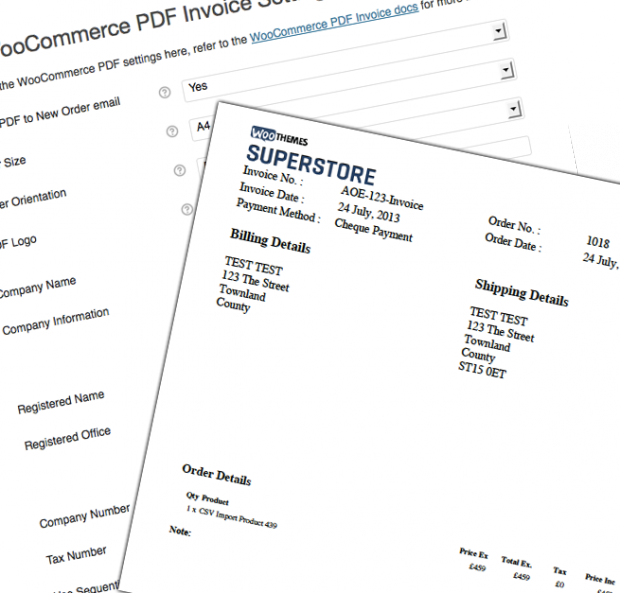
WooCommerce PDF Invoices Extension allows you to attach a PDF invoice to WooCommerce ‘completed order’ emails. Also, clients can download previous invoices. Version: 4.18.0 Attach a PDF Invoice to the completed order email and allow invoices to be downloaded from customer's My Account page.

Released on: 2025-11-20

Single License

Club Membership

17,99 / Month Membership

NEW Activate all licensed items with the free Dashboard

EffectIO Dashboard

Discover when we give away free Plugins

Find out when we give items for Free


Hey! 🎉 Monthly emails, tops. Snag exclusive plugins/themes for $0. They go quick, but you might just get a freebie! 😉

30 Days Money Back Guarantee

Guaranteed pre-activated plugins. Most items work immediately after installation. Open a support ticket to obtain the license keys for the ones that ask for activation.

Free support to install and setup on your site.

Automatically Generate and Attach PDF Invoices with WooCommerce-PDF-Invoices

Revamp your invoices with the powerful and customizable WooCommerce-PDF-Invoices extension. This outstanding tool streamlines your business operations by automatically generating and attaching fully customizable PDF invoices to completed or processing order emails.

Never again will you need to manually create and send invoices to your customers. With WooCommerce-PDF-Invoices, the invoice is seamlessly included in the order email, saving you time and effort.

Your customers can enjoy the convenience of accessing and downloading their previous invoices directly from their account. Admins also have the ability to resend the PDF or download a copy whenever necessary.

Key Features:

    📄 Automatically attach PDF invoices to completed order emails.
    💯 Fully customizable invoices to match your branding.
    📩 Customers can download previous invoices from their account.
    🔄 Admins can easily resend or download PDF copies.
    ⚡ Seamless integration with WooCommerce.
    ⏰ Save time and effort on manual invoice creation.
    📊 Efficiently manage your business operations.
    🌐 SEO-friendly solution to boost online presence.
    💪 Stay ahead of the competition.
    💸 Cost-effective alternative to traditional invoicing methods.
    ⚙️ Update items conveniently via the EffectIO Dashboard.
    🔒 GPL code available for enhanced flexibility.
    🔧 Avail of premium support from EffectIO.
    🎁 Catch super deals with discounts ranging from 30 to 90 percent.
    📈 Drive sales with professional and appealing invoices.
    🌟 Boost customer satisfaction and loyalty.

Upgrade Your Business with WooCommerce-PDF-Invoices

Experience the power of WooCommerce-PDF-Invoices to streamline your invoicing process and enhance your customer experience. Take advantage of the customizable PDF invoices, SEO-friendly features, and the time-saving automation this extension offers. With the EffectIO alternative, you gain access to cost-saving updates, pre-activated items, and unbeatable discounts. Don’t miss out on this opportunity to optimize your business operations.

Get started with WooCommerce-PDF-Invoices today and witness the transformation in your invoicing process. Increase efficiency, professionalism, and customer satisfaction like never before!

Release Date

7/6/2016

5 reviews for EffectIO WooCommerce PDF Invoices 5.1.0

  1. edendvatri321

    If you want to Add or Remove columns from the invoice using filters this is perfect!!!

  2. lipasimone

    This is perfect and very helpfull!

  3. martindumas8

    If you want to resend or download invoice from the order list, this is perfect!

  4. sekstefani

    If you want customizable invoice template, just try with this product!!

  5. Stefani Sekovska

    Thank you Effectio for WooCommerce PDF Invoices, Perfect!!

Add a review

Attach a PDF Invoice to the completed order email and allow invoices to be downloaded from customer’s My Account page.

2025.10.25 — version 5.1.0
  • Fix subscriptions renewal invoices being created automatically when creation method is manual
  • WC 10
  • Fix delete all invoice data for HPOS
2024.11.11 — version 5.0.7
  • Check payment_complete for creating invoice details
  • Fix missing Invoice number and date in some circumstances
2024.07.23 — version 5.0.6
  • Fix email invoice from bulk actions
2024.05.13 — version 5.0.5
  • Fix remove meta boxes from subscriptions page
2024.02.07 — version 5.0.4
  • Fix Cannot access offset of type string on string
2024.02.07 — version 5.0.3
  • Fix fatal error when using MPDF
  • Fix deprecated functions in MPDF
2024.01.22 — version 5.0.2
  • Fix WC_pdf_debug does not have a method "woocommerce_invoice_details_meta_box"
2024.01.03 — version 5.0.1
  • Fix missing bulk export option for HPOS
  • Fix missing admin notices for bulk actions for HPOS
2023.12.14 — version 5.0.0
  • WC 8.3
  • HPOS Support
  • PHP 8.3
  • New filter for column widths
  • Fix bulk order actions not redirecting
  • Fix bulk order actions update messages
  • Fix create_email scheduled action failure
2023.06.29 — version 4.18.2
  • WC 7.8.0
2023.06.09 — version 4.18.1
  • Ensure PDFs are attached to completed order email when order is completed during checkout
  • Only PDF Export class when required
2023.06.01 — version 4.18.0
  • WC 7.7.0
  • Unset DOMPDF object after PDF is generated for compatibility
  • Update PDFMerger for PHP 8.x compatibility
  • Make sure Send Class loads when editing an order
2.0.3
  • Remove unnecessary fonts
2023.05.22 — version 4.17.3
  • WC 7.6.0
  • Fix - Check _wc_pdf_invoice_number and _invoice_number are not empty
  • Fix - "Undefined variable $zip"
  • Fix - make sure invoice is created at point order is created for pending order status.
  • Fix - move bulk emailing invoices to scheduled action
  • Fix - remove [data-icon]::after css
  • Fix - Change WC active check
  • Fix - Make sure PDF is attached to Order Note email.
2023.02.16 — version 4.17.2
  • Fix - Deprecated Subscriptions filters
  • Fix - PDF Export notice
2022.11.03 — version 4.17.1
  • Fix - Download from My Account page
2022.10.24 — version 4.17.0
  • Security - Additional checks when downloading invoices
2022.10.03 — version 4.16.3
  • Fix MPDF temp folder
  • Fix pdf_template_order_totals filter
  • Remove refund from get_pdf_order_totals
2022.09.26 — version 4.16.2
  • Add "Set Resources Folder" to System Status
2022.08.30 — version 4.16.1
  • Fix - System Status is PDF attached notice
  • Fix - Add is_null check to maybe_send_admin_email_on_creation
  • Fix - Make sure PDF_Invoice_Admin_PDF_Invoice is loaded before tigger()
2022.08.16 — version 4.16.0
  • Fix - Unsupported operand types: string + int
  • Fix - Fix for defaults before settings saved
  • New - Optionally send admin email when invoice is initially created.
  • WC 6.8
2022.05.31 — version 4.15.6
  • Add image for "paid in full"
  • Fix - Undefined variable $tax_display
  • New - PDFINVOICEADDITIONALCSS template tag. Use pdf_template_additional_template_css to add CSS to template file.
2022.04.01 — version 4.15.5
  • Bug - respect "Attach a PDF Invoice to the email or include a download link?" setting
  • Bug - make sure all invoice meta is deleted when invoice is deleted
  • Fix - Discounts modifying line prices, use $item methods to retrieve line prices.
  • New - Additional filters for functions limited by user role
2021.12.21 — version 4.15.4
  • Fix admin actions when using mPDF
2021.12.06 — version 4.15.3
  • New filter for post types allowed for invoices woocommerce_pdf_invoice_ignore_order_types
  • Fix logic check in get_invoice_display_invoice_num
  • New meta key _invoice_created_mysql specifically used when resetting invoice number option is YES
  • Upgrade - add _invoice_created_mysql for previous orders
2021.11.30 — version 4.15.2
  • Fix layout issue with mPDF generator
  • DOMPDF - set rendering backend to CPDF
2021.11.15 — version 4.15.1
  • Fix for invoices not attaching to emails at checkout
  • Fix bulk action 'create and email invoice'
2021.10.27 — version 4.15.0
  • WC 5.8
  • Filter for terms title (pdf_invioce_terms_title)
  • Filter for terms content (pdf_invioce_terms_content)
  • Filter for applying the_content (pdf_invioce_terms_content_apply_the_content)
  • New option to create invoice date when invoice is created.
  • Do not add date to invoice if no date is stored
  • Make sure display_invoice_number is created and update the order if it's missing
  • Additional classes and IDs for the template https://docs.woocommerce.com/document/pdf-invoice-developer-tools/#section-19
  • Fix "PHP Notice: Trying to access array offset on value of type bool"
  • Fix download link test
  • Add option to overlay "Paid In Full"
  • Fix invoices not creating for Pending order status
2021.09.09 — version 4.14.4
  • Fix shipping tracking output logic
2021.09.07 — version 4.14.3
  • Fix shipping tracking output
2021.08.03 — version 4.14.2
  • Fix terms template multipage issue
2021.08.03 — version 4.14.1
  • Remove debugging code.
2021.08.03 — version 4.14.0
  • Add {{ordernumber}} to filename variables
  • WC 5.5
  • WooCommerce Shipment Tracking
  • Make sure terms template is not affected by email template setting
  • Make sure terms template uses correct font
  • Fix Undefined array key "pdf_suffix"
3.5.0 — 3.5.0
2021.05.15 — version 4.13.4
  • Fix php notices in PHP helper tab
  • Make sure partial refund emails have PDF attached if required
  • Remove some button CSS
  • Remove deprecated $order methods
2021.05.15 — version 4.13.3
  • Fix System Status enabled emails showing X
  • Check if Theme Editor is available / available for logged in user
  • Make sure downloads and emails use the same template file.
2021.05.06 — version 4.13.2
  • Restrict missing logo admin notice to WC manager
2021.04.18 — version 4.13.1
  • Fix Uncaught Exception: PDFlib::get_value()
2021.04.17 — version 4.13.0
2021.04.01 — version 4.12.1
  • Optionally store the logo in the invoice meta, allows old invoices to keep the logo used when created
  • new filter to allow no PDF to be attached based on custom variable pdf_invoice_custom_no_pdf_required
  • Move PDF Invoice debugging info to WC System Status for ease.
  • Rename PDF Debugging tab to Admin functions.
  • Remove unnecessary logging from zip exporting
  • If not using sequential invoice numbers then use $order->get_order_number() not $order_id for compatibility with Sequential Order Numbers plugins
  • Rework PDF download link in order meta box
  • Add option to set Chroot see https://github.com/dompdf/dompdf/wiki/Usage#security-restrictions-for-local-files
  • Missing Logo admin notice
  • WC 5.2
2021.03.18 — version 4.12.0
  • Fix wc_pdf_invoice_number not saving
  • Fix invoice date formating
  • Fix invoice download link in order MetaBox
  • WC 5.1
2021.03.18 — version 4.11.1
  • Compatibility with WOOCS - WooCommerce Currency Switcher
  • PHP 8
  • New option to override woocommerce_tax_display_cart for showing taxes in order totals section
  • New filter pdf_invoice_order_item_totals to modify $order->get_order_item_totals() before output
2021.01.29 — version 4.11.0
2020.01.26 — version 4.10.2
  • Option to fix invoice dates in PDF Invoice -> Debugging tab
2020.01.14 — version 4.10.1
  • Make sure _wc_pdf_invoice_number is respected
  • Get correct date for order meta box
  • WC 4.9
2020.12.07 — version 4.10.0
2020.11.11 — version 4.9.2
  • New filter for invoice date apply_filters( 'woocommerce_pdf_nvoices_set_invoice_date', $return, $order_id );
2020.11.08 — version 4.9.1
  • Add option for RTL
  • New template placeholder for RTL
  • Filter for RTL placeholder
2020.10.28 — version 4.9.0
  • Add mPDF and option to choose between DomPDF and mPDF
  • Combine font folders for DomPDF and mPDF
2020.10.23 — version 4.8.1
  • Fix Logo not showing
  • Remove deprecate WC function

Testimonials

Benny O'Brien@benny_obie

The quick response from a friendly team member at @effectioshop honestly caught me off guard.
Nice work!


Stuart Boyle@stuart_boyle

@effectioshop As an eCommerce developer, effectio.org has enabled me to reach higher expectations and my clients are very happy.


22,000+ Users · 180 Countries
Trusted by freelancers, agencies & store owners worldwide

How It Works

Install the free EffectIO Dashboard plugin on your WordPress site. It connects to the EffectIO catalog, detects every premium plugin and theme you own, and gives you a single hub to manage licenses, run updates, and keep your admin panel clean — all from one screen.

One-Click Updates
Update any premium plugin or theme instantly. No manual downloads, no FTP — just click "Update Now."

🔑

License Manager
View, activate, and manage all your license keys in one place. No hunting through emails or vendor dashboards.

🔇

Notification Blocker
Blocks intrusive admin nag screens, upsell banners, and ads that clutter your dashboard. Re-enable anytime.

🛡️

Vendor Request Control
Prevents redundant license-check pings to third-party servers for items you already manage through EffectIO.

📦

Bulk Activation
Club members can activate all eligible plugins and themes at once — one button, zero hassle.

🆓

100% Free
The Dashboard itself costs nothing. Install it and it auto-activates on your domain — no key required.

Get Started in 3 Steps

1

Download & Install

Download the EffectIO Dashboard zip and install it via Plugins → Add New → Upload.

2

Browse & Activate

Open EffectIO → Catalog in your admin panel. The dashboard auto-detects your installed items and matches them to your licenses.

3

Update & Manage

Keep everything current with one-click updates. Manage licenses, block nag notices, and enjoy a cleaner WordPress experience.

Licenses

All WordPress derivative work is GPL-licensed. Most items are pre-activated and ready to use. Some require an activation key — we provide it with your purchase, and the Dashboard lets you apply it in seconds.

Club members enjoy bulk activation: activate every eligible item at once with a single click. No more entering keys one by one.

✅ Money-Back Guarantee

Every item is tested and ships with full features. If something doesn't work and we can't fix it, you get a full refund. We believe premium tools should be accessible — that's why we offer a low-cost subscription so freelancers, small businesses, and agencies can grow without a large upfront investment.

Manage and Update all your sites

17.99 $ / Month Membership

2900 Plugins and Themes. Install, Update, Activate and Delete any plugin. Unlimited Sites. Best WP Agency Deal.

Clean Items

NGO Mission

Always Updated

SSL Connection











