WooCommerce Pre Orders plugin allows your customers to order products before they are available. Purchase it from EffectIO! Version: 2.0.5
Sell pre-orders for products in your WooCommerce store.
Hey! 🎉 Monthly emails, tops. Snag exclusive plugins/themes for $0. They go quick, but you might just get a freebie! 😉
30 Days Money Back Guarantee
Guaranteed pre-activated plugins. Most items work immediately after installation. Open a support ticket to obtain the license keys for the ones that ask for activation.
WooCommerce Pre-Orders plugin allows your customers to order products before they are available. The pre-order experience is fully customizable and if you’re using a supported payment gateway, pre-orders can be charged upon release without the customer returning and paying for their order.
WooCommerce Pre-Orders allows you to:
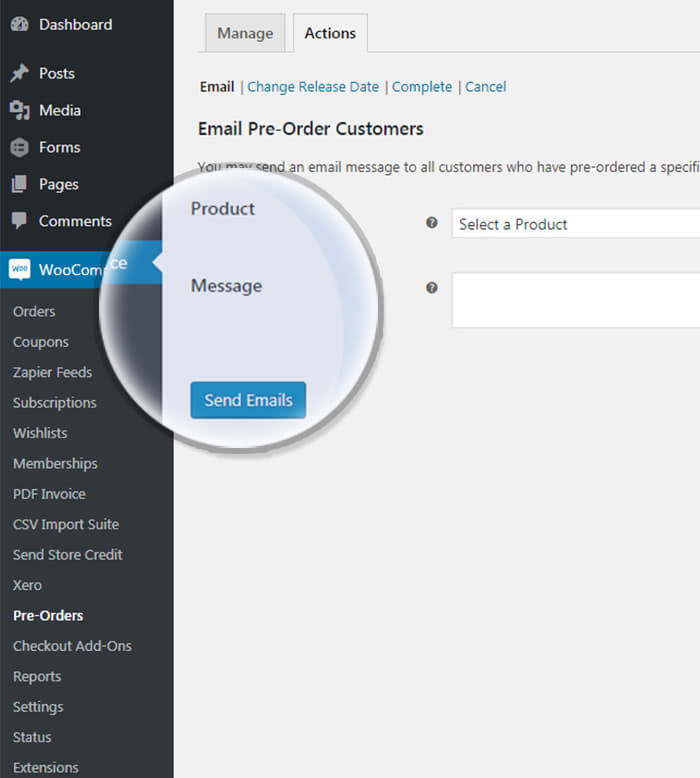
Send Emails To All Customers Who Pre-ordered A Product
This plugin has a number of preorder specific emails that can be easily customized. This action sends an email to customers based on the product ordered, without changing the status.
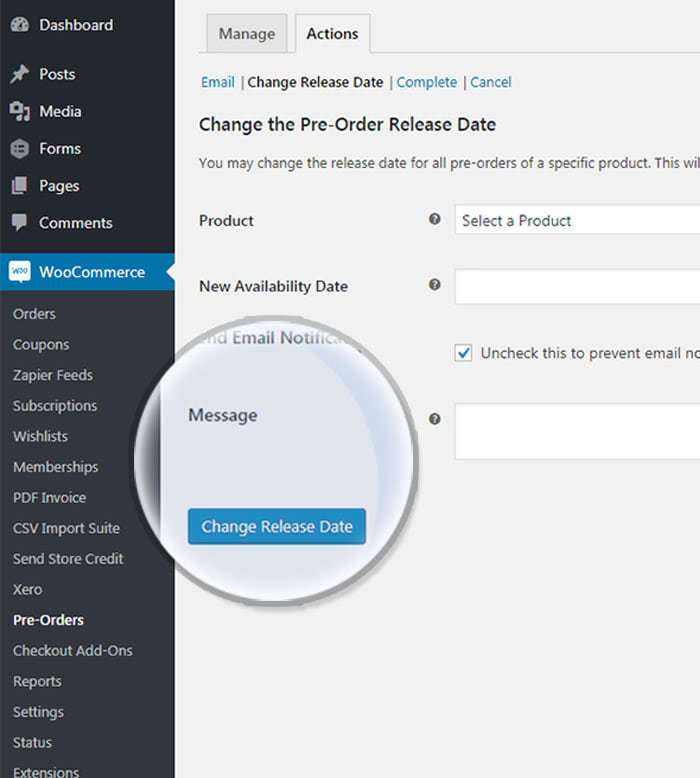
Change The Release Date For A Specific Product
You can adjust the release date for all pre orders of a specific product. Either check or uncheck the “Send Email Notification” box to optionally notify all customers involved.
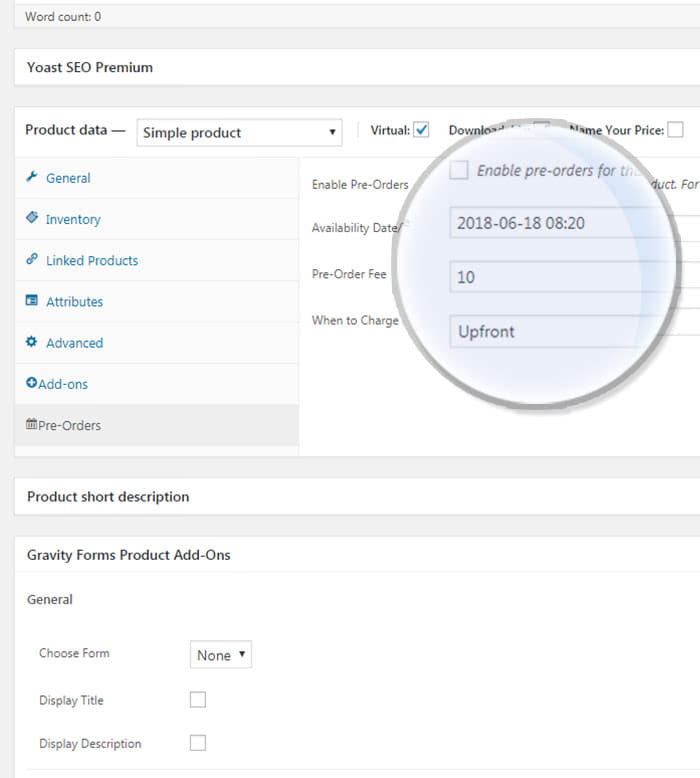
Customize Preorder Fields For Simple Or Variable Products
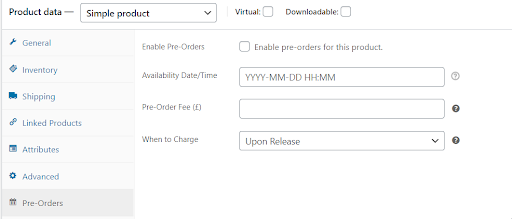
You can easily enable a product for pre order. After enabling it, you can set the availability date and time, the pre order fee and when to charge for the product.
Configure The General Settings For All Preordered Products
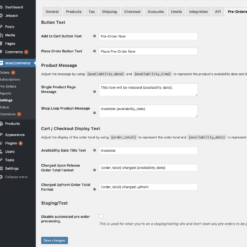
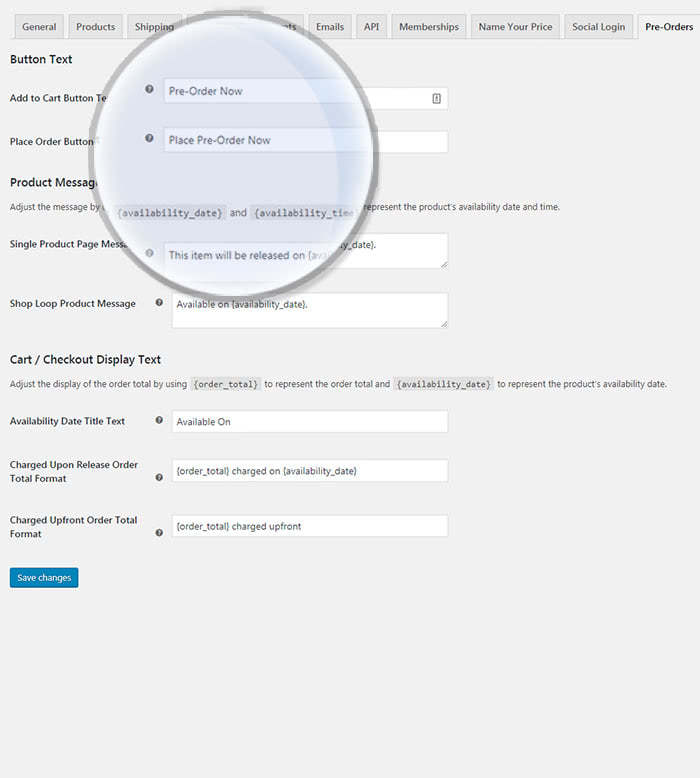
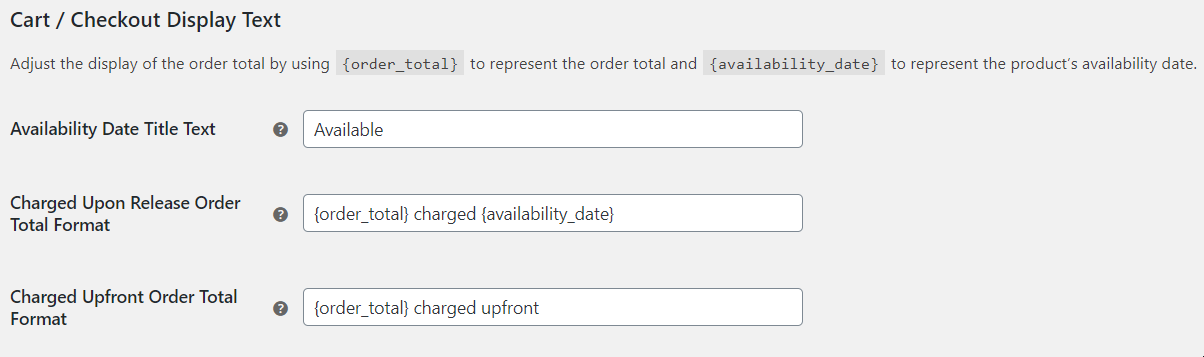
You can set the button text or control the message displayed below the price on the product page. You can also change the text shown when the product is in the cart.
Pre Orders Plugin Features:
Set an optional date/time when the product will be available.
Automatically charge orders when the product is available.
Change the release date for a pre ordered product without changing the preorder status.
Email all customers who preordered a product so they remain engaged.
Cancel pre orders if the product is no longer available.
Filter your pre orders with a custom “pre order” order status.
Works with simple and variable products.
Optionally charge a fee for a pre order thus increasing your chance to reach a product/market fit.
Customize the Add to Cart Or Place Order buttons for preorders thus having a more compelling call to action.
Does your store have products which are so awesome that your users should order them even before their release date? Then Woocommerce Pre Orders is the perfect plugin for you! Try this amazing plugin, which allows you to set the availability of your product, when it’s going to be available and many other cool options your ecommerce store simply can’t afford missing!
How to get started
Download the EffectIO Dashboard plugin, activate it and search for Woocommerce Pre Orders. On the right part of the screen, you should see the Install button. Click on Install, then go to Plugins -> Installed Plugins and activate it.
How Woocommerce Pre Orders Works
From the plugin manager, you will see these 5 options: Settings, Manage Pre-Orders, Support, Docs and Deactivate. The last option is for when you no longer need the plugin and you want to delete it from your site.
If you click on settings, a screen of options will pop up. We’ll walk through them and tell you what each of them means.
From here, you can modify the buttons on which your users click in order to buy. You can basically write anything. Just remember, write things that convert well. You can even test different options, especially if you’re running ads, in order to see which type of message button converts better.
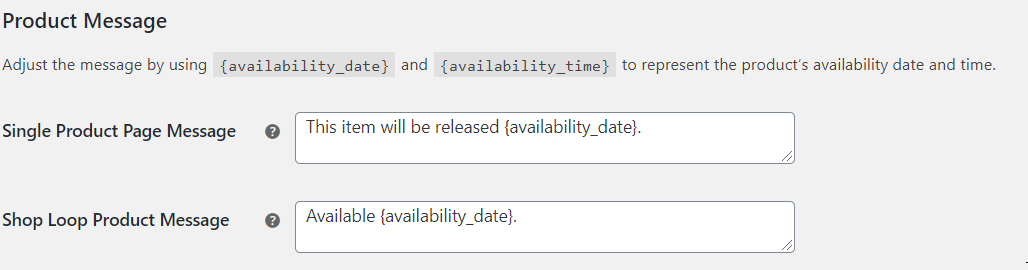
The Product Message option offers you the possibility to tell your users when the specific product is available. You can write a single product page message or a shop message (this last one means that it’s available for the whole shop). Here, you can also enter other options, such as “Order Now”.
Moreover, you can let your users know when a product is available or not.
If you just found out about this plugin and you don’t know how to perfectly use it yet, you can put the whole plugin on staging, so no orders will be processed automatically. This might be a good idea for anyone, in order not to worry about not delivering orders. In other words, this is just another testing option you should disable after you make sure that everything is alright and you can handle all the pre-orders.
Quick recap
When you want to enable pre-orders for a specific product, all that you have to do is to enable pre-orders for that, by going to Products -> That specific product. You can also set the availability time or date, including the hours and minutes and the Pre-Order Fee. Moreover, another cool feature is that you can charge your customers “Upon Release” or “Upfront”. Customize each product depending on your products’ availability and create an amazing journey for your users!
To conclude
Woocommerce Pre Orders is the kind of plugin you might want to test if you have products which need to be ordered before going available. Also don’t forget to let your customers know when their favorite products are going to be available for them in order to make sure that they have a great shopping experience.
5 reviews for EffectIO WooCommerce Pre-Orders 2.3.2
Rated 5 out of 5
tarikakgul97 –
Very useful plugin for allowing customers to order products before they are available and automatically charge orders when the product is available :)))
Rated 5 out of 5
mario_nonevski –
If you want to set an optional date/time when the product will be available or you want to change the release date for a pre-ordered product, this is what you are trying!
Rated 5 out of 5
jani.simon –
If you are searching for plugin who will cancel pre-orders if the product is no longer available, here is it!
Rated 5 out of 5
emakocov –
If you are searching for plugin who will email all customers who pre-ordered a product, just choose this
Rated 5 out of 5
petersendiana90 –
Pre-orders can be charged upon release if you’re using a supported payment gateway, Good job, thanks!
10.1 — Bump WooCommerce "tested up to" version 10.1.9.9 — Bump WooCommerce minimum supported version to 9.9.6.7 — Bump WordPress minimum supported version to 6.7.
Dev - Add helper `WC_Pre_Orders_Product::product_has_pre_orders()` (now used by `product_has_active_pre_orders()`) with HPOS-aware queries for better accuracy.
Dev - Add global block checkout integration script.
2.2.9 — 2025-07-14
Fix - Pagination buttons added to the My Account > Pre-orders page.
10.0 — Bump WooCommerce "tested up to" version 10.0.9.8 — Bump WooCommerce minimum supported version to 9.8.2.2.8 — 2025-06-18
Fix - Custom pay later payment gateway text displays on the Block Checkout.
Fix - Corrected the pre-order release date display for simple products on the My Account page.
9.9 — Bump WooCommerce "tested up to" version 9.9.9.7 — Bump WooCommerce minimum supported version to 9.7.2.2.7 — 2025-05-12
Fix - Deprecation warnings on WC Settings > Emails screen.
2.2.6 — 2025-04-28
Fix - Resolved "translation loading was triggered too early" issue in WordPress 6.7.
Fix - Ensure that the "Place Order" button text is displayed according to the Pre-orders settings in the block checkout.
Fix - Potential fatal error when a draft order is deleted while a customer session is in progress.
9.8 — Bump WooCommerce "tested up to" version 9.8.9.6 — Bump WooCommerce minimum supported version to 9.6.6.6 — Bump WordPress minimum supported version to 6.6.6.8 — Bump WordPress "tested up to" version 6.8.
Dev - Fix an off-by-one error when running the E2E test suite in the eastern hemisphere.
Dev - Add the WordPress Plugin Check GitHub Action.
Dev - Update all third-party actions our workflows rely on to use versions based on specific commit hashes.
2.2.4 — 2025-01-27
Fix - Automatically transition pre-order status as an order status is updated to Pending Payment, Processing, Refunded or Failed.
2.2.3 — 2025-01-13
Add - Introduce a cancel button for pre-orders on the Order page. Requires WooCommerce 9.6 or later.
Fix - Fatal errors for subscriptions that are not attached to a parent order.
9.6 — Bump WooCommerce "tested up to" version 9.6.9.4 — Bump WooCommerce minimum supported version to 9.4.
Dev - Use the @woocommerce/e2e-utils-playwright NPM package for E2E tests.
2.2.2 — 2024-12-09
Fix - Issue where the availability date field is pre-filled with a date in the past.
2.2.1 — 2024-11-25
Fix - Ensures thank you message is translatable to non-English languages.
9.5 — Bump WooCommerce "tested up to" version 9.5.9.3 — Bump WooCommerce minimum supported version to 9.3.2.2.0 — 2024-11-18
Add - Introduce support for pre-ordering Woo Subscriptions products.
Add - Introduce the filter `wc_pre_orders_after_product_options_updated` within `WC_Pre_Orders_Admin_Products::save_product_tab_options()`.
Add - Introduce the filter `wc_pre_orders_admin_script_data` within `WC_Pre_Orders_Admin::load_styles_scripts()`.
Fix - Prevent the use of the Cash On Delivery payment gateway for Pre-Orders charged upfront.
Dev - Fix failing E2E tests.
2.1.5 — 2024-11-049.4 — Bump WooCommerce "tested up to" version 9.4.9.2 — Bump WooCommerce minimum supported version to 9.2.6.7 — Bump WordPress "tested up to" version 6.7.6.5 — Bump WordPress minimum supported version to 6.5.2.1.4 — 2024-09-24
Add - Pre-orders section in My Account now includes breadcrumb heading.
Fix - Accept internationalized decimal separators in the pre-order fee input field.
Fix - Remove pre-order data from draft orders when pre-order products are removed from the cart.
Fix - Timepicker's `Now` button reflects timezone set within the WordPress dashboard.
9.3 — Bump WooCommerce "tested up to" version 9.3.9.1 — Bump WooCommerce minimum supported version to 9.1.2.1.3 — 2024-09-03
Add - Show merchants a warning to manually process refunds after cancelling charged upfront pre-orders.
Fix - Ensure the display text shows correctly if using cart or checkout blocks.
Fix - Pre-Order confirmation message to remove "on" before "at a future date".
9.2 — Bump WooCommerce "tested up to" version 9.2.9.0 — Bump WooCommerce minimum supported version to 9.0.
Dev - Ensure jQuery is imported correctly into our script.
2.1.2 — 2024-07-156.6 — Bump WordPress "tested up to" version 6.6.
Dev - Exclude the Woo Comment Hook `@since` sniff.
Dev - Fix QIT E2E tests and add support for a few new test types.
2.1.1 — 2024-07-019.0 — Bump WooCommerce "tested up to" version 9.0.8.8 — Bump WooCommerce minimum supported version to 8.8.6.5 — Bump WordPress "tested up to" version 6.5.6.4 — Bump WordPress minimum supported version to 6.4.
Testimonials
Benny O'Brien@benny_obie
The quick response from a friendly team member at @effectioshop honestly caught me off guard. Nice work!
22,000+ Users · 180 Countries Trusted by freelancers, agencies & store owners worldwide
How It Works
Install the free EffectIO Dashboard plugin on your WordPress site. It connects to the EffectIO catalog, detects every premium plugin and theme you own, and gives you a single hub to manage licenses, run updates, and keep your admin panel clean — all from one screen.
⚡
One-Click Updates Update any premium plugin or theme instantly. No manual downloads, no FTP — just click "Update Now."
🔑
License Manager View, activate, and manage all your license keys in one place. No hunting through emails or vendor dashboards.
🔇
Notification Blocker Blocks intrusive admin nag screens, upsell banners, and ads that clutter your dashboard. Re-enable anytime.
🛡️
Vendor Request Control Prevents redundant license-check pings to third-party servers for items you already manage through EffectIO.
📦
Bulk Activation Club members can activate all eligible plugins and themes at once — one button, zero hassle.
🆓
100% Free The Dashboard itself costs nothing. Install it and it auto-activates on your domain — no key required.
Get Started in 3 Steps
1
Download & Install
Download the EffectIO Dashboard zip and install it via Plugins → Add New → Upload.
2
Browse & Activate
Open EffectIO → Catalog in your admin panel. The dashboard auto-detects your installed items and matches them to your licenses.
3
Update & Manage
Keep everything current with one-click updates. Manage licenses, block nag notices, and enjoy a cleaner WordPress experience.
Licenses
All WordPress derivative work is GPL-licensed. Most items are pre-activated and ready to use. Some require an activation key — we provide it with your purchase, and the Dashboard lets you apply it in seconds.
Club members enjoy bulk activation: activate every eligible item at once with a single click. No more entering keys one by one.
✅ Money-Back Guarantee
Every item is tested and ships with full features. If something doesn't work and we can't fix it, you get a full refund. We believe premium tools should be accessible — that's why we offer a low-cost subscription so freelancers, small businesses, and agencies can grow without a large upfront investment.



















tarikakgul97 –
Very useful plugin for allowing customers to order products before they are available and automatically charge orders when the product is available :)))
mario_nonevski –
If you want to set an optional date/time when the product will be available or you want to change the release date for a pre-ordered product, this is what you are trying!
jani.simon –
If you are searching for plugin who will cancel pre-orders if the product is no longer available, here is it!
emakocov –
If you are searching for plugin who will email all customers who pre-ordered a product, just choose this
petersendiana90 –
Pre-orders can be charged upon release if you’re using a supported payment gateway, Good job, thanks!