EffectIO WooCommerce Print Invoices/Packing Lists

Original price was: $49.00.Current price is: $12.99. / year

Drop-in compatible replacement & Licensed Product

WooCommerce Print Invoices and Packing Lists Lets You Print and Manage Invoices and Organize Your Order System Using a Shipping List. Version: 3.13.1 Customize and print invoices and packing lists for WooCommerce orders from the WordPress admin

Released on: 2025-12-10

Single License

Club Membership

17,99 / Month Membership

NEW Activate all licensed items with the free Dashboard

EffectIO Dashboard

Discover when we give away free Plugins

Find out when we give items for Free


Hey! 🎉 Monthly emails, tops. Snag exclusive plugins/themes for $0. They go quick, but you might just get a freebie! 😉

30 Days Money Back Guarantee

Guaranteed pre-activated plugins. Most items work immediately after installation. Open a support ticket to obtain the license keys for the ones that ask for activation.

Free support to install and setup on your site.

WooCommerce Print Invoices and Packing Lists lets you print your WooCommerce invoices and packing lists.

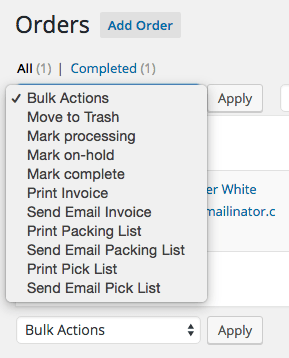
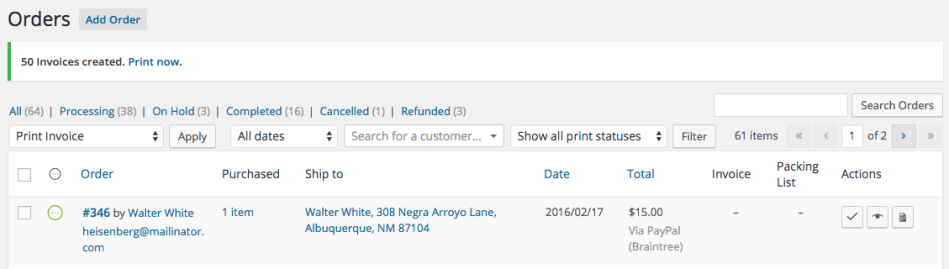
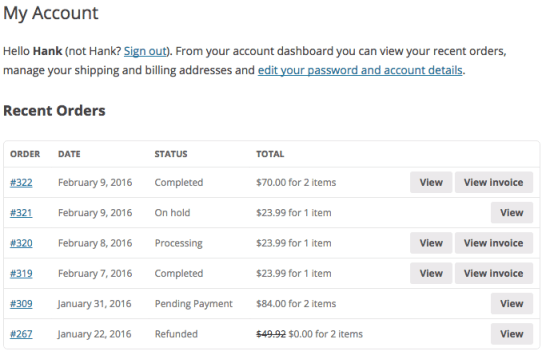
WooCommerce Print Invoices and Packing Lists allows you to easily print documents for orders straight from the Orders page (individually and in bulk), while editing orders, and allows customer to view invoices from the “My Account” page.

This plugin makes customizing your order documents as simple and flexible as possible for both users and developers. Invoice settings let you determine what information you want to show to customers, and you can even use a live preview to adjust colors, font sizes, and other appearance settings.

When you’re picking orders in your store or warehouse, you know exactly where each kind of product is. We’ve organized packing and pick lists in the same way your organize your inventory. Packing lists will show you items needed to fulfill a single order, and you can even exclude virtual (non-shipped) items or include customer notes.

WooCommerce Print Invoices and Packing Lists Features

  • Customize document appearance and information with a live preview using the WordPress Customizer — no coding needed!
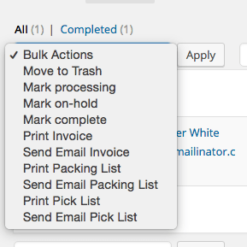
  • Easily print or email invoices on a per-order basis or in bulk. Emails will be sent only when an order is paid for.
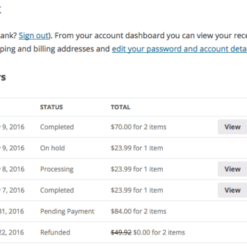
  • Let customers view invoices from the “My Account” page.
  • Quickly print or email packing lists for one or more orders.
  • Sort items on packing lists by category for faster order fulfillment
  • Automatically email packing lists to shop admins for new orders
  • Print pick lists for multiple orders to help with mass order fulfillment
  • Optionally send professional-looking invoices as an HTML email to your customers
  • Use sequential invoice numbers, or use WooCommerce order numbers as your invoice numbers
Release Date

7/6/2016

Reviews

There are no reviews yet.

Be the first to review “EffectIO WooCommerce Print Invoices and Packing Lists 3.14.2”

Customize and print invoices and packing lists for WooCommerce orders from the WordPress admin

2025.12.08 — version 3.14.2
  • Fix - Fatal error when emailing pick lists
  • Fix - "Translations loaded too early" error
  • Dev - Update the SkyVerge Plugin Framework to v5.15.12
2025.10.14 — version 3.14.1
  • Misc - Tested up to WooCommerce 10.2
  • Misc - Adjust/improve escaping and sanitizing throughout codebase
2025.03.25 — version 3.14.0
  • New - Add support for new WooCommerce email previews
  • Misc - Update the SkyVerge Plugin Framework to v5.15.6
2025.02.11 — version 3.13.8
  • Tweak - Change how "Unit Price" is calculated on invoices for better clarity and immutability (improves compatibility with Memberships discounts)
  • Fix - Declare compatibility with block cart and checkout (the plugin was already compatible, this just addresses the notice that would appear)
2024.11.13 — version 3.13.7
  • Fix - Sometimes printing multiple invoices would only render one page
  • Fix - Prevent duplicate order ID titles from appearing when printing multiple invoices
2024.08.13 — version 3.13.6
  • Fix - Missing placeholders in some Dutch translations
2024.06.05 — version 3.13.5
  • Fix - Ensure plugin declares HPOS compatibility correctly
  • Fix - Update SkyVerge Plugin Framework to 5.12.4, which addresses multiple JS errors
2024.05.27 — version 3.13.4
  • Fix - Dutch translation generated a fatal error when enabled.
5.12.3 — Update the SkyVerge Plugin Framework to version 5.12.3
2024.02.26 — version 3.13.3
  • Fix - German translation introduced an error when handling some placeholders in recent PHP versions
2023.11.17 — version 3.13.2
  • Fix - Address an issue in installations based on HPOS where bulk order actions were broken
2023.08.02 — version 3.13.1
  • Fix - Ensure that searching orders in the admin screen by invoice number can return consistent results when using HPOS
2023.07.06 — version 3.13.0
  • Misc - Add compatibility for WooCommerce High Performance Order Storage (HPOS)
2023.03.15 — version 3.12.1
  • Fix - Fix issue causing PHP warnings when Avatax is enabled
2022.11.29 — version 3.12.0
  • Misc - Require PHP 7.4 and WordPress 5.6
2022.08.15 — version 3.11.5
  • Fix - Replace deprecated usages of `is_ajax()` in favor of `wp_doing_ajax()`
  • Misc - Require WooCommerce 3.9.4 or newer
2021.09.23 — version 3.11.4
  • Fix - Correct differences in tax rounding between line items and the order total when rounding tax at subtotal
2021.06.02 — version 3.11.3
  • Fix - Ensure to pass item object or data to filter hiding virtual items
2021.05.31 — version 3.11.2
  • Fix - Do not trigger the plugin modal when clicking on the order update button from the order edit screen
  • Fix - Ensure document tables are not displayed too wide on some email clients like Gmail
  • Fix - When excluding virtual items from a packing list, ensure the total does not include any, and that emails are not sent if no physical products are present
2021.01.29 — version 3.11.1
  • Tweak - Consolidate multiple invoice and packing list settings into individual dropdown fields
  • Fix - Prevent subcategories with the same name from being grouped with the same parent category on pick lists
  • Fix - Fix customizer compatibility issues with the Twenty Twenty theme
  • Dev - Add the `wc_pip_pick_list_table_order_heading` filter to allow pick list header customization when the output is set to group items by order for selected orders
2021.01.19 — version 3.11.0
  • Feature - Merge the Extra Columns free add on into the core plugin
2020.12.07 — version 3.10.0
  • Misc - Add compatibility for WooCommerce 4.7
  • Misc - Require PHP 7.0 or newer
2020.11.12 — version 3.9.2
  • Fix - Ensure that the weight of products handled by WooCommerce Measurement Price Calculator are correctly listed in packing lists
  • Dev - Ensure that instances of `wc_pip_order_item_weight` filter have consistent arguments passed
2020.09.30 — version 3.9.1
  • Misc - Remove the SkyVerge help menu item as part of the plugin assets
2020.08.24 — version 3.9.0
  • Misc - Add SkyVerge help menu for support on WooCommerce.com connected sites
2020.08.03 — version 3.8.7
  • Fix - Display the sample SKU column in invoice previews when enabled
2020.06.04 — version 3.8.6
  • Fix - Fix fatal error when printing pick list grouped by category containing order(s) with deleted product(s)
2020.06.02 — version 3.8.5
  • Fix - Adjust the order action buttons UI so that label translations with long text doesn't break CSS
2020.05.04 — version 3.8.4
  • Misc - Add support for WooCommerce 4.1
2020.03.09 — version 3.8.3
  • Misc - Add support for WooCommerce 4.0
2020.02.20 — version 3.8.2
  • Fix - Display refunded items correctly when bulk printing documents for multiple orders
  • Fix - Use bulk actions filter to add order bulk actions, if available
2020.01.02 — version 3.8.1
  • Misc - Add support for WooCommerce 3.9
2019.11.05 — version 3.8.0
  • Feature - Add settings to let merchants remove optional column fields from documents
  • Misc - Add support for WooCommerce 3.8
2019.09.04 — version 3.7.1
  • Tweak - Use modals instead of admin notices for order actions UI
  • Fix - Improve compatibility with WooCommerce Admin
  • Misc - Updated Italian translation
2019.08.12 — version 3.7.0
  • Localization - Add German translation, thanks to Andreas Broicher https://tangosummer.com
  • Misc - Add support for WooCommerce 3.7
  • Misc - Remove support for WooCommerce 2.6
  • Misc - Require PHP 5.6+
2019.06.19 — version 3.6.7
  • Tweak - Clean outdated print options from abandoned prints on upgrade, deactivation and activation
2019.06.07 — version 3.6.6
  • Fix - Ensure the correct data types are passed to the `wc_pip_[type]_hide_virtual_item` filter
2019.06.05 — version 3.6.5
  • Fix - When orders have refunds, display the correct quantity for the same items in Pick Lists
  • Fix - Keep listing deleted products in Pick Lists and Packing Lists (behavior can be toggled via filter hook)
  • Fix - When grouping items by category in pick lists, ensure that items belonging to categories whose names do not match their slugs, are not accidentally grouped as "Uncategorized"
  • Fix - Prevent WooCommerce from sending duplicated emails while updating an order from admin and clicking on the update button with an email order action selected, instead of using the order action button
2019.04.30 — version 3.6.4
  • Fix - Ensure item names display for deleted products
2019.04.03 — version 3.6.3
  • Fix - Ensure the order actions popup panel displays the order number instead of the order ID in the header
  • Misc - Add support for WooCommerce 3.6
  • Misc - Require PHP 5.4+
2019.01.30 — version 3.6.2
  • Tweak - Ensure that an item listed in a document is hyperlinked to its product page even when out of stock, if the user viewing the document is a shop manager
  • Fix - Fix category hierarchy on packing lists when categories exist with the same name
  • Dev - Remove SkyVerge Framework methods from template files for better backwards compatibility
2018.10.25 — version 3.6.1
  • Misc - Add support for WooCommerce 3.5
  • Misc - Add support for WooCommerce Product Add-Ons 3.0
2018.07.25 — version 3.6.0
  • Fix - Ensure default settings are correctly set in new plugin installs
  • Fix - Correctly align the company VAT number when center or right aligned
  • Misc - Dropped support for PHP 5.2: PHP 5.3 is now the minimum required version
  • Dev - Add filter to toggle whether showing the chosen shipping method in invoice documents
  • Dev - Add new filter to help customizing the output of pick lists table rows
2018.05.23 — version 3.5.2
  • Misc - Add support for WooCommerce 3.4
2018.05.03 — version 3.5.1
  • Fix - Prevent duplicate order numbers from being displayed in the header on fresh installs
2018.03.28 — version 3.5.0
  • Feature - Add support for EU invoice requirements and a company VAT number field in customizer
  • Tweak - Allow sending emails manually from order actions even if they are disabled in email settings
  • Tweak - Use a WordPress pointer to handle the order actions popup panel instead of a tooltip
  • Fix - Ensure refunded amounts of items in order are correct when prices displayed in invoices are tax inclusive
  • Fix - Prevent more third party scripts and styles from accidentally loading in customizer views
2018.01.23 — version 3.4.0
  • Tweak - Display the invoice number in order preview
  • Fix - If an order has many items that require more than one page to print, some browsers may have placed the table footer on each page, rather than just at the end
  • Dev - Added filter to toggle the document table footer between 'tfoot' and 'tbody' (now default)
  • Misc - Add support for WooCommerce 3.3
  • Misc - Remove support for WooCommerce 2.5
2017.11.15 — version 3.3.5
  • Fix - Pick lists could show incorrect item weight if items are present in more than one order
  • Fix - Refunded totals were incorrectly rounded to nearest integer on invoices
  • Fix - Improve plugin performance by reducing excessive queries introduced by WooCommerce 3.0+ in admin order edit screens
  • Dev - The filter `wc_pip_sort_order_items` has been deprecated in favor of `wc_pip_sort_order_item_rows`
2017.09.26 — version 3.3.4
  • Fix - Address a capability issue within the order edit screen, where admin users who can manage WooCommerce but don't have the `edit_shop_orders` capability cannot use properly the Print Invoice/Packing List action
  • Fix - When printing a Pick list and "Groups items by category for selected orders" is selected, the items sort order could be incorrect
2017.08.30 — version 3.3.3
  • Fix - Address a display issue with some attributes whose values might have been shown as dashed slugs rather than text in the item details
  • Fix - Templates have been updated to address an issue with MS Outlook clients where the table footer was in reversed order
  • Fix - When using "Groups items by category for selected orders" in Pick Lists, if there are similar product variations, the pick list would combine variations into attributes rather than breaking them out in different rows
  • Fix - Ensure configured subject for email is used instead of defaults

Testimonials

Benny O'Brien@benny_obie

The quick response from a friendly team member at @effectioshop honestly caught me off guard.
Nice work!


Stuart Boyle@stuart_boyle

@effectioshop As an eCommerce developer, effectio.org has enabled me to reach higher expectations and my clients are very happy.


22,000+ Users · 180 Countries
Trusted by freelancers, agencies & store owners worldwide

How It Works

Install the free EffectIO Dashboard plugin on your WordPress site. It connects to the EffectIO catalog, detects every premium plugin and theme you own, and gives you a single hub to manage licenses, run updates, and keep your admin panel clean — all from one screen.

One-Click Updates
Update any premium plugin or theme instantly. No manual downloads, no FTP — just click "Update Now."

🔑

License Manager
View, activate, and manage all your license keys in one place. No hunting through emails or vendor dashboards.

🔇

Notification Blocker
Blocks intrusive admin nag screens, upsell banners, and ads that clutter your dashboard. Re-enable anytime.

🛡️

Vendor Request Control
Prevents redundant license-check pings to third-party servers for items you already manage through EffectIO.

📦

Bulk Activation
Club members can activate all eligible plugins and themes at once — one button, zero hassle.

🆓

100% Free
The Dashboard itself costs nothing. Install it and it auto-activates on your domain — no key required.

Get Started in 3 Steps

1

Download & Install

Download the EffectIO Dashboard zip and install it via Plugins → Add New → Upload.

2

Browse & Activate

Open EffectIO → Catalog in your admin panel. The dashboard auto-detects your installed items and matches them to your licenses.

3

Update & Manage

Keep everything current with one-click updates. Manage licenses, block nag notices, and enjoy a cleaner WordPress experience.

Licenses

All WordPress derivative work is GPL-licensed. Most items are pre-activated and ready to use. Some require an activation key — we provide it with your purchase, and the Dashboard lets you apply it in seconds.

Club members enjoy bulk activation: activate every eligible item at once with a single click. No more entering keys one by one.

✅ Money-Back Guarantee

Every item is tested and ships with full features. If something doesn't work and we can't fix it, you get a full refund. We believe premium tools should be accessible — that's why we offer a low-cost subscription so freelancers, small businesses, and agencies can grow without a large upfront investment.

Manage and Update all your sites

17.99 $ / Month Membership

2900 Plugins and Themes. Install, Update, Activate and Delete any plugin. Unlimited Sites. Best WP Agency Deal.

Clean Items

NGO Mission

Always Updated

SSL Connection











