EffectIO WooCommerce Product Bundles

Original price was: $49.00.Current price is: $7.99. / year

Drop-in compatible replacement & Licensed Product

WooCommerce Product Bundles allows you to create and offer highly configurable product bundles, kits and assemblies, that contain simple and variable items. Version: 6.22.3 Offer product bundles, bulk discount packages, and assembled products.

Released on: 2025-12-10

Single License

Club Membership

17,99 / Month Membership

NEW Activate all licensed items with the free Dashboard

EffectIO Dashboard

Discover when we give away free Plugins

Find out when we give items for Free


Hey! 🎉 Monthly emails, tops. Snag exclusive plugins/themes for $0. They go quick, but you might just get a freebie! 😉

30 Days Money Back Guarantee

Guaranteed pre-activated plugins. Most items work immediately after installation. Open a support ticket to obtain the license keys for the ones that ask for activation.

Free support to install and setup on your site.

Find out More About WooCommerce Product Bundles

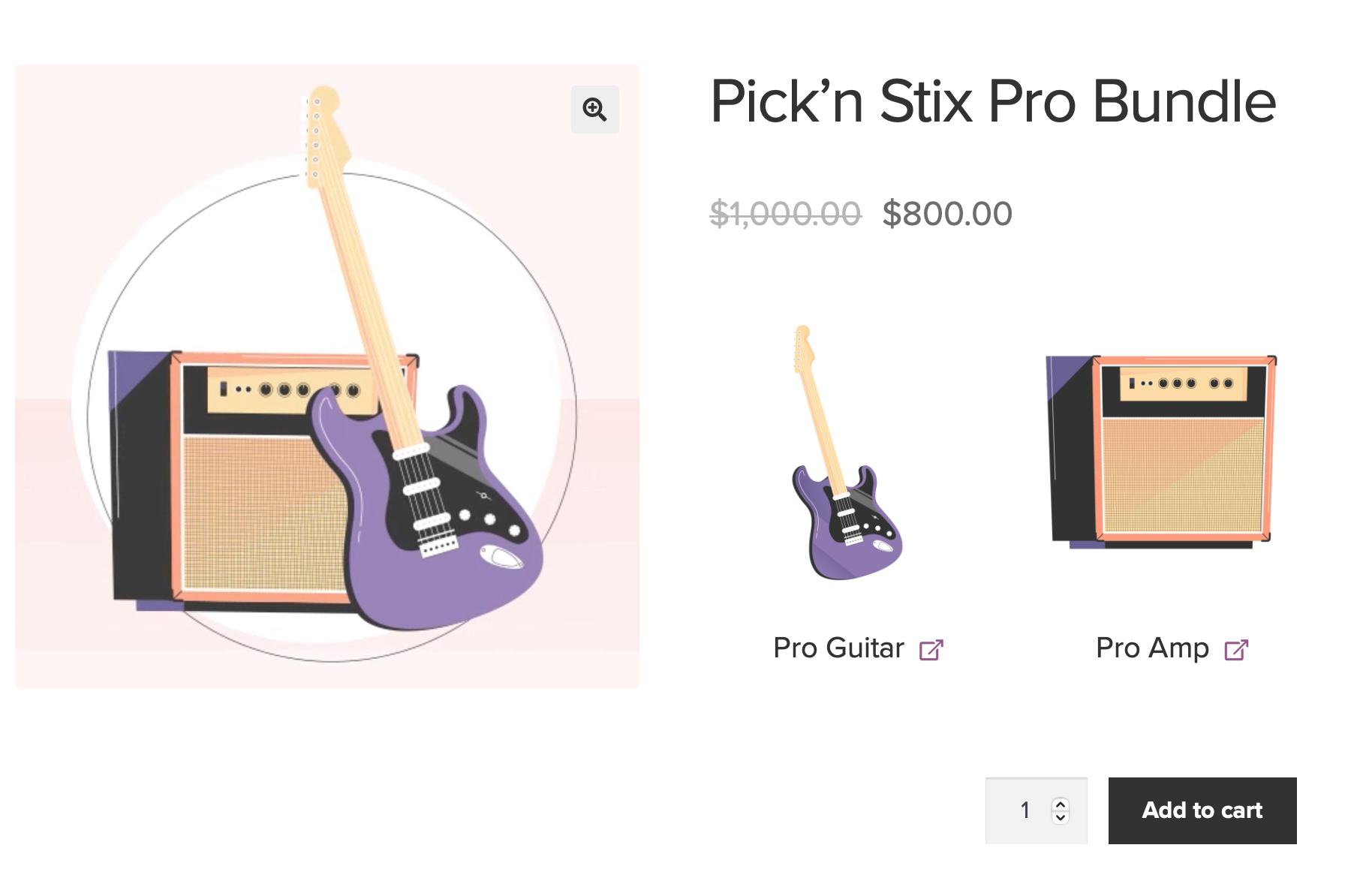
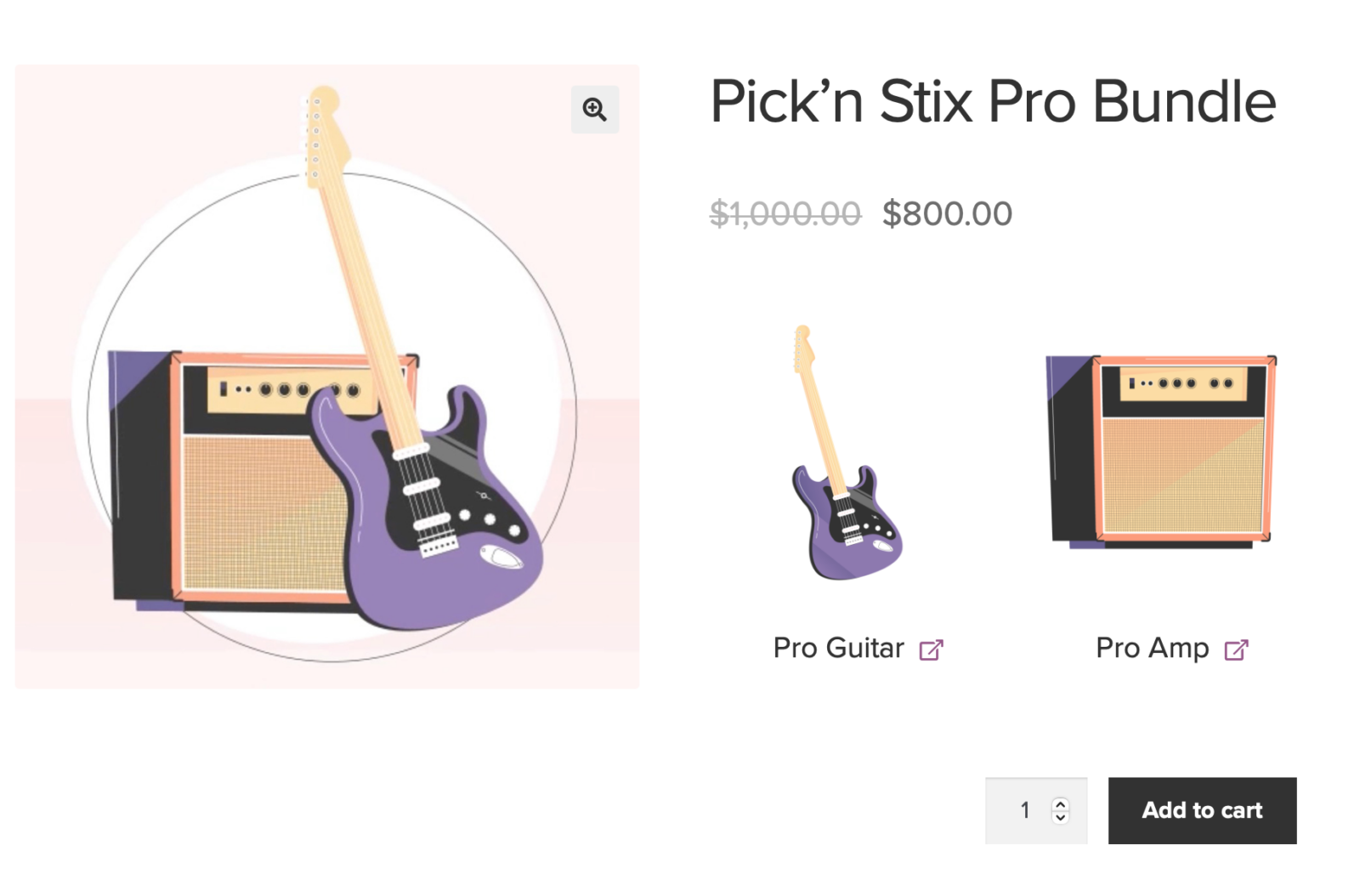
WooCommerce Product Bundles enables you to produce and provide extremely configurable product bundles, packages and assemblies, that consist of simple and variable items. More than this, Product Bundles is probably the most straightforward WooCommerce extension for creating configurable product packages. With Bundles, you can rapidly develop complicated products or generate easy discount combos by combining simple and adjustable items.

WooCommerce Product Bundles Features

  • Assistance for easy, adjustable and subscription items
  • Perfect for applications with strict inventory management needs
  • Overrides the automatic bundled product amount price: the quantity field of every bundled item worth the Minimum Quantity.
  • Adaptable pricing and shipping alternatives
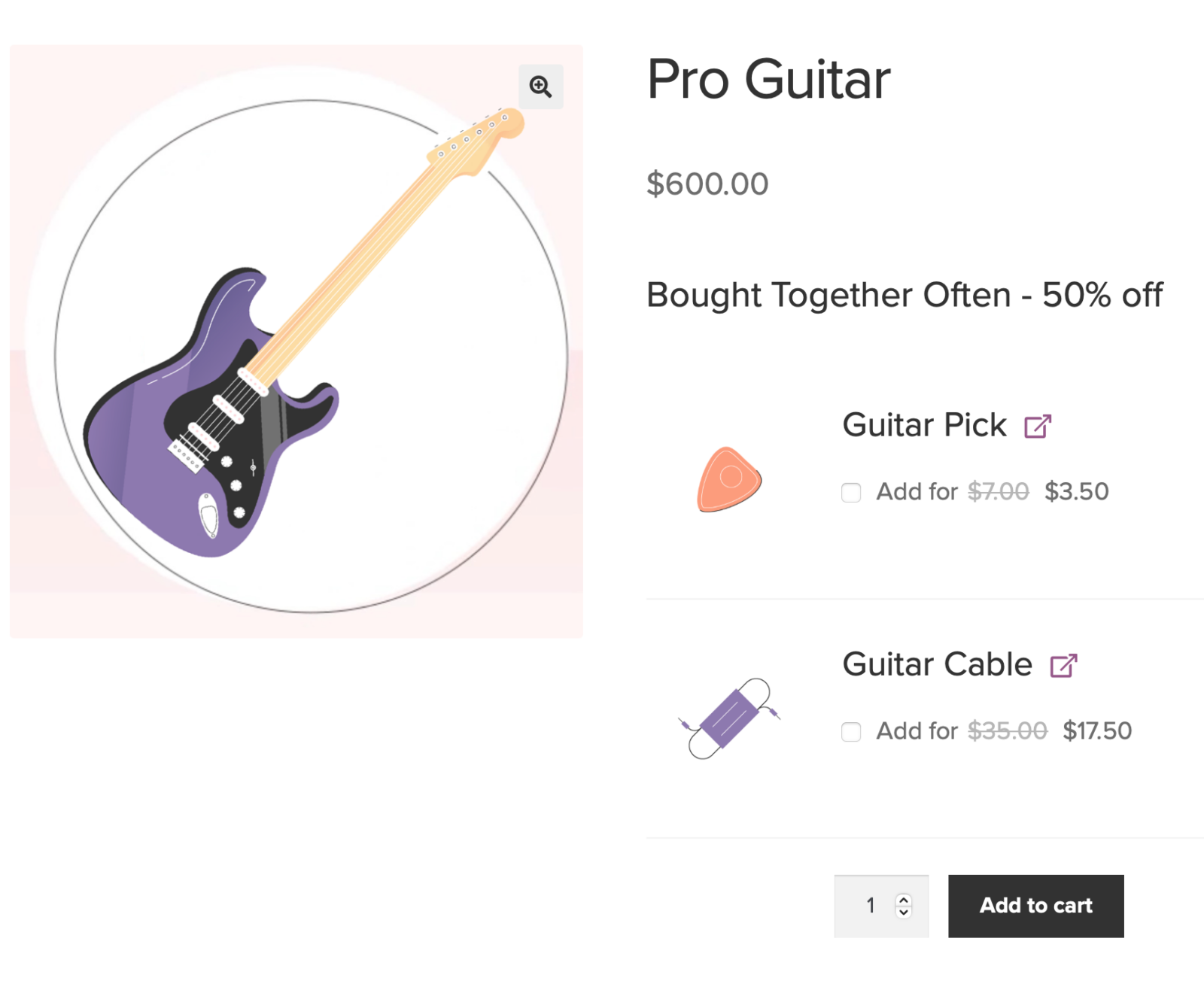
  • Configurable bundled item amounts and optional bundled products
  • Innovative setting choices
  • Works with a variable bundle weight each time a bundle consists of constructed products: constructed bundles have a fixed weight, which is described under Product Data > Shipping > Weight. Assembled bundled items (Shipped Individually disabled) have no impact on the weight of their container.
  • Functions with WooCommerce Subscriptions
  • Assistance for several well-liked WooCommerce extensions such as Product Add-ons, Name Your Price and Composite Products
WooCommerce-Product-Bundles_interface

Interface

How to Install the Plugin

First of all, you download the .zip file from your WooCommerce account.

Secondly, you go to Add New and Upload Plugin at the top.

After that, you Choose File and select the .zip file you downloaded at the first step.

In the end, you click Install now and Activate the extension.

Tips and Tricks

  • Firstly, make optional bundled products have automatically selection. Therefore, optional bundled product checkboxes are unticked by default.
  • Moreover, eliminate the “optional” suffix from optional bundled product headings. The extension adds an “- optional” suffix next to the name of bundled products that were optional.
  • In addition, determine quantity restrictions (min/max) for the overall quantity of chosen bundled products. As they are, Product Bundles do not contain choices for determining bundled product quantity constraints at bundle-level. Instead, you may utilize WooCommerce Mix ‘n Match, which enables you to determine container-level amount restrictions for varieties of grouped items.
  • Furthermore, allow discounts over bundled product sale prices. Do not ignore sale prices when applying bundled item discounts.
  • Besides that, modify the look of product subtotals in the cart/orders. Equally important, add together the subtotals of parent/child line products in cart/order templates. Also, show the aggregated worth instead of the actual subtotal of the parent product. Additionally, intend and display the subtotals of individually-priced items with a Subtotal: prefix.

How to use the plugin

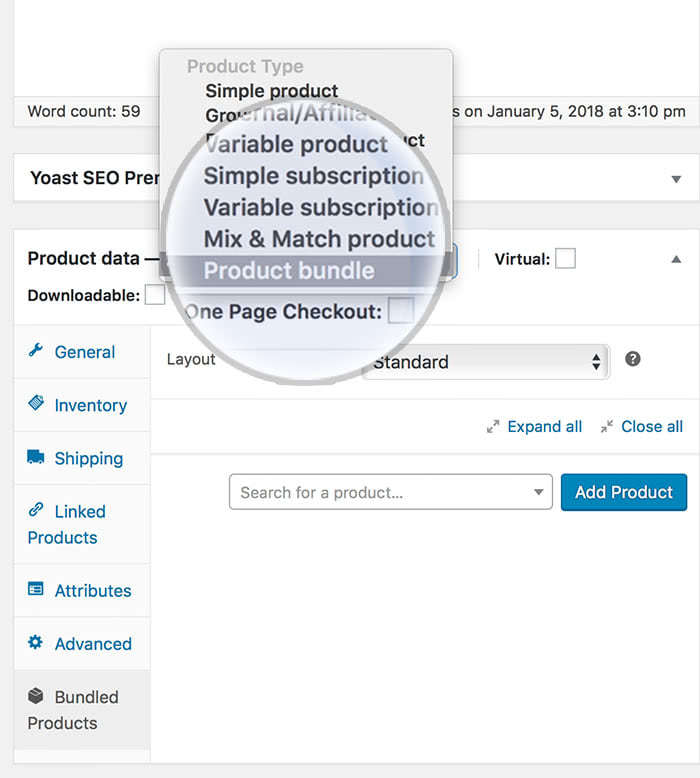
After you activate it, this option will pop up on your screen:
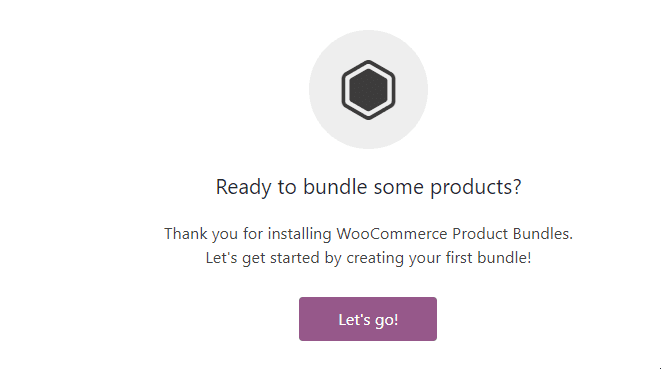
first time

Then go below the page to Product data-> Bundled products.

From there, you have a bunch of options, as the layout, which can be: standard, tabular or grid.

product bundle

What is more, you can even choose the form location:

WooCommerce Product Bundles

Also choose the grouping options: Grouped, Flat or None.

The Minimum Bundle Size is is set to 0, but you can choose whichever option you want, as well as the maximum size. This entirely depends on your type of business and purpose.
woocommerce product bundles (2)

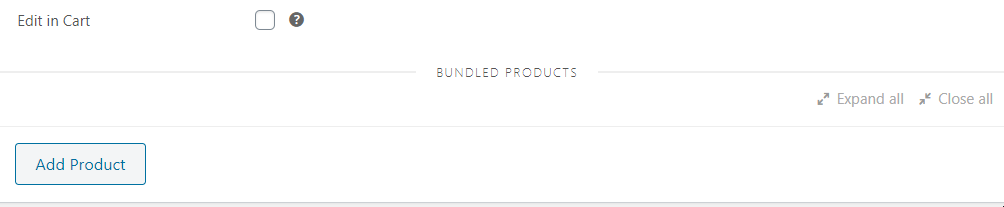
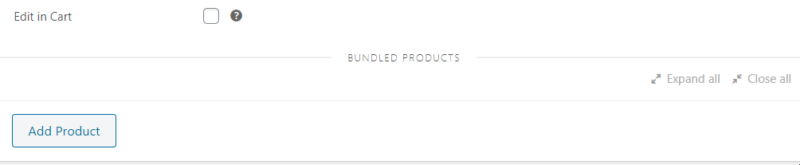
You can also check the “Edit in Cart” option. If you enable this, you will able to change the configuration of the bundles in the cart.

Finally, click on “Add product” in order to put in practice the above mentioned settings. After adding the product in the list, you can go through the 2 types of settings: basic and advanced settings.
woocommerce product bundles basic settings

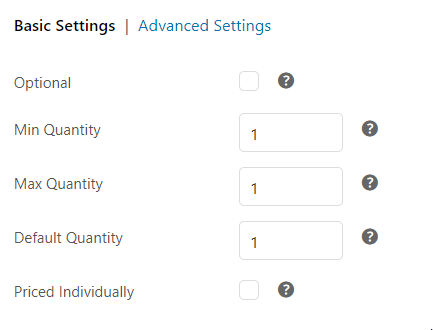
Regarding the basic settings, you can set them to be optional or leave the box blank in order to make it required. Also set the minimum quantity and the maximum one. You can set the default quantity, too. If you want your products to be priced individually, simply do so by checking the last box.
advanced settings woocommerce product bundles

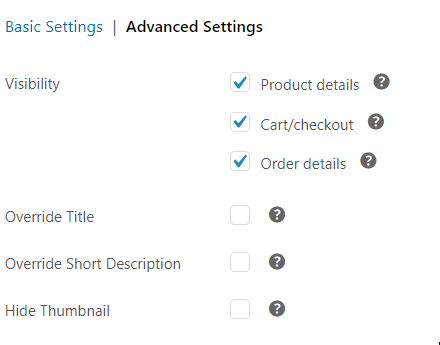
You can check here the visibility of your products’ details from here and uncheck the options that you don’t want to show, like: product details, cart / checkout or order details. You can also override the title and the short description, as well as hiding the thumbnail.

Conclusion

To sum up, Woocommerce Product Bundles is a helpful plugin that helps you create amazing and unique sites. Discover it along with other plugins from EffectIO and start doing web design at a professional level!
5 reviews for EffectIO WooCommerce Product Bundles 8.5.4

  1. edendvatri321

    This allows you to create and offer highly configurable product bundles!!!

  2. lipasimone

    This helped me to create discount combos!

  3. martindumas8

    Good product, thank you Effectio 🙂

  4. sekstefani

    Configurable bundled product quantities and optional bundled items, Perfect product!!

  5. jani.simon

    So many features:flexible pricing and shipping options, configurable bundled product quantities and optional bundled items, advanced configuration options and also the good thing is that works with WooCommerce subscriptions!

  6. fosatb007

    Hi, Will this plug allow me to generate a page anything like this combining several simple products and displaying individual discounts within the bundle: https://www.broadcastwarehouse.com/fm-community-radio/6/package

    Regards

    David

    • Adrian

      Yep, it will allow you to bundle together a few other products. Try it out, it come with money back guarantee, like everything else!

Add a review

Offer product bundles, bulk discount packages, and assembled products.

2025.12.03 — version 8.5.4
  • Tweak - Replaced wc_enqueue_js with wp_add_inline_script according to the recommended WordPress core script patterns.
6.9 — Bumped WordPress tested up to version to 6.9.
10.4 — Bumped WooCommerce tested up to version to 10.4.
2025.11.12 — version 8.5.3
  • Fix - Replaced invalid HTML line break tags.
  • Fix - Reverted a change where the subtotal was hidden on shortcode cart and checkout pages.
  • Fix - Fixed Add to Cart quantity selector styles in stepper mode.
2025.10.13 — version 8.5.2
  • Fix - Improved accessibility on shortcode cart and checkout pages.
  • Fix - Fixed a compatibility issue with optional bundled items and required Product Addons.
  • Tweak - Improved performance when object cache is enabled.
2025.09.09 — version 8.5.1
  • Fix - Fixed an issue that prevented shoppers from skipping the configuration of optional Variable Products.
2025.09.02 — version 8.5.0
  • Tweak - Important: Updated frontend templates.
  • Fix - Improved accessibility.
2025.07.01 — version 8.4.2
  • Fix - Improved accessibility.
  • Fix - Improved compatibility with WooCommerce's quantity stepper block.
2025.06.04 — version 8.4.1
  • Fix - Resolved an issue that prevented adding Bundle-sells to the cart.
2025.05.14 — version 8.4.0
  • Dev - Removed deprecated WC_PB_Core_Compatibility::wc_current_theme_is_fse_theme.
  • Tweak - Improved product edit script to skip adding bundled items with empty values.
2025.05.06 — version 8.3.6
  • Tweak - Replaced the use of deprecated function wc_current_theme_is_fse_theme.
  • Tweak - Deprecated WC_PB_Core_Compatibility::wc_current_theme_is_fse_theme.
2025.04.08 — version 8.3.5
  • Tweak - Added Product Bundles-specific data to the product Store API endpoint to improve Store API support.
  • Fix - Resolved a compatibility issue with Print Invoices and Packing Lists that prevented bundled items from showing up in Packing Lists when the container Bundle was deleted from the order.
2025.03.11 — version 8.3.4
  • Fix - Fixed zero price in the JSON-LD product structured data output.
  • Tweak - Improved display of composited bundled items in receipts.
2025.02.11 — version 8.3.3
  • New - Added support for Name Your Price products in Bundle-sells.
  • Fix - Support multiple Bundle forms of the same Bundle on a page.
  • New - Introduced the 'woocommerce_bundled_item_title_is_link' hook to control over the bundled items title link.
  • New - Added compatibility with the Receipts Rendering Engine.
2025.01.15 — version 8.3.2
  • Fix - Resolved an issue that prevented adding Bundle-sells to cart.
2025.01.15 — version 8.3.1
  • Fix - Resolved an issue that prevented the Site Editor from loading.
2025.01.14 — version 8.3.0
  • New - Added support to configure bundled items when performing add to cart and update cart item actions via StoreAPI.
  • New - Added support for Name Your Price to bundled variable products.
  • Fix - Fixed an issue that prevented Bundles from being added to the cart when an optional, out of stock item was not selected.
2024.12.19 — version 8.2.2
  • Fix - Reverted the removal global product variable in the context of the admin page to prevent regressions.
2024.12.10 — version 8.2.1
  • Fix - Hides removed and quantity changed notices for products inside a bundle for checkout blocks.
  • Tweak - Removed use of global product variable in the context of the admin page.
2024.11.20 — version 8.2.0
  • New - Important: Product Bundles now requires Product Add-Ons 7.2+ for the integration between the two plugins to work.
  • New - Important: Product Bundles now requires Composite Products 10.2+ for the integration between the two plugins to work.
  • New - Added support for pre-populating bundled product add-ons when clicking on a cart item link.
  • Fix - Resolved an issue that caused order totals to be incorrectly updated when editing an bundled order item in the admin context.
  • Fix - Resolved an issue that caused 'Add to cart' to be displayed instead of 'Select options' when a bundled product had required add-ons.
  • Fix - Fixes an issue with Add-On validation when editing an order in the admin context.
  • Fix - Resolved the deprecation introduced in WC 9.3.0 by inheriting the reporting class conditionally.
  • Fix - Resolved an issue that made the remove-item endpoint return a wrongfully formatted value.
  • Fix - Used correct icon for the Product Data > Bundled Products tab.
  • Fix - Fixed queries producing database errors in the logs.
2024.10.22 — version 8.1.2
  • Tweak - Added 'presentation' role to variable product table in bundles to improve accessibility.
2024.10.02 — version 8.1.1
  • Tweak - Improved keyboard usability and accessibility for bundle type selection.
  • Tweak - Improved error notice when a Bundle in the cart can no longer be purchased.
  • Fix - Fixed a compatibility issue with Product Add-ons that prevented configuring product bundles.
2024.09.17 — version 8.1.0
  • New - Important: Product Bundles now requires Product Add-Ons 7.1+ for the integration between the two plugins to work.
  • New - Added support for configuring bundled product add-ons in admin orders.
  • Tweak - Rollback: Suppress cart change notifications for bundled items.
  • Fix - Fixed HTML code appearing for bundled product titles on the admin page.
  • Fix - Fixed an issue that disabled the 'Proceed to checkout button' in the Cart block after quantity updates.
  • Fix - Resolved a display issue with bundled item prices in confirmation emails.
  • Fix - Fixed an issue with duplicate membership discounts being applied with certain bundle configurations.
2024.09.09 — version 8.0.4
  • Tweak - Ensure compatibility with WooCommerce 9.3.
2024.09.03 — version 8.0.3
  • New - When 'Hide out of stock items from the catalog' is enabled, hide bundles with insufficient stock in Upsells, among other places.
2024.08.27 — version 8.0.2
  • New - Show backorder status on Composite Product's review page when the configuration requires so, if there's an item or if the bundle itself is available on backorder.
  • Fix - Suppress cart change notifications for bundled items.
  • Fix - Fix untranslated 'View Cart' string.
  • Tweak - Avoid passing null values to version_compare function.
2024.07.30 — version 8.0.1
  • Fix - Deactivate plugin for WooCommerce versions prior to 8.2 to avoid fatal errors.
2024.07.30 — version 8.0.0
  • New - Important: PHP 7.4+ is now required.
  • New - Important: WooCommerce 8.2+ is now required.
  • New - Important: WordPress 6.2+ is now required.
  • New - Important: Remove all previously deprecated code.
  • Fix - Included own copy of WP_Background_Process library to avoid conflicts with other plugins.
  • Fix - Fixed a pay-for-order conflict with WooPayments.
2024.07.22 — version 7.2.1
  • Fix - Resolved a fatal error triggered with WooCommerce 9.1, when tracking and legacy Order data storage were enabled.
  • Tweak - Improved adding bundles to the cart programmatically: support overriding bundled item properties.
  • Fix - Improved code to prevent fatal error triggered sometimes when fetching tax ratios.
2024.07.03 — version 7.2.0
  • New - Important: - Product Bundles now requires Product Add-Ons 6.9+ for the integration between the two plugins to work.
  • Fix - Fixed bundle_stock_status enum in REST API.
  • Fix - Fixed price data for percentage-based add-ons in discounted bundled items.
  • Fix - Resolved an issue that made add-on prices contribute to the total Bundle price even for bundled items that were not 'Priced Individually'.
  • Fix - Fixed the use of 'woocommerce_display_product_attributes' filter for displaying variable product attributes in Bundles.
2024.06.04 — version 7.1.2
  • Fix - Improved validation of values when getting maintenance and dismissed notices from the DB.
  • Fix - Improved handling of express checkout buttons for PayPal, Stripe and WC Payments.
  • Tweak - Improved integration with Min/Max Quantities to account for category-level 'Group of' rules when adding a product as a bundled item.
2024.05.14 — version 7.1.1
  • Fix - Important: Security improvements.
  • Fix - Resolved a compatibility issue with Gravity Forms.
  • Fix - Fixed an issue that prevented Bundles from being edited in Subscriptions in admin context.
  • New - Tested up to WooCommerce 8.8.
2024.04.09 — version 7.1.0
  • New - Introduced 'wp wc pb sync-stock' WP CLI command to handle parent stock syncing.
  • New - Introduced filter 'woocommerce_pb_sync_stock_via_cli' to handle syncing solely through WP CLI.
  • New - Introduced filter 'woocommerce_pb_sync_parent_stock_use_action_scheduler' to enable syncing through the Action Scheduler.
  • New - Introduced filters 'woocommerce_pb_sync_parent_stock_as_batch_size' and 'woocommerce_pb_sync_parent_stock_as_interval' to fine-tune batch sizes and intervals when syncing stock.
  • New - Introduced new onboarding tutorial.
  • Tweak - Improved compatibility with Min/Max Quantities and Bundles that contain variations.
2024.03.26 — version 7.0.2
  • Fix - Disabled 'Filter Variations' option if all allowed variations have been deleted.
2024.03.06 — version 7.0.1
  • Tweak - Improved product data controller to prevent potential fatal errors from integrations.
2024.03.05 — version 7.0.0
  • New - Important: Added compatibility with PHP 8.3.
  • New - Important: Product Bundles now requires Composite Products 9.0+ for the integration between the two plugins to work.
  • New - Important: Product Bundles now requires Product Add-Ons 6.7.0+ for the integration between the two plugins to work.
  • Fix - Fixed an issue that prevented the 'Sale' badge from showing up in Bundles with only optional items, whose Min Bundle Size was greater than 1.
  • Fix - Fixed an issue where the 'woocommerce_variation_option_name' hook was called with the incorrect number of arguments.
2024.02.14 — version 6.22.7
  • Fix - Ensure proper placement of the bundled item product link within the bundle form.
  • Fix - Resolved soft deprecation error coming from using 'substr' in plugin's scripts.
2024.01.17 — version 6.22.6
  • Tweak - Deferred plugin scripts for WordPress 6.3+ installs.
  • Tweak - Added a warning to inform users about how to correctly translate the percentage (%) characters in strings to avoid fatal errors.
  • Fix - Fixed the integration between Product Bundles and Flatsome.
  • Fix - Fixed the integration between Product Bundles and Quickview.
2023.11.29 — version 6.22.5
  • Fix - Resolved PHP notice triggered when using Product Bundles together with Payment Plugins for Stripe WooCommerce.
  • Fix - Fixed incorrect cart price for Name Your Price bundled variation.
  • Fix - Resolved an issue with adding Bundles with optional items to orders via the mobile app.
2023.10.17 — version 6.22.4
  • Tweak - Re-designed Product Data > Shipping notice about Unassembled Bundles.
  • Tweak - Declared compatibility with the cart/checkout Blocks.
  • Fix - Resolved a compatibility issue with Zapier related to the existence of the order object in REST API context.
  • Fix - Important: Security improvements.
2023.08.28 — version 6.22.3
  • Fix - Important: Updated the 'bundle-add-to-cart-wrap.php' template to resolve an issue that prevented Bundle notices from showing up when the mini-cart block was used.
  • Tweak - Use admin theme colors in admin.
  • Fix - Ensure that the 'Currently editing' notice shows up in the block-based Single Product Template when editing a Bundle.
  • Fix - Fixed an issue that prevented the Minimum/Maximum size validation from running on the block-based Single Product template.
2023.07.19 — version 6.22.2
  • Fix - Prevent a fatal error concerning the 'wc_print_notice' function when editing a single product block with a bundle product.
2023.07.05 — version 6.22.1
  • Fix - Resolved an issue with Bundle totals in the block-based cart when the number of displayed decimals was 0.
2023.07.03 — version 6.22.0
  • Tweak - Important: The 'Form Location' option is no longer supported when using a block theme. Use the following snippet to force its use: 'add_filter( 'woocommerce_bundle_has_legacy_product_template', '__return_true' );'
  • Fix - Improvements in block support for the single product template.
  • Fix - Resolved a compatibility issue with Points and Rewards that made a 'Earn at least 0 points by purchasing this product' message show up when purchasing a Product Bundle with optional components.
2023.06.22 — version 6.21.1
  • Fix - Removed duplicate tooltip under Product Data > Inventory.
  • Tweak - Changed the Product Data > Inventory > Sold Individually dropdown to radio buttons for Product Bundles.
  • Tweak - Re-designed the Product Data > Bundled Products and Product Data > Shipping empty states.
  • Tweak - Updated tooltip messages under Product Data > Inventory.
  • Fix - Fixed error that was triggered when creating a new product, tracking was enabled and WooCommerce 7.8 was active.
2023.06.19 — version 6.21.0
  • Fix - Important: Security improvements.
  • Fix - Fixed an issue that charged subscription bundled items add-ons twice.
2023.06.13 — version 6.20.0
  • Tweak - Removed add-on flat fees from per unit product prices in the cart. Requires Product Add-Ons v6.4.0.
  • New - Introduced 'woocommerce_store_api_before_bundle_aggregated_totals_calculation' and 'woocommerce_store_api_after_bundle_aggregated_totals_calculation' actions.
  • Fix - Fixed an issue that required customers to select mandatory items for optional bundled items that hadn't been selected.
2023.05.29 — version 6.19.0
  • New - Introduced block theme support on existing frontend templates.
  • New - Added support for blocks-based notices styling.
  • Fix - Improvements in global styles compatibility.
2023.05.17 — version 6.18.6
  • Tweak - Introduced basic event tracking support via Tracks.
2023.05.10 — version 6.18.5
  • Tweak - Added support for 'bundle_price' key in the REST API schema.
  • New - Introduced the 'woocommerce_bundled_item_group_of_quantity' filter to override the bundled items' Group of quantity.
  • Fix - Fixed validation notice for Name Your Price bundled items.
  • Fix - Fixed fatal error during data collection.

Testimonials

Benny O'Brien@benny_obie

The quick response from a friendly team member at @effectioshop honestly caught me off guard.
Nice work!


Stuart Boyle@stuart_boyle

@effectioshop As an eCommerce developer, effectio.org has enabled me to reach higher expectations and my clients are very happy.


22,000+ Users · 180 Countries
Trusted by freelancers, agencies & store owners worldwide

How It Works

Install the free EffectIO Dashboard plugin on your WordPress site. It connects to the EffectIO catalog, detects every premium plugin and theme you own, and gives you a single hub to manage licenses, run updates, and keep your admin panel clean — all from one screen.

One-Click Updates
Update any premium plugin or theme instantly. No manual downloads, no FTP — just click "Update Now."

🔑

License Manager
View, activate, and manage all your license keys in one place. No hunting through emails or vendor dashboards.

🔇

Notification Blocker
Blocks intrusive admin nag screens, upsell banners, and ads that clutter your dashboard. Re-enable anytime.

🛡️

Vendor Request Control
Prevents redundant license-check pings to third-party servers for items you already manage through EffectIO.

📦

Bulk Activation
Club members can activate all eligible plugins and themes at once — one button, zero hassle.

🆓

100% Free
The Dashboard itself costs nothing. Install it and it auto-activates on your domain — no key required.

Get Started in 3 Steps

1

Download & Install

Download the EffectIO Dashboard zip and install it via Plugins → Add New → Upload.

2

Browse & Activate

Open EffectIO → Catalog in your admin panel. The dashboard auto-detects your installed items and matches them to your licenses.

3

Update & Manage

Keep everything current with one-click updates. Manage licenses, block nag notices, and enjoy a cleaner WordPress experience.

Licenses

All WordPress derivative work is GPL-licensed. Most items are pre-activated and ready to use. Some require an activation key — we provide it with your purchase, and the Dashboard lets you apply it in seconds.

Club members enjoy bulk activation: activate every eligible item at once with a single click. No more entering keys one by one.

✅ Money-Back Guarantee

Every item is tested and ships with full features. If something doesn't work and we can't fix it, you get a full refund. We believe premium tools should be accessible — that's why we offer a low-cost subscription so freelancers, small businesses, and agencies can grow without a large upfront investment.

Manage and Update all your sites

17.99 $ / Month Membership

2900 Plugins and Themes. Install, Update, Activate and Delete any plugin. Unlimited Sites. Best WP Agency Deal.

Clean Items

NGO Mission

Always Updated

SSL Connection