EffectIO WooCommerce UPS Shipping

Original price was: $79.00.Current price is: $12.99. / year

Drop-in compatible replacement & Licensed Product

WooCommerce UPS Shipping lets you get shipping rates from the UPS API which handles both domestic and international parcels. Version: 3.5.7 WooCommerce UPS Shipping allows a store to obtain shipping rates for your orders dynamically via the UPS Shipping API.

Released on: 2025-03-12

Single License

Club Membership

17,99 / Month Membership

NEW Activate all licensed items with the free Dashboard

EffectIO Dashboard

Discover when we give away free Plugins

Find out when we give items for Free


Hey! 🎉 Monthly emails, tops. Snag exclusive plugins/themes for $0. They go quick, but you might just get a freebie! 😉

30 Days Money Back Guarantee

Guaranteed pre-activated plugins. Most items work immediately after installation. Open a support ticket to obtain the license keys for the ones that ask for activation.

Free support to install and setup on your site.

What is WooCommerce UPS Shipping?

WooCommerce UPS Shipping lets you get shipping rates from the UPS API, which handles both domestic and international parcels. The Rates API will return rates in the currency of the country in which the API was registered in order to make sure this matches your store. This shipping method works primarily with measurements in Inches and weight in Pounds, but there are also other units that can be converted automatically. Both international and domestic parcels can be calculated with UPS plugin WooCommerce.

How to install this product configurator

First of all, you have to download the extension from your WooCommerce dashboard. After that, go to Plugins > Add New > Upload and choose the ZIP file that you have just downloaded. Finally, you have to click Install now and then Activate and you are done.

UPS plugin WooCommerce Features

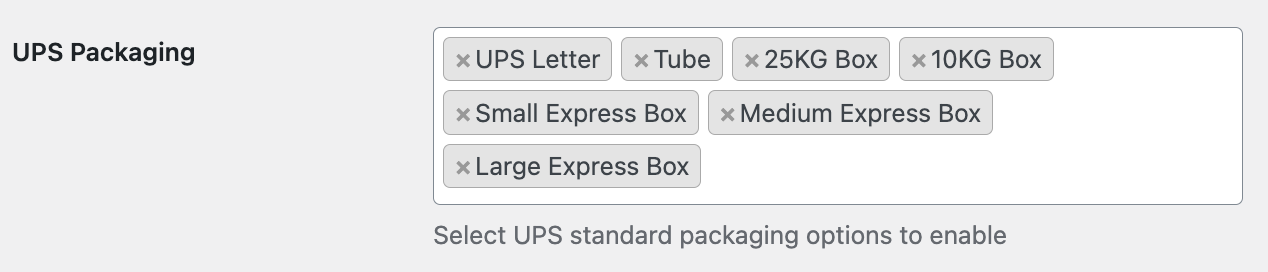
UPS offers standard boxes for shipping.

Two packing methods with UPS, pack items individually and pack into boxes with weights and dimensions.

Steps for configuration

  1. Go to WooCommerce > Settings > Shipping
  2. You have to select the shipping zone where you want to add the method, and then press Add shipping method + the button on the right
  3. After that, you have to select UPS from the dropdown and press Add shipping method
  4. The last step is to configure the settings, and here are some categories that you need to take in to consideration:
  • Method & Origin Settings
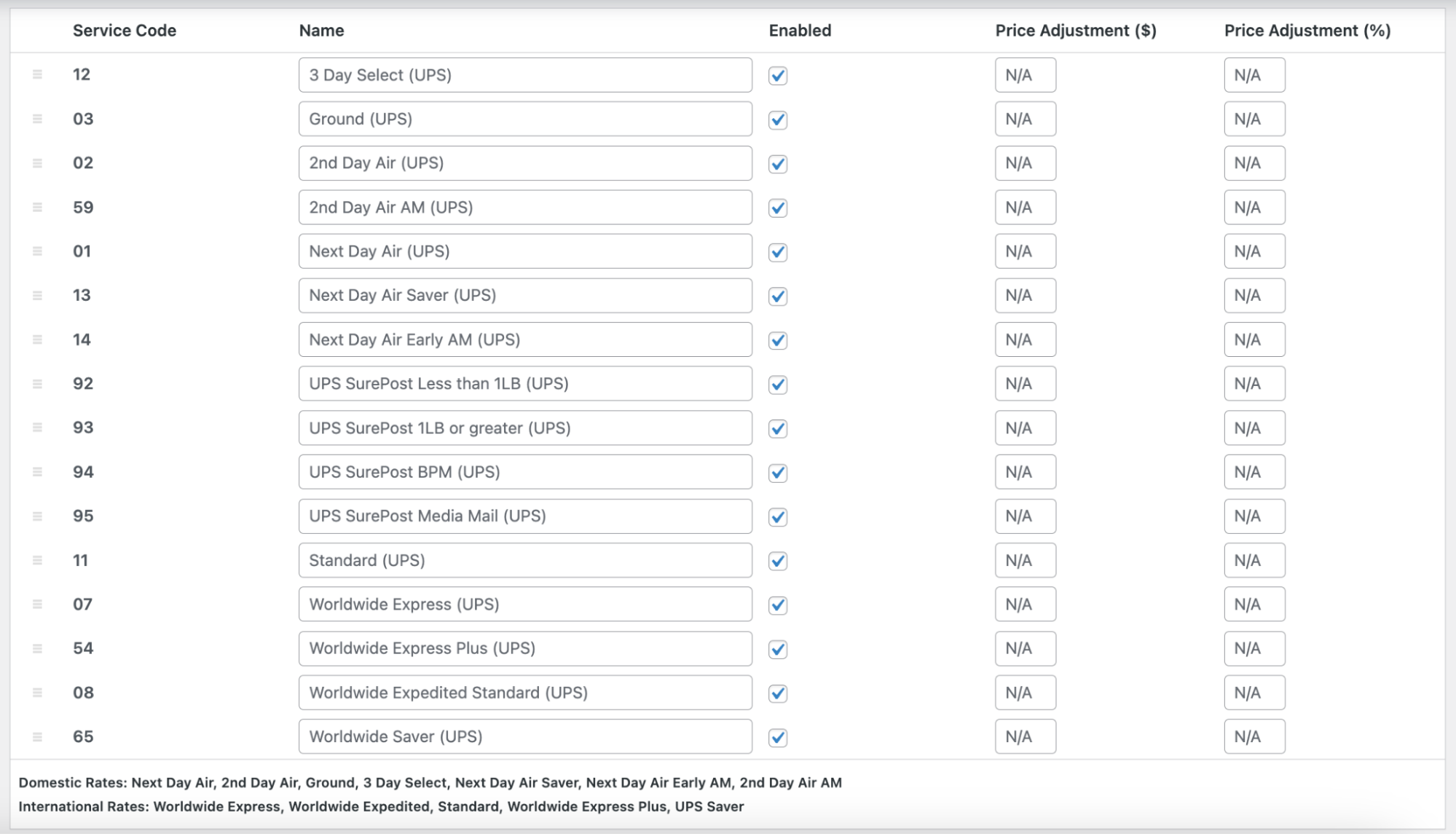
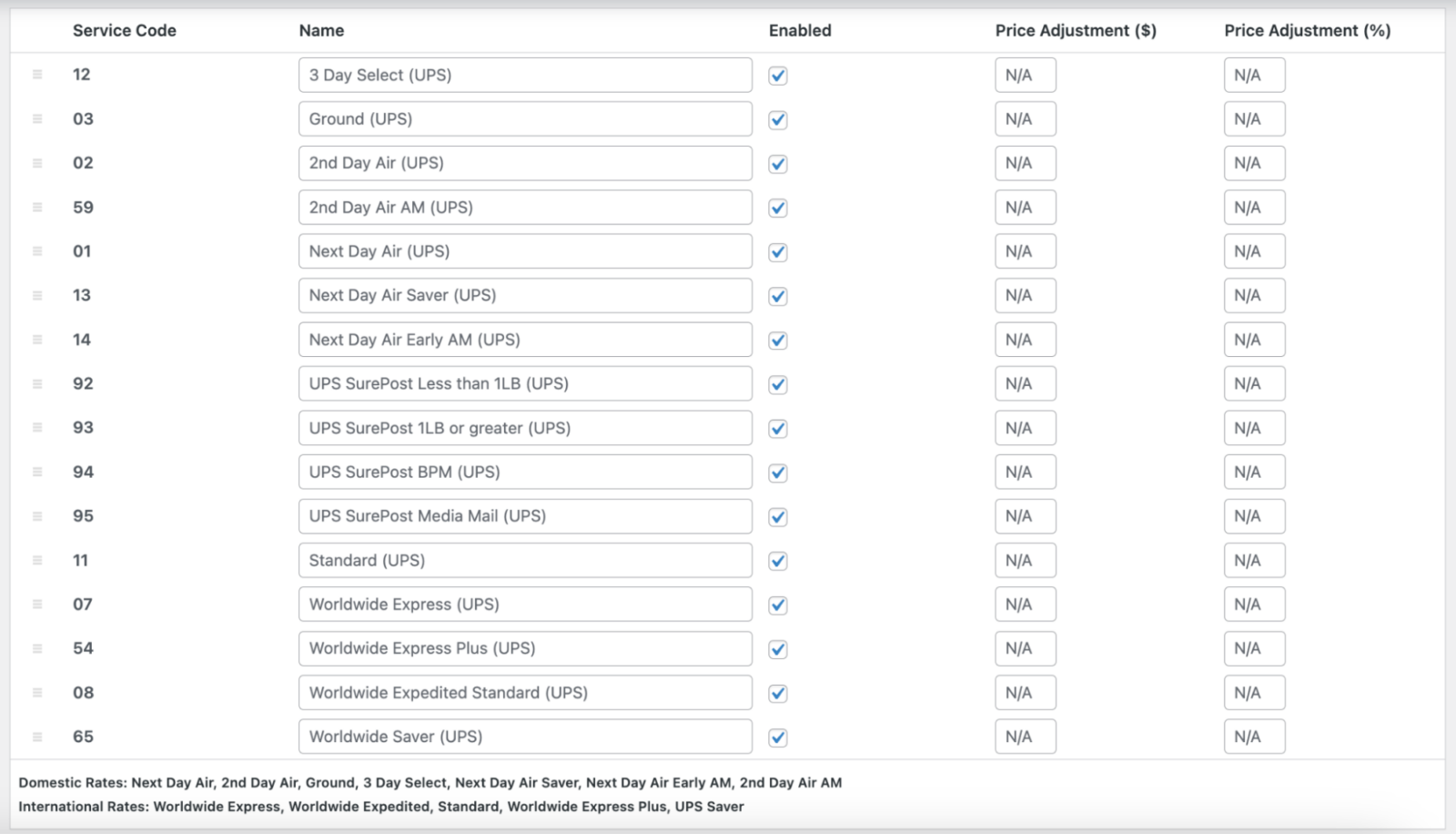
  • Services & Packaging
  • Advanced Options

Quotes calculations

Domestic

  • Next Day Air Early
  • 2nd Day Air AM
  • Next Day Air Saver
  • 2nd Day Air
  • 3 Day Select
  • Next Day Air
  • Ground
  • Standard

International

  • Worldwide Express
  • Worldwide Express Plus
  • Saver
  • Worldwide Expedited

Parcel Packing Methods with UPS plugin WooCommerce

There are two ways in which you can pack this shipping method and each one of them influences the parcels that you send o the API.

  1. Pack items individually. This means that each item that you have in your cart is send to the UPS API. The only thing that is required here is the weight but introducing the dimensions of the product also makes a more accurate quote.

In order to use this method, you have to add a new product and then scroll down to Product Data > Shipping to enter the dimensions of the product.

  1. Pack into boxes with weights and dimensions. This is the recommended shipping method, because here you can create your own custom box sizes in UPS Settings. This method is filling the custom box from the smallest to the largest based on the size and on volume and then sends the number of boxes to UPS API in order to get a shipping estimation.


#image_66479259 {
width: 100%;
}

#image_1064119299 {
width: 100%;
}

#section_177719956 {
padding-top: 30px;
padding-bottom: 30px;
}

Release Date

7/6/2016

Reviews

There are no reviews yet.

Be the first to review “EffectIO WooCommerce UPS Shipping 3.9.6”

WooCommerce UPS Shipping allows a store to obtain shipping rates for your orders dynamically via the UPS Shipping API.

3.8.0 — 2025-03-04
  • Add - New box packer with setting option for box packer library selection.
3.7.7 — 2025-02-19
  • Fix - Origin country displaying incorrect selected value.
  • Tweak - WooCommerce 9.7 compatibility.
3.7.6 — 2025-01-27
  • Tweak - PHP 8.4 Compatibility.
3.7.5 — 2025-01-13
  • Tweak - Optimize checkout address validation functionality.
3.7.4 — 2024-12-09
  • Tweak - Increase item measurements and weight precision to 4 decimal points.
  • Fix - Security issues on PHP >= 8.3.
3.7.3 — 2024-11-05
  • Fix - "Apply suggested address" action does not work when "Ship to a different address" is used in Legacy checkout.
3.7.2 — 2024-10-22
  • Tweak - WordPress 6.7 compatibility.
3.7.1 — 2024-09-02
  • Fix - Automatic weight/dimensions not set early enough.
3.7.0 — 2024-07-02
  • Add - Button to automatically apply the matched shipping address on checkout.
  • Tweak - WordPress 6.6 and WooCommerce 9.0 compatibility.
  • Fix - Limit OAuth attempts and improve error handling.
  • Fix - Strict comparison breaking UPS Standard rates.
3.6.6 — 2024-06-24
  • Fix - PHP 8.2 deprecation notices and WordPress Coding Standards.
3.6.5 — 2024-06-12
  • Fix - UPS debug notice still display even if the UPS rate does not return.
  • Fix - Formatted dimension strings bypassing empty checks.
3.6.4 — 2024-05-20
3.6.3 — 2024-05-09
  • Fix - Update build process to fix publication on WCCOM.
3.6.2 — 2024-05-06
  • Fix - SurePost rates not showing when using REST API.
3.6.1 — 2024-04-29
  • Fix - Woo Cart/Checkout blocks compatibility.
3.6.0 — 2024-04-15
  • Fix - Default services sort order mismatch between frontend and backend.
3.5.9 — 2024-03-19
  • Tweak - WordPress 6.5 compatibility.
3.5.8 — 2024-02-21
  • Fix - Disable the deprecated UPS XML API and settings.
3.5.7 — 2023-09-18
  • Fix - Incorrect API request element sent for Insured Value.
3.5.6 — 2023-09-11
  • Update - Security Update.
3.5.5 — 2023-09-05
  • Fix - Package information is not displayed when using REST API.
3.5.4 — 2023-08-29
  • Fix - WordPress Coding Standards.
3.5.3 — 2023-08-14
  • Fix - Negotiated rates not returned when using REST API.
3.5.2 — 2023-08-08
  • Fix - Remove PickupType element from the REST API request.
3.5.1 — 2023-07-17
  • Fix - REST API showing disabled service rates.
3.5.0 — 2023-07-11
  • Add - Integrated UPS Address Validation API.
3.4.4 — 2023-07-03
  • Fix - Check that item value is numeric before adding to packed box value.
3.4.3 — 2023-05-31
  • Add - Integrated UPS REST API.
3.4.2 — 2023-04-18
  • Fix - Fatal error in UPS Simple Rate when product is missing dimensions.
3.4.1 — 2023-01-16
  • Fix - Add addressline1 and city to the XML request in order to get more accurate rate.
  • Tweak - PHP 8 compatibility.
3.4.0 — 2022-11-03
  • Add - Declared High-Performance Order Storage (HPOS) compatibility.
3.3.2 — 2022-09-06
  • Fix - exclude unnecessary files from plugin zip file.
3.3.1 — 2022-08-15
  • Tweak - WC 6.6 and WP 6.0 compatibility.
3.3.0 — 2022-05-18
  • Add - Support for SurePost Rates.
3.2.38 — 2022-03-17
  • Fix - API rates not matching calculator rates for the UK.
3.2.37 — 2022-01-04
  • Fix - Missing Languages folder and .pot file in release-ready zip file.
3.2.36 — 2021-09-29
  • Fix - "Invalid Shipping Address" error in WC Payment's Apple Pay.
3.2.35 — 2021-09-10
  • Add - Package dimensions to order shipping details.
  • Tweak - Show the specific rate label when only offering customers the cheapest rate.
3.2.34 — 2021-07-27
  • Add - UPS Simple Rate
3.2.33 — 2021-07-13
  • Fix - Base "Weight/Dimension Units - Automatic" on zone origin instead of destination.
3.2.32 — 2021-06-22
  • Fix - Validate postcode before sending to UPS API.
3.2.31 — 2021-02-09
  • Fix - Error when libxml_disable_entity_loader() is disabled by host
3.2.30 — 2020-12-10
  • Tweak - PHP 8 compatibility.
3.2.29 — 2020-09-23
  • Fix - Rates not available for countries without Postal codes.
  • Tweak - Remove PickupType option as it's deprecated from the UPS Rates API.
3.2.28 — 2020-08-19
  • Fix - Replace deprecated jQuery methods.
  • Tweak - WordPress 5.5 compatibility.
3.2.27 — 2020-06-23
  • Fix - Make loading assets compatible with WooCommerce Branding.
3.2.26 — 2020-06-05
  • Add - Setting to control tax status.
  • Tweak - WC 4.2 compatibility.
3.2.25 — 2020-04-30
  • Tweak - WC 4.1 compatibility.
3.2.24 — 2020-04-14
  • Tweak - Add filters for boxpack and request.
  • Tweak - Add filters for Settings.
  • Tweak - Fallback Rate displayed prematurely.
3.2.23 — 2020-03-30
  • Tweak - Remove legacy code.

Testimonials

Benny O'Brien@benny_obie

The quick response from a friendly team member at @effectioshop honestly caught me off guard.
Nice work!


Stuart Boyle@stuart_boyle

@effectioshop As an eCommerce developer, effectio.org has enabled me to reach higher expectations and my clients are very happy.


22,000+ Users · 180 Countries
Trusted by freelancers, agencies & store owners worldwide

How It Works

Install the free EffectIO Dashboard plugin on your WordPress site. It connects to the EffectIO catalog, detects every premium plugin and theme you own, and gives you a single hub to manage licenses, run updates, and keep your admin panel clean — all from one screen.

One-Click Updates
Update any premium plugin or theme instantly. No manual downloads, no FTP — just click "Update Now."

🔑

License Manager
View, activate, and manage all your license keys in one place. No hunting through emails or vendor dashboards.

🔇

Notification Blocker
Blocks intrusive admin nag screens, upsell banners, and ads that clutter your dashboard. Re-enable anytime.

🛡️

Vendor Request Control
Prevents redundant license-check pings to third-party servers for items you already manage through EffectIO.

📦

Bulk Activation
Club members can activate all eligible plugins and themes at once — one button, zero hassle.

🆓

100% Free
The Dashboard itself costs nothing. Install it and it auto-activates on your domain — no key required.

Get Started in 3 Steps

1

Download & Install

Download the EffectIO Dashboard zip and install it via Plugins → Add New → Upload.

2

Browse & Activate

Open EffectIO → Catalog in your admin panel. The dashboard auto-detects your installed items and matches them to your licenses.

3

Update & Manage

Keep everything current with one-click updates. Manage licenses, block nag notices, and enjoy a cleaner WordPress experience.

Licenses

All WordPress derivative work is GPL-licensed. Most items are pre-activated and ready to use. Some require an activation key — we provide it with your purchase, and the Dashboard lets you apply it in seconds.

Club members enjoy bulk activation: activate every eligible item at once with a single click. No more entering keys one by one.

✅ Money-Back Guarantee

Every item is tested and ships with full features. If something doesn't work and we can't fix it, you get a full refund. We believe premium tools should be accessible — that's why we offer a low-cost subscription so freelancers, small businesses, and agencies can grow without a large upfront investment.

Manage and Update all your sites

17.99 $ / Month Membership

2900 Plugins and Themes. Install, Update, Activate and Delete any plugin. Unlimited Sites. Best WP Agency Deal.

Clean Items

NGO Mission

Always Updated

SSL Connection











