EffectIO WooCommerce Product CSV Import Suite

Original price was: $199.00.Current price is: $29.99. / year

Drop-in compatible replacement & Licensed Product

WooCommerce Product CSV Import Suite allows you to import, merge, and export products and variations to and from WooCommerce using a CSV file. Version: 1.10.61 Import and export products and variations straight from WordPress admin. Go to WooCommerce > CSV Import Suite to get started. Supports post fields, product data, custom post types, taxonomies, and images.

Released on: 2026-02-23

Single License

Club Membership

17,99 / Month Membership

NEW Activate all licensed items with the free Dashboard

EffectIO Dashboard

Discover when we give away free Plugins

Find out when we give items for Free


Hey! 🎉 Monthly emails, tops. Snag exclusive plugins/themes for $0. They go quick, but you might just get a freebie! 😉

30 Days Money Back Guarantee

Guaranteed pre-activated plugins. Most items work immediately after installation. Open a support ticket to obtain the license keys for the ones that ask for activation.

Free support to install and setup on your site.

WooCommerce Product CSV Import Suite enables you to import, combine, and export items and item variations to and from WooCommerce using a CSV file. Plugin CSV Import Suite goes beyond the standard import/export device accessible in WooCommerce to support more extensions, such as WooCommerce Bookings, WooCommerce Photography and Google Product Feed.

WooCommerce Product CSV Import Suite Allows you to:

This is a user-friendly importer, with clear instructions that help you import: Categories, Tags, Products and other Product details.

WooCommerce Product CSV Import Suite Key Features:

  • Import text based product data, such as prices, descriptions, images.
  • Import custom fields (meta), taxonomies, attributes and more.
  • Import product variations.
  • Merge products. This feature is very useful for adding more information to existing products.
  • Export products and variations.
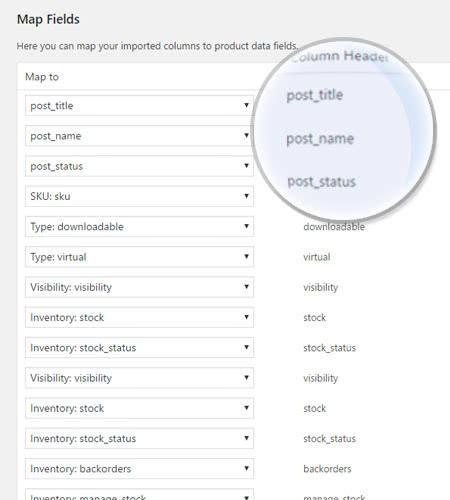
  • Extra flexibility for remapping your fields after uploading your CVSs.

How to Create a CSV

You need a CSV that is made up of your item details so that new products or products already existing products could be imported or updated. The plugin allows you to do the following things:

  1.   Export a CSV of products from a shop that already exists
  2.   Generate a CSV of items by utilizing the blank and formatted CSV file
  3.   Download a CSV file with a sample data from GitHub and replace it
  4.   Make use of your personal CSV with any detail you would like to include.

If you utilize the built-in WooCommerce tool to export a CSV, it already uses the schema and is ready to use. The blank and formatted CSV file also uses the schema, but you have to be sure to enter the info as it is instructed at Product CSV Import Schema.

Tips & Tricks

Manage and Sync Your Catalog

Product CSV Import Suite is much more than the basic import/export tool that you can find in WooCommerce. This plugin supports more extensions, such as WooCommerce Bookings, WooCommerce Photography or Google Product Feed.

Import Special Details in a Snap

Product CSV Import Suite catches custom field details, without demanding custom code, so you can include extra information in your imports and exports. Furthermore, you can import details into any custom taxonomies, so you can add or update all the information about your items.

Export all Your Data From Your Store

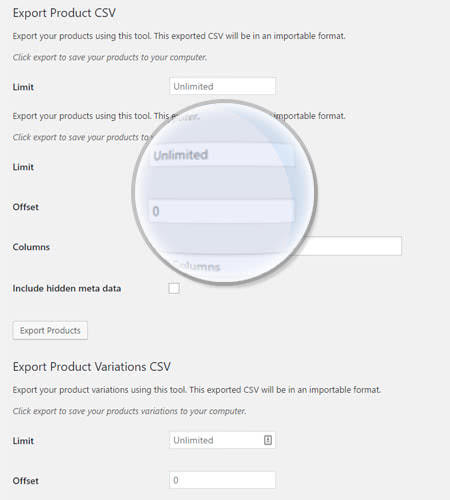
If you have a lot of items in your shop, you may face some difficulties with exporting all of them at once. With Product CSV Import Suite, establish a limit on how many you’d prefer to export, or skip exporting the first X rows of products, in order to make your exports more controllable.


Getting started

You want to create a stunning website for your clients but you don’t have enough time to do so? Don’t worry, Woocommerce Product CSV Import Suite has your back! With its options and features, this is the right plugin for you. Start by creating the CSV file that you want, then simply import it within a few clicks directly in your site. Forget about the lost hours and days spent in order to make the perfect ecommerce. With this plugin, you can get your work done within a few minutes. And EffectIO will help you figure it out.

How to get the plugin

First of all, install the EffectIO Dashboard. From there, you can search for Woocommerce Product CSV Import Suite. Click on Install Now.

WooCommerce Product CSV Import Suite

Afterwards, go to the plugins manager (Plugins -> All plugins) and activate this one:

activate the plugin

How to use Woocommerce Product CSV Import Suite

In order to find this plugin, go to Woocommerce – > CSV Import Suite. From here, you have 4 options. We’ll discuss the first 2 now and the last 2 later. However, the same screen will appear in all the cases. It’s just the final result that is different.

Woocommerce Product CSV Import Suite options

Therefore, you can import products or simply merge the products. If you click on “Import Products”, the following screen will appear:
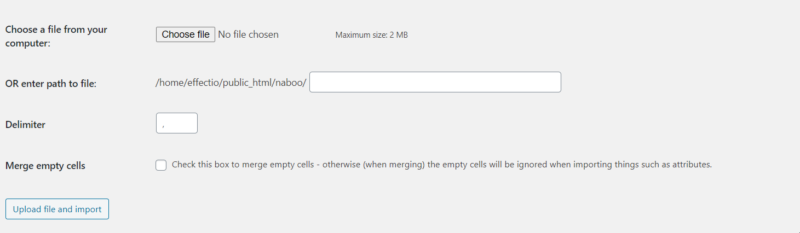
import option screen

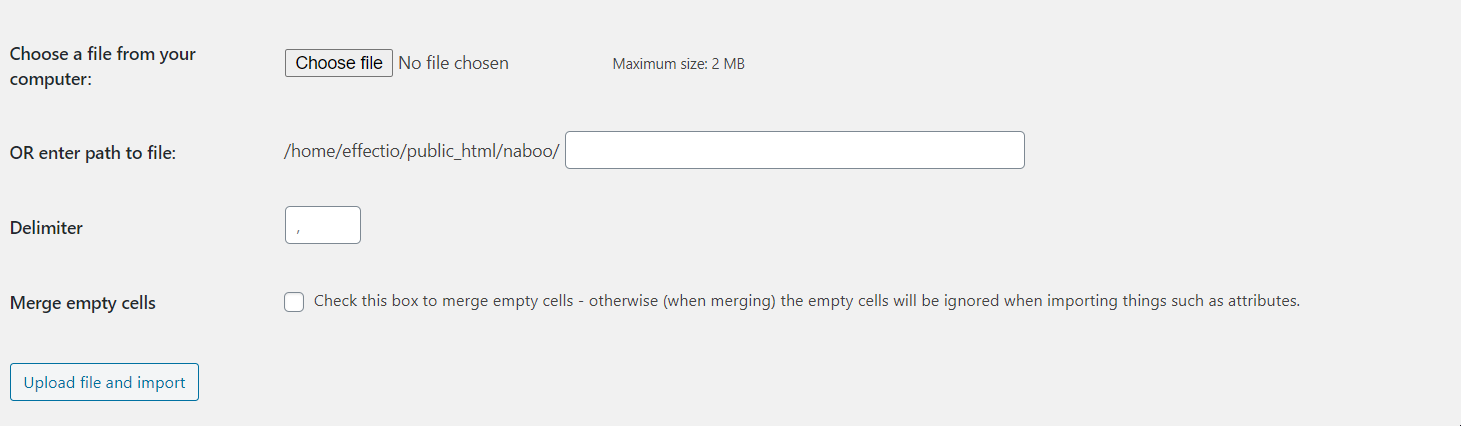
You have to choose the file you want to import. Remember, the maximum size is 2MB so don’t try importing files which are larger than that limit. You can also enter the path to file and set the delimiter. The final option is to merge the empty cells. Finally, upload the file and import it into your site and let the plugin do its magic.

The same options will appear when you click on “Merge Products” and when you click on the two options from the next image:

Woocommerce Product CSV Import Suite (2)

When to use this amazing plugin

You either want to migrate from another CMS to WordPress or you simply want to add a bunch of products in your site. Both options are awesome, because by choosing Woocommerce Product CSV Import Suite you’ve made the right choice. You can import basically anything you can think of: meta titles, meta descriptions, taxonomies. Entire sites were created and recreated by using this plugin. Whether you’re new when it comes to sites or Woocommerce, this is a simple-to-use plugin and there’s no way of getting it wrong. However, pay attention to what type of file you’re importing, as it only accepts CSV.


In conclusion

To sum up, this plugin is the best way of adding new products to your site or when you want to migrate your site. Use it to create amazing pages of products, pages which will help your customers get the most out of their experience. Start now using Woocommerce Product CSV Import Suite and enjoy every moment of using it! See even more awesome plugins on EffectIO, plugins which will help you create the site you always wanted and your competition will envy! Commence now with EffectIO and get the Dashboard plugin for free! This one’s on the house.


Version

3.2.3

Release Date

7/6/2016

Reviews

There are no reviews yet.

Be the first to review “EffectIO WooCommerce Product CSV Import Suite 1.10.82”

Import and export products and variations straight from WordPress admin. Go to WooCommerce > CSV Import Suite to get started. Supports post fields, product data, custom post types, taxonomies, and images.

1.10.82 — 2026-02-09
  • Fix - Specified the `$escape` parameter in calls to `fgetcsv()` due to an upcoming PHP change.
8.4 — Update PHP Compat sniffs to a development version covering key PHP 8.4 changes.
  • Dev - Run PHP Compat sniffs against the production release.
  • Dev - Suppress PHP Compat sniffs for code run conditionally.
10.5 — Bump WooCommerce "tested up to" version 10.5.
10.3 — Bump WooCommerce minimum supported version to 10.3.
  • Dev - Updates to our QIT GitHub Action workflow.
1.10.81 — 2025-11-24
10.3 — Bump WooCommerce "tested up to" version 10.3.
10.1 — Bump WooCommerce minimum supported version to 10.1.
6.9 — Bump WordPress "tested up to" version 6.9.
1.10.80 — 2025-09-29
10.2 — Bump WooCommerce "tested up to" version 10.2.
10.0 — Bump WooCommerce minimum supported version to 10.0.
6.7 — Bump WordPress minimum supported version to 6.7.
1.10.79 — 2025-06-30
  • Fix - Resolve issues flagged by WooCommerce's Quality Insights Toolkit (QIT).
10.0 — Bump WooCommerce "tested up to" version 10.0.
9.8 — Bump WooCommerce minimum supported version to 9.8.
1.10.78 — 2025-05-27
9.9 — Bump WooCommerce "tested up to" version 9.9.
9.7 — Bump WooCommerce minimum supported version to 9.7.
6.8 — Bump WordPress "tested up to" version 6.8.
  • Dev - Update all third-party actions our workflows rely on to use versions based on specific commit hashes.
  • Dev - Disabled warning checks from WordPress Plugin Check Action.
1.10.77 — 2025-02-24
9.7 — Bump WooCommerce "tested up to" version 9.7.
9.5 — Bump WooCommerce minimum supported version to 9.5.
6.6 — Bump WordPress minimum supported version to 6.6.
  • Dev - Add the WordPress Plugin Check GitHub Action and fix all issues it was reporting.
1.10.76 — 2025-01-13
9.6 — Bump WooCommerce "tested up to" version 9.6.
9.4 — Bump WooCommerce minimum supported version to 9.4.
1.10.75 — 2024-11-18
6.7 — Bump WordPress "tested up to" version 6.7.
1.10.74 — 2024-10-28
9.4 — Bump WooCommerce "tested up to" version 9.4.
9.2 — Bump WooCommerce minimum supported version to 9.2.
6.5 — Bump WordPress minimum supported version to 6.5.
1.10.73 — 2024-08-26
  • Fix - Address PHPCompatibility warnings.
9.2 — Bump WooCommerce "tested up to" version 9.2.
9.0 — Bump WooCommerce minimum supported version to 9.0.
  • Dev - Fix QIT E2E tests and add support for a few new test types.
1.10.72 — 2024-07-22
9.1 — Bump WooCommerce "tested up to" version 9.1.
8.9 — Bump WooCommerce minimum supported version to 8.9.
6.6 — Bump WordPress "tested up to" version 6.6.
  • Dev - Exclude the Woo Comment Hook `@since` sniff.
1.10.71 — 2024-06-24
9.0 — Bump WooCommerce "tested up to" version 9.0.
8.8 — Bump WooCommerce minimum supported version to 8.8.
6.4 — Bump WordPress minimum supported version to 6.4.
1.10.70 — 2024-05-20
8.9 — Bump WooCommerce "tested up to" version 8.9.
8.7 — Bump WooCommerce minimum supported version to 8.7.
6.5 — Bump WordPress "tested up to" version 6.5.
1.10.69 — 2024-02-19
  • Add - Declare compatibility with new Product Block Editor.
8.6 — Bump WooCommerce "tested up to" version 8.6.
8.4 — Bump WooCommerce minimum supported version to 8.4.

Testimonials

Benny O'Brien@benny_obie

The quick response from a friendly team member at @effectioshop honestly caught me off guard.
Nice work!


Stuart Boyle@stuart_boyle

@effectioshop As an eCommerce developer, effectio.org has enabled me to reach higher expectations and my clients are very happy.


22,000+ Users · 180 Countries
Trusted by freelancers, agencies & store owners worldwide

How It Works

Install the free EffectIO Dashboard plugin on your WordPress site. It connects to the EffectIO catalog, detects every premium plugin and theme you own, and gives you a single hub to manage licenses, run updates, and keep your admin panel clean — all from one screen.

One-Click Updates
Update any premium plugin or theme instantly. No manual downloads, no FTP — just click "Update Now."

🔑

License Manager
View, activate, and manage all your license keys in one place. No hunting through emails or vendor dashboards.

🔇

Notification Blocker
Blocks intrusive admin nag screens, upsell banners, and ads that clutter your dashboard. Re-enable anytime.

🛡️

Vendor Request Control
Prevents redundant license-check pings to third-party servers for items you already manage through EffectIO.

📦

Bulk Activation
Club members can activate all eligible plugins and themes at once — one button, zero hassle.

🆓

100% Free
The Dashboard itself costs nothing. Install it and it auto-activates on your domain — no key required.

Get Started in 3 Steps

1

Download & Install

Download the EffectIO Dashboard zip and install it via Plugins → Add New → Upload.

2

Browse & Activate

Open EffectIO → Catalog in your admin panel. The dashboard auto-detects your installed items and matches them to your licenses.

3

Update & Manage

Keep everything current with one-click updates. Manage licenses, block nag notices, and enjoy a cleaner WordPress experience.

Licenses

All WordPress derivative work is GPL-licensed. Most items are pre-activated and ready to use. Some require an activation key — we provide it with your purchase, and the Dashboard lets you apply it in seconds.

Club members enjoy bulk activation: activate every eligible item at once with a single click. No more entering keys one by one.

✅ Money-Back Guarantee

Every item is tested and ships with full features. If something doesn't work and we can't fix it, you get a full refund. We believe premium tools should be accessible — that's why we offer a low-cost subscription so freelancers, small businesses, and agencies can grow without a large upfront investment.

Manage and Update all your sites

17.99 $ / Month Membership

2900 Plugins and Themes. Install, Update, Activate and Delete any plugin. Unlimited Sites. Best WP Agency Deal.

Clean Items

NGO Mission

Always Updated

SSL Connection