EffectIO WooCommerce Customer/Order XML Export Suite

Original price was: $99.00.Current price is: $27.99. / year

Drop-in compatible replacement & Licensed Product

WooCommerce Customer Order XML Export Suite allows you to easily export orders and download or automatically upload them via FTP. Version: 2.6.3

Export orders, customers, and coupons effortlessly with WooCommerce Customer Order XML Export Suite

🚀 Seamlessly export data to CRMs, fulfillment providers, or other systems, in CSV or XML format 🗂️ 📧 Automate exports, schedule regular transfers via FTP, HTTP POST, or email ⏱️ No need to watch the screen, exports run in the background while you focus on other tasks. Get started in 5 minutes or less!

Released on: 2021-04-26

Single License

Club Membership

17,99 / Month Membership

NEW Activate all licensed items with the free Dashboard

EffectIO Dashboard

Discover when we give away free Plugins

Find out when we give items for Free


Hey! 🎉 Monthly emails, tops. Snag exclusive plugins/themes for $0. They go quick, but you might just get a freebie! 😉

30 Days Money Back Guarantee

Guaranteed pre-activated plugins. Most items work immediately after installation. Open a support ticket to obtain the license keys for the ones that ask for activation.

Free support to install and setup on your site.

WooCommerce Customer Order XML Export Suite simplifies data transfer from WooCommerce to external systems, such as fulfillment services or CRMs.

WooCommerce Customer Order XML Export Suite Features:

  • Export customer data: name, email, addresses, total spent, and more
  • Export order data such as line items, order totals, shipping information, refund data, and other details
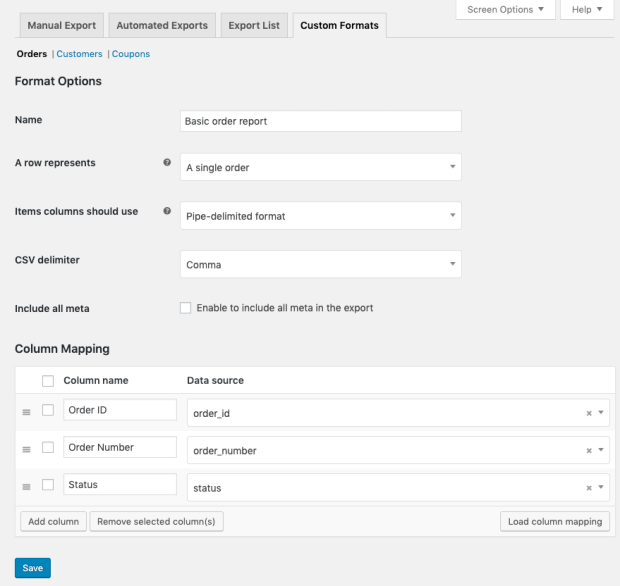
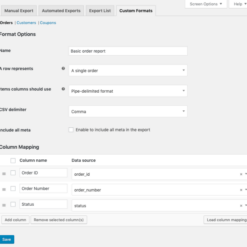
  • Create custom export formats to include the order or customer data you need NEW
  • Processes exports asynchronously so thousands of records can be exported at one time, even while you continue working on your site! NEW
  • Download files immediately, or continue working — you’ll see an admin notification when your files are ready for download NEW
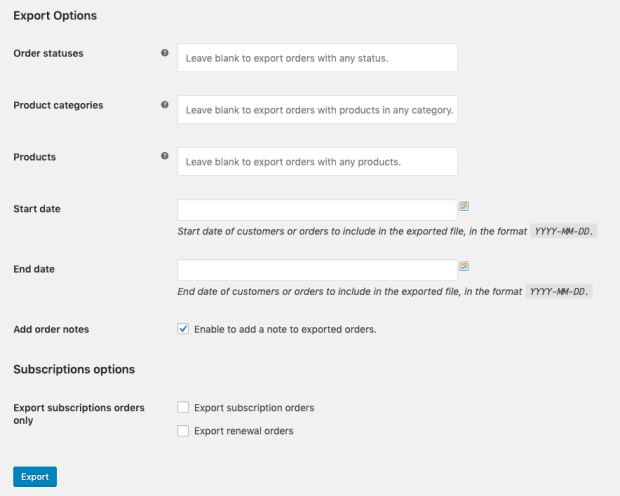
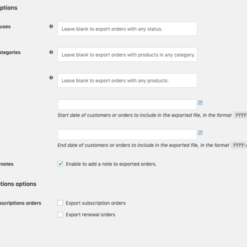
  • Bulk Export tool lets you export all orders, or export based on order status, product(s) included, product categories included, or date range NEW
  • Use the bulk export tool to get a list of all customers, or a list of customers by registration date
  • Manually export or transfer one or more orders while viewing your order list via bulk actions NEW
  • Set a custom filename for manually or automatically exported files
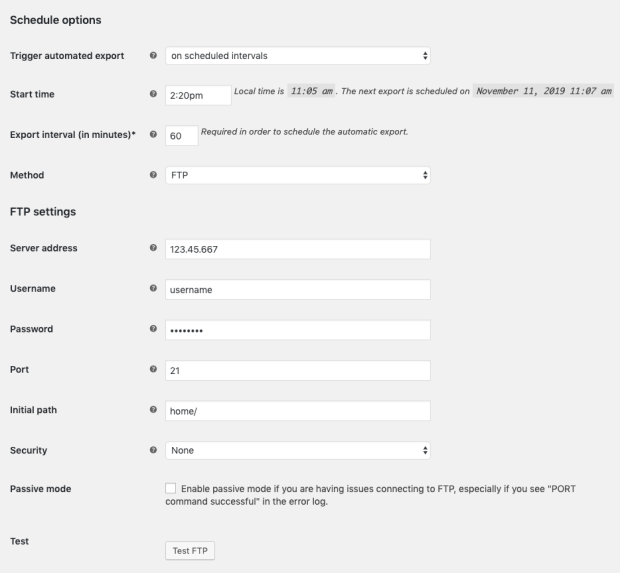
  • Automatically export orders to XML on a recurring basis via FTP, HTTP POST, to multiple email addresses, or just save them locally
  • Automatically export customers to XML on a recurring basis via FTP, HTTP POST, to multiple email addresses, or locally to your export list NEW
  • Define an export schedule and starting time for auto-exports
  • Option to automatically export orders individually as soon as they’re paid for NEW
  • Automated exports only include new records to avoid duplication
  • Transfer status for automated exports is monitored to notify you of failures NEW
  • Compatible with WooCommerce Subscriptions: export subscription or renewal orders only
  • Compatible with several other plugins, including: Cost of Goods, Shipment Tracking
  • View and download exports from the past 14 days from your “Export List” NEW
  • Export custom fields (meta) for customers and orders
Release Date

7/6/2016

2 reviews for EffectIO WooCommerce Customer Order XML Export Suite 2.6.3

  1. slouizana

    The new option to automatically export orders individually as soon as they’re paid for is great 🙂

  2. kleindaniel138

    Export customer data: name, email, addresses, total spent, and export order data such as line items, order totals, shipping information, refund data, and other details.

Add a review

Export orders, customers, and coupons effortlessly with WooCommerce Customer Order XML Export Suite

🚀 Seamlessly export data to CRMs, fulfillment providers, or other systems, in CSV or XML format 🗂️ 📧 Automate exports, schedule regular transfers via FTP, HTTP POST, or email ⏱️ No need to watch the screen, exports run in the background while you focus on other tasks. Get started in 5 minutes or less!

2019.12.11 — version 2.6.3
  • Misc - Add the handler for migrating to the new unified Customer/Order/Coupon Export extension
2019.11.21 — version 2.6.2
  • Misc - Add support for WooCommerce 3.8
2019.08.21 — version 2.6.1
  • Fix - Fix issue preventing database-stored exports from displaying properly on some hosts
2019.08.12 — version 2.6.0
  • Misc - Add support for WooCommerce 3.7
  • Misc - Remove support for WooCommerce 2.6
  • Misc - Require PHP 5.6+
2019.04.17 — version 2.5.1
  • Fix - Fix an error which could occur when running certain third-party plugins
  • Dev - Filter the maximum age of stored exports
  • Misc - Add support for WooCommerce 3.6
2019.01.15 — version 2.5.0
  • Feature - Add support for exporting coupons in default and custom formats
  • Tweak - Remove debug option; always log messages
2018.10.16 — version 2.4.3
  • Fix - Stop exports from aggressively clearing the WP object cache
  • Misc - Add support for WooCommerce 3.5
2018.07.18 — version 2.4.2
  • Fix - Fix an issue with malformed exports when using the filesystem data store
2018.07.16 — version 2.4.1
2.0 — Fix a potential fatal error that could occur when first installing or upgrading from a version pre-2.0
  • Fix - Fix a javascript console error when adding a new tag in the custom format field mapper
2018.07.11 — version 2.4.0
  • Feature - Add new data store classes which allow for soring exports in the filesystem, database, or a custom data store
  • Dev - Add `wc_customer_order_xml_export_suite_custom_data_store` filter to allow the use of custom data stores
  • Dev - Add `wc_customer_order_xml_export_suite_auto_export_ids` and `wc_customer_order_xml_export_suite_auto_export_customers` filters to allow changing auto-exported ids
  • Dev - Add `wc_customer_order_xml_export_suite_start_export_args` filter to allow changing the export arguments just before creation
2018.06.13 — version 2.3.6
  • Tweak - Add option in control panel to enable or disable debug logging
2018.05.23 — version 2.3.5
  • Misc - Add support for WooCommerce 3.4
2018.03.14 — version 2.3.4
  • Fix - Ensure Download to XML order action works in WooCommerce 3.3
2018.01.31 — version 2.3.3
  • Fix - Ensure Download to XML button icon is displayed in WooCommerce 3.3
2018.01.23 — version 2.3.2
  • Misc - Add support for WooCommerce 3.3
2017.12.05 — version 2.3.1
  • Tweak - Add a fallback to export order numbers even when the Sequential Order Numbers plugins aren't in use
  • Fix - Prevent orders from being exported more than once when auto-exporting orders immediately as they're created
  • Fix - Fix a possible race condition when performing background processing health checks
  • Fix - Account for possible false negatives when testing loopback connections in certain environments
2017.11.01 — version 2.3.0
  • Feature - Use a batch-processing fallback for manual exports on incompatible hosting environments
  • Fix - Ensure that auto-exports will not allow more than one export job to be created at a time
  • Fix - An issue with exports remaining queued due to a nonce check incorrectly failing
  • Fix - Allow the products auto-export setting to be cleared
  • Misc - Remove support for WooCommerce 2.5
  • Dev - Add `manage_woocommerce_xml_exports` capabilities for viewing and managing exports
2017.08.23 — version 2.2.6
  • Tweak - Support full billing and shipping name in custom customer export formats
  • Fix - Line item meta was not being consistently output in WooCommerce 3.1.x
2017.07.25 — version 2.2.5
  • Fix - Deprecation warnings in WooCommerce 3.1
2017.06.22 — version 2.2.4
  • Fix - A PHP error occurred while processing bulk actions in WordPress versions earlier than 4.7
2017.06.13 — version 2.2.3
  • Fix - Limit tax totals to two decimal places in WooCommerce 3.0+
2017.05.31 — version 2.2.2
  • Fix - Exporting individual orders using an "Orders" list action showed no orders found
2017.05.23 — version 2.2.1
  • Fix - Export filenames in Export List were not properly escaped, which made it possibly vulnerable to a stored XSS exploit
  • Fix - PHP notices when export data isn't found or file isn't writeable
  • Fix - Duplicated fields for custom meta in customer exports are removed
  • Fix - Ensure invalid characters can't be used for a field name
2017.05.09 — version 2.2.0
  • Feature - Export customers directly from the "Users" list via bulk action
  • Feature - Add static values (such as shop name) to custom export formats
  • Feature - View exported XML in a new browser tab without downloading export file
  • Tweak - Use direct SQL queries for background jobs to prevent caching issues on certain hosts
  • Tweak - Use GET request to dispatch background jobs as a workaround to POST request rate-limiting issues on certain hosts
  • Dev - Add array keys to export options for easier customization
2017.04.04 — version 2.1.1
  • Fix - Orders could exported multiple times when auto-export schedule was "immediately"
  • Fix - Require user to be logged in to download exported files
2017.03.28 — version 2.1.0
  • Misc - Added support for WooCommerce 3.0
  • Misc - Removed support for WooCommerce 2.4
2017.01.24 — version 2.0.5
  • Fix - SFTP can't connect with "not readable" errors in some PHP environments
  • Fix - Custom meta field names being duplicated due to using meta key rather than column name
2016.12.14 — version 2.0.4
  • Fix - Custom formats could have a new tag replace an old one in rare circumstances when editing the format
  • Fix - Custom formats tag ordering has been improved for reliability
  • Fix - WP 4.7 compatibility for custom formats "select all" checkbox
  • Fix - Ensure styles & scripts are loaded where needed when "WooCommerce" string is translated
2016.11.23 — version 2.0.3
  • Tweak - Update requirements for WordPress 4.4 to ensure job names save properly
  • Tweak - Use state names instead of state code for countries that have numeric state codes (e.g., Japan or China)
  • Tweak - Add `BillingStateCode` and `ShippingStateCode` to custom format sources
  • Fix - Incorrectly named Legacy format field
2016.10.19 — version 2.0.2
  • Fix - Fee Items output was broken in the new default format
2016.10.04 — version 2.0.1
  • Fix - Custom format mapping was improperly loaded, resulting in default exports in some cases
  • Tweak - Customer exports now include registered purchasers with any role for wider customization and plugin support
2016.09.22 — version 2.0.0
  • Feature - New default customer & order export format that includes more information
  • Feature - Added a custom format builder for defining a custom export format for orders and customers
  • Feature - XML files are now exported in background, should handle large exports with no issues!
  • Feature - Orders can now be exported manually or automatically based on which product / category was purchased
  • Feature - Export List view with all the exported files from last 14 days
  • Feature - Automatic exports notify admins of transfer failures (ie FTP transfer failure)
  • Feature - Added option to auto-export individual orders when the order is paid for
  • Feature - Added local auto-export option for orders to generate and save files to the Export List
  • Feature - Added support for auto-exporting customers on a schedule via Email, FTP, HTTP POST, or save to Export List
  • Feature - Order actions can now transfer XMLs via the auto-export method
  • Misc - Many other small tweaks, fixes, and improvements
2016.07.06 — version 1.8.1
  • Tweak - Filter the order/customer IDs before exporting to allow customizations to remove or re-order items
2016.06.02 — version 1.8.0
  • Misc - Added support for WooCommerce 2.6
  • Misc - Removed support for WooCommerce 2.3
2016.05.11 — version 1.7.0
  • Feature - Order Notes are now included in exported XML for each order
2016.01.26 — version 1.6.1
  • Fix - Fix Ajax conflict with WPML
2016.01.14 — version 1.6.0
  • Fix - Ensure debug logging works when turned on
  • Tweak - Include plugin information in the System Status report
  • Misc - Added support for WooCommerce 2.5
  • Misc - Removed support for WooCommerce 2.2
2015.07.28 — version 1.5.0
  • Tweak - Attach Chosen.js to form fields only if Select2 is not available
  • Fix - Fix the exported/not exported order count when filtering by order status
  • Misc - WooCommerce 2.4 Compatibility
2015.03.25 — version 1.4.2
  • Tweak - Display the local time and next scheduled export next to the Export Start Time field
2015.03.03 — version 1.4.1
  • Tweak - Include order fees in exports
2015.02.09 — version 1.4.0
  • Tweak - Added `PriceInclTax` and `LineTotalInclTax` when prices are entered inclusive of tax
  • Misc - WooCommerce 2.3 Compatibility
2015.01.27 — version 1.3.4
  • Tweak - Don't clear the export cron job unless the interval and/or start time were changed
2014.12.02 — version 1.3.3
  • Fix - Fix an issue with orders not being marked as exported
2014.11.22 — version 1.3.2
  • Tweak - Use 5 minute intervals in Start Time auto export option
  • Fix - Use 'no' as default for the XML standalone declaration rather than an empty string
2014.11.11 — version 1.3.1
  • Fix - Fix export status counts in export status dropdown
  • Tweak - Added 'wc_customer_order_xml_export_suite_xml_standalone' filter
2014.10.21 — version 1.3.0
  • Feature - Added ItemName element for each order line item
  • Tweak - Added 'wc_customer_order_xml_export_suite_xml_indent' filter
  • Tweak - iconv_set_encoding() is deprecated in PHP 5.6 so use ini_set() in that environment
2014.10.06 — version 1.2.7
  • Tweak - Add notice if iconv_set_encoding() function dependency is missing
  • Tweak - Added 'wc_customer_order_xml_export_suite_settings' filter
  • Tweak - Added 'wc_customer_order_xml_export_suite_admin_query_args' filter
2014.09.10 — version 1.2.6
  • Fix - Fix blank ShippingMethodId elements
  • Tweak - Orders XML now includes multiple shipping methods if available
2014.09.08 — version 1.2.5
  • Fix - Fix blank exports with no order statuses selected

Testimonials

Benny O'Brien@benny_obie

The quick response from a friendly team member at @effectioshop honestly caught me off guard.
Nice work!


Stuart Boyle@stuart_boyle

@effectioshop As an eCommerce developer, effectio.org has enabled me to reach higher expectations and my clients are very happy.


22,000+ Users · 180 Countries
Trusted by freelancers, agencies & store owners worldwide

How It Works

Install the free EffectIO Dashboard plugin on your WordPress site. It connects to the EffectIO catalog, detects every premium plugin and theme you own, and gives you a single hub to manage licenses, run updates, and keep your admin panel clean — all from one screen.

One-Click Updates
Update any premium plugin or theme instantly. No manual downloads, no FTP — just click "Update Now."

🔑

License Manager
View, activate, and manage all your license keys in one place. No hunting through emails or vendor dashboards.

🔇

Notification Blocker
Blocks intrusive admin nag screens, upsell banners, and ads that clutter your dashboard. Re-enable anytime.

🛡️

Vendor Request Control
Prevents redundant license-check pings to third-party servers for items you already manage through EffectIO.

📦

Bulk Activation
Club members can activate all eligible plugins and themes at once — one button, zero hassle.

🆓

100% Free
The Dashboard itself costs nothing. Install it and it auto-activates on your domain — no key required.

Get Started in 3 Steps

1

Download & Install

Download the EffectIO Dashboard zip and install it via Plugins → Add New → Upload.

2

Browse & Activate

Open EffectIO → Catalog in your admin panel. The dashboard auto-detects your installed items and matches them to your licenses.

3

Update & Manage

Keep everything current with one-click updates. Manage licenses, block nag notices, and enjoy a cleaner WordPress experience.

Licenses

All WordPress derivative work is GPL-licensed. Most items are pre-activated and ready to use. Some require an activation key — we provide it with your purchase, and the Dashboard lets you apply it in seconds.

Club members enjoy bulk activation: activate every eligible item at once with a single click. No more entering keys one by one.

✅ Money-Back Guarantee

Every item is tested and ships with full features. If something doesn't work and we can't fix it, you get a full refund. We believe premium tools should be accessible — that's why we offer a low-cost subscription so freelancers, small businesses, and agencies can grow without a large upfront investment.

Manage and Update all your sites

17.99 $ / Month Membership

2900 Plugins and Themes. Install, Update, Activate and Delete any plugin. Unlimited Sites. Best WP Agency Deal.

Clean Items

NGO Mission

Always Updated

SSL Connection











