EffectIO ePay.bg Gateway for WooCommerce 1.5.2

Original price was: $70.00.Current price is: $9.99. / year

Drop-in compatible replacement & Licensed Product

Allows you to use ePay.bg payment processor with the WooCommerce plugin. Version: 1.5.1 Allows you to use ePay.bg payment processor with the WooCommerce plugin.

Released on: 2024-02-28

Single License

Club Membership

17,99 / Month Membership

NEW Activate all licensed items with the free Dashboard

EffectIO Dashboard

Discover when we give away free Plugins

Find out when we give items for Free

Hey! 🎉 Monthly emails, tops. Snag exclusive plugins/themes for $0. They go quick, but you might just get a freebie! 😉

30 Days Money Back Guarantee

Guaranteed pre-activated plugins. Most items work immediately after installation. Open a support ticket to obtain the license keys for the ones that ask for activation.

Free support to install and setup on your site.

Integrate ePay.bg Payment System with Your WooCommerce Store

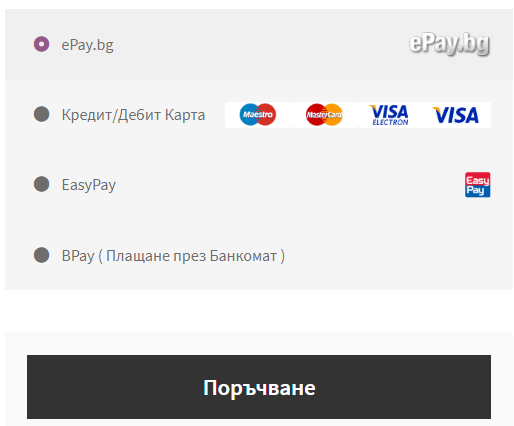
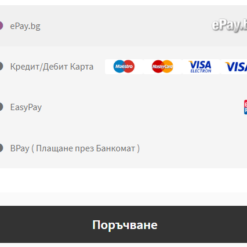
ePay.bg is a leading Bulgarian online payment system that allows customers to securely pay for orders using BORICA logo debit and credit cards such as Visa and MasterCard, or through an ePay.bg micro account. With ePay.bg Payment Gateway, you can easily integrate your WooCommerce store with this trusted payment system.

The payment process is seamless and secure. Customers will be redirected to the ePay.bg secure servers to complete the payment, and then redirected back to your store. Installation and setup are incredibly simple, taking just a few minutes to get started. If you already have an ePay.bg account, you can start accepting payments right away. Simply install the plugin, enter your ePay.bg API credentials, and you’re good to go!

With the ePay.bg Payment Gateway for WooCommerce, you can:

  • Accept payments through ePay.bg, a reliable and popular Bulgarian online payment system
  • Support payment with BORICA logo debit and credit cards including Visa and MasterCard
  • Allow customers to pay using their ePay.bg micro accounts
  • Ensure secure payment processing with the customer redirect feature
  • Quickly install and set up the plugin, saving you time and effort
  • Enjoy the convenience of a seamless integration with ePay.bg
  • Effortlessly handle payments in Bulgarian Lev BGN
  • Access premium support from EffectIO for any assistance you may need
  • Update the plugin easily via the EffectIO Dashboard and benefit from pre-activated installations
  • Take advantage of EffectIO’s super deals, offering discounts of 30 to 90 percent
  • Experience the flexibility of GPL code for customization

Ready to enhance your WooCommerce store with ePay.bg’s secure payment system? Get started today and start accepting payments with ease!

Effortless Integration with ePay.bg Payment System

Secure, Fast, and Reliable Payment Processing

Allows you to use ePay.bg payment processor with the WooCommerce plugin.

2024.02.27 — version 1.5.2
  • HPOS compatibility declaration
  • Tweak: Removed reference of deprecated wc_get_log_file_path function
2023.03.02 — version 1.5.1
  • Fix: The minified checkout js file was incorrectly generated
2022.11.07 — version 1.5.0
  • Refactor: Changed the payment invoice generation to allow for multiple invoices generated for an order and still be able to process the payment notifications correctly
  • Tweak: Added "Status > Tools" setting to allow for custom invoice table
2022.01.19 — version 1.4.5
  • Tweak: Select the clicked ePay.bg payment option for the instances where the checkout is refreshed multiple times.
2021.06.01 — version 1.4.4
  • Fix: The payment types of the separated form were not unchecking when a new payment method was selected.
  • Fix: Issues with updating the checkout on every payment method change.
  • Checked and verified WC 5.3.0 compatibility.
  • WC tags
2019.11.27 — version 1.4.3
  • Fix: WPML translation compatibility for EasyPay and BPay instructions
  • Fix: When payment options are displayed as separated, the default options was not checked on load.
2018.09.25 — version 1.4.2
  • Fix: Payment methods not changing when there is a JS error on the page.
2018.07.31 — version 1.4.1
1.4.0
2018.07.30 — version 1.4.0
  • New: Added new checkout option template. This one will separate each payment option type into a separate radio button on the Checkout page
  • Tweak: Made admin settings for bPay and EasyPay description to display|hide dynamically
  • Fix: removed loading image on redirecting to epay action
  • Dev: Removed all references of update_post_meta and get_post_meta for versions past WC 3.0
  • Dev: New 'wc_epaybg_expired_payment_customer_note' filter to control the leaving of customer note after expired payment notification.
  • Dev: New "wc_epaybg_order_status_for_expired_payment" filter to allow merchants to choose the order status for expired payments
2018.06.15 — version 1.3.1
  • WC 3.4 compat checked
  • Woo Tags
  • changelog formatting fix
2017.04.19 — version 1.3
  • WC 3.0 Compatibility check
  • WC 2.3 support dropped.
2015.08.24 — version 1.2.2
  • Fix: Now new invoice is generated on every payment request.
2015.08.21 — version 1.2.1
  • Tweak: Debug log the exact parameters sent to ePay.bg in the payment request.
2015.08.04 — version 1.2
  • New: Added setting to choose a default selected payment type on the checkout page.
  • WC 2.4 support checked.
  • Tweak: Now every payment type generates it's own invoice number. This will prevent invoice numbers from duplicating in the ePay system, if the customer tried to pay with multiple payment types for a single order.
  • Updated Compatibility class to support WC 2.4.
  • Tweak: The first payment option is no longer selected by default on the checkout page.
2015.03.23 — version 1.1.5
  • New: Added wc_epaybg_generate_unique_invoice_number filter to check for invoice uniqueness.
  • New: Added invoice number prefix setting, to ensure multiple store invoice uniqueness. Prefix requires to be only numbers ( i.e. 01 )
  • Tweak: Updated the debug log file location in the setting description.
  • Fix: Now Cyrillic characters are correctly showing in the order description.
2014.11.30 — version 1.1.4
  • Tweak: removed a deprecated split() function.
2014.11.25 — version 1.1.3
  • UTF/Windows-1251 encoding compatibility for responses
  • WC 2.2 support
2014.01.23 — version 1.1.2
  • WC 2.1 support
2013.11.18 — version 1.1.1
  • Tweak: Load text domains at the proper time
  • Fix: ePay.bg type is not send with the correct PAGE parameter
  • Tweak: Language is now send with both Credit card and ePay.bg payment types
2013.11.08 — version 1.1
  • New: Support for EasyPay, BPay and Direct Credit/Debit Card payments
2013.02.07 — version 1.0.3
  • WC 2.0 support
2012.12.23 — version 1.0.2
  • Updated and tested for WP 3.5
2012.12.05 — version 1.0.1
  • Updater
2012.06.14 — version 1.0
  • First Release

Testimonials

Benny O'Brien@benny_obie

The quick response from a friendly team member at @effectioshop honestly caught me off guard.
Nice work!


Stuart Boyle@stuart_boyle

@effectioshop As an eCommerce developer, effectio.org has enabled me to reach higher expectations and my clients are very happy.


22,000+ Users · 180 Countries
Trusted by freelancers, agencies & store owners worldwide

How It Works

Install the free EffectIO Dashboard plugin on your WordPress site. It connects to the EffectIO catalog, detects every premium plugin and theme you own, and gives you a single hub to manage licenses, run updates, and keep your admin panel clean — all from one screen.

One-Click Updates
Update any premium plugin or theme instantly. No manual downloads, no FTP — just click "Update Now."

🔑

License Manager
View, activate, and manage all your license keys in one place. No hunting through emails or vendor dashboards.

🔇

Notification Blocker
Blocks intrusive admin nag screens, upsell banners, and ads that clutter your dashboard. Re-enable anytime.

🛡️

Vendor Request Control
Prevents redundant license-check pings to third-party servers for items you already manage through EffectIO.

📦

Bulk Activation
Club members can activate all eligible plugins and themes at once — one button, zero hassle.

🆓

100% Free
The Dashboard itself costs nothing. Install it and it auto-activates on your domain — no key required.

Get Started in 3 Steps

1

Download & Install

Download the EffectIO Dashboard zip and install it via Plugins → Add New → Upload.

2

Browse & Activate

Open EffectIO → Catalog in your admin panel. The dashboard auto-detects your installed items and matches them to your licenses.

3

Update & Manage

Keep everything current with one-click updates. Manage licenses, block nag notices, and enjoy a cleaner WordPress experience.

Licenses

All WordPress derivative work is GPL-licensed. Most items are pre-activated and ready to use. Some require an activation key — we provide it with your purchase, and the Dashboard lets you apply it in seconds.

Club members enjoy bulk activation: activate every eligible item at once with a single click. No more entering keys one by one.

✅ Money-Back Guarantee

Every item is tested and ships with full features. If something doesn't work and we can't fix it, you get a full refund. We believe premium tools should be accessible — that's why we offer a low-cost subscription so freelancers, small businesses, and agencies can grow without a large upfront investment.

Manage and Update all your sites

17.99 $ / Month Membership

2900 Plugins and Themes. Install, Update, Activate and Delete any plugin. Unlimited Sites. Best WP Agency Deal.

Clean Items

NGO Mission

Always Updated

SSL Connection











