EffectIO AME Branding Add-on 1.3.11

Original price was: $70.00.Current price is: $9.99. / year

Drop-in compatible replacement & Licensed Product

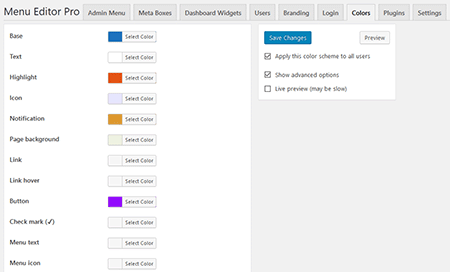
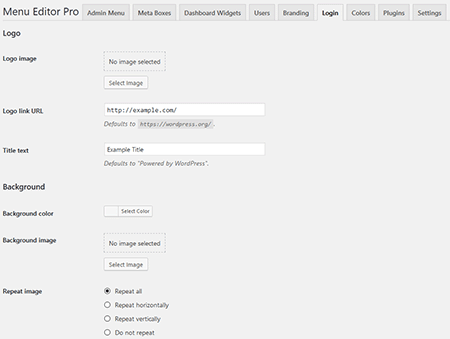
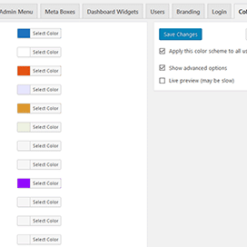
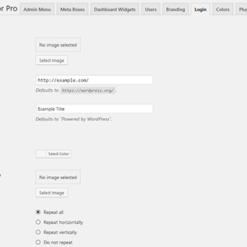
Adds branding options to Admin Menu Editor Pro. It creates three new tabs on the "Settings → Menu Editor Pro" page: "Branding", "Login", and "Colors". Version: 1.3.5 Adds branding options to Admin Menu Editor Pro. It creates three new tabs on the "Settings → Menu Editor Pro" page: "Branding", "Login", and "Colors".

Released on: 2025-09-19

Single License

Club Membership

17,99 / Month Membership

NEW Activate all licensed items with the free Dashboard

EffectIO Dashboard

Discover when we give away free Plugins

Find out when we give items for Free

Hey! 🎉 Monthly emails, tops. Snag exclusive plugins/themes for $0. They go quick, but you might just get a freebie! 😉

30 Days Money Back Guarantee

Guaranteed pre-activated plugins. Most items work immediately after installation. Open a support ticket to obtain the license keys for the ones that ask for activation.

Free support to install and setup on your site.

Introducing AME Branding Add-on 1.3.5: Enhance Your WordPress Brand

Are you looking to elevate your WordPress site’s brand identity? Look no further than AME Branding Add-on 1.3.5, developed by our team of expert WordPress developers. This powerful add-on allows you to customize various aspects of your website’s branding, ensuring your brand is consistently represented across all pages.

Enhance Your Website’s Appearance with AME Branding Add-on 1.3.5

With AME Branding Add-on 1.3.5, you have the flexibility to customize key elements of your WordPress site’s branding, creating a cohesive and professional look. Change the login screen, customize colors, and personalize the WordPress admin area to match your brand’s unique style and identity.

Easy-to-Use Interface with Extensive Features

AME Branding Add-on 1.3.5 features an intuitive and user-friendly interface, allowing you to easily make changes to your branding. Effortlessly edit the login screen, modify colors, add logos, and more, all without any coding knowledge. Our add-on offers a seamless experience that makes branding customization a breeze.

Benefits of Using AME Branding Add-on 1.3.5:

  • Create a consistent brand image across your WordPress site
  • Customize the login screen to match your brand’s style
  • Personalize the WordPress admin area with your own branding elements
  • Choose from a wide range of colors to represent your brand accurately
  • No coding knowledge required – easily make changes with the intuitive interface
  • Effortlessly add logos and other brand assets
  • Compatible with the latest version of WordPress
  • Regular updates available via the EffectIO Dashboard
  • Comes pre-activated for your convenience
  • Enjoy the benefits of GPL code and premium support from EffectIO
  • Save costs with the EffectIO alternative – a cost-saving update channel for plugins
  • Access super deals with discounts ranging from 30% to 90% on EffectIO
  • Responsive and mobile-friendly design
  • Improve user experience with a branded website

Update your WordPress site’s branding easily and efficiently with AME Branding Add-on 1.3.5. Upgrade your website’s look and feel and achieve a seamless brand experience for your visitors. Experience the power of customization and enhance your brand identity today!

Adds branding options to Admin Menu Editor Pro. It creates three new tabs on the “Settings → Menu Editor Pro” page: “Branding”, “Login”, and “Colors”.

1.3.11
  • Fixed a WP 6.8 compatibility issue that could cause a fatal error in the "Colors" tab when saving settings.
1.3.10
  • Fixed the login page background color not being applied.
1.3.9
  • Fixed an error that prevented color scheme settings from being changed in WP 6.7.
1.3.8
  • Fixed the login logo no longer showing up in WP 6.7.
  • Fixed an obscure bug in the "Remove the WordPress logo from the Toolbar" feature where some of the default logo submenus would not be removed when the logo itself was removed.
  • Prevented users from accidentally causing a fatal error by entering an invalid format string in "Custom "Howdy" text".
  • Tested up to WP 6.7.
1.3.7
  • Fixed a number of deprecation notices like "Deprecated: trim(): Passing null to parameter #1 ($string) of type string is deprecated in .../login-page.php on line N".
  • Users can now preview color schemes as long as they have access to the Admin Customizer, even if they don't have the ability to change AME settings in general.
  • Tested up to WP 6.4.1.
1.3.6
  • Fixed a number of PHP 8.2 deprecation notices that were triggered when generating a custom admin color scheme.
1.3.5
  • Fixed an error related to "WordPress update notifications" that could be shown when saving branding settings in Multisite where the settings were previously imported from a non-Multisite site.
1.3.4
  • Fixed existing logo images not showing up in the Toolbar and on the login page.
1.3.3
  • Fixed SVG menu icons becoming invisible when the user sets a custom highlight color in the "Colors" tab but does not choose an icon color.
  • Tested up to WP 6.2.
1.3.2
  • Added some of the branding settings to the "Easy Hide" page.
  • Fixed a bug where color settings were not immediately applied after importing plugin configuration from a file. The settings would show up in the "Colors" tab, but the custom color scheme wouldn't actually work until you clicked the "Save Changes" button.
  • Fixed a conflict with a theme that requires a more recent version of the `scssphp/scssphp` library.
1.3.1
  • Added settings that let you add messages to the top and bottom of the login form. Unlike the "custom message" setting, these new settings display the text inside the login form itself, not above it.
  • Made the "footer text" setting override custom footer text added by other plugins.
  • Fixed a large number of notices and warnings that were thrown by the Leafo/ScssPhp library when running on PHP 7.4.
  • Fixed a few jQuery deprecation warnings.
1.3
  • Added a "login page title" setting that lets you change the title of the login page.
  • Updated some settings page styles to match the admin interface changes introduced in WordPress 5.3.
1.2
  • Added a "set external URL" option to all image settings. This lets you directly enter the image URL instead of selecting an image from the Media Library.
  • Fixed this PHP notice: "login_headertitle is deprecated since version 5.2.0! Use login_headertext instead. Usage of the title attribute on the login logo is not recommended for accessibility reasons."
  • Fixed the "hide admin footer" option not working with some themes that change #wpfooter styles.
  • Fixed a conflict with Hide My WP Pro 3.0 that prevented the "Logo link URL" setting in the "Login" tab from having any effect.
  • Tested up to WordPress 5.2.1.
1.1
  • Added import/export support.
  • The custom admin color scheme now also applies to the Toolbar (a.k.a. Admin Bar) on the site front end.
1.0.1
  • Fixed a bug where the "Lost your password" form would display a message saying "lostpassword" instead of the standard password recovery message.
  • Tested with WP 4.9.5.
1.0
  • Initial release.

Testimonials

Benny O'Brien@benny_obie

The quick response from a friendly team member at @effectioshop honestly caught me off guard.
Nice work!


Stuart Boyle@stuart_boyle

@effectioshop As an eCommerce developer, effectio.org has enabled me to reach higher expectations and my clients are very happy.


22,000+ Users · 180 Countries
Trusted by freelancers, agencies & store owners worldwide

How It Works

Install the free EffectIO Dashboard plugin on your WordPress site. It connects to the EffectIO catalog, detects every premium plugin and theme you own, and gives you a single hub to manage licenses, run updates, and keep your admin panel clean — all from one screen.

⚡

One-Click Updates
Update any premium plugin or theme instantly. No manual downloads, no FTP — just click "Update Now."

🔑

License Manager
View, activate, and manage all your license keys in one place. No hunting through emails or vendor dashboards.

🔇

Notification Blocker
Blocks intrusive admin nag screens, upsell banners, and ads that clutter your dashboard. Re-enable anytime.

🛡️

Vendor Request Control
Prevents redundant license-check pings to third-party servers for items you already manage through EffectIO.

📦

Bulk Activation
Club members can activate all eligible plugins and themes at once — one button, zero hassle.

🆓

100% Free
The Dashboard itself costs nothing. Install it and it auto-activates on your domain — no key required.

Get Started in 3 Steps

1

Download & Install

Download the EffectIO Dashboard zip and install it via Plugins → Add New → Upload.

2

Browse & Activate

Open EffectIO → Catalog in your admin panel. The dashboard auto-detects your installed items and matches them to your licenses.

3

Update & Manage

Keep everything current with one-click updates. Manage licenses, block nag notices, and enjoy a cleaner WordPress experience.

Licenses

All WordPress derivative work is GPL-licensed. Most items are pre-activated and ready to use. Some require an activation key — we provide it with your purchase, and the Dashboard lets you apply it in seconds.

Club members enjoy bulk activation: activate every eligible item at once with a single click. No more entering keys one by one.

✅ Money-Back Guarantee

Every item is tested and ships with full features. If something doesn't work and we can't fix it, you get a full refund. We believe premium tools should be accessible — that's why we offer a low-cost subscription so freelancers, small businesses, and agencies can grow without a large upfront investment.

Manage and Update all your sites

17.99 $ / Month Membership

2900 Plugins and Themes. Install, Update, Activate and Delete any plugin. Unlimited Sites. Best WP Agency Deal.

Clean Items

NGO Mission

Always Updated

SSL Connection











