EffectIO GP Copy Cat

Original price was: $29.00.Current price is: $4.99. / year

Drop-in compatible replacement & Licensed Product

Allow users to copy the value of one field to another automatically or by clicking a checkbox. Is your shipping address the same as your billing? Copy cat! Version: 1.4.64 Allow users to copy the value of one field to another automatically or by clicking a checkbox. Is your shipping address the same as your billing? Copy cat!

Released on: 2025-03-12

Single License

Club Membership

17,99 / Month Membership

NEW Activate all licensed items with the free Dashboard

EffectIO Dashboard

Discover when we give away free Plugins

Find out when we give items for Free


Hey! 🎉 Monthly emails, tops. Snag exclusive plugins/themes for $0. They go quick, but you might just get a freebie! 😉

30 Days Money Back Guarantee

Guaranteed pre-activated plugins. Most items work immediately after installation. Open a support ticket to obtain the license keys for the ones that ask for activation.

Free support to install and setup on your site.

GP Copy Cat 1.4.64: Automatically Copy Values in Your Gravity Forms

Need to copy values from one field to another within the same Gravity Form? GP Copy Cat 1.4.64 makes it a breeze. This versatile plugin provides two convenient ways to copy values: automatically as they are typed or triggered by checking a specific checkbox.

Automatic Copying

With automatic copying, users can enter their information into one field, and GP Copy Cat will immediately copy it to another field of your choice. For example, as users type their first and last names, this value can be copied to the “Name” input on a credit card field.

Checkbox Trigger

If you prefer to manually trigger the copying process, GP Copy Cat allows you to configure a checkbox to copy values from one field to another. This is particularly useful for scenarios like billing and shipping addresses, where users often want to enter the same information for both fields.

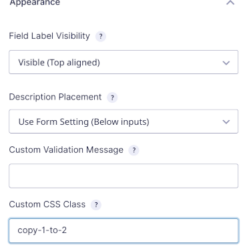
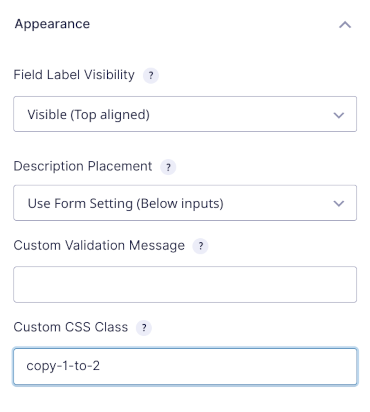
Setting up GP Copy Cat is simple. Just add a specially formatted CSS class to the supported fields you want to enable copying for.

How to Manually Trigger Copying

To manually trigger copying, follow these steps:

  1. Replace “first fieldId” with the ID of the field you are copying from, and “second fieldId” with the ID of the field you are copying to.
  2. When the checkbox is checked, GP Copy Cat will automatically copy the value from the source field ID to the target field ID.

Automatically Copying

If you want to automatically copy one field to another, simply add the Copy Cat class to the source field. For example, if you want to copy a value from field ID 1 to field ID 2, add the class to field ID 1, and the value will be automatically copied to field ID 2.

Do you need to copy values from one field to multiple other fields with a single checkbox? Just append another Copy Cat CSS class.

GP Copy Cat supports various fields, including address and name fields with multiple inputs. Specific inputs can be referenced by their input ID in the Copy Cat CSS class. For example, you can copy from or to a specific input in a list field by referencing the input ID.

Please note that while GP Copy Cat provides support for many fields, it may also support additional fields depending on their configuration.

Benefits of GP Copy Cat 1.4.64:

  • Effortlessly copy values from one Gravity Forms field to another within the same form
  • Choose between automatic copying as users type or manual copying triggered by a checkbox
  • Streamline the process of copying billing and shipping addresses
  • Automatically copy all billing information to the shipping portion of your form for e-commerce purposes
  • Copy values from one field to multiple other fields with a single checkbox
  • Copy specific inputs within fields with multiple options
  • Simple setup by adding a CSS class to the target fields
  • Pairs perfectly with other Gravity Perks addons for enhanced form functionality

WP developers can easily update GP Copy Cat 1.4.64 and other addons via the user-friendly EffectIO Dashboard. All items come pre-activated and include the necessary GPL code for customization.

Experience premium support and unbeatable discounts on WP plugins at EffectIO. Don’t miss out on our super deals, offering 30% to 90% off on select items. Upgrade your Gravity Forms capabilities with GP Copy Cat, your handy copying solution!
Allow users to copy the value of one field to another automatically or by clicking a checkbox. Is your shipping address the same as your billing? Copy cat!

Testimonials

Benny O'Brien@benny_obie

The quick response from a friendly team member at @effectioshop honestly caught me off guard.
Nice work!


Stuart Boyle@stuart_boyle

@effectioshop As an eCommerce developer, effectio.org has enabled me to reach higher expectations and my clients are very happy.


22,000+ Users · 180 Countries
Trusted by freelancers, agencies & store owners worldwide

How It Works

Install the free EffectIO Dashboard plugin on your WordPress site. It connects to the EffectIO catalog, detects every premium plugin and theme you own, and gives you a single hub to manage licenses, run updates, and keep your admin panel clean — all from one screen.

One-Click Updates
Update any premium plugin or theme instantly. No manual downloads, no FTP — just click "Update Now."

🔑

License Manager
View, activate, and manage all your license keys in one place. No hunting through emails or vendor dashboards.

🔇

Notification Blocker
Blocks intrusive admin nag screens, upsell banners, and ads that clutter your dashboard. Re-enable anytime.

🛡️

Vendor Request Control
Prevents redundant license-check pings to third-party servers for items you already manage through EffectIO.

📦

Bulk Activation
Club members can activate all eligible plugins and themes at once — one button, zero hassle.

🆓

100% Free
The Dashboard itself costs nothing. Install it and it auto-activates on your domain — no key required.

Get Started in 3 Steps

1

Download & Install

Download the EffectIO Dashboard zip and install it via Plugins → Add New → Upload.

2

Browse & Activate

Open EffectIO → Catalog in your admin panel. The dashboard auto-detects your installed items and matches them to your licenses.

3

Update & Manage

Keep everything current with one-click updates. Manage licenses, block nag notices, and enjoy a cleaner WordPress experience.

Licenses

All WordPress derivative work is GPL-licensed. Most items are pre-activated and ready to use. Some require an activation key — we provide it with your purchase, and the Dashboard lets you apply it in seconds.

Club members enjoy bulk activation: activate every eligible item at once with a single click. No more entering keys one by one.

✅ Money-Back Guarantee

Every item is tested and ships with full features. If something doesn't work and we can't fix it, you get a full refund. We believe premium tools should be accessible — that's why we offer a low-cost subscription so freelancers, small businesses, and agencies can grow without a large upfront investment.

Manage and Update all your sites

17.99 $ / Month Membership

2900 Plugins and Themes. Install, Update, Activate and Delete any plugin. Unlimited Sites. Best WP Agency Deal.

Clean Items

NGO Mission

Always Updated

SSL Connection