EffectIO GravityView – Multiple Forms 0.5.1

Original price was: $70.00.Current price is: $9.99. / year

Drop-in compatible replacement & Licensed Product

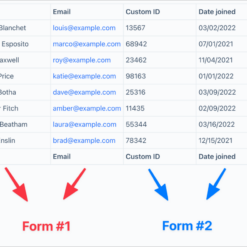
Display values from multiple forms in a single View. Version: 0.3.4 Display values from multiple forms in a single View.

Released on: 2025-09-19

Single License

Club Membership

17,99 / Month Membership

NEW Activate all licensed items with the free Dashboard

EffectIO Dashboard

Discover when we give away free Plugins

Find out when we give items for Free

Hey! 🎉 Monthly emails, tops. Snag exclusive plugins/themes for $0. They go quick, but you might just get a freebie! 😉

30 Days Money Back Guarantee

Guaranteed pre-activated plugins. Most items work immediately after installation. Open a support ticket to obtain the license keys for the ones that ask for activation.

Free support to install and setup on your site.

GravityView – Multiple Forms Plugin

GravityView – Multiple Forms 0.3.4 is a powerful WordPress plugin that allows you to easily display, filter, and manage multiple Gravity Forms submissions on your website. This plugin is designed to enhance your website’s functionality by providing a seamless integration with Gravity Forms.

At EffectIO, we offer an alternative cost-saving update channel for plugins like GravityView. Our platform allows you to access the latest versions of plugins, including GravityView, directly from the EffectIO Dashboard. Plus, all items come pre-activated, so you can start using them right away.

Key Features:

  • Display multiple Gravity Forms submissions with ease 📋
  • Effortlessly filter and search through form entries 🔍
  • Manage and edit form submissions directly from your website’s frontend ✏️
  • Customize the appearance of your forms to match your website’s design 🎨
  • One-click installation and setup process ⚙️
  • Seamless integration with Gravity Forms ✨
  • Responsive and mobile-friendly designs for optimal user experience 📱
  • Advanced sorting and pagination options for easy navigation through form submissions 📊
  • Export form entries to CSV or Excel files for further analysis 📈
  • Real-time updates of form submissions for instant updates on your website ⏰
  • Efficiently manage and organize your form entries by status and priority 📑
  • Achieve GDPR compliance by handling personal data securely and responsibly 🔒
  • Improve website performance with optimized code 🚀
  • Premium support from the EffectIO team, ensuring you get the help you need 💡
  • GPL code, empowering you to customize and extend the plugin according to your needs 🔧
  • Benefit from EffectIO’s super deals, offering discounts ranging from 30 to 90 percent for premium plugins 💰

Upgrade Your WordPress Experience with GravityView

Unlock the full potential of Gravity Forms and seamlessly manage multiple form submissions on your WordPress website with GravityView – Multiple Forms Plugin. With the power of GravityView, you can effortlessly display your form submissions, filter and search through them, and even edit them directly from your frontend. Take control of your form management process while achieving GDPR compliance and personalizing the appearance of your forms to match your website’s design.

Get the latest version of GravityView and many other premium plugins through the EffectIO Dashboard. Benefit from our cost-saving update channel and enjoy the convenience of pre-activated items. Additionally, take advantage of our super deals, offering discounts of 30 to 90 percent on premium plugins. Experience exceptional performance, premium support, and the freedom to customize with the GPL code of GravityView – Multiple Forms Plugin.
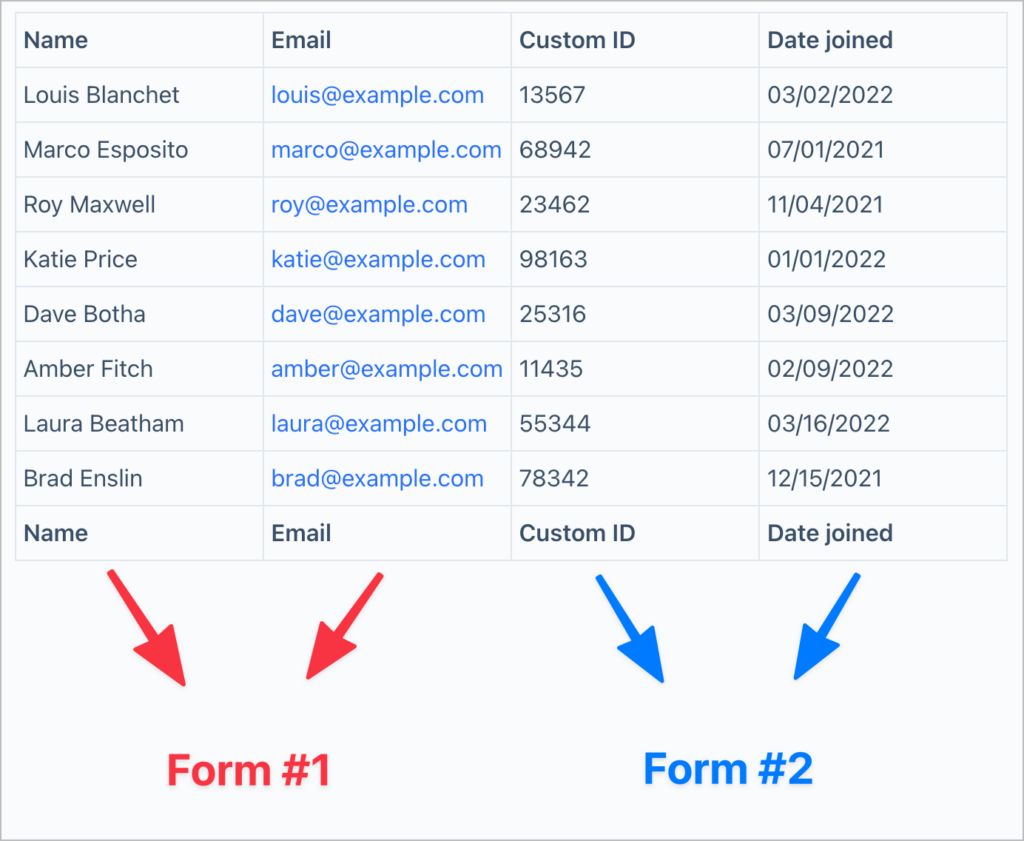
Display values from multiple forms in a single View.

0.5.1
  • This update fixes sorting issues affecting joined data in Views. #### 🐛 Fixed
  • Sorting Views by fields from joined forms, including the field used to create the join, was not working.
0.5.0
  • This release introduces an option to control the visibility of unapproved joined entries, refactors join logic for better filtering, and resolves issues with missing or incorrectly displayed joined entries. #### 🚀 Added
  • New 'Show only approved joined entries' setting in the View editor to control the display of unapproved or disapproved joined entries. #### ✨ Improved
  • Reworked join logic for more flexible filtering.
  • Multiple join conditions on the same form are now processed within a single join, ensuring all conditions apply together. #### 🐛 Fixed
  • Some related joined entries were missing from the View.
  • Unapproved joined entries were incorrectly displayed in the View. #### 💻 Developer Updates
  • Added: `gk/multiple-forms/query/handler/join/conditions` filter to modify conditions for a joined form query.
0.4.0
  • This release adds support for different View types in the View editor and fixes issues with sorting and missing parent form entries. #### 🚀 Added
  • Support for using different View types in the Multiple Entries and Single Entry layouts (requires GravityView 2.26.1 or newer).
  • Compatibility with the upcoming Layout Builder View type in GravityView. #### 🐛 Fixed
  • Trashed entries in a joined form prevented related entries from the parent form from displaying in the View.
  • Sorting on joined fields did not work properly.
  • Sorting by one field (column) would instead sort by another.
0.3.8
  • Fixed: Fatal error when editing fields with GravityEdit if the View uses joined forms
0.3.7
  • Fixed: Missing option to add fields from joined forms in the View editor when using GravityView 2.19.4 or newer
0.3.6
  • Fixed: Performance issue caused by Multiple Forms modifying database queries, even when not needed
  • Fixed: Linking to the Single Entry from a View with joins now works as expected (with joined entry IDs separated by commas)
0.3.5
  • Fixed: Fatal error that prevents the ability to create a new View
0.3.4
  • Fixed: Fatal error when running less than PHP 8.0
0.3.3
  • Improved: Display an admin notice when GravityView or Gravity Forms are not installed and activated
  • Fixed: `'GravityKit\MultipleForms\GF_Query_JSON_Literal' not found` fatal error when performing a search on a View
  • Fixed: Joining two Views using "any form field" joins can cause fatal errors
0.3.2
  • Fixed: Fatal error when GravityView is not activated (introduced in Version 0.3)
0.3.1
  • Fixed: PHP warning
0.3
  • Fixed: Fatal error related to namespacing
0.3
  • Fixed: Fatal error when activating the extension
0.3
  • Added: You can now sort Views by joined form fields
  • Modified: Minimum version of PHP bumped to 7.2 to match all other GravityKit plugins
  • Fixed: When field ids across joined forms were the same, values could be pulled from the wrong form
  • Fixed: View editor became unusable when a joined form was trashed or deleted
  • Fixed: When "Show only approved entries" was enabled for a View, it was behaving as if "Strict Entry Match" were also enabled
0.2
  • Fixed: Conflict preventing Yoast SEO scripts from running on Views
0.2
  • Added: Allow joining forms on field meta and properties
  • Adds support for [Nested Forms by GravityWiz](https://gravitywiz.com/?ref=63)!
  • Added: Allow joining multiple forms on entry meta (non-field data)
  • Added: `gravityview_multiple_forms/allow_join_on` filter for developers to modify the list of permissible meta and properties
  • Added: Italian and Persian translations (Thanks, Farhad P.!)
  • Improved: Do not require a published View to display join conditions
  • Modified: Now requires GravityView 2.6 or newer
  • Fixed: Fatal error when using Gravity Forms 2.2 or older
  • Fixed: "Cannot read property 'title' of undefined" JavaScript error
0.1
  • Fixed: PHP Warning: `Declaration of GF_Patched_Query::_prime_joins() should be compatible with GF_Query::_prime_joins()`
0.1
  • Liftoff!

Testimonials

Benny O'Brien@benny_obie

The quick response from a friendly team member at @effectioshop honestly caught me off guard.
Nice work!


Stuart Boyle@stuart_boyle

@effectioshop As an eCommerce developer, effectio.org has enabled me to reach higher expectations and my clients are very happy.


22,000+ Users · 180 Countries
Trusted by freelancers, agencies & store owners worldwide

How It Works

Install the free EffectIO Dashboard plugin on your WordPress site. It connects to the EffectIO catalog, detects every premium plugin and theme you own, and gives you a single hub to manage licenses, run updates, and keep your admin panel clean — all from one screen.

⚡

One-Click Updates
Update any premium plugin or theme instantly. No manual downloads, no FTP — just click "Update Now."

🔑

License Manager
View, activate, and manage all your license keys in one place. No hunting through emails or vendor dashboards.

🔇

Notification Blocker
Blocks intrusive admin nag screens, upsell banners, and ads that clutter your dashboard. Re-enable anytime.

🛡️

Vendor Request Control
Prevents redundant license-check pings to third-party servers for items you already manage through EffectIO.

📦

Bulk Activation
Club members can activate all eligible plugins and themes at once — one button, zero hassle.

🆓

100% Free
The Dashboard itself costs nothing. Install it and it auto-activates on your domain — no key required.

Get Started in 3 Steps

1

Download & Install

Download the EffectIO Dashboard zip and install it via Plugins → Add New → Upload.

2

Browse & Activate

Open EffectIO → Catalog in your admin panel. The dashboard auto-detects your installed items and matches them to your licenses.

3

Update & Manage

Keep everything current with one-click updates. Manage licenses, block nag notices, and enjoy a cleaner WordPress experience.

Licenses

All WordPress derivative work is GPL-licensed. Most items are pre-activated and ready to use. Some require an activation key — we provide it with your purchase, and the Dashboard lets you apply it in seconds.

Club members enjoy bulk activation: activate every eligible item at once with a single click. No more entering keys one by one.

✅ Money-Back Guarantee

Every item is tested and ships with full features. If something doesn't work and we can't fix it, you get a full refund. We believe premium tools should be accessible — that's why we offer a low-cost subscription so freelancers, small businesses, and agencies can grow without a large upfront investment.

Manage and Update all your sites

17.99 $ / Month Membership

2900 Plugins and Themes. Install, Update, Activate and Delete any plugin. Unlimited Sites. Best WP Agency Deal.

Clean Items

NGO Mission

Always Updated

SSL Connection