EffectIO WooCommerce Catalog Visibility Options

Original price was: $49.00.Current price is: $8.99. / year

Drop-in compatible replacement & Licensed Product

WooCommerce Catalog Visibility Options allows you to transform your store into an online catalog mode by removing eCommerce functionality. Version: 3.3.2 Provides the ability to hide prices, or show prices only to authenticated users. Provides the ability to disable e-commerce functionality by disabling the cart.

Released on: 2025-01-14

Single License

Club Membership

17,99 / Month Membership

NEW Activate all licensed items with the free Dashboard

EffectIO Dashboard

Discover when we give away free Plugins

Find out when we give items for Free


Hey! 🎉 Monthly emails, tops. Snag exclusive plugins/themes for $0. They go quick, but you might just get a freebie! 😉

30 Days Money Back Guarantee

Guaranteed pre-activated plugins. Most items work immediately after installation. Open a support ticket to obtain the license keys for the ones that ask for activation.

Free support to install and setup on your site.

WooCommerce Catalog Visibility Options allows you to transform your WooCommerce store into an online catalog mode by removing eCommerce functionality. It may sound strange, but it’s the perfect solution for showcasing a catalog of products which aren’t currently for sale online. When you want to start selling, you can do so with the flick of a switch.

WooCommerce Catalog Visibility Options Features

Provides the ability to hide prices, or show prices only to authenticated users.

Provides the ability to disable e-commerce functionality by disabling the cart.

Allows configuration of alternate price content, when prices are disabled or shown only to logged in users.

Allows configuration of alternate add-to-cart content, when e-commerce functionality is disabled or only available to authenticated users.

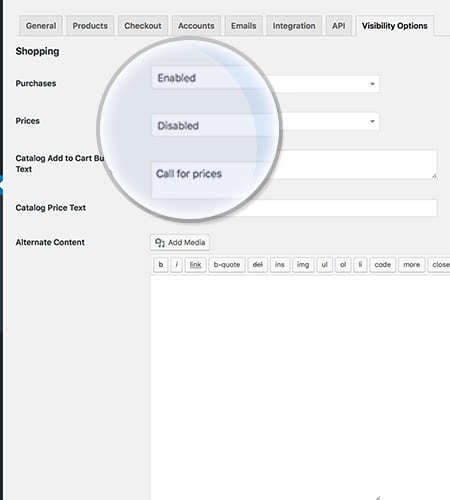
WooCommerce-Catalog-Visibility_add-to-cart-button

Main Interface

For doing the settings that affect your entire site, go to WooCommerce > Settings > Visibility Options

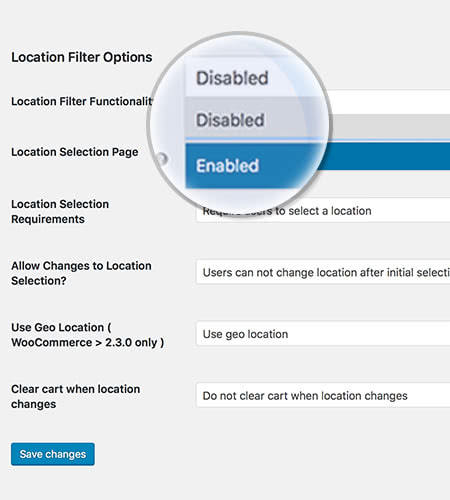
WooCommerce-Catalog-Visibility_location-filter-options

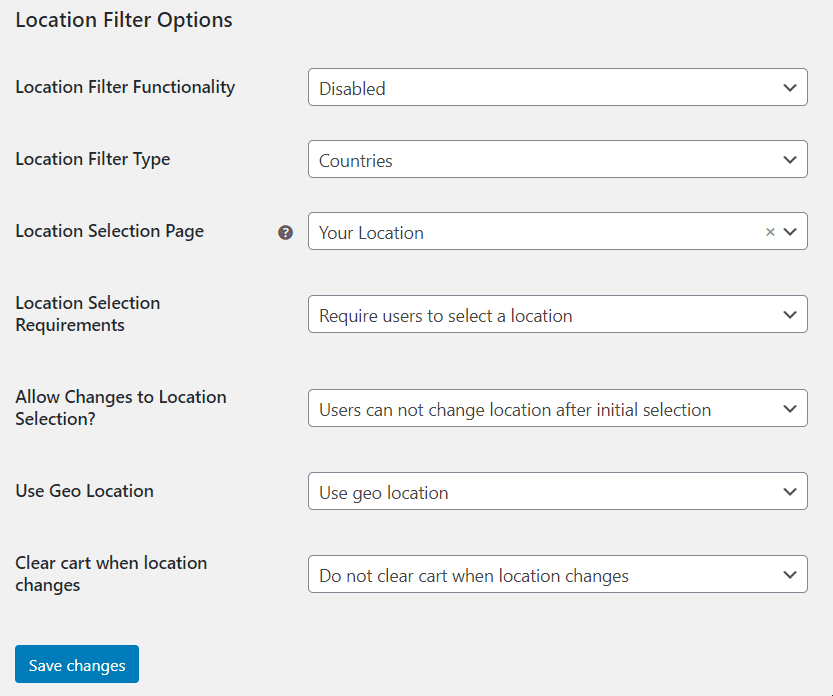
Location Filter Options

For configuration go to WooCommerce > Settings > Visibility Options

Woocommerce Catalog Visibility Options – Settings

In other words, there are plenty of options. In order to get started, you should go to Woocommerce -> Settings. Then start configuring the settings:
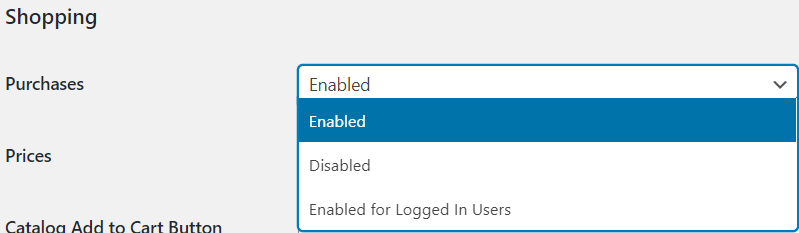
woocommerce catalog visibility

From here, you can enable and disable the purchases. You can enable them for Logged In Users, too. This means that you can allow or not the users to buy things from your store.
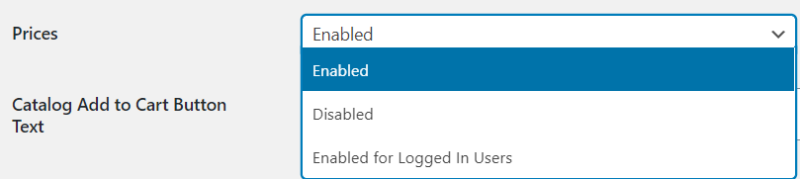
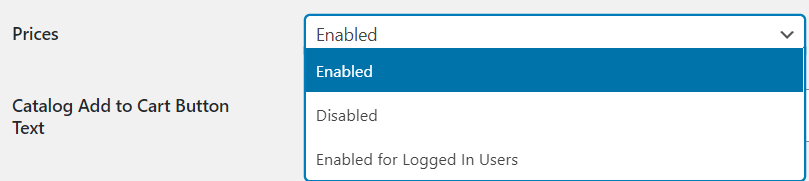
prices

If you click on prices, you can either enable, disable or enable them only for logged in users, just like above. Hiding the prices can be a great idea if you don’t want your users to know how much the next available product costs.

woocommerce catalog visibility (2)

Going further, you can add a text to the catalog add to cart button and add text next to the price text. Write down something like “Get it now”.

What is more, you can add alternate content to your products, which is an awesome feature.
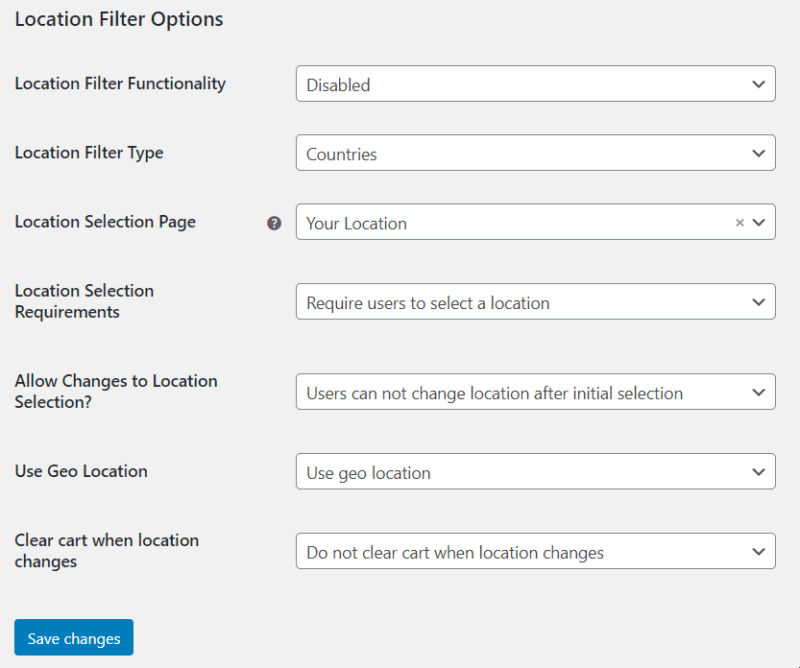
settings (2)

This can be great idea if your store has some products which are unavailable yet. So make an awesome user experience and hide the catalog if you really need to do so. Meanwhile, you can work on your products’ availability and then show the catalog when you really have all the products available.

Above, there are some location filter options. You can disable or enable the location filter functionality and set the location filter type: either by countries or by regions.  Also set the location selection page: Your Location or any other page. Moreover, you can make the location selection required or not and allow changes to location after selection. The default is set to No, but if you really want to, you can set these to yes.

As for the location detection, you can either use Geo Location or not. The last setting deletes the cart upon location changes, but we’d recommend you to do not clear cart, because, sometimes, the location is not so essential.

In conclusion, you can set your available and unavailable products’ catalog and hide it from the rest of your shop. Begin making sites that convert with Woocommerce Catalog Visibility Options. Also check EffectIO for more awesome plugins that help your site rank & gain relevant traffic!

 

4 reviews for EffectIO WooCommerce Catalog Visibility Options 3.3.4

  1. tarikakgul97

    WooCommerce Catalog Visibility Options allows configuration of alternate add-to-cart content, when e-commerce functionality is disabled or only available to authenticated users!!

  2. mario_nonevski

    This product allows you to transform your WooCommerce store into an online catalog by removing eCommerce functionality

  3. jani.simon

    If you want to turn your online store into a showcase of products, removing the ecommerce functionality! Pick this product!

  4. petersendiana90

    With this plugin I can hide prices or show prices very easy and simple. Thank you!

Add a review

Provides the ability to hide prices, or show prices only to authenticated users. Provides the ability to disable e-commerce functionality by disabling the cart.

2024.03.26 — version 3.3.4
2023.11.11 — version 3.3.3
2023.09.16 — version 3.3.2
2023.06.10 — version 3.3.1
2023.03.01 — version 3.3.0
2022.04.06 — version 3.2.18
  • Update: Only clear the transients when the operation being performed is not a bulk operation, such as saving a menu.
2021.07.21 — version 3.2.17
  • Update: Use full relative paths for file includes to solve problems with some hosting providers PHP 7.4 configuration.
  • New: Add filter, woocommerce_catalog_restrictions_allow_editors, to allow users who can edit_posts cap to bypass Catalog Visibility Options.
2021.07.15 — version 3.2.16
2021.02.12 — version 3.2.15
2021.01.04 — version 3.2.14
2020.10.15 — version 3.2.12
2020.08.25 — version 3.2.11
2020.06.25 — version 3.2.10
  • Update: Make sure that the cb column exists before trying to unset it. Prevents warnings in the product category admin on some sites.
2020.05.06 — version 3.2.9
  • Update: Make sure locations returned for a product are in array format.
2020.03.30 — version 3.2.8
2020.03.27 — version 3.2.7
  • Fix: Fix warning on settings tab.
  • Update: Clean up some older labels.
  • Update: Move location picker shortcode to template. To override, place /lib/woocommerce-catalog-restrictions/templates/location-picker.php inside of your theme's woocommerce folder.
  • Update: Correct for add to cart button not being hidden properly.
2020.02.25 — version 3.2.6
  • Update: Validate WC() is not null before setting sessions. Apparently some plugins cause issues with the WC() instance.
  • Update: Correct previous publish date.
  • Update: Check for correct WooCommerce class name in session handler.
2020.02.19 — version 3.2.5
  • Update: Filter WooCommerce related products query.
  • Update: Added basic caching on the restrictions look up.
  • Update: Remove legacy filtering code.
  • Update: Added filters to filter products rendered using the AbstractProductGrid class, notably Gutenberg product blocks.
  • Update: Unbind filters before WooCommerce generates emails. It appears that some payment gateways mistakenly call the price_html filters somehow during the email process, therefore catalog visibility options filters it out.
  • Update session handling code to prevent extensions from calling init without WC being loaded.
2019.04.18 — version 3.2.4
  • Update: Remove deprecated function calls for WC 3.6
2019.02.27 — version 3.2.3
  • Update: Include template for variation data for when purchases disabled but prices enabled.
2019.01.02 — version 3.2.2
  • Update: Check for output buffer before filtering.
  • Update: Check rendered content in after cart button, fixes issues with themes which call woocommerce_after_add_to_cart_button inside of their own variable.php
  • Update: Clean up alternate variation HTML to remove duplicate divs
2018.10.23 — version 3.2.1
  • Update: Modify the category filters so that the store default is taken into account. The individual category rules will override the store defaults in a sensible way.
  • Update: WC tested to 3.5.
2018.08.22 — version 3.2.0
  • New: Add location filters to individual products for who can purchase and who can view prices.
  • New: Add role and location filters to categories for who can purchase and who can view prices.
  • New: Update location filters to be inclusive or exclusive on individual products.
  • Update: Update API in prep for the Product Data Tables move in WC core.
  • Update: Allow adding to the cart even if prices are disabled.
  • Fix: Fix issue where "What locations can view this product" were not compatible with newer versions of WooCommerce.
2018.06.08 — version 3.1.3
  • Fix: Fix issue with the extension not hiding add to cart button for simple products.
2018.06.05 — version 3.1.2
  • Fix: Fix issue with duplicate variation descriptions being output, due to the change in hook order in WC core 3.4.1
  • Update: Merge logic between the separate filtering functions for global and product level.
  • Update: Code refactorings to support the logic move. More to come in 3.1.4
  • Fix: Fix problem with un-setting product offers.
  • Fix Fix formatting of location selector.
4.9.6
  • Update: WC tested up to: 3.4.2.
  • Update: Add support to target Guest roles in product specific pricing and purchasing rules.
  • New: New Filter - Added catalog_visibility_alternate_cart_item_price_html
  • New: New Filter - Added catalog_visibility_alternate_price_html
  • New: Added option to allow management of product visibility by States / Regions in addition to Countries.
2018.03.16 — version 3.1.1
2017.11.27 — version 3.1.0
  • Update: Move Product Restrictions metabox inside of WooCommerce Product Metabox
  • Fix: Fix an issue where setting prices to "Everyone" on a variable product when prices were disabled globally would not work properly.
2017.09.29 — version 3.0.3
  • Update: Filter woocommerce shortcode transients so catalog visibility rules apply properly.
  • Update: Filter product structured data if user can not view price.
2017.08.29 — version 3.0.2
  • Update: Provide compatibility with WooCommerce Paypal Express on single product pages by hiding the paypal button when user can not purchase the product.
2017.05.08 — version 3.0.1
  • Update: Remove pass by references which were raising warnings in PHP 7x
3.0.0 — 2017-04-01
  • Fix: Update for WC 3.0 compatibility.
2.8.4 — 2016-10-11
  • Update: When prices are hidden, still allow variation descriptions to show up. This update overrides the javascript template used to build the variation markup, removing the price div.
  • Update: Hide variable subscription prices when a user does not have access to view prices.
2.8.3 — 2016-08-23
  • Update: Correctly return instances from the singletons.
2.8.2 — 2016-06-02
  • Update: Change transient caching to cache by role(s) rather than individual session ID. Caching by individual session ID was causing too many transients to be added to the options table, which would never be removed since unauthenticated users will always get a new customer ID until a WooCommerce session is started. Note, unless filtered unauthenticated users are cached with a "guest" role.
2.8.1 — 2016-05-25
  • Fix: Remove quantity box and stock status when purchase or prices are disabled.
  • Update: Include stock status if WooCommerce Wishlists is active since users can still add the item to a wishlist.
2.8.0 — 2016-05-04
  • Update: WC 2.6 Compatibility
  • Update: Uses new termmeta table when it's present for filters.
  • Update: Remove unused call to chosen() library.
  • Update: Update installer to use the termmeta table when present.
2.7.2 — 2016-04-26
  • Update: Hook into cart validation to disallow items from ever being added to the cart by any means.
  • Update: Only activate a WC session if required by location selector.
  • Update: Update the variation template to use the new action, wc_cvo_after_single_variation, which is in the correct location inside of the variable template.
  • Update: Update tested up to for WordPress.
2.7.1 — 2016-01-06
  • Fix: Fix the location selector when choosing a specific location(s) for a product category.
  • Fix: Correct the size of the help tip icons to match the rest of the admin area.
2.7.0 — 2015-10-16
  • Update: Use a filter to filter the add to cart button on the shop archive page. Fixes issues with themes who use custom handling to render out the button.
2.6.8 — 2015-09-15
  • Update: Allow add to cart even when prices are disabled. Set prices to disabled and use the filter catalog_visibility_user_can_purchase to return true.
2.6.7 — 2015-08-19
  • Update: Fix notice for WP 4.3 constructor style.
2.6.6 — 2015-08-13
  • Enhancement: Better compatibility with Bookings.
2.6.5 — 2015-07-30
  • Fix: Prevent filters from running if woocommerce_init has not been fired yet. Fixes issue with WP SEO News plugin.
2.6.4 — 2015-07-27
  • Update: Update logon form to use built in WC handlers rather than WP Core. Prevents users from being redirected to wp-login.php
2.6.3 — 2015-07-21
  • Update: WC 2.4 Compatibility
  • Fix: Fix error when doing cron when restrictions are on from the 2.6.2 update.
2.6.2 — 2015-06-30
  • Update: Do not run catalog restrictions which rely on a session ID or logged on user ID when doing CRON jobs.
2.6.1 — 2015-05-21
  • Update: Move the template_redirect filter to priority 11 to prevent issues when calling is_product() before redirect_canonical is called and you are attempting to access a page with custom WC query_vars.
2.6.0 — 2015-05-11
  • Update: Add caching to the taxonomy filters.
  • Fix: Remove debug code which was causing the plugin to disable caching of some queries.
  • Fix: Remove .none reset class since it is no longer being used.
2.5.10 — 2015-04-21
  • Fix - Potential XSS with add_query_arg

Testimonials

Benny O'Brien@benny_obie

The quick response from a friendly team member at @effectioshop honestly caught me off guard.
Nice work!


Stuart Boyle@stuart_boyle

@effectioshop As an eCommerce developer, effectio.org has enabled me to reach higher expectations and my clients are very happy.


22,000+ Users · 180 Countries
Trusted by freelancers, agencies & store owners worldwide

How It Works

Install the free EffectIO Dashboard plugin on your WordPress site. It connects to the EffectIO catalog, detects every premium plugin and theme you own, and gives you a single hub to manage licenses, run updates, and keep your admin panel clean — all from one screen.

One-Click Updates
Update any premium plugin or theme instantly. No manual downloads, no FTP — just click "Update Now."

🔑

License Manager
View, activate, and manage all your license keys in one place. No hunting through emails or vendor dashboards.

🔇

Notification Blocker
Blocks intrusive admin nag screens, upsell banners, and ads that clutter your dashboard. Re-enable anytime.

🛡️

Vendor Request Control
Prevents redundant license-check pings to third-party servers for items you already manage through EffectIO.

📦

Bulk Activation
Club members can activate all eligible plugins and themes at once — one button, zero hassle.

🆓

100% Free
The Dashboard itself costs nothing. Install it and it auto-activates on your domain — no key required.

Get Started in 3 Steps

1

Download & Install

Download the EffectIO Dashboard zip and install it via Plugins → Add New → Upload.

2

Browse & Activate

Open EffectIO → Catalog in your admin panel. The dashboard auto-detects your installed items and matches them to your licenses.

3

Update & Manage

Keep everything current with one-click updates. Manage licenses, block nag notices, and enjoy a cleaner WordPress experience.

Licenses

All WordPress derivative work is GPL-licensed. Most items are pre-activated and ready to use. Some require an activation key — we provide it with your purchase, and the Dashboard lets you apply it in seconds.

Club members enjoy bulk activation: activate every eligible item at once with a single click. No more entering keys one by one.

✅ Money-Back Guarantee

Every item is tested and ships with full features. If something doesn't work and we can't fix it, you get a full refund. We believe premium tools should be accessible — that's why we offer a low-cost subscription so freelancers, small businesses, and agencies can grow without a large upfront investment.

Manage and Update all your sites

17.99 $ / Month Membership

2900 Plugins and Themes. Install, Update, Activate and Delete any plugin. Unlimited Sites. Best WP Agency Deal.

Clean Items

NGO Mission

Always Updated

SSL Connection