EffectIO WooCommerce FreshBooks

Original price was: $79.00.Current price is: $12.99. / year

Drop-in compatible replacement & Licensed Product

WooCommerce FreshBooks provides high performance and tons of flexibility in synchronizing your WooCommerce shop with FreshBooks. Version: 3.14.1

Goodbye, Freshbooks! 🎉👋

In the spirit of continuous improvement, WooCommerce is retiring the Freshbooks integration. Examining, refining, and streamlining our product offering is of paramount importance. Rest assured, we provide the best possible selection of themes and extensions for your online store. Explore our latest offerings or contact our support team for assistance. 😊🛍️

Released on: 2020-01-10

Single License

Club Membership

17,99 / Month Membership

NEW Activate all licensed items with the free Dashboard

EffectIO Dashboard

Discover when we give away free Plugins

Find out when we give items for Free


Hey! 🎉 Monthly emails, tops. Snag exclusive plugins/themes for $0. They go quick, but you might just get a freebie! 😉

30 Days Money Back Guarantee

Guaranteed pre-activated plugins. Most items work immediately after installation. Open a support ticket to obtain the license keys for the ones that ask for activation.

Free support to install and setup on your site.

WooCommerce FreshBooks extension allows you to automatically email PDF invoices to the customer while also creating new customers as new clients in Freshbooks.

Completely Sync WooCommerce and Freshbooks

WooCommerce FreshBooks provides high performance and tons of flexibility in synchronizing your WooCommerce shop with Freshbooks. Want to only invoice some orders manually? Easy. Need to create invoices for all orders? Do it automatically! Improve your Freshbooks reporting by tying Freshbooks items to your WooCommerce products and by syncing payments between WooCommerce and Freshbooks.

WooCommerce FreshBooks Features:

  • Easily create new clients in Freshbooks when customers order from your WooCommerce store
  • Alternatively, invoice all orders under a default client NEW
  • Option to automatically generate invoices for all orders, or manually create invoices
  • Option to automatically send invoices via email or snail mail for new orders
  • Bulk actions to create, send, or add payments to invoices
  • Sync WooCommerce order numbers and Freshbooks invoice numbers
  • Include shipping and taxes as line items with relevant codes in invoices
  • Automatically sync payments between your shop’s WooCommerce orders and Freshbooks invoices
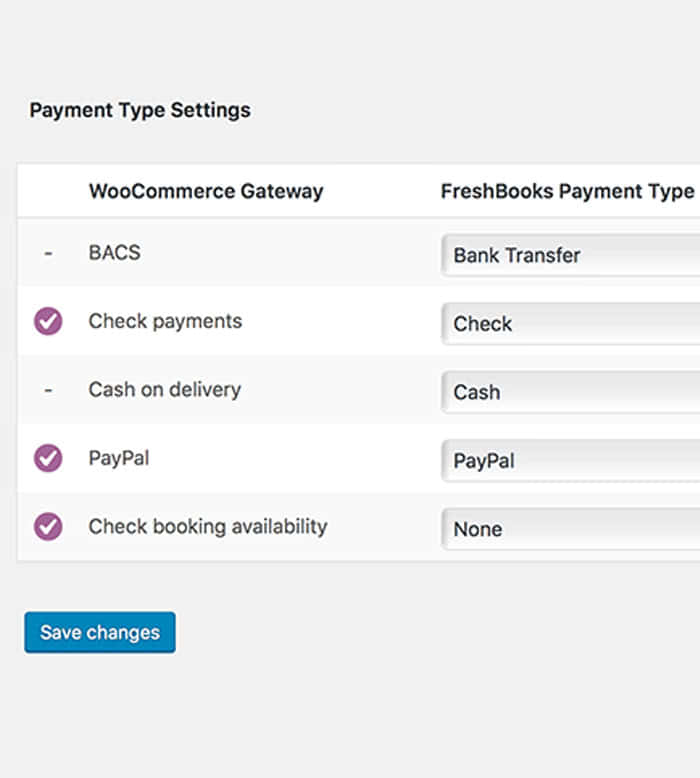
  • Map Freshbooks payment types for the WooCommerce payment methods you offer NEW
  • Link WooCommerce products to Freshbooks items for better reporting
  • Supports WooCommerce Subscriptions to generate invoices for each renewal order.
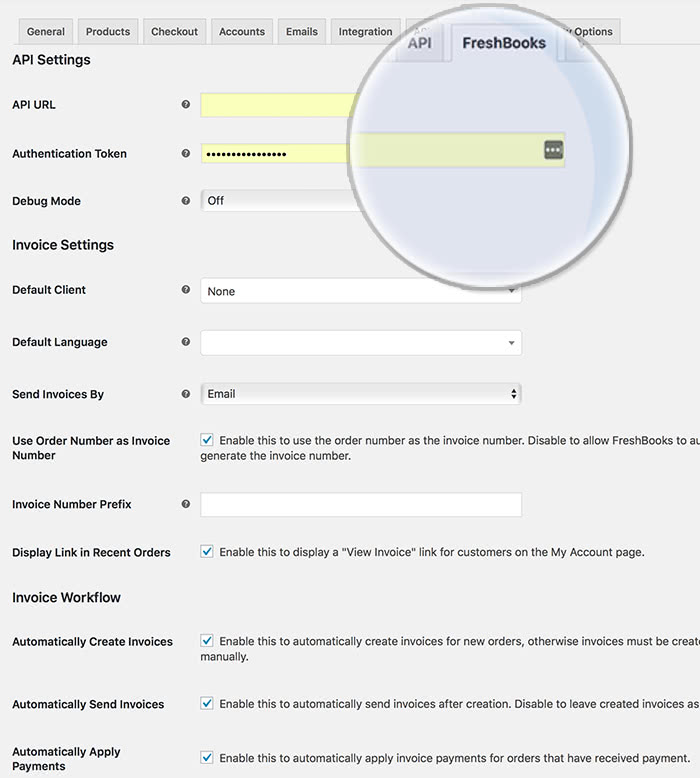
WooCommerce-Freshbooks_main-interface

Extension Settings

WooCommerce-Freshbooks_payment-type-otions

Payment Type Settings

Version

3.2.3

Release Date

7/6/2016

Reviews

There are no reviews yet.

Be the first to review “EffectIO WooCommerce FreshBooks 3.14.1”

Goodbye, Freshbooks! 🎉👋

In the spirit of continuous improvement, WooCommerce is retiring the Freshbooks integration. Examining, refining, and streamlining our product offering is of paramount importance. Rest assured, we provide the best possible selection of themes and extensions for your online store. Explore our latest offerings or contact our support team for assistance. 😊🛍️

2020.01.02 — version 3.14.1
  • Misc - Add support for WooCommerce 3.9
2019.10.21 — version 3.14.0
  • Misc - Add support for WooCommerce 3.8
2019.08.12 — version 3.13.0
  • Misc - Add support for WooCommerce 3.7
  • Misc - Remove support for WooCommerce 2.6
  • Misc - Require PHP 5.6+
2019.04.03 — version 3.12.1
  • Misc - Add support for WooCommerce 3.6
  • Misc - Require PHP 5.4+
2019.02.12 — version 3.12.0
  • Misc - Drop support for PHP v5.2: PHP v5.3 is now the minimum supported version
5.3 — Update the SkyVerge Plugin Framework to version 5.3
2018.11.29 — version 3.11.4
  • Tweak - Add setting to send line items inclusive of tax
2018.10.16 — version 3.11.3
  • Misc - Add support for WooCommerce 3.5
2018.05.23 — version 3.11.2
  • Misc - Add support for WooCommerce 3.4
2018.02.07 — version 3.11.1
  • Ensure order table action icons are displayed correctly in WooCommerce 3.3+
2018.01.23 — version 3.11.0
  • Tweak - Add Freshbooks invoice status to order preview modal
  • Misc - Add support for WooCommerce 3.3
  • Misc - Remove support for WooCommerce 2.5
2017.08.01 — version 3.10.1
  • Misc - Added support for WooCommerce 3.1
2017.03.28 — version 3.10.0
  • Fix - Ensure styles & scripts are loaded where needed when "WooCommerce" string is translated
  • Fix - When product prices include tax, use un-rounded unit costs to avoid price disparities between FreshBooks and WooCommerce
  • Misc - Added support for WooCommerce 3.0
  • Misc - Removed support for WooCommerce 2.4
  • Misc - Removed support for WooCommerce Subscriptions versions older than v2.0.0
2016.08.31 — version 3.9.2
  • Fix - On some mobile devices the orders table view in the orders edit screen might result broken by the Freshbooks invoice status column
2016.07.27 — version 3.9.1
  • Misc - WordPress 4.6 compatibility
2016.06.02 — version 3.9.0
  • Misc - Added support for WooCommerce 2.6
  • Misc - Removed support for WooCommerce 2.3
2016.05.03 — version 3.8.0
  • Feature - Attach Taxamo VAT Number to Freshbooks clients
  • Feature - Customers can now link to the Freshbooks invoice from the WooCommerce My Orders section
2016.01.14 — version 3.7.0
  • Misc - Added support for WooCommerce 2.5
  • Misc - Removed support for WooCommerce 2.2
2015.12.11 — version 3.6.0
  • Feature - You can now select which FreshBooks payment types should be used for order payment methods
2015.10.06 — version 3.5.1
  • Tweak - Auto-create invoices (when enabled) for the COD gateway
  • Misc - WooCommerce Subscriptions 2.0 Compatibility
2015.07.28 — version 3.5.0
  • Misc - WooCommerce 2.4 Compatibility
2015.06.16 — version 3.4.0
  • Feature - WooCommerce Bookings compatibility
  • Tweak - Added support for custom product types
2015.04.29 — version 3.3.3
  • Tweak - Introduce the `wc_freshbooks_payment_type` filter
2015.03.26 — version 3.3.2
  • Tweak - Attach Chosen.js to form fields only if Select2 is not available
2015.02.24 — version 3.3.1
  • Fix - Ensure the FreshBooks Item can be saved for all product types
  • Fix - Ability to set the FreshBooks Item back to "None"
  • Fix - Ensure variation meta is properly saved in WooCommerce 2.3
2015.02.09 — version 3.3.0
  • Tweak - Notify user if required `xmlwriter` PHP extension is missing
  • Misc - WooCommerce 2.3 Compatibility
2014.11.11 — version 3.2.4
  • Tweak - Added 'Not Exported' option to invoice status filter
  • Fix - Fix an issue with attribute display on the Freshbooks invoice
2014.10.21 — version 3.2.3
  • Fix - Fix "Wrong parameters for Exception" error
  • Misc - Update plugin framework
2014.09.10 — version 3.2.2
  • Fix - Fix error when bulk updating invoice status for orders that have no associated invoice
  • Fix - Fix error during upgrade to WooCommerce 2.2
2014.09.09 — version 3.2.1
  • Fix - Load all invoice items if more than 100 exist
  • Tweak - Invoices can updated from an order in bulk
2014.09.07 — version 3.2.0
  • Feature - You can now update invoices from an order after they have been created in FreshBooks
  • Fix - Fix issue with order search when plugin is active
  • Misc - WooCommerce 2.2 Compatibility
2014.08.19 — version 3.1.1
  • Fix - Include order discounts for manually created orders
  • Fix - Only lookup clients when creating invoices if the order has a valid billing email
2014.07.14 — version 3.1
  • Feature - You can now manually update invoices using the bulk order action
  • Fix - Fix issue with updating invoice status when an invoice is paid in FreshBooks
  • Fix - Fix issue with sending automatically sending new invoices for new orders
2014.06.04 — version 3.0.1
  • Fix - Fix missing coupon line items
2014.05.27 — version 3.0
  • Feature - Easily view invoice status & number for each order
  • Feature - You can now control whether an invoice is sent immediately or created as a draft on a per-order basis
  • Feature - Quickly browse to the associated invoice in Freshbooks for an order when viewing in the Edit Order screen
  • Feature - Set a default language for your invoices
  • Feature - Taxes are now included as line items with Tax Codes used as item names for improved reporting
  • Feature - Invoices and payments are automatically synced between FreshBooks and WooCommerce
  • Feature - Link your products to FreshBooks items for improved reporting
  • Misc - Complete rewrite to improve stability and performance
  • Misc - Uses SkyVerge Plugin Framework
  • Misc - WooCommerce 2.1 is now required
  • Misc - Many new filters and actions added to help you customize the integration
  • Localization - Text domain changed from `wc_freshbooks` to `woocommerce-freshbooks`
2014.04.25 — version 2.1.3
  • Tweak - Line item attributes are now included in invoice item descriptions
  • Fix - Fix issue when creating payments under a generic client
2014.02.24 — version 2.1.2
  • Fix - Fix issue when creating invoices under a generic client
2014.02.10 — version 2.1.1
  • Tweak - Invoices are created using the same currency as your site
  • Tweak - Clients / Invoices are now automatically created when changing an order status from on-hold/failed to processing/completed
2014.01.20 — version 2.1
  • Misc - WooCommerce 2.1 Compatibility
2013.12.13 — version 2.0.4
  • Tweak - Coupons are now included as invoice line items
  • Fix - Ampersands in company names are now properly encoded
2013.11.09 — version 2.0.3
  • Tweak - Order Fees are now included as invoice line items
  • Tweak - Shipping and tax are only included in the created invoice if they exist on the order
  • Tweak - Subscription renewal orders now create a new invoice and automatically apply the payment
2013.09.27 — version 2.0.2
  • Feature - You can now create a client & invoice from an order using the order actions drop-down
2013.08.23 — version 2.0.1
  • Tweak - Rebrand to SkyVerge
2013.02.28 — version 2.0.0
  • Updated PHP API library
  • Manual payments action added for WC 2.0+ sites
  • WC_Order instead of woocommerce_order
  • Code cleanup
  • Generic client option added
  • Descriptions added to settings
  • Removed create invoice option, made no sense...
  • Use order number as invoice number.
2012.12.04 — version 1.0.2
  • New updater
2012.03.07 — version 1.0.1
  • Added taxes to invoice
  • If invoice prefix if left blank invoice will autoincrement based on last Freshbooks invoice created.
2012.03.01 — version 1.0
  • First release

Testimonials

Benny O'Brien@benny_obie

The quick response from a friendly team member at @effectioshop honestly caught me off guard.
Nice work!


Stuart Boyle@stuart_boyle

@effectioshop As an eCommerce developer, effectio.org has enabled me to reach higher expectations and my clients are very happy.


22,000+ Users · 180 Countries
Trusted by freelancers, agencies & store owners worldwide

How It Works

Install the free EffectIO Dashboard plugin on your WordPress site. It connects to the EffectIO catalog, detects every premium plugin and theme you own, and gives you a single hub to manage licenses, run updates, and keep your admin panel clean — all from one screen.

One-Click Updates
Update any premium plugin or theme instantly. No manual downloads, no FTP — just click "Update Now."

🔑

License Manager
View, activate, and manage all your license keys in one place. No hunting through emails or vendor dashboards.

🔇

Notification Blocker
Blocks intrusive admin nag screens, upsell banners, and ads that clutter your dashboard. Re-enable anytime.

🛡️

Vendor Request Control
Prevents redundant license-check pings to third-party servers for items you already manage through EffectIO.

📦

Bulk Activation
Club members can activate all eligible plugins and themes at once — one button, zero hassle.

🆓

100% Free
The Dashboard itself costs nothing. Install it and it auto-activates on your domain — no key required.

Get Started in 3 Steps

1

Download & Install

Download the EffectIO Dashboard zip and install it via Plugins → Add New → Upload.

2

Browse & Activate

Open EffectIO → Catalog in your admin panel. The dashboard auto-detects your installed items and matches them to your licenses.

3

Update & Manage

Keep everything current with one-click updates. Manage licenses, block nag notices, and enjoy a cleaner WordPress experience.

Licenses

All WordPress derivative work is GPL-licensed. Most items are pre-activated and ready to use. Some require an activation key — we provide it with your purchase, and the Dashboard lets you apply it in seconds.

Club members enjoy bulk activation: activate every eligible item at once with a single click. No more entering keys one by one.

✅ Money-Back Guarantee

Every item is tested and ships with full features. If something doesn't work and we can't fix it, you get a full refund. We believe premium tools should be accessible — that's why we offer a low-cost subscription so freelancers, small businesses, and agencies can grow without a large upfront investment.

Manage and Update all your sites

17.99 $ / Month Membership

2900 Plugins and Themes. Install, Update, Activate and Delete any plugin. Unlimited Sites. Best WP Agency Deal.

Clean Items

NGO Mission

Always Updated

SSL Connection