EffectIO WooCommerce Name Your Price

Original price was: $49.00.Current price is: $12.99. / year

Drop-in compatible replacement & Licensed Product

WooCommerce Name Your Price lets customers define the product price. Also useful for accepting user-set donations. Purchase it from EffectIO! Version: 3.5.6 WooCommerce Name Your Price allows customers to set their own price for products or donations.

Released on: 2025-05-05

Single License

Club Membership

17,99 / Month Membership

NEW Activate all licensed items with the free Dashboard

EffectIO Dashboard

Discover when we give away free Plugins

Find out when we give items for Free


Hey! 🎉 Monthly emails, tops. Snag exclusive plugins/themes for $0. They go quick, but you might just get a freebie! 😉

30 Days Money Back Guarantee

Guaranteed pre-activated plugins. Most items work immediately after installation. Open a support ticket to obtain the license keys for the ones that ask for activation.

Free support to install and setup on your site.

Find out More About WooCommerce Name Your Price

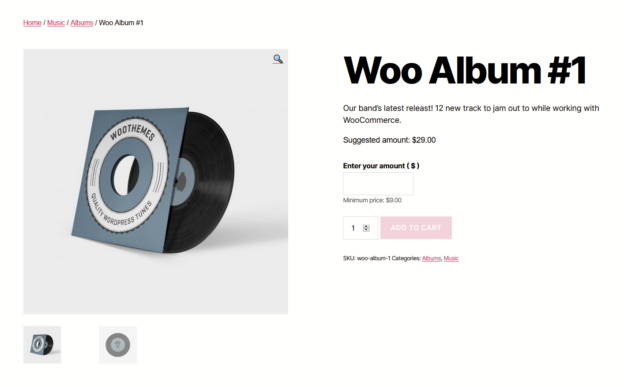
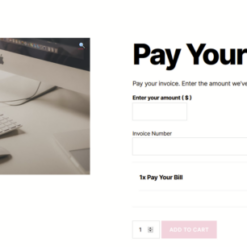
WooCommerce Name Your Price plugin lets you be flexible in the prices you are willing to take for certain products. Moreover, you have the possibility to use this extension in order to accept user-determined donations, collecting pricing data or to take a new approach to sell your products.

You can suggest your customer a price to pay and, more than this, optionally enforce a minimum acceptable price. Otherwise, you can leave it totally at the choice of the client.

WooCommerce Name Your Price Feature

Name Your Price for Variable Products

This plugin supports the prices defined by clients for variable products.

Support for Product Bundles

You have now the possibility to sell combos, simple kits and item assemblies or you can simply offer a discount every time your clients purchase more items together.

Let Subscribers Choose When to Pay

With the help of this plugin, you can now let your clients decide when they want to pay for the products they have purchased.

Create Printable Gift Certificates

You have now the possibility to personalize and sell downloadable PDF vouchers for offline goods or services.

Easy Configuration

After you have created a product, you have to simply click the checkbox marked “Name Your Price”.

See What’s In It For You

In order to allow a flexible and user-determined pricing for any simple product that you have, you have to follow some steps:

  • You can edit a product and look for the “Name Your Price” checkbox in the Product Data meta box.
  • Then, in order for your clients to set their own price for the items, you have to tick the checkbox.
  • After that, you fill the prices that you want, taking into consideration the minimums that are suggested already.
  • In the end, you just have to save the product. If you will view the product after you save it, you will see that the minimum prices will still be displayed.

If you want to set the pricing for a variable product, you now have the possibility to take advantage of “Name your price” variations on variable products. Whenever you choose a Name Your Price variation, the Name Your Price input will appear on the front-end.
4 reviews for EffectIO WooCommerce Name Your Price 3.6.2

  1. martindumas8

    This was what I really needed! Thanks!

  2. sekstefani

    If you want to let your customers to define the product price., try with this Effectio product!!!

  3. tarikakgul97

    Helpful and useful plugin for accepting user-set donations and if you want to take a new approach to selling products, great product from Effectio

  4. mario_nonevski

    So many features:name your price for variable products, support for product bundle, let subscribers choose when to pay, create printable gift certificates by using the PDF Product Vouchers plugin etc etc

Add a review

WooCommerce Name Your Price allows customers to set their own price for products or donations.

2025.04.23 — version 3.6.2
  • Update: Tested up to WordPress 6.8.0
  • Fix: Updated compatibility for PDF Product Vouchers plugin.
2025.03.17 — version 3.6.1
  • Update: Tested up to WooCommerce 9.9.0
  • Fix: REST API unsetting NYP state if 'nyp' param not included. #272.
  • Fix: Store API handling for variable products.
2024.12.12 — version 3.6.0
  • New: Introduce REST API support for dedicated NYP properties.
  • New: Introduce setting to hide quantity input for Name Your Price products.
  • New: Introduce setting to disable edit price in cart link. #270.
  • New: Introduce optional setting for stricter sold individually. #211.
  • New: Introduce setting to control Name Your Price + Gift Cards display order. #208.
  • Warning: Admin metabox script is refactored. If you were calling any of the jQuery functions therein, please retest your customizations.
  • Fix: Improve display of quick edit options.
  • Fix: Incorrect add to cart button text if Variable Subscription and Variable Product are on the same page.
2024.07.30 — version 3.5.14
  • Update: Tested up to WooCommerce 9.1.0.
  • Fix: Missing Edit Price button on initial load of cart block. #269.
  • Fix: Limit product type options to only product posts.
  • Fix: esc_html() on add to cart text in variations.
2024.03.19 — version 3.5.13
  • Fix: Fatal error in Cybersource gateway compatibility module.
2024.02.15 — version 3.5.12
  • Fix: Deprecate `wc_nyp_supports_formatting_on_done_typing` filter as autoformatting the currency on "done typing" has been removed for accessibility reasons.
  • Tweak: Handle enter keypresses- If valid move focus to next input. If invalid, stay put.
2024.01.29 — version 3.5.11
  • Fix: Do not include product-editor files that are still in development.
2024.01.29 — version 3.5.10
  • Fix: Missing language .pot file in release asset.
2023.12.11 — version 3.5.9
  • Fix: Variable products plus comma decimal causing incorrect price on reload. #263.
  • Fix: Add cart/checkout block compatibility. #257.
2023.10.27
  • Fix: Variable Products' "Clear" Link not working and returning error in console tab.
2023.09.27
  • Update: Tested up to WooCommerce 8.2.
  • Fix: Show error messages in Grouped Products on checkbox checked if there's already a price in the input. #256.
  • Tweak: Make variable products scripts more versatile for future integrations.
2023.09.11
  • Fix: Disable regular price fields in quick edit when product is NYP. #250.
  • Fix: Currency formatting when editing price in cart after switching currencies.
  • Tweak: Add support for Aelia Currency converting pre-filled price when editing price in cart after switching currencies.
2023.08.30 — version 3.5.5
  • Update: Tested up to WooCommerce 8.0.
  • Fix: Frontend script validation compatibility issue with Product Bundles containing NYP Variations.
2023.07.11 — version 3.5.4
  • Update: Tested up to WooCommerce 7.8.
  • Fix: Fatal error on admin edit products screen when product post type is NOT from WooCommerce.
2023.05.15 — version 3.5.3
  • Fix: Switch price input inputmode to decimal for better mobile iOS support.
2023.04.10 — version 3.5.2
  • Update: Tested up to WooCommerce 7.6.
  • Fix: Remove duplicate "Settings" link on plugins page.
  • Fix: Entirely remove ul.woocommerce-error element when price is valid for better compatibility with ajax refreshing in cart.
2023.02.16 — version 3.5.1
  • Fix: Fatal error on new installs.
2023.02.13 — version 3.5.0
  • Important: Requires WooCommerce 4.0.0 and PHP 7.2.
  • Important: Updates/changes to text strings. Please revise your translations.
  • New: Customize the "Upgrade/Downgrade" button text for switching subscription prices. Go to WooCommerce > Settings > Subscriptions.
  • New: Automatically format the price when focused on the price input after 1 second of inactivity.
  • New: Support for Store API add to cart validation. wp-json/wc/store/v1/cart/add-item?id=66&nyp=99
  • New: Add support for Import/Export. #206.
  • New: Add compatibility with Aelia Currency Switcher.
  • Dev: Rewrite name-your-price.js to remove accounting.js script dependency. #234.
  • Dev: Remove `finally` from try/catch block in cart->validate_price() as it is always executing instead of allowing the Exception to be thrown. This means you will need to catch Exception if `throw_exception` is enabled via method args.
  • Dev: Deprecate/remove `wc_nyp_error_message` filter.
  • Dev: Fix CoCart compatibility module.
2023.01.16 — version 3.4.0
  • Update: Tested up to WooCommerce 7.3.
  • New: Add inputmode="numeric" attribute to price input. Brings up number keyboard on mobiles.
  • Fix: Compatibility for NYP Variations as part of Product Bundle. #223.
2022.11.1 — version 3.3.10
  • Update: Tested up to WooCommerce 7.0.
  • Fix: Hide PayPal Pament's "buy now" buttons for Name Your Price products.
  • Fix: Hide Braintree PayPal's "buy now" buttons for Name Your Price products.
  • Fix: Hide Cybersource GooglePay request buttons for Name Your Price products.
  • Tweak - Declare compatibility with High Performance Order Tables (HPOS).
2022.03.17 — version 3.3.9
  • Update: Tested up to WooCommerce 6.3.
  • Fix: run wp_localize_script in wp_enqueue_scripts hook. Solves issue of popups not loading woocommerce_nyp_params object.
2022.01.31 — version 3.3.8
  • Fix: PHP notice on single product page, undefined variable.
  • Dev: WC_Name_Your_Price_Display::display_price_input( $product, $args ); second parameter now supports custom args.
2021.12.01 — version 3.3.7
  • New: WooCommerce Payments compatibility module to completely remove payment request buttons on NYP product.
  • Fix: Load RTL stylesheets when not in SCRIPT_DEBUG mode.
  • Tweak: Wrap currency symbol in span element
2021.11.18 — version 3.3.6
  • Fix: Add additional check to prevent product script errors when script is loaded where no NYP products exist.
2021.11.11 — version 3.3.5
  • Update: Tested up to WooCommerce 5.9.0.
  • Fix: Hide PayPal Payments payment request buttons for Name Your Price products.
  • Fix: Hide WooCommerce Payments payment request buttons for Name Your Price products.
  • Fix: Remove incorrect deprecation notice for woocommerce_price_trim_zeros.
2021.11.02 — version 3.3.4
  • New: Add wc_nyp_before_price_label and wc_nyp_after_price_label hooks to price-input.php template.
  • Fix: Respect Woo's woocommerce_price_trim_zeros filter and trim the trailing zeros from entered price.
2021.11.01 — version 3.3.3
  • Update: Tested against WooCommerce 5.8.
  • Fix: Save products with no min as having 0 price. Helps with sorting and fixed PHP warning for NYP products that are bundled but not priced-individually.
  • Fix: Fixed PHP warning for missing admin notices.
  • Fix: Replace another deprecated jQuery 3.0 function.
  • Tweak: rename 'wc_nyp_isset_disable_edit_it_cart' filter to 'wc_nyp_disable_edit_it_cart'
  • Tweak: Detect optional products when status !== true instead of === false.
2021.08.11 — version 3.3.2
  • Update: Tested against WooCommerce 5.6.
  • New: Add wc_nyp_sort_by_suggested_price filter to change _regular_price to suggested price if true. False defaults to minimum price.
2021.07.01 — version 3.3.1
  • Fix: Incorrect handling of comma decimals in manual subscription renewal.
2021.06.14 — version 3.3.0
  • Update: Tested against WooCommerce 5.4.
  • Fix: Remove delay for updating form when NYP is changed. Resolves issue with ajax add to cart on mobiles.
  • Fix: Replace deprecated jQuery 3.0 functions.
2021.03.30 — version 3.2.3
  • New: Add support for Name Your Price to variable products in Product Bundles; required Bundles 6.9.0.
2021.02.15 — version 3.2.2
  • Fix: Limit has_options() filter to REST requests to fix issue it caused with NYP display in grouped products.
2021.02.10 — version 3.2.1
  • Update: Change updated against plugin headers.
2021.02.09 — version 3.2.0
  • Update: Tested against WooCommerce 5.0.
  • Fix: Incorrect quantity on product page when editing a price in cart.
  • Tweak: Serve minified stylesheets when SCRIPT_DEBUG constant is false.
  • Tweak: Remove use of deprecated jQuery select(), focus(), and change() shortcuts.
  • Tweak: Use fallback selector when theme's don't use .single_add_to_cart_button class on add to cart buttons on single product page.
  • Tweak: Filter has_options() to true for NYP products, to handle display in All Products blocks.
2020.11.19 — version 3.1.7
  • Update: Tested against WooCommerce 4.7.
  • Tweak: Remove use of jQuery ready().
  • Tweak: Change click handler to use a class property, for more extensibility.
2020.09.19 — version 3.1.6
  • Fix: Adjust front-end validation script to handle sold-indidivudally checkboxes in grouped products.
2020.09.11
  • Update: Tested against WooCommerce 4.5.
  • Tweak: Add style rule for Elementor forms
2020.08.17 — version 3.1.4
  • Update: Tested against WP 5.5.
  • Fix: Remove HTML from price input title attribute in price-input.php template.
  • Tweak: Inherit error notice icons (or lack thereof) from theme styles.
2020.08.03 — version 3.1.3
  • Fix: "Warning: Division by zero" in cart for variable billing period subscriptions.
  • Dev: Add wc_nyp_replace_price_template filter to prevent price template move in case of duplicate prices
2020.07.09 — version 3.1.2
  • Update: Tested against WC 4.3
  • Fix: Prevent editing cart price from adding a new item to cart.
2020.06.18 — version 3.1.1
  • Fix: Validate against values from $cart_item_data if present. Fixes validation failure when trying to renew subscription.
2020.06.08 — version 3.1.0
  • Update: Tested against WC 4.2.
  • New: Support for CoCart for headless stores, for more information visit: https://cocart.xyz/
  • Fix: Make subscription period string translatable.
  • Fix: Prevent duplicate Suggested Price strings if theme has customized price template's location.
2020.05.22 — version 3.0.6
  • Fix: Typo in subscription switching error message.
  • Fix: Incorrect subscription switching errors on simple subscriptions with variation switching disabled.
2020.05.16 — version 3.0.5
  • Fix: Default to "Choose price" for add to cart text in loop if setting is left empty.
  • Fix: Javascript error on variations since helpers can return false, need to check variation price aren't false.
  • Fix: Undefined variable in variable product sync/save routine.
  • Tweak: Reduce subscription terms to "Due for X $period" when billing interval and billing length are the same.
2020.05.07 — version 3.0.4
  • Fix: Urgent issue of variation NYP checkbox not saving.
  • Fix: Only run sync on variable products if there are NYP variations.
2020.05.06 — version 3.0.3
  • Fix: Skip validation if the NYP div is not visible... in the case of variable products with non-NYP variations selected.
2020.05.06 — version 3.0.2
  • Fix: Use wp_kses_post() on label text to prevent HTML from displaying as text for subscriptions.
2020.05.05 — version 3.0.1
  • Update: Tested against WC 4.1
  • Fix: Changelog formatting causing continual prompts to update the plugin.
  • Fix: Script error with Composite products when selecting a non-NYP product.
2020.05.04 — version 3.0.0
  • Read more about this update here: https://woo.com/document/name-your-price/whats-new-in-3-0
  • IMPORTANT: Introduce Placeholders for Minimum Text field and Suggested Text field. The Database is lightly updated to account for this. For mono-lingual sites this should be seamless. For multi-lingual sites, you will need to revisit your translations of the minimum and suggested text strings and add the %PRICE% placeholder where the price is expected to appear.
  • IMPORTANT: woocommerce_get_price_input filter has been removed for security reasons. Attributes for the price input can be modified via the wc_nyp_price_input_attributes filter or by overriding the price-input.php template
  • New: Total rewrite of validation scripts! Finally fixing the UX problem of needing to click on empty space before you can click on the add to cart button, when the initial input value is lower than the minimum. Still prevents adding to cart if any Name Your Price product is not valid.
  • New: The initial input now defaults to null for better accessibility.
  • New: Prevent form submission when enter key is pressed in price input.
  • New: Add support for switching amounts on Name Your Price subscriptions.
  • New: Compatibility with WooCommerce Gateway PayPal Express Checkout Smart Buttons v1.6.21
  • Update: Full accessibility audit, inputs and errors are now properly read by screen-readers.
  • Update: Light UX changes, including changing positions of minimum prompts and position of error messages.
  • Update: Unifiy UX across all product types.
  • Update: Move suggested text from default WooCommerce single product page hook, to display closer to input.
  • Update: Unified filter and action hooks to use the `wc_nyp_` prefix. All previous filters will still work, just with a warning.
  • Update: Minimum Price and Suggested Price display if value is explicitly set to 0.
  • Update: If no custom add to cart text set in options, use the WooCommerce default.
  • Update: Add wc_nyp_single_update_cart_text for modifying the 'Update product' text when editing the price of a product already in the cart.
  • Fix: Better admin support for extending NYP support to custom types via `wc_nyp_simple_supported_types` filter.
  • Fix: Add One Page Checkout classes to stylesheet to ensure style apply to One Page Checkout shortcodes.
  • Fix: Do not validate a grouped Name Your Price product if it is not being added to the cart.
2020.03.11 — version 2.11.7
  • Fix: Error in cart re-validation.

Testimonials

Benny O'Brien@benny_obie

The quick response from a friendly team member at @effectioshop honestly caught me off guard.
Nice work!


Stuart Boyle@stuart_boyle

@effectioshop As an eCommerce developer, effectio.org has enabled me to reach higher expectations and my clients are very happy.


22,000+ Users · 180 Countries
Trusted by freelancers, agencies & store owners worldwide

How It Works

Install the free EffectIO Dashboard plugin on your WordPress site. It connects to the EffectIO catalog, detects every premium plugin and theme you own, and gives you a single hub to manage licenses, run updates, and keep your admin panel clean — all from one screen.

One-Click Updates
Update any premium plugin or theme instantly. No manual downloads, no FTP — just click "Update Now."

🔑

License Manager
View, activate, and manage all your license keys in one place. No hunting through emails or vendor dashboards.

🔇

Notification Blocker
Blocks intrusive admin nag screens, upsell banners, and ads that clutter your dashboard. Re-enable anytime.

🛡️

Vendor Request Control
Prevents redundant license-check pings to third-party servers for items you already manage through EffectIO.

📦

Bulk Activation
Club members can activate all eligible plugins and themes at once — one button, zero hassle.

🆓

100% Free
The Dashboard itself costs nothing. Install it and it auto-activates on your domain — no key required.

Get Started in 3 Steps

1

Download & Install

Download the EffectIO Dashboard zip and install it via Plugins → Add New → Upload.

2

Browse & Activate

Open EffectIO → Catalog in your admin panel. The dashboard auto-detects your installed items and matches them to your licenses.

3

Update & Manage

Keep everything current with one-click updates. Manage licenses, block nag notices, and enjoy a cleaner WordPress experience.

Licenses

All WordPress derivative work is GPL-licensed. Most items are pre-activated and ready to use. Some require an activation key — we provide it with your purchase, and the Dashboard lets you apply it in seconds.

Club members enjoy bulk activation: activate every eligible item at once with a single click. No more entering keys one by one.

✅ Money-Back Guarantee

Every item is tested and ships with full features. If something doesn't work and we can't fix it, you get a full refund. We believe premium tools should be accessible — that's why we offer a low-cost subscription so freelancers, small businesses, and agencies can grow without a large upfront investment.

Manage and Update all your sites

17.99 $ / Month Membership

2900 Plugins and Themes. Install, Update, Activate and Delete any plugin. Unlimited Sites. Best WP Agency Deal.

Clean Items

NGO Mission

Always Updated

SSL Connection