EffectIO WooCommerce Payment Gateway Based Fees

Original price was: $49.00.Current price is: $12.99. / year

Drop-in compatible replacement & Licensed Product

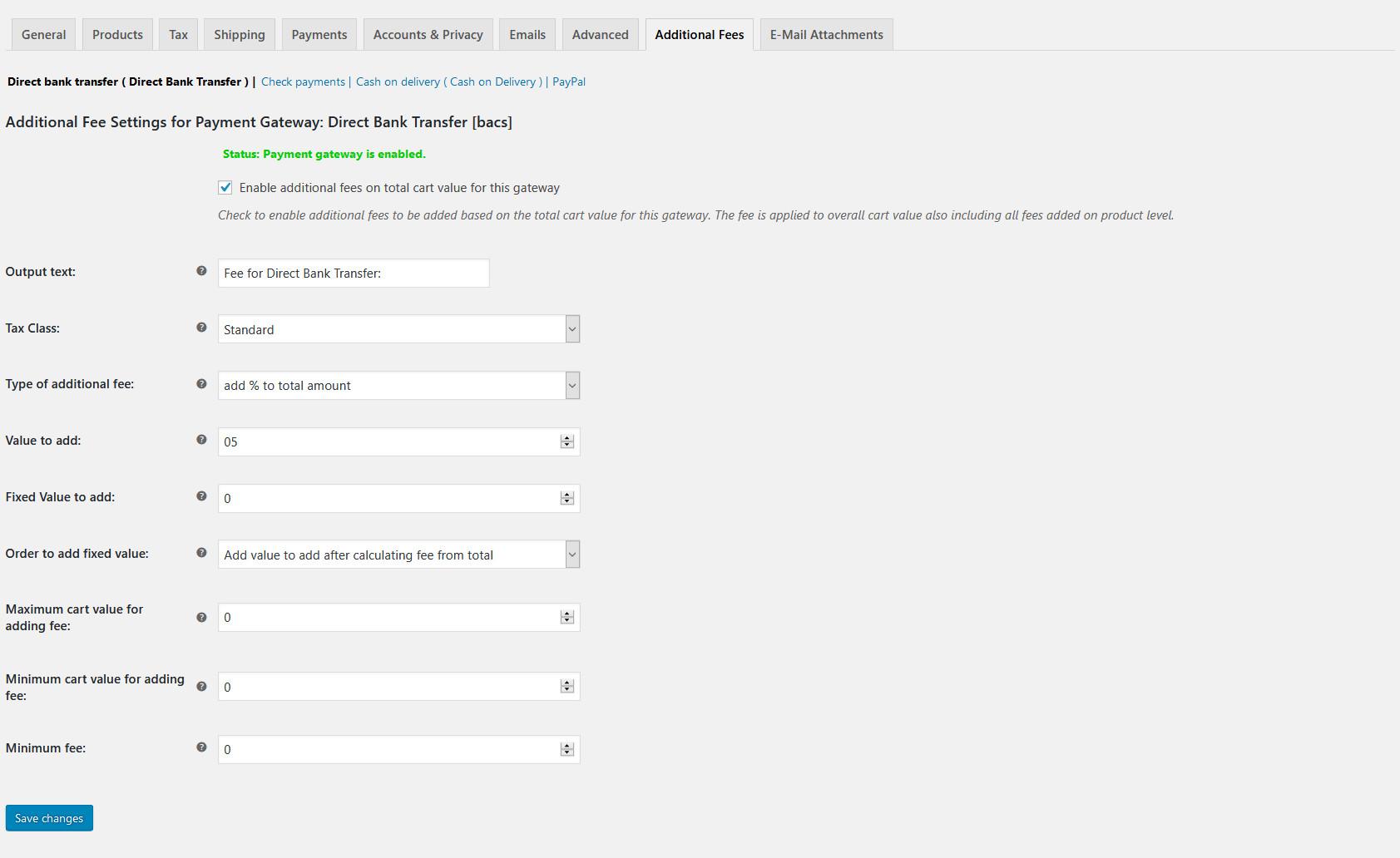
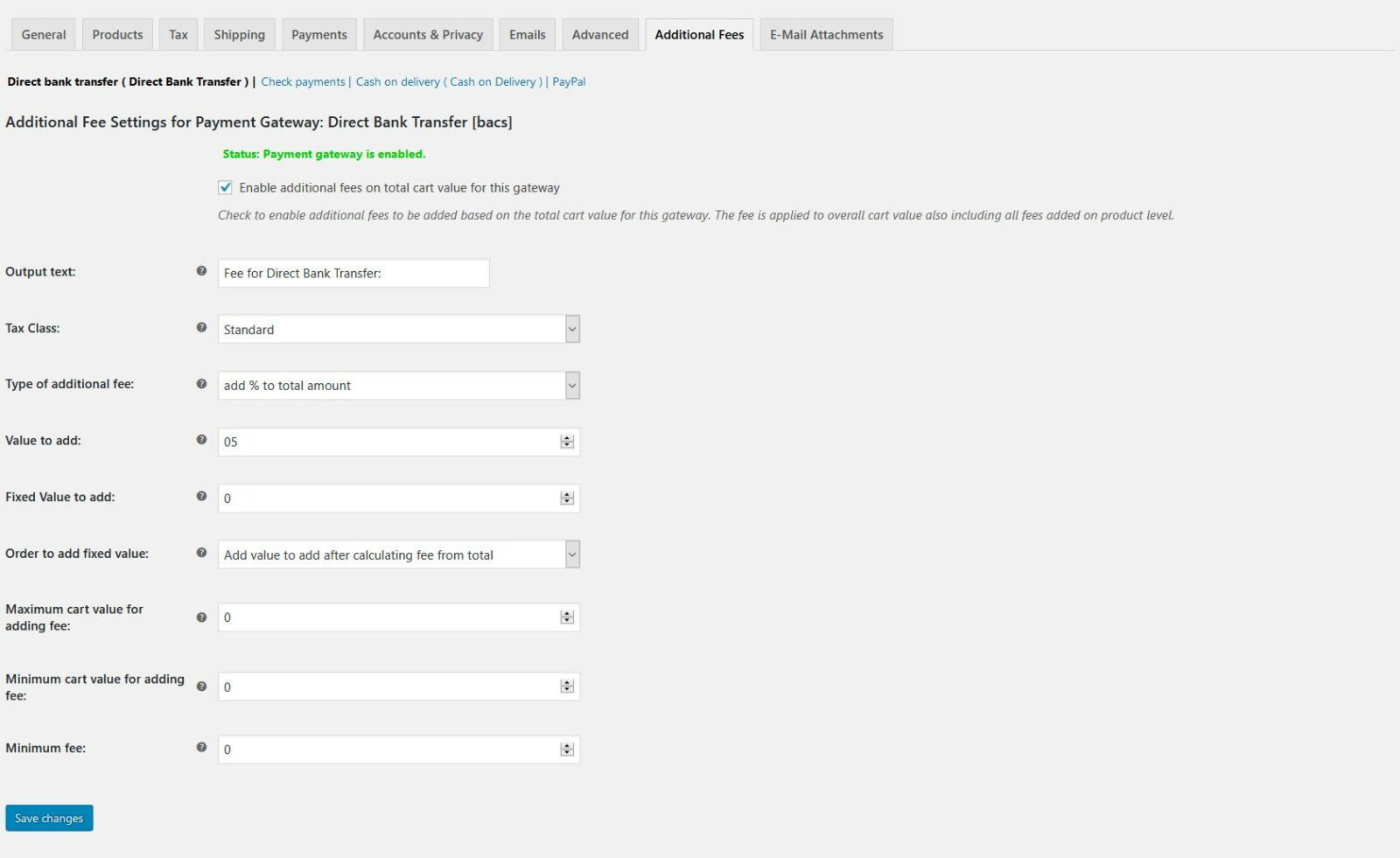
WooCommerce Payment Gateway Based Fees allows you to add fees to orders based on the selected payment method. Purchase it from EffectIO! Version: 4.0 Add fees to an order automatically depending on the payment gateway. The fees are calculated on product level and/or on total cart value on checkout page, pay-for-order page and admin order page. The admin can change the amount added in the backend and can also disable calculation of fees for a specific order for the pay-for-order page.

Released on: 2025-04-06

Single License

Club Membership

17,99 / Month Membership

NEW Activate all licensed items with the free Dashboard

EffectIO Dashboard

Discover when we give away free Plugins

Find out when we give items for Free


Hey! 🎉 Monthly emails, tops. Snag exclusive plugins/themes for $0. They go quick, but you might just get a freebie! 😉

30 Days Money Back Guarantee

Guaranteed pre-activated plugins. Most items work immediately after installation. Open a support ticket to obtain the license keys for the ones that ask for activation.

Free support to install and setup on your site.

Add fees to orders based on payment method

The WooCommerce Payment Gateway Based Fees extension allows you to easily add fees to orders depending on the chosen payment gateway. This powerful extension gives you the flexibility to automatically assess fees based on the price of certain products in the cart or the cart total. Additionally, shop administrators have the ability to change fees on an order-by-order basis at any time. Even manual fee adjustments are possible, making it convenient for customers who want to switch payment methods after checkout.

It’s important to note that the Payment Gateway Based Fees extension is currently not compatible with the automated taxes service of the Jetpack plugin. However, you can easily disable automated taxes in the Tax tab of your WooCommerce settings to continue benefiting from this fantastic extension.

Why Choose WooCommerce Payment Gateway Based Fees?

Here are some key benefits of using the Payment Gateway Based Fees extension:

  • Simple and intuitive setup
  • Ability to add fees based on chosen payment gateway
  • Automatically assess fees on product price or cart total
  • Shop administrators can easily adjust fees on individual orders
  • Manual fee application for customers who switch payment methods
  • Compatible with a wide range of payment gateways
  • Updates available through EffectIO Dashboard
  • Items come pre-activated for convenience
  • Full support for GPL code
  • Premium support from EffectIO

If you’re looking for an alternative update channel for plugins, EffectIO is the perfect solution. With EffectIO, you can access cost-saving updates and enjoy super deals with discounts ranging from 30 to 90 percent. Make the most out of your WooCommerce experience and take advantage of the Payment Gateway Based Fees extension from EffectIO.

Release Date

7/6/2016

2 reviews for EffectIO WooCommerce Payment Gateway Based Fees 5.2

  1. slouizana

    Great, enables or dissables, additional fees for entier website without removing data, tax calculation for additional fees is also supported.

  2. kleindaniel138

    This plugin lets you add a fee to an order, depending on the chosen payment gateway. A fee may be apllied manually or can be set automatically.

Add a review

Add fees to an order automatically depending on the payment gateway. The fees are calculated on product level and/or on total cart value on checkout page, pay-for-order page and admin order page. The admin can change the amount added in the backend and can also disable calculation of fees for a specific order for the pay-for-order page.

2025.04.01 — version 5.2
  • added: in active beta support for automatic tax calculation in WC Tax and Shipping plugin - a hack only, because there is no relyable hook for second calculation caused by taxjar
  • added: parameters to filter wc_add_fees_wc_calculated_totals_done_check (should be deprecated when using WC Tax and Shipping plugin)
2025.02.28 — version 5.1.4
  • tweak: WooPayments compatibility - replaced $gateway->title with $gateway->get_title() (https://github.com/Automattic/woocommerce-payments/issues/10280)
2025.02.03 — version 5.1.3
  • fixed: error in wc_additional_fees_block_checkout.js when global object wc does not exist
2025.02.03 — version 5.1.2.1
2025.01.28 — version 5.1.2
  • fixed: broken block checkout page with WC 9.6 (removed 'wc-blocks' in wp_register_script( 'wc_additional_fees_block_script', ....)
  • tweak: added an is_array check to handler_wc_add_settings_tab_array() to fix 3-rd party plugin conflict rendering null
2024.12.14 — version 5.1.1
  • tweak: improve block checkout DOM monitoring for payment gateway radio buttons
2024.11.29 — version 5.1
  • tweak: extended PHP, WP and WC info to plugin header to remove error message in deploy test
  • fixed: check if block checkout DOM is completely loaded to attach our payment method check handler
2024.10.21 — version 5.0
  • added: support for WooCommerce Block Cart Page and Block Checkout Page
  • added: filter 'wc_add_fees_cart_before_add_total_fee': allows to skip adding our fees depending on cart
  • added: filter 'wc_add_fees_rest_api_route_is_block_checkout_route': allows to control routing for REST_API calls in block cart and block checkout page
  • added: filter 'wc_add_fees_load_block_checkout_scripts': allows to disable loading our block cart and block checkout scripts even when enabled by WC
  • removed: code to support WooCommerce < 2.6.14
2024.08.31 — version 4.2
  • fixed: "Trying to access array offset on value of type null for $fee->gateway_option[WC_Add_Fees::OPT_KEY_OUTPUT]" on checkout page for very small values when fee amount = 0
  • checked compatibility for WP 6.6 and WooCommerce 9.2.3
  • correction below filter "wc_add_fees_wc_fees_calculated_done_check" was "wc_add_fees_wc_calculated_totals_done_check" https://github.com/InoplugsOrganization/Open-Library/blob/main/Payment%20Gateway%20Based%20Fees/Fee%20Calculation/wc_add_fees_wc_calculated_totals_done_check.php
2023.10.10 — version 4.1
  • feature: option "Maximum fee": limit fee to a maximum value
  • feature: option "Exclude Fees For E-Mails": skip total cart fees for a gateway for given E-Mails
  • added: filter "wc_add_fees_gateway_fee_maximum": change maximum fee value during calculation
  • added: filter "wc_add_fees_hide_product_panel_options": remove our tab from product metabox settings https://github.com/InoplugsOrganization/Open-Library/blob/main/Payment%20Gateway%20Based%20Fees/Metabox%20Product/wc_add_fees_hide_product_panel_options.php
  • added: filter "wc_add_fees_wc_fees_calculated_done_check": skip a second fee calculation (e.g. by WC automatic tax calculation) https://github.com/InoplugsOrganization/Open-Library/blob/main/Payment%20Gateway%20Based%20Fees/Fee%20Calculation/wc_add_fees_wc_fees_calculated_done_check.php
2023.07.11 — version 4.0.1
  • fixed: small typo error
  • fixed: minor styling error in backend product tab fees settings
  • fixed: Warning: Undefined variable $index in ../classes/class-wc-add-fees.php on line 920
2023.05.24 — version 4.0
  • added: compatibility support for WooCommerce HPOS
  • cleanup: remove backwards compatibility prior WooCommerce 3.0
2023.01.02 — version 3.2.6
  • Security fix: added esc_attr to woocommerce-additional-fees\v2614\class-wc-add-fees.php line 1050ff
2022.09.06 — version 3.2.5
  • Added support for plugin https://woocommerce.com/products/WooCommerce-deposits/
2022.01.26 — version 3.2.4
  • Added filter 'wc_add_fees_subscriptions_remove_fees' - remove manually added fees (e.g. if our fees are added manually we do not recognise them)
  • checked compatibility for WP 5.8 and WooCommerce 6.1
2021.03.25 — version 3.2.3
  • Pay for order page fix: Force calculation of fees on pageload (WC has by default payment method N/A on new created orders in backend
  • Add loading icon on "Pay for order page"
2021.03.20 — version 3.2.2
  • klarna_payments compatibility: gateway not recognised on checkout page
2020.12.29 — version 3.2.1
5.6
2020.11.16 — version 3.2
  • Improved: change logic to load available payment gateways to avoid 3-rd party plugins not activating gateways properly on ajax callback calculating fees
2020.08.22 — version 3.1.12
  • Fixed: ZIP Payment Gateway not calculating fees
  • Fixed: Subscription plugin pay for failed renewal order creates a new order
2020.07.08 — version 3.1.11
  • Fixed: Admin payment methods N/A and Other are supported with "Disabled" - no fees added
2019.10.30 — version 3.1.10
  • Fixed: escape attributes on pay for order page
2019.09.18 — version 3.1.9
  • Fixed: a bug when other WPML components are used function wpml_get_active_languages() does not exist
2019.09.15 — version 3.1.8
  • Added: WPML support to translate option "Output text" for cart fee
2019.09.14 — version 3.1.7
  • Fixed: WC 3.7 comp. with additional tax classes being moved from options to database table
  • Fixed a bug with subscription plugin and pay for order page - invalid order status
  • Add new filters
  • wc_add_fees_pay_for_order_valid_order_statuses
  • wc_add_fees_pay_for_order_force_continue_classes
  • wc_add_fees_pay_for_order_force_continue fixes problems with 3rd party like subscriptions not returning a valid order status in filter woocommerce_valid_order_statuses_for_payment
  • wc_add_fees_fee_output_text - allows to change fee output text in frontend e.g. translate for WPML
2019.08.15 — version 3.1.6
  • WC 3.7 compatibility bug saving options page not working
2018.06.03 — version 3.1.5
  • Fix problem with sanitized tax class value in order item fee
  • Move main plugin file to woocommerce-additional-fees.php to support new WC update feature
2018.03.17 — version 3.1.4
  • Fix support of fees for variation products
2018.02.28 — version 3.1.3
  • Add new options
  • Minimum cart value for adding fee
  • Minimum fee
  • Add new filters
  • wc_add_fees_maximum_cart_order_value
  • wc_add_fees_minimum_cart_order_value
2018.01.28 — version 3.1.2
  • Fix floating point problem with 0 - remove fees
2018.01.26 — version 3.1.1
  • Bugfix WooCommerce PayPal Express Checkout Gateway: Fees not added on checkout page
2017.11.04 — version 3.1.0
  • Fix German Market compatibility
  • Add an option to change order of adding fixed value fee
2017.10.26 — version 3.0.8
  • Small fix for German Market plugin
  • Small fix tax for fixed value to add and total value added
2017.10.22 — version 3.0.7
3.2
  • Add filter wc_add_fees_fixed_fee_before_normal_fee
  • Refactor fixed amount tax calculation with woocommerce_prices_include_tax option setting
2017.10.13 — version 3.0.6
  • Add filters to allow changing of predefined values (e.g. depending on different credit cards in one payment gateway)
  • WC 3.2 bugfix integrate class WC_Cart_Fees added with 3.2
2017.06.07 — version 3.0.5
  • Subscription plugin: - Add new actions to handle double fees of our plugin on pay for order page - Add filter "woocommerce_create_order" to avoid new order on pay for order when fees change
2017.06.05 — version 3.0.4
  • Change WC_Order to WC_Abstract_Order as type in function definintion
  • Replace new WC_Order by wc_get_order()
2017.05.30 — version 3.0.3
  • Modified bugfix subscription plugin - remove our fees from existing order on renewal and manual payment see https://github.com/woocommerce/woocommerce-subscriptions/pull/450#issuecomment-304106454
  • EU VAT plugin temporary fix: does not take care of is_vat_exempt of a saved order (see classes\class-wc-order-add-fees.php)
  • WC 3.0 compatibility adjustments
2017.05.12 — version 3.0.2
  • Bugfix subscription plugin pay for order page - adds all fees from existing order (we do not recognise our fees any longer)
2017.04.04 — version 3.0.1
  • Integrate German Market (this plugin is currently not ready for WC 3.0.0)
2017.04.03 — version 3.0.0
3.0.0
  • for backwards comp move php classes to /v2614 - remove code for versions <= 2.6.14 from php class code in /classes - add CRUD access introduced with WC 3.0.0 - refactor and optimize code - supress fee lines with calculated value 0
  • As we moved all code < WC 2.6.14 to own folder, all classes, properties and methods in folder classes have @since 3.0.0 by default
2017.03.09 — version 2.2.25
  • Add filter 'wc_add_fees_remove_fixed_fees_on_no_fees'
2017.03.09 — version 2.2.24
  • Fix deprecated actions/filters on settings page (notice message on tab - screen reader)
  • Refactor code in function autoload
2017.03.06 — version 2.2.23
  • Bugfix: extend filter 'wc_add_fees_calculated_fee'
2017.03.02 — version 2.2.22
2017.02.24 — version 2.2.21
  • Add filter 'wc_add_fees_calculated_fee'
2017.02.24 — version 2.2.20
  • Bugfix for plugin woocommerce-follow-up-emails: Fatal error on saveing an order: fixed with "if( ! class_exists( 'Follow_Up_Emails' ) )"

Testimonials

Benny O'Brien@benny_obie

The quick response from a friendly team member at @effectioshop honestly caught me off guard.
Nice work!


Stuart Boyle@stuart_boyle

@effectioshop As an eCommerce developer, effectio.org has enabled me to reach higher expectations and my clients are very happy.


22,000+ Users · 180 Countries
Trusted by freelancers, agencies & store owners worldwide

How It Works

Install the free EffectIO Dashboard plugin on your WordPress site. It connects to the EffectIO catalog, detects every premium plugin and theme you own, and gives you a single hub to manage licenses, run updates, and keep your admin panel clean — all from one screen.

One-Click Updates
Update any premium plugin or theme instantly. No manual downloads, no FTP — just click "Update Now."

🔑

License Manager
View, activate, and manage all your license keys in one place. No hunting through emails or vendor dashboards.

🔇

Notification Blocker
Blocks intrusive admin nag screens, upsell banners, and ads that clutter your dashboard. Re-enable anytime.

🛡️

Vendor Request Control
Prevents redundant license-check pings to third-party servers for items you already manage through EffectIO.

📦

Bulk Activation
Club members can activate all eligible plugins and themes at once — one button, zero hassle.

🆓

100% Free
The Dashboard itself costs nothing. Install it and it auto-activates on your domain — no key required.

Get Started in 3 Steps

1

Download & Install

Download the EffectIO Dashboard zip and install it via Plugins → Add New → Upload.

2

Browse & Activate

Open EffectIO → Catalog in your admin panel. The dashboard auto-detects your installed items and matches them to your licenses.

3

Update & Manage

Keep everything current with one-click updates. Manage licenses, block nag notices, and enjoy a cleaner WordPress experience.

Licenses

All WordPress derivative work is GPL-licensed. Most items are pre-activated and ready to use. Some require an activation key — we provide it with your purchase, and the Dashboard lets you apply it in seconds.

Club members enjoy bulk activation: activate every eligible item at once with a single click. No more entering keys one by one.

✅ Money-Back Guarantee

Every item is tested and ships with full features. If something doesn't work and we can't fix it, you get a full refund. We believe premium tools should be accessible — that's why we offer a low-cost subscription so freelancers, small businesses, and agencies can grow without a large upfront investment.

Manage and Update all your sites

17.99 $ / Month Membership

2900 Plugins and Themes. Install, Update, Activate and Delete any plugin. Unlimited Sites. Best WP Agency Deal.

Clean Items

NGO Mission

Always Updated

SSL Connection











