EffectIO Quick View for WooCommerce

Original price was: $29.00.Current price is: $7.99. / year

Drop-in compatible replacement & Licensed Product

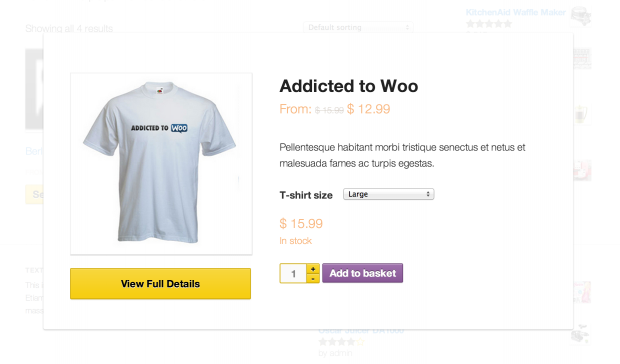
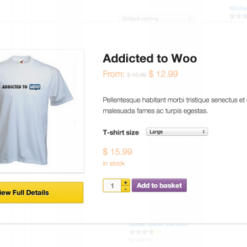
WooCommerce Quick View lets you show a quick view button to view product details and add to cart via lightbox popup. Purchase it on EffectIO! Version: 1.6.0 Let customers quick view products and add them to their cart from a lightbox. Supports variations.

Released on: 2024-02-26

Single License

Club Membership

17,99 / Month Membership

NEW Activate all licensed items with the free Dashboard

EffectIO Dashboard

Discover when we give away free Plugins

Find out when we give items for Free


Hey! 🎉 Monthly emails, tops. Snag exclusive plugins/themes for $0. They go quick, but you might just get a freebie! 😉

30 Days Money Back Guarantee

Guaranteed pre-activated plugins. Most items work immediately after installation. Open a support ticket to obtain the license keys for the ones that ask for activation.

Free support to install and setup on your site.

Showcase Your Products with WooCommerce Quick View

Enhance the shopping experience on your WordPress website with the WooCommerce Quick View plugin. This powerful tool adds a quick view button to product loops, allowing customers to access detailed product information in a convenient lightbox with just a single click.

With two optional triggers, you can choose to display the quick view button in your product loop or set nonajax add to cart buttons to open the lightbox upon click. This feature is particularly useful for showcasing variation details and providing a seamless browsing experience.

Benefits of WooCommerce Quick View:

  • Instantly display product details in a convenient lightbox
  • Improve customer engagement and user experience
  • Save time with quick access to essential product information
  • Effortlessly navigate through product variations
  • Enhance product visibility and boost sales
  • Seamlessly integrate with your WooCommerce store
  • Simple setup and easy to customize
  • Optimize your WordPress website for better conversion rates
  • Responsive design for flawless functionality on all devices
  • Regular updates through EffectIO Dashboard
  • Comes pre-activated for immediate use
  • GPL code and premium support from EffectIO
  • Unlock exclusive deals with 30 to 90 percent discounts at EffectIO

Upgrading to WooCommerce Quick View via EffectIO gives you access to an alternative, cost-saving update channel for your plugins. Experience the benefits of seamless product browsing and enjoy top-notch support from the expert WordPress developers at EffectIO.

Version

3.2.3

Release Date

7/6/2016

Reviews

There are no reviews yet.

Be the first to review “EffectIO WooCommerce Quick View 1.8.3”

Let customers quick view products and add them to their cart from a lightbox. Supports variations.

1.8.3 — 2025-11-17
  • Misc - Require WooCommerce to activate the plugin
  • Misc - Ensure compatibility with latest WordPress and WooCommerce versions
1.8.2 — 2025-01-14
  • Fix - Ensure that the quick view button is not duplicated in the product loop when a FSE theme is active in some views
1.8.1 — 2024-03-25
  • Tweak - Update brand to Kestrel
  • Tweak - Change plugin name to Quick View for WooCommerce
1.8.0 — 2024-02-05
  • Feature - Declare compatibility with the WooCommerce Cart and Checkout blocks.
  • Tweak - Updated the plugin URLs to the new woo.com domain.
  • Tweak - Updated the plugin author.
  • Tweak - Tested compatibility up to WC 8.5.
  • Tweak - Tested compatibility up to WP 6.4.
  • Dev - Updated plugin templates.
1.7 — Dropped deprecated plugin code up to version 1.7.
  • Dev - Changed the plugin namespace to `KoiLab\WC_Quick_View`.
  • Dev - Updated the minimum requirements to WC 3.7, WP 4.9, and PHP 5.6.
1.7.0 — 2023-02-13
  • Tweak - Added links to the plugin settings, the documentation page, and to get support, in the plugin list.
  • Tweak - Declare compatibility with WooCommerce High-Performance Order Storage (HPOS).
  • Tweak - Changed plugin text domain to 'woocommerce-quick-view'.
  • Tweak - Updated plugin author.
  • Tweak - Tested compatibility up to WC 7.4.
  • Tweak - Tested compatibility with WP 6.1.
  • Dev - Implement the singleton pattern in the main plugin class.
  • Dev - Updated minimum requirements to WC 3.5, WP 4.7, PHP 5.4.
1.6.0 — 2022-05-25
  • Fix - Add `.nvmrc` file.
  • Fix - Add renovate bot configuration.
  • Fix - Add support to block themes, several shortcodes and the Related/Linked Products sections in the single product page.
  • Fix - Replace node-sass with sass package.
  • Fix - fix: composer 2.2 excludes handling.
  • Tweak - WC 6.5 compatibility.
  • Tweak - WP 6.0 compatibility.
1.5.0 — 2021-08-10
  • Fix - Add 'wc_quick_view_after_single_product' hook in quick-view.php.
  • Fix - Update build scripts and tooling.
  • Tweak - WC 5.5 compatibility.
  • Tweak - WP 5.8 compatibility.
1.4.0 — 2021-01-27
  • Fix - Quickview with products shortcode.
  • Tweak - WC 5.0 compatibility.
1.3.1 — 2020-12-09
  • Tweak - WC 4.8 compatibility.
  • Tweak - WP 5.6 compatibility.
1.3.0 — 2020-12-09
  • Tweak - WC 4.8 compatibility.
  • Tweak - WP 5.6 compatibility.
1.2.12 — 2020-10-06
  • Fix - Set the default size so we don't have to pass the size through the URL.
  • Fix - Support quick view buttons on pages built with WooCommerce Blocks (excluding the All Products block).
  • Tweak - WC 4.5 compatibility.
1.2.11 — 2020-08-19
  • Tweak - WordPress 5.5 compatibility.
1.2.10 — 2020-06-10
  • Tweak - WC 4.2 compatibility.
1.2.8 — 2020-04-30
  • Tweak - Remove legacy code.
  • Tweak - WC 4.1 compatibility.
1.2.7 — 2020-03-06
  • Tweak - WC tested up to 4.0.
1.2.6 — 2020-01-14
  • Tweak - WC tested up to 3.9.
1.2.5 — 2019-11-04
  • Tweak - WC tested up to 3.8.
1.2.4 — 2019-08-08
  • Tweak - WC tested up to 3.7.
1.2.3 — 2019-07-02
  • Fix - Quick View doesn't appear for the `[product_category]` shortcode.
1.2.2 — 2019-04-26
  • Fix - Quick View Button Missing From Category/Tag Archives.
1.2.1 — 2019-04-16
  • Tweak - WC tested up to 3.6.
1.2.0 — 2019-01-07
  • Update - Support product galleries and variation images.
  • Fix - Don't redirect to product page on add to cart button.
1.1.14 — 2018-10-09
  • Update - WC 3.5 compatibility.
1.1.13 — 2018-05-21
  • Update - WC 3.4 compatibility.
1.1.12 — 2018-01-29
  • Fix - View Full Details link is broken on non-ajax add to cart button.
1.1.11 — 2018-01-11
  • Update - Compatibility with Currency Converter widget.
1.1.10 — 2017-12-13
  • Update - Updated tested up to header.
1.1.9 — 2017-10-19
  • Fix - URL links were not escaped of special characters.
  • Fix - Add text domain to plugin header.
1.1.8 — 2017-04-03
  • Fix - Update for WooCommerce 3.0 compatibility.
1.1.7 — 2017-02-22
  • Fix - Issue with delay when used with product bundles.
1.1.6 — 2016-01-14
  • Tweak - Update deprecated WooCommerce functions.
1.1.5 — 2016-01-14
  • Fix - WooCommerce 2.5 compatibility.
  • Fix - Fixed support for Composite Products.
1.1.4 — 2015-06-19
  • Tweak - Improved display on handheld devices.
1.1.3 — 2015-03-12
  • Fix - Splash Popup compatibility.
1.1.2 — 2015-01-29
  • Fix - Backwards compatibility.
1.1.1 — 2015-01-28
  • Fix - WC 2.3 support.
1.1.0 — 2015-01-27
  • New - Compatible with WooCommerce 2.3.
  • New - Responsive styles for screens less than 768px.
1.0.16 — 2014-08-19
  • added do_action('wc_quick_view_before_single_product'); for compatibility.
1.0.15 — 2014-05-07
  • Fix URL for varaiables.
1.0.14 — 2014-01-17
  • 2.1 compat.
1.0.13 — 2013-07-31
  • Fixed quick view button when % in product name.
1.0.12 — 2013-07-31
  • Additional hooks.
1.0.11 — 2013-07-31
  • Better compatibility with addons.
1.0.8 — 2013-07-11
  • Only load lightboxes for quickview.
1.0.7 — 2013-06-11
  • Swatches and quick view compatibily.
1.0.6 — 2013-06-11
  • Change add to cart URL for non-ajax buttons.
1.0.5 — 2013-06-11
  • Handle woocommerce_enable_ajax_add_to_cart specifically.
1.0.4 — 2013-06-10
  • Fix non-ajax buttons option.
1.0.3 — 2013-06-10
  • Use setup_postdata().

Testimonials

Benny O'Brien@benny_obie

The quick response from a friendly team member at @effectioshop honestly caught me off guard.
Nice work!


Stuart Boyle@stuart_boyle

@effectioshop As an eCommerce developer, effectio.org has enabled me to reach higher expectations and my clients are very happy.


22,000+ Users · 180 Countries
Trusted by freelancers, agencies & store owners worldwide

How It Works

Install the free EffectIO Dashboard plugin on your WordPress site. It connects to the EffectIO catalog, detects every premium plugin and theme you own, and gives you a single hub to manage licenses, run updates, and keep your admin panel clean — all from one screen.

One-Click Updates
Update any premium plugin or theme instantly. No manual downloads, no FTP — just click "Update Now."

🔑

License Manager
View, activate, and manage all your license keys in one place. No hunting through emails or vendor dashboards.

🔇

Notification Blocker
Blocks intrusive admin nag screens, upsell banners, and ads that clutter your dashboard. Re-enable anytime.

🛡️

Vendor Request Control
Prevents redundant license-check pings to third-party servers for items you already manage through EffectIO.

📦

Bulk Activation
Club members can activate all eligible plugins and themes at once — one button, zero hassle.

🆓

100% Free
The Dashboard itself costs nothing. Install it and it auto-activates on your domain — no key required.

Get Started in 3 Steps

1

Download & Install

Download the EffectIO Dashboard zip and install it via Plugins → Add New → Upload.

2

Browse & Activate

Open EffectIO → Catalog in your admin panel. The dashboard auto-detects your installed items and matches them to your licenses.

3

Update & Manage

Keep everything current with one-click updates. Manage licenses, block nag notices, and enjoy a cleaner WordPress experience.

Licenses

All WordPress derivative work is GPL-licensed. Most items are pre-activated and ready to use. Some require an activation key — we provide it with your purchase, and the Dashboard lets you apply it in seconds.

Club members enjoy bulk activation: activate every eligible item at once with a single click. No more entering keys one by one.

✅ Money-Back Guarantee

Every item is tested and ships with full features. If something doesn't work and we can't fix it, you get a full refund. We believe premium tools should be accessible — that's why we offer a low-cost subscription so freelancers, small businesses, and agencies can grow without a large upfront investment.

Manage and Update all your sites

17.99 $ / Month Membership

2900 Plugins and Themes. Install, Update, Activate and Delete any plugin. Unlimited Sites. Best WP Agency Deal.

Clean Items

NGO Mission

Always Updated

SSL Connection











