EffectIO WooCommerce URL Coupons

Original price was: $49.00.Current price is: $12.99. / year

Drop-in compatible replacement & Licensed Product

WooCommerce URL Coupons allows you to add a individual URL to a coupon code that automatically applies a discount or adds products to the shopping cart. Version: 2.15.0 Create a unique URL that applies a discount and optionally adds one or more products to the customer's cart.

Released on: 2025-12-10

Single License

Club Membership

17,99 / Month Membership

NEW Activate all licensed items with the free Dashboard

EffectIO Dashboard

Discover when we give away free Plugins

Find out when we give items for Free


Hey! 🎉 Monthly emails, tops. Snag exclusive plugins/themes for $0. They go quick, but you might just get a freebie! 😉

30 Days Money Back Guarantee

Guaranteed pre-activated plugins. Most items work immediately after installation. Open a support ticket to obtain the license keys for the ones that ask for activation.

Free support to install and setup on your site.

Extend or Automate your Coupons with WooCommerce URL Coupons

The WooCommerce URL Coupons extension by SkyVerge allows you to enhance the functionality of your coupons by adding a unique URL to each one. When customers click on or use this URL, the associated coupon discount is automatically applied, and you can even add products to their shopping cart.

Increase Conversions by Removing Coupon Fields

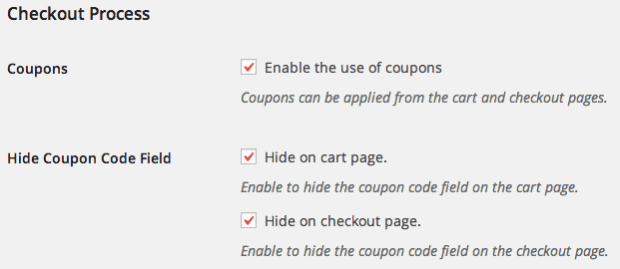
Studies have shown that coupon fields on websites can deter customers and decrease conversions. With URL Coupons, you can choose to hide the coupon code fields in the cart and/or checkout, ensuring that only URL coupons can be used. This eliminates the need for customers to leave your site in search of coupons and increases the likelihood of completing their purchases.

Automatically Apply Coupons for Visitors

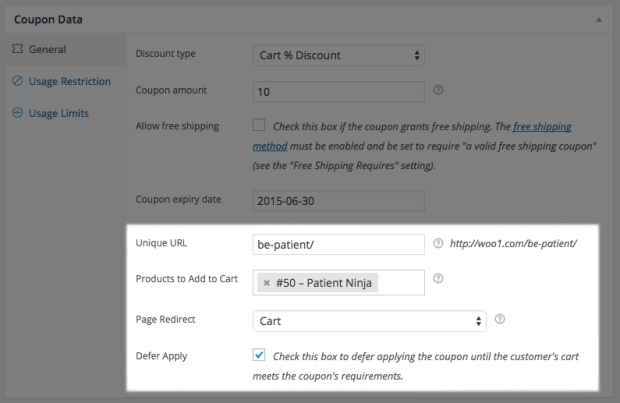
By assigning URLs to your coupons, you can automatically apply discounts to visitors who access your store through these links. This feature allows you to reward loyal customers, engage with fans, or incentivize certain actions such as reading blog posts or visiting landing pages. The discount is applied without any manual input from the customer, providing a seamless shopping experience.

Redirect customers after coupon application

URL Coupons also enables you to redirect customers to specific pages after they have visited a coupon URL. This feature is particularly useful for guiding customers to the shopping cart or checkout page, reducing barriers to purchasing, and providing a streamlined onepage coupon application and purchasing experience.

Personalize Your Coupon URLs to Reward Customers

With URL Coupons, you have the option to personalize your coupon URLs, allowing you to create unique URLs for individual customers. For example, you can have a generic coupon URL like mystore.com/couponthanks, but you can also personalize it for specific customers, such as mystore.com/couponthanksjohn or mystore.com/couponthanksjane. This personalization enhances the customer experience and makes them feel appreciated.

Key WooCommerce URL Coupons Features

  • Automatically apply coupon discounts through unique URLs
  • Hide coupon code fields to increase conversions
  • Reward customers with personalized coupon URLs
  • Redirect customers after coupon application
  • Create targeted discounts for specific pages or posts
  • Improve advertising campaign conversions
  • Increase customer engagement with automatic discounts
  • One-click activation and automatic updates through the EffectIO Dashboard
  • Cost-effective alternative to purchasing from individual plugin developers
  • Access to premium support from the EffectIO team
  • GPL code ensures freedom and flexibility
  • Save up to 90% with EffectIO’s super deals on WooCommerce plugins

Upgrade your WooCommerce store with WooCommerce URL Coupons from EffectIO and take control of your coupon strategy. With its powerful features and seamless integration, you can boost conversions, personalize customer experiences, and automate your coupon process. Visit EffectIO today to enjoy exclusive discounts and access to the latest plugin updates.

4 reviews for EffectIO WooCommerce URL Coupons 2.16.2

  1. martindumas8

    Must have product! Excellent!

  2. sekstefani

    This product allows you to add a individual URL to a coupon code!!!
    Working good!!

  3. tarikakgul97

    This product has more features like that help current customers remember, share, and use coupons and track and increase conversions from your online advertisements…

  4. mario_nonevski

    If you want to help current customers remember, share, and use coupons and also optionally to hide other coupon application methods!!

Add a review

Create a unique URL that applies a discount and optionally adds one or more products to the customer’s cart.

2025.12.04 — version 2.16.2
  • Misc - Improve escaping and sanitizing throughout codebase
  • Misc - Tested up to WooCommerce 10.2
2025.06.09 — version 2.16.1
  • Fix - "Translations loaded too early" error
  • Fix - Undefined index error when creating coupons via the REST API
  • Misc - Update the SkyVerge Framework to v5.15.11
2024.02.08 — version 2.16.0
  • Feature - Add support for the cart and checkout blocks
2023.11.17 — version 2.15.1
  • Misc - Add admin notices to help merchants reverting to the cart or checkout shortcodes if the corresponding blocks are used instead
2023.05.10 — version 2.15.0
  • Misc - Add compatibility for WooCommerce High Performance Order Storage (HPOS)
  • Misc - Replace `FILTER_SANITIZE_STRING` deprecated in PHP 8.1 in favor of `FILTER_SANITIZE_FULL_SPECIAL_CHARS` when saving coupon options in admin
2022.12.01 — version 2.14.0
  • Misc - Require PHP 7.4 and WordPress 5.6
2022.11.04 — version 2.13.2
  • Tweak - Clarify messaging for defer apply coupon notices
2022.02.07 — version 2.13.1
  • Fix - Replace deprecated `is_ajax()` usages with `wp_doing_ajax()`
  • Misc - Require WooCommerce 3.9.4 or above
2021.08.09 — version 2.13.0
  • Tweak - Tweak the admin UI
2020.12.07 — version 2.12.0
  • Misc - Add compatibility for WooCommerce 4.7
  • Misc - Require PHP 7.0 or newer
2020.10.23 — version 2.11.0
  • Feature - Add an optional URL prefix setting for coupon URLs to help tackling caching issues with some host providers and grouping coupons under a common base route
  • Tweak - Prevent variable products to be associated with a coupon as products to be added to cart
  • Fix - Ensure that upgrade methods in the plugin lifecycle handler do not trigger a PHP error when updating from very old versions
  • Localization - Update Italian translation
2020.09.30 — version 2.10.1
  • Misc - Remove the SkyVerge help menu item as part of the plugin assets
2020.08.17 — version 2.10.0
  • Misc - Add SkyVerge help menu for support on WooCommerce.com connected sites
2020.05.29 — version 2.9.4
  • Fix - Introduce a sanity check to avoid a WordPress error in front end while handling the coupon field at cart or checkout
2020.05.04 — version 2.9.3
  • Misc - Add support for WooCommerce 4.1
2020.03.05 — version 2.9.2
  • Misc - Add support for WooCommerce 4.0
2020.01.02 — version 2.9.1
  • Misc - Add support for WooCommerce 3.9
2019.11.07 — version 2.9.0
  • Misc - Add support for WooCommerce 3.8
2019.08.12 — version 2.8.0
  • Misc - Add support for WooCommerce 3.7
  • Misc - Remove support for WooCommerce 2.6
  • Misc - Require PHP 5.6+
2019.05.22 — version 2.7.5
  • Fix - Save the coupon URL when the coupon status is draft or pending review, or the coupon is scheduled for future publication
2019.04.24 — version 2.7.4
  • Misc - Add support for WooCommerce 3.6
  • Misc - Require PHP 5.4+
2018.12.19 — version 2.7.3
  • Tweak - Add support for creating URL Coupons via the WooCommerce REST API
2018.10.31 — version 2.7.2
  • Fix - Address a fatal error which occurs when using with an outdated SkyVerge plugin
2018.10.24 — version 2.7.1
  • Misc - Add support for WooCommerce 3.5
2018.07.31 — version 2.7.0
  • Misc - Dropped support for PHP 5.2: PHP 5.3 is now the minimum required version
2018.05.29 — version 2.6.3
  • Fix - Move the coupon display options to the General settings tab in WooCommerce 3.4
2018.05.23 — version 2.6.2
  • Misc - Add support for WooCommerce 3.4
2018.03.07 — version 2.6.1
  • Tweak - Add a filter to allow controlling whether the current URL matches a coupon or not
  • Fix - Check if necessary server variables are set before trying to match coupon URL
2018.01.26 — version 2.6.0
  • Misc - Add support for WooCommerce 3.3
  • Misc - Remove support for WooCommerce 2.5
2017.11.07 — version 2.5.3
  • Fix - Ensure coupon code isn't filtered when applied via URL to avoid issues with special characters in coupons
  • Misc - Render an admin notice when a site uses outdated versions of PHP
  • Dev - Filter query args for coupon redirect to allow URL params to be added programmatically
2017.08.08 — version 2.5.2
  • Fix - Ensure deferred coupons are applied during AJAX requests
2017.04.26 — version 2.5.1
  • Tweak - If a coupon adds products, always add these to the cart, even if previously applied
  • Tweak - Improve performance on sites with thousands of coupon codes
  • Fix - Redirect page not being recognized in WooCommerce 3.0+
  • Fix - Workaround for plugins and themes that incorrectly filter home_url
2017.03.28 — version 2.5.0
  • Misc - Added support for WooCommerce 3.0
  • Misc - Removed support for WooCommerce 2.4
2016.10.25 — version 2.4.1
  • Fix - Individual blog posts were not available as a redirect page
2016.10.13 — version 2.4.0
  • Feature - Added Customer/Order/Coupon CSV Import Suite 3.1.0+ compatibility
  • Localization - Added Italian translation
2016.08.10 — version 2.3.1
  • Fix - When coupons are hidden on the cart and / or checkout, and a coupon is removed, it's not being removed from the cart
2016.06.02 — version 2.3.0
  • Misc - Added support for WooCommerce 2.6
  • Misc - Removed support for WooCommerce 2.3
2016.05.11 — version 2.2.1
  • Fix - Prevent adding a product multiple times to cart when the coupon has defer apply, a required product and a different product that is set to be added to cart
  • Misc - Added filters to set default values when creating a new URL Coupon in admin edit screen
2016.01.14 — version 2.2.0
  • Fix - Improved add to cart validation handling: products that require user input will not be added to cart via URL Coupon
  • Misc - Added support for WooCommerce 2.5
  • Misc - Removed support for WooCommerce 2.2
2015.12.18 — version 2.1.7
  • Fix - URL Coupon redirects did not work properly
2015.12.17 — version 2.1.6
  • Fix - Dropdown to choose a page to redirect to did not return results
2015.12.11 — version 2.1.5
  • Tweak - Use ajax search in dropdown to choose a redirect page (WooCommerce 2.3+)
  • Fix - When coupon url is the same as the slug of the page that triggers the coupon, an extra notice might be shown
2015.11.19 — version 2.1.4
  • Fix - Fix the URL Coupons settings display in WC 2.4+
2015.11.18 — version 2.1.3
  • Tweak - Limit the number of taxonomy terms displayed in the Page Redirect select
  • Fix - Prevent delayed notices after a deferred coupon has been applied
2015.09.25 — version 2.1.2
  • Fix - Fix adding deferred coupons to the cart when the coupon code field is hidden
2015.09.15 — version 2.1.1
  • Fix - Ensure the Redirect meta does not get cleared when updating a coupon
2015.07.28 — version 2.1.0
  • Fix - Page Redirect select value displaying the wrong page in the admin
  • Misc - WooCommerce 2.4 Compatibility
2015.07.20 — version 2.0.1
  • Fix - Fix a rare redirect issue
  • Fix - Fix the coupon code field displaying on the cart page even when you've opted to hide it
2015.05.21 — version 2.0.0
  • Feature - Added an option to defer applying the URL coupons until the customer's cart meets the coupon's requirements
  • Feature - No more page redirect limits! You can select a post category/tag, or product category/tag to redirect to.
  • Feature - When viewing the Coupon list in the admin, you can now see the unique URL slug for each coupon
  • Tweak - Improved redirects to product pages
  • Fix - Fixed issue where coupons couldn't be automatically removed when invalid if the coupon field was hidden on the cart page
  • Fix - Escape all instances of add_query_arg and remove_query_arg to avoid a potential XSS attack
  • Fix - Attach Chosen.js to form fields only if Select2 is not available
2015.04.21 — version 1.3.2
  • Fix - Potential XSS with add_query_arg

Testimonials

Benny O'Brien@benny_obie

The quick response from a friendly team member at @effectioshop honestly caught me off guard.
Nice work!


Stuart Boyle@stuart_boyle

@effectioshop As an eCommerce developer, effectio.org has enabled me to reach higher expectations and my clients are very happy.


22,000+ Users · 180 Countries
Trusted by freelancers, agencies & store owners worldwide

How It Works

Install the free EffectIO Dashboard plugin on your WordPress site. It connects to the EffectIO catalog, detects every premium plugin and theme you own, and gives you a single hub to manage licenses, run updates, and keep your admin panel clean — all from one screen.

One-Click Updates
Update any premium plugin or theme instantly. No manual downloads, no FTP — just click "Update Now."

🔑

License Manager
View, activate, and manage all your license keys in one place. No hunting through emails or vendor dashboards.

🔇

Notification Blocker
Blocks intrusive admin nag screens, upsell banners, and ads that clutter your dashboard. Re-enable anytime.

🛡️

Vendor Request Control
Prevents redundant license-check pings to third-party servers for items you already manage through EffectIO.

📦

Bulk Activation
Club members can activate all eligible plugins and themes at once — one button, zero hassle.

🆓

100% Free
The Dashboard itself costs nothing. Install it and it auto-activates on your domain — no key required.

Get Started in 3 Steps

1

Download & Install

Download the EffectIO Dashboard zip and install it via Plugins → Add New → Upload.

2

Browse & Activate

Open EffectIO → Catalog in your admin panel. The dashboard auto-detects your installed items and matches them to your licenses.

3

Update & Manage

Keep everything current with one-click updates. Manage licenses, block nag notices, and enjoy a cleaner WordPress experience.

Licenses

All WordPress derivative work is GPL-licensed. Most items are pre-activated and ready to use. Some require an activation key — we provide it with your purchase, and the Dashboard lets you apply it in seconds.

Club members enjoy bulk activation: activate every eligible item at once with a single click. No more entering keys one by one.

✅ Money-Back Guarantee

Every item is tested and ships with full features. If something doesn't work and we can't fix it, you get a full refund. We believe premium tools should be accessible — that's why we offer a low-cost subscription so freelancers, small businesses, and agencies can grow without a large upfront investment.

Manage and Update all your sites

17.99 $ / Month Membership

2900 Plugins and Themes. Install, Update, Activate and Delete any plugin. Unlimited Sites. Best WP Agency Deal.

Clean Items

NGO Mission

Always Updated

SSL Connection