EffectIO WooCommerce Customer/Order/Coupon Export

Original price was: $79.00.Current price is: $7.99. / year

Drop-in compatible replacement & Licensed Product

WooCommerce Customer Order CSV Export Suite is a full-featured and easy CVS export tool for your WooCommerce store. Version: 4.8.1

Export Orders, Customers, and Coupons with Ease

πŸš€ Get your WooCommerce data out in seconds! Export individual or bulk records in customizable CSV or XML formats. πŸ“‚ Scheduled automated exports and quick manual exports process in the background while you focus on other tasks. Save time and simplify your workflow with WooCommerce Customer Order Coupon Export plugin. Try it now and streamline your data management! πŸ’ΌπŸ‘¨β€πŸ’»πŸ“Š

Released on: 2019-09-05

Single License

Club Membership

17,99 / Month Membership

NEW Activate all licensed items with the free Dashboard

EffectIO Dashboard

Discover when we give away free Plugins

Find out when we give items for Free


Hey! πŸŽ‰ Monthly emails, tops. Snag exclusive plugins/themes for $0. They go quick, but you might just get a freebie! πŸ˜‰

30 Days Money Back Guarantee

Guaranteed pre-activated plugins. Most items work immediately after installation. Open a support ticket to obtain the license keys for the ones that ask for activation.

Free support to install and setup on your site.

WooCommerce Customer Order CSV ExportΒ lets you export orders or customer records, bulk export records on-demand, or you can set up automatic exports via FTP, HTTP POST, or email for orders and customers.

Both order and customer CSV exports are processed asynchronously in the background on your site. This means that you can begin an export, and it will process as you continue to work on other things. These exports are batch-processed to prevent timeouts, letting an export churn through thousands of records while you continue working on your site.

WooCommerce Customer Order CSV Export Features:

  • Export customer data: name, email, addresses, whether a paying customer, and more
  • Export order data such as line items, order totals, shipping information, and other details
  • Create custom export formats to include the order or customer data you need
  • Processes exports asynchronously so thousands of records can be exported at one time, even while you continue working on your site!
  • Download files immediately, or continue working β€” you’ll see an admin notification when your files are ready for download
  • Bulk Export tool lets you export all orders, or export based on order status, product(s) included, product categories included, or date range
  • Use the bulk export tool to get a list of all customers, or a list of customers by registration date
  • Manually export or transfer one or more orders while viewing your order list via bulk actions
  • Set a custom filename for manually or automatically exported files
  • Automatically export WooCommerce orders to excel on a recurring basis via FTP, HTTP POST, or to multiple email addresses
  • Automatically export customers to CSV on a recurring basis via FTP, HTTP POST, or to multiple email addresses
  • Define an export schedule and starting time for auto-exports
  • Option to automatically export orders individually as soon as they’re paid for
  • Automated exports only include new records to avoid duplication
  • Transfer status for automated exports is monitored to notify you of failures
  • Compatible with WooCommerce Subscriptions: export subscription or renewal orders only
  • Compatible with several other plugins, including:
  • View and download previous exports from the past 14 days from your β€œExport List”
  • Export custom fields (meta) for customers and orders
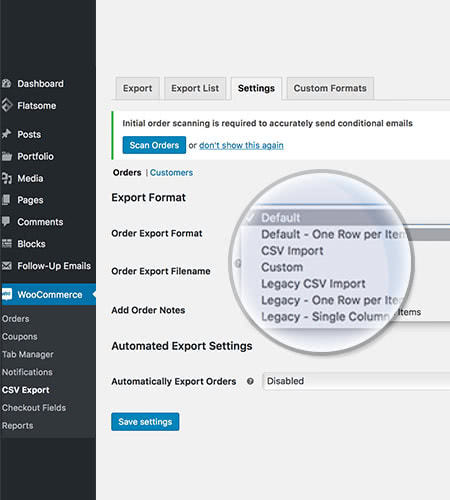
WooCommerce-CSV-Export_SETTINGS

Settings

Manage different export criteria for your lists

WooCommerce-CSV-Export_LISTS

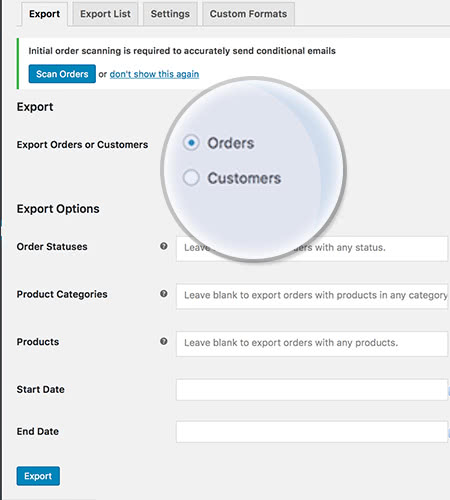
Manual Export

Both orders and customers can be exported manually at any time

In other words…

How to get the plugin

Download the plugin from EffectIO Dashboard. Click on Install, then activate it.

Woocommerce Customer Order CSV Export configuration

After installing the plugin, this notification will appear on the top of your WordPress dashboard:

WooCommerce Customer Order CSV Export cofig notification

From here you can choose whether to setup the automated or manual export. We’ll go through each of these:

1. Automated Exports
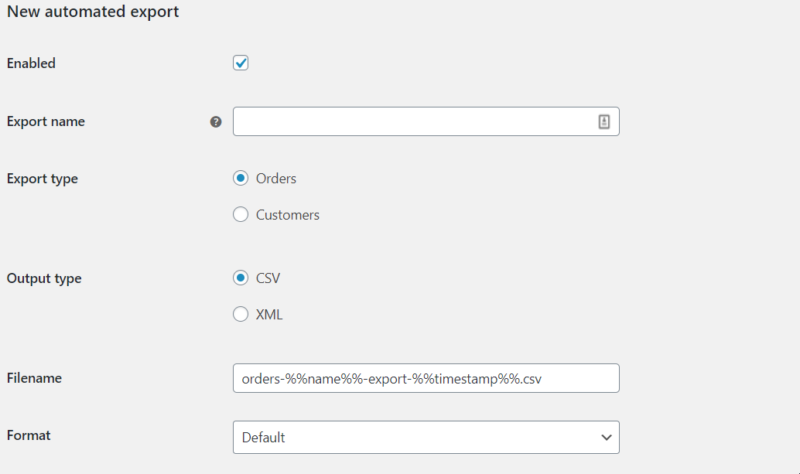
automated export

You can click on “Automated export” and this will show up. You can either enable or disable it. Give your export file a name and choose your export type between orders and customers. You can either export this into a CSV or XML file. Name your file, choose the format (between Default, One Row per Item, CSV import) and that’s it.
Woocommerce customer order csv export

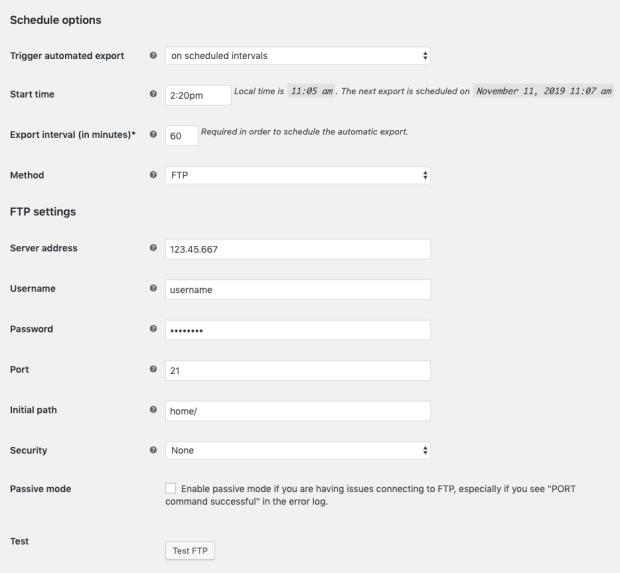
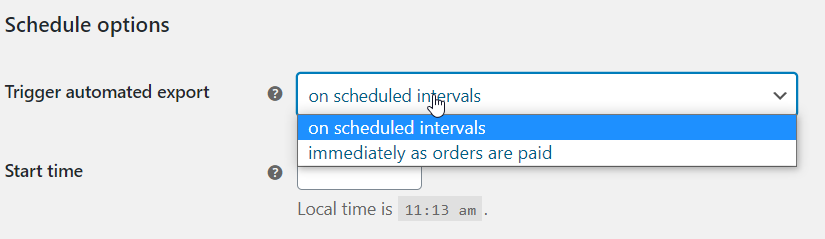
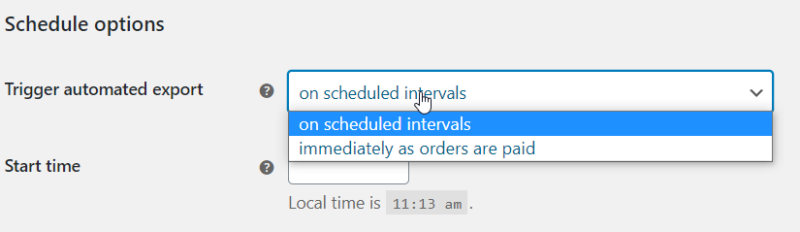
You can set the export to be done at different intervals: on scheduled intervals or immediately as orders are paid. Also choose a start time.
time

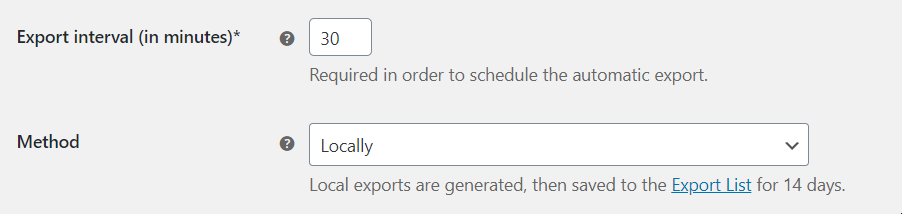
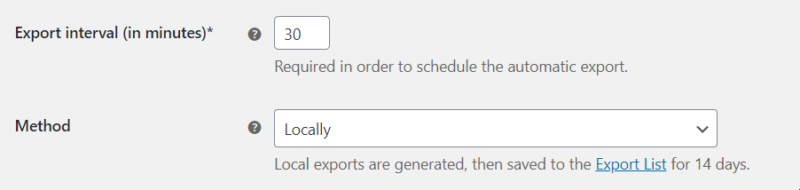
What is more, you can choose the export interval, which is set for minutes. The default value is 30 minutes, but it can be any longer or shorter. This option is required in order to trigger the automatic export.

Regarding the method, you can choose from: Locally, FTP, HTTP Post or even email.

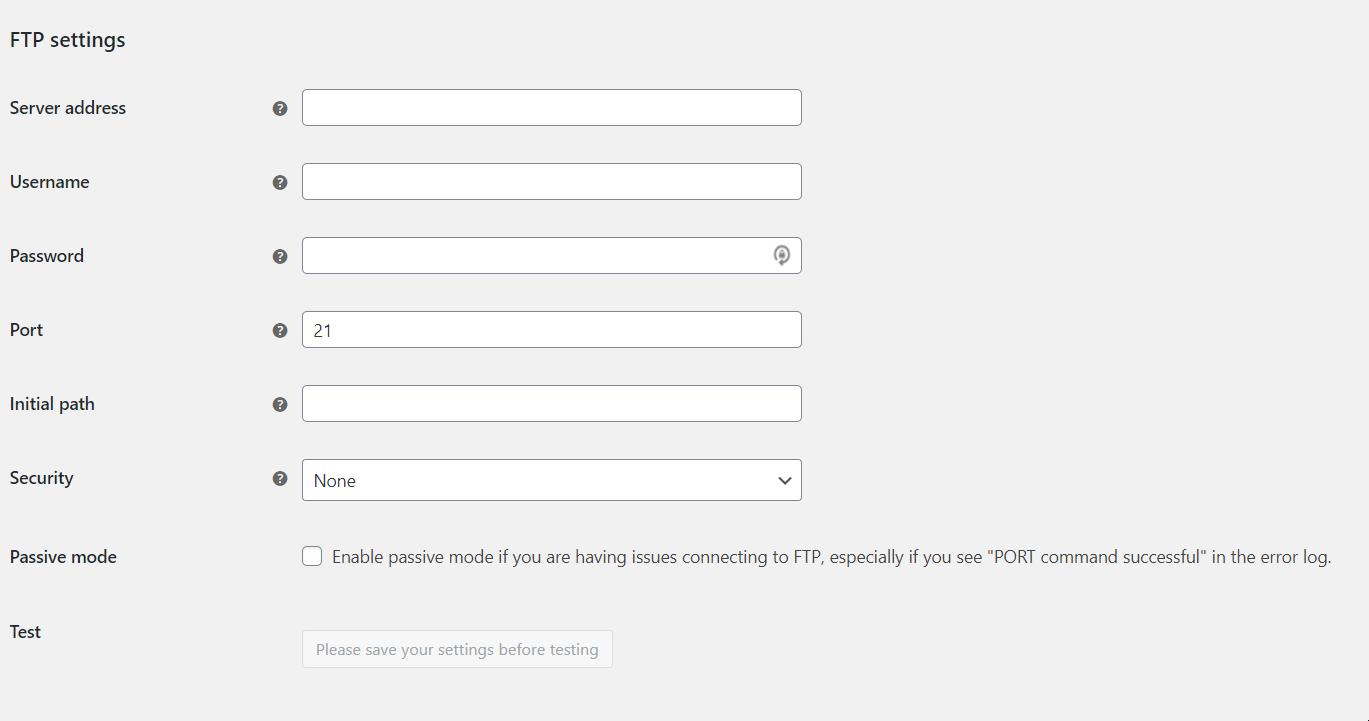
The FTP Settings
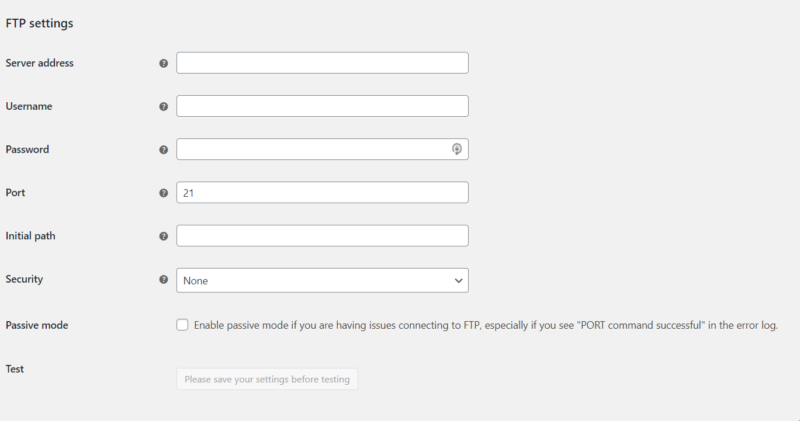
Woocommerce customer order csv export (2)

Complete all the details of your server there and enable the passive mode if you have issues connecting to FTP.

You can also test the settings, however, save your settings before testing.
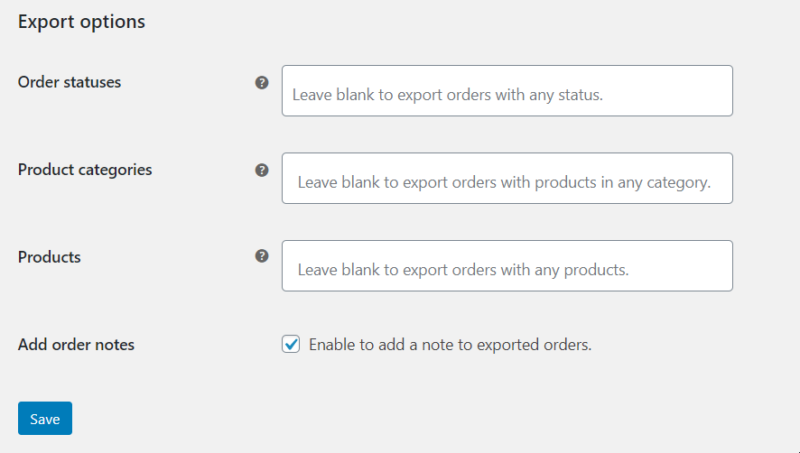
export

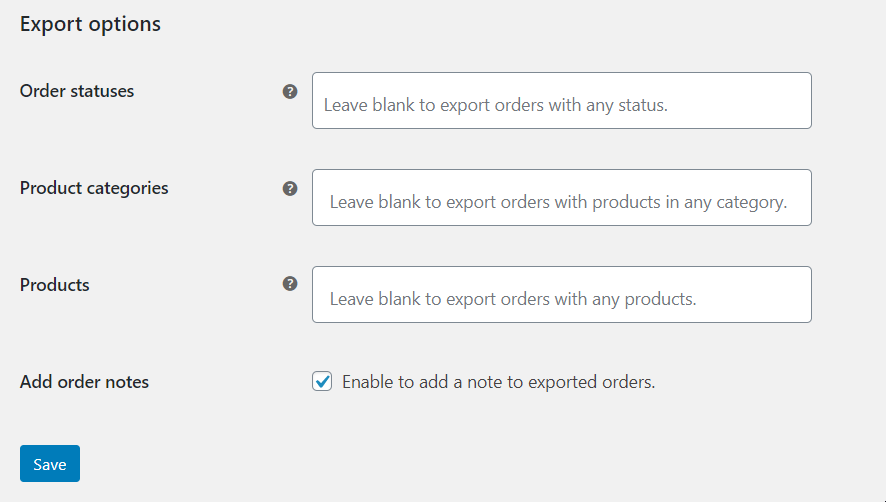
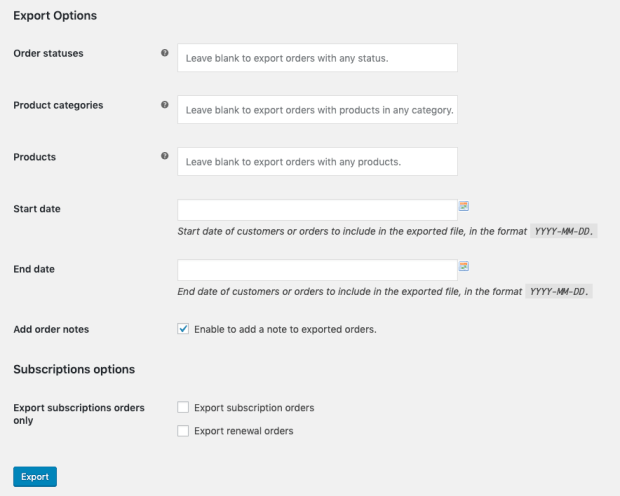
From here, you can select the order statuses to be exported and the product categories. You can also export only the products you want and add order notes.

Manual exports

woocommerce customer order csv export manual

There are slight differences between the manual and the automatic export types: the first one allows batch processing, while not allowing to set up the download interval.

Depending on your scenario, both options can be good and provide a real solution to your problems.

Exported files & Custom Formats

The exported files will appear in a separate part. All you have to do in order to find them is to go to Woocommerce -> Export and click on Export list. If you haven’t exported anything before, this option will show up:

exported files

If you click on Custom Formats, you can add a new one.
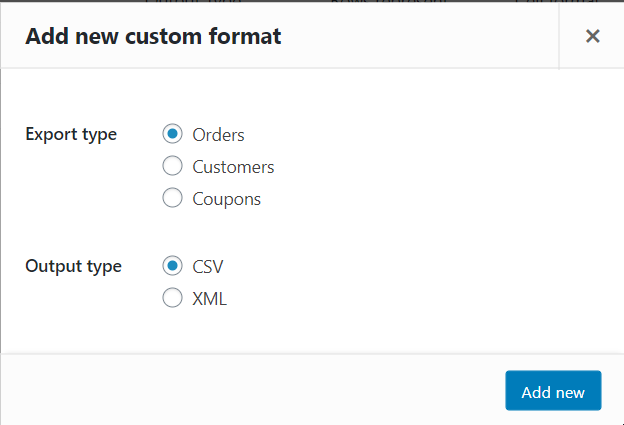
Woocommerce customer order csv export custom format

You have to choose between these. Choose the ones that best represent your interest. Then choose from the following formats:
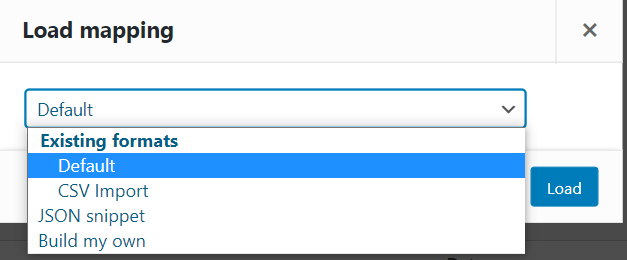
add new format

We’ll choose the default one, but you can choose whichever you want.
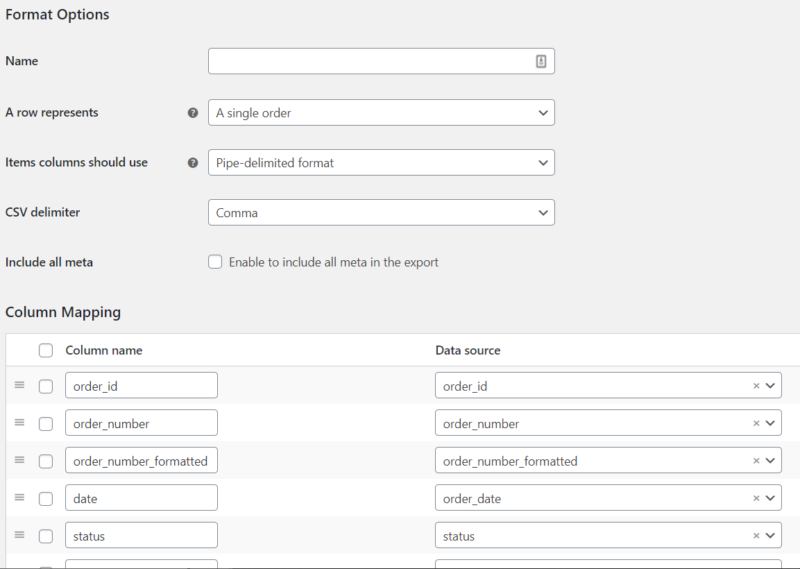
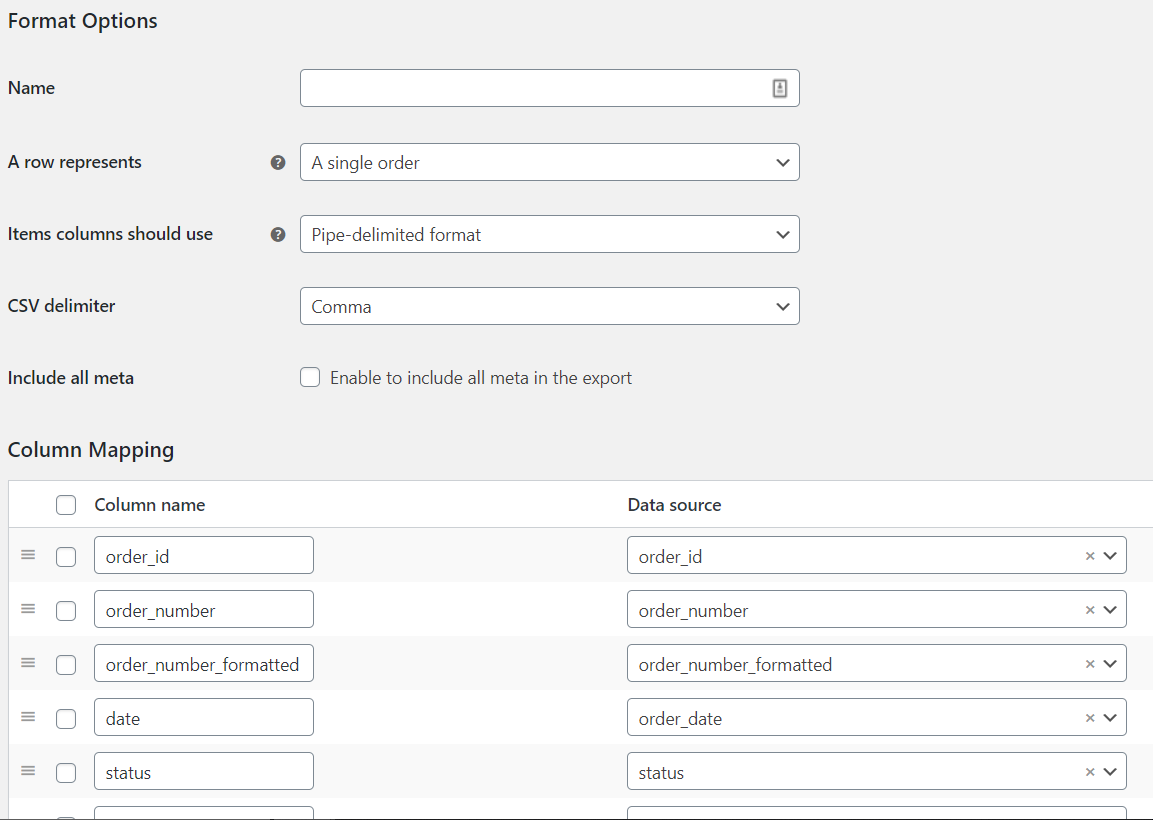
column and mapping

The format options will appear there, as well as the Column Mapping with all its options. Insert the name of the Format, choose what a row represents, how many items columns should use, the CSV delimiter and enable whether to include all the meta in the export.

To conclude

In conclusion, you can export your site’s products and categories using Woocommerce Customer Order CSV Export. Start working and finishing everything within just a few hours! Instead of manually exporting every product, you can now have this option for you and your business. Save more time with EffectIO and discover even more awesome plugins using our Dashboard. Start now your journey with us and you will not regret the choice you’ve made!
 

Release Date

7/6/2016

5 reviews for EffectIO WooCommerce Customer Order CSV Export 5.5.7

  1. edendvatri321

    If you want to Export customer data like name, email, addresses, whether a paying customer or export order data such as line items, order totals, shipping information, and other details this is what you need!!!

  2. lipasimone

    Must have this, working perfect!

  3. martindumas8

    I think that this is the perfect solution for exporting data :))

  4. sekstefani

    Easy way for exporting data!!!

  5. Stefani Sekovska

    Working good, thank you Effectio!

Add a review

Export Orders, Customers, and Coupons with Ease

πŸš€ Get your WooCommerce data out in seconds! Export individual or bulk records in customizable CSV or XML formats. πŸ“‚ Scheduled automated exports and quick manual exports process in the background while you focus on other tasks. Save time and simplify your workflow with WooCommerce Customer Order Coupon Export plugin. Try it now and streamline your data management! πŸ’ΌπŸ‘¨β€πŸ’»πŸ“Š

2026.02.16 β€” version 5.5.7
  • Fix - Ensure XML exports prefix meta entries with `Meta-` . This was accidentally changed in the previous release.
2026.02.04 β€” version 5.5.6
  • Fix - XML exports with meta not working if the meta field name contained spaces (e.g. PayPal transaction fee meta)
2025.09.08 β€” version 5.5.5
  • Fix - JavaScript error on admin pages
2025.08.18 β€” version 5.5.4
  • Fix - "Translations loaded too early" error
  • Fix - Remove support for deprecated navigation feature
  • Misc - Update the SV Framework to v5.15.12
  • Dev - Add more escaping and sanitizing to code base
2024.09.09 β€” version 5.5.3
  • Fix - PHP deprecation notices when dismissing export finished notices
2024.08.29 β€” version 5.5.2
  • Fix - Unable to export orders when HPOS is enabled
  • Fix - PHP deprecation warnings
2024.03.27 β€” version 5.5.1
  • Fix - Cast numbers to floats when formatting them to avoid type issues with PHP 8.0+
  • Dev - Have `WC_Customer_Order_CSV_Export_Method_Email` to extend `WC_Email` to improve third party compatibility
  • Misc - Improve compatibility with PHP 8.2+
2023.07.25 β€” version 5.5.0
  • Misc - Add compatibility for WooCommerce High Performance Order Storage (HPOS)
  • Fix - Don't format empty strings as numbers when exporting to CSV
  • Fix - Don't escape non-string values when exporting to CSV
  • Fix - Address an issue with loading field mapping from existing formats when adding a custom format
  • Fix - Ensure the "exported by" meta boxes are displayed on the order edit page only
2023.03.17 β€” version 5.4.1
  • Fix - Fix dynamic property creation causing errors in PHP 8.2
2022.12.01 β€” version 5.4.0
  • Misc - Require PHP 7.4 and WordPress 5.6
2022.08.24 β€” version 5.3.5
  • Fix - Improve Background Job Handler compatibility with newer WooCommerce versions while processing a job queue
2022.08.15 β€” version 5.3.4
  • Fix - Replace deprecated `is_ajax()` function calls with `wp_doing_ajax()`
  • Misc - Require WooCommerce 3.9.4 or greater
2021.09.08 β€” version 5.3.3
  • Misc - Harden some SQL usages
  • Misc - Remove legacy woo-includes functions
2021.03.15 β€” version 5.3.2
  • Feature - Add support for the WooCommerce Navigation admin feature
2021.03.05 β€” version 5.3.1
  • Fix - Ensure that when editing an Automated Export, the Export Options select fields are updated as well
2021.01.22 β€” version 5.3.0
  • Feature - Merge the Export Refunds Only free add on into the core plugin
  • Feature - Merge the Export Vat Number free add on into the core plugin
  • Fix - Address a possible issue when exporting refunded orders in XML
2020.12.07 β€” version 5.2.0
  • Tweak - Append the file extension automatically if the exported filename is missing it
  • Tweak - Prevent automated exports to be created with an empty filename
  • Fix - Export meta columns with the same ordering they're set in the Custom Formats admin page
  • Fix - Fix create/edit/delete operations on custom formats using multibyte (non-ASCII) characters in the format name
  • Fix - Ensure that `woocommerce_email_headers` hook receives all arguments as expected by the core filter
  • Dev - Add `wc_customer_order_export_decimal_separator` and `wc_customer_order_export_thousands_separator` filters to allow the use of custom separators in exports
  • Misc - Add compatibility for WooCommerce 4.7
  • Misc - Require PHP 7.0 or newer
2020.09.30 β€” version 5.1.2
  • Misc - Remove the SkyVerge help menu item as part of the plugin assets
2020.09.09 β€” version 5.1.1
  • Tweak - Add the 'item_price' column option to the order exporter
  • Tweak - Unify the custom formats list table to a single screen for all export types
2020.08.24 β€” version 5.1.0
  • Misc - Add SkyVerge help menu for support on WooCommerce.com connected sites
2020.07.28 β€” version 5.0.14
  • Fix - Escape quotes in the export name field
  • Fix - Hide start date and end date fields when Export Type is set to Coupon in the Manual Export
2020.06.04 β€” version 5.0.13
  • Fix - Address a potential PHP fatal error when exporting coupons that are configured to exclude some products, but the products no longer exist
2020.05.04 β€” version 5.0.12
  • Misc - Add support for WooCommerce 4.1
2020.04.16 β€” version 5.0.11
  • Fix - Fix a bug that was causing orders not to be properly marked as exported by immediate automated exports when changing the order status via the edit page
2020.04.09 β€” version 5.0.10
  • Fix - Fix a bug that could cause automations to be scheduled at the wrong time after the interval was changed
2020.03.05 β€” version 5.0.9
  • Tweak - Mark customer/order as globally exported when it is exported by all automated exports of the associated type
  • Fix - Prevent error notices when marking orders as exported
  • Misc - Add support for WooCommerce 4.0
2020.02.06 β€” version 5.0.8
  • Fix - Use a background process to mark orders as exported
2020.01.24 β€” version 5.0.7
  • Fix - Correctly use FTP Passive mode when specified in the plugin settings
2020.01.02 β€” version 5.0.6
  • Fix - Fix a JavaScript bug that could cause an endless loop of downloads while using the Download to CSV or Download to XML bulk actions
  • Misc - Add support for WooCommerce 3.9
2019.12.11 β€” version 5.0.5
  • Misc - Add support for migrating from the XML Export Suite plugin
2019.12.05 β€” version 5.0.4
  • Fix - Correctly send the output_type to the format data sources filter
  • Fix - Ensure meta values are properly set when exporting to legacy custom formats
  • Fix - Ensure third-party column options are available when creating new custom formats
2019.11.26 β€” version 5.0.3
  • Fix - Add configuration modal to download actions
  • Fix - Fix empty exports when using a migrated custom format
  • Fix - Fix fatal error on get_settings_url
2019.11.19 β€” version 5.0.2
  • Fix - Order status filter should only consider globally exported orders (for consistency with order status column)
2019.11.13 β€” version 5.0.1
  • Fix - Fix a Fatal error triggered if Action Scheduler 3.0 is being used on the website
  • Fix - Manual exports via order actions or order/user bulk actions should mark the order/user as globally exported
2019.11.12 β€” version 5.0.0
  • Feature - Unify the functionality of Customer/Order CSV & XML Export into a single plugin
  • Feature - Add support for multiple automated exports to send exports to different destinations, in different formats, on their own schedule
  • Misc - Add support for WooCommerce 3.8
2019.08.21 β€” version 4.8.1
  • Fix - Fix issue preventing database-stored exports from displaying properly on some hosts
2019.08.12 β€” version 4.8.0
  • Fix - Fix a bug which caused exports not to work without re-saving settings after install
  • Misc - Add support for WooCommerce 3.7
  • Misc - Remove support for WooCommerce 2.6
  • Misc - Require PHP 5.6+
2019.07.30 β€” version 4.7.1
  • Fix - Only test loopback connection on plugin settings page
2019.06.27 β€” version 4.7.0
  • Feature - Create and manage multiple custom formats for order, customer, and coupon exports
2019.06.05 β€” version 4.6.4
  • Tweak - Drop support for legacy export formats in fresh installations of the plugin
  • Fix - Exclude auto-draft orders from order export
  • Fix - Fix load mapping functionality for Coupons custom format
  • Fix - Address a bug that may have produced a PHP warning in the system status report admin page
  • Fix - Bail out from writing rows to CSV that may contain empty data and cause file download issues in some circumstances
2019.04.17 β€” version 4.6.3
  • Fix - Fix an error which could occur when running certain third-party plugins
  • Dev - Filter the maximum age of stored exports
  • Misc - Add support for WooCommerce 3.6
2019.01.22 β€” version 4.6.2
  • Fix - Fix issue causing the download_permissions column to always be populated with 0
  • Fix - Ensure greater than 10 coupons can be exported at a time
  • Fix - Set individual_use column to yes/no to match CSV Import's format
  • Fix - Fix an error exporting coupons which are restricted to or excluded from deleted products
  • Misc - Add a notice on the Custom Formats tab that alerts the user if they are modifying a custom format that is not enabled
2018.11.29 β€” version 4.6.1
  • Fix - Fix bug causing no results when more than one coupon matches a filter criteria.
2018.11.07 β€” version 4.6.0
  • Feature - Add support for exporting coupons in CSV Import or custom formats
2018.10.16 β€” version 4.5.3
  • Fix - Stop exports from aggressively clearing the WP object cache
  • Misc - Add support for WooCommerce 3.5
2018.07.18 β€” version 4.5.2
  • Fix - Fix an issue with malformed exports when using the filesystem data store
2018.07.16 β€” version 4.5.1
  • Fix - Fix a javascript console error when adding a new column in the custom format column mapper 2018.07.11 - versions 4.5.0
  • Feature - Add new data store classes which allow for soring exports in the filesystem, database, or a custom data store
  • Dev - Add `wc_customer_order_csv_export_custom_data_store` filter to allow the use of custom data stores
  • Dev - Add `wc_customer_order_csv_auto_export_ids` and `wc_customer_order_csv_auto_export_customers` filters to allow changing auto-exported ids
  • Dev - Add `wc_customer_order_csv_export_start_export_args` filter to allow changing the export arguments just before creation
2018.05.23 β€” version 4.4.6
  • Misc - Add support for WooCommerce 3.4
2018.05.03 β€” version 4.4.5
  • Fix - Improve performance when exporting orders containing subscriptions and renewals from sites with many orders
  • Dev - Add `wc_customer_order_csv_export_admin_export_list_columns` and `wc_customer_order_csv_export_admin_export_list_custom_column` filters to adjust export list columns
2018.03.14 β€” version 4.4.4
  • Fix - Ensure Download to CSV order action works in WooCommerce 3.3

Testimonials

Benny O'Brien@benny_obie

The quick response from a friendly team member at @effectioshop honestly caught me off guard.
Nice work!


Stuart Boyle@stuart_boyle

@effectioshop As an eCommerce developer, effectio.org has enabled me to reach higher expectations and my clients are very happy.


22,000+ Users Β· 180 Countries
Trusted by freelancers, agencies & store owners worldwide

How It Works

Install the free EffectIO Dashboard plugin on your WordPress site. It connects to the EffectIO catalog, detects every premium plugin and theme you own, and gives you a single hub to manage licenses, run updates, and keep your admin panel clean β€” all from one screen.

⚑

One-Click Updates
Update any premium plugin or theme instantly. No manual downloads, no FTP β€” just click "Update Now."

πŸ”‘

License Manager
View, activate, and manage all your license keys in one place. No hunting through emails or vendor dashboards.

πŸ”‡

Notification Blocker
Blocks intrusive admin nag screens, upsell banners, and ads that clutter your dashboard. Re-enable anytime.

πŸ›‘οΈ

Vendor Request Control
Prevents redundant license-check pings to third-party servers for items you already manage through EffectIO.

πŸ“¦

Bulk Activation
Club members can activate all eligible plugins and themes at once β€” one button, zero hassle.

πŸ†“

100% Free
The Dashboard itself costs nothing. Install it and it auto-activates on your domain β€” no key required.

Get Started in 3 Steps

1

Download & Install

Download the EffectIO Dashboard zip and install it via Plugins β†’ Add New β†’ Upload.

2

Browse & Activate

Open EffectIO β†’ Catalog in your admin panel. The dashboard auto-detects your installed items and matches them to your licenses.

3

Update & Manage

Keep everything current with one-click updates. Manage licenses, block nag notices, and enjoy a cleaner WordPress experience.

Licenses

All WordPress derivative work is GPL-licensed. Most items are pre-activated and ready to use. Some require an activation key β€” we provide it with your purchase, and the Dashboard lets you apply it in seconds.

Club members enjoy bulk activation: activate every eligible item at once with a single click. No more entering keys one by one.

βœ… Money-Back Guarantee

Every item is tested and ships with full features. If something doesn't work and we can't fix it, you get a full refund. We believe premium tools should be accessible β€” that's why we offer a low-cost subscription so freelancers, small businesses, and agencies can grow without a large upfront investment.

Manage and Update all your sites

17.99 $ / Month Membership

2900 Plugins and Themes. Install, Update, Activate and Delete any plugin. Unlimited Sites. Best WP Agency Deal.

Clean Items

NGO Mission

Always Updated

SSL Connection