EffectIO WooCommerce Smart Coupons

Original price was: $99.00.Current price is: $24.99. / year

Drop-in compatible replacement & Licensed Product

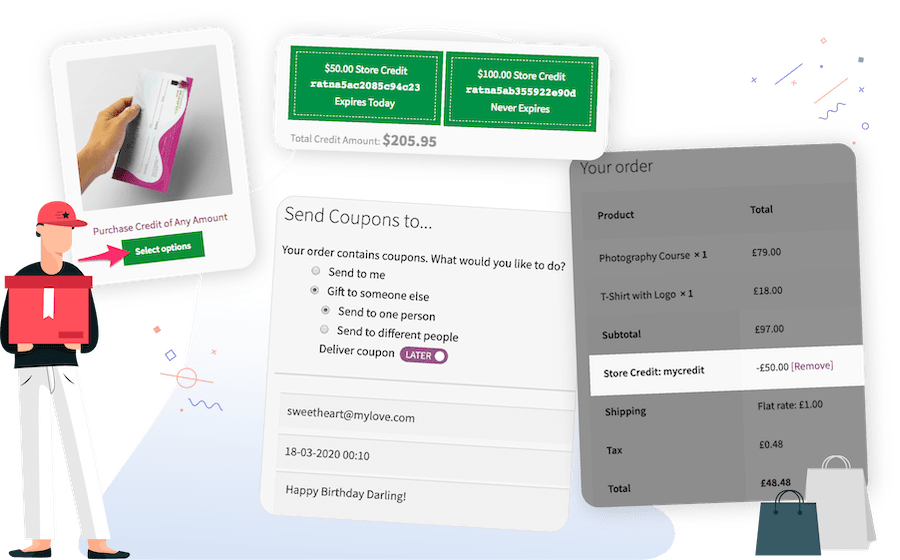
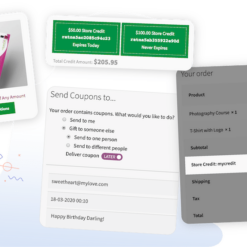
WooCommerce Smart Coupons allows customers to to buy coupons as credits for themselves or as a gift to others. Try this coupon plugin! Version: 8.6.0 WooCommerce Smart Coupons lets customers buy gift certificates, store credits or coupons easily. They can use purchased credits themselves or gift to someone else.

Released on: 2026-02-23

Single License

Club Membership

17,99 / Month Membership

NEW Activate all licensed items with the free Dashboard

EffectIO Dashboard

Discover when we give away free Plugins

Find out when we give items for Free


Hey! ๐ŸŽ‰ Monthly emails, tops. Snag exclusive plugins/themes for $0. They go quick, but you might just get a freebie! ๐Ÿ˜‰

30 Days Money Back Guarantee

Guaranteed pre-activated plugins. Most items work immediately after installation. Open a support ticket to obtain the license keys for the ones that ask for activation.

Free support to install and setup on your site.

WooCommerce Smart Coupons enables your clients to instantly issue coupons on item acquisitions and to purchase credits for themselves or gift to others. Thousands of shop managers count on Smart Coupons everyday โ€“ making it one of the most preferred WooCommerce extensions for marketing. Test this coupon plugin if you wish to see your clients producing coupon codes.

How to install this plugin

  1. ย ย ย First of all, you download the .zip file from your WooCommerce account.
  2. ย ย ย Secondly, you go to Add New to upload the file that you have downloaded.
  3. ย ย ย Then, you Activate the extension.
  4. ย ย ย In the end, you will be redirected to the Welcome Page of Smart Coupons.

WooCommerce Smart Coupons Features

  • Generate coupons of a new kind.
  • Auto Create any discount.
  • Distinctive coupon code generation for all credits/gift certificates.
  • Automatic Balance Maintenance – Credit coupon stability is decreased instantly.
  • Automatic Deletion on Zero Balance – Credit/certificate is deleted automatically when balance reaches zero. Therefore, you do not need to invest time on this.
  • Connect as many coupons as you prefer with an item.
  • Practical and familiar coupon management interface.
  • Establish expiry dates of coupons in Days, Weeks, Months & Years.
  • Alternative to choose the productโ€™s price as the couponโ€™s quantity – enable your clients to ย purchase any credit amount from single product using this coupon plugin.

How to Add Coupons to Your Store

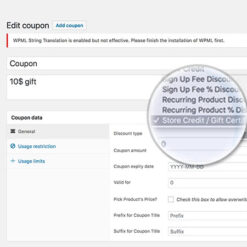
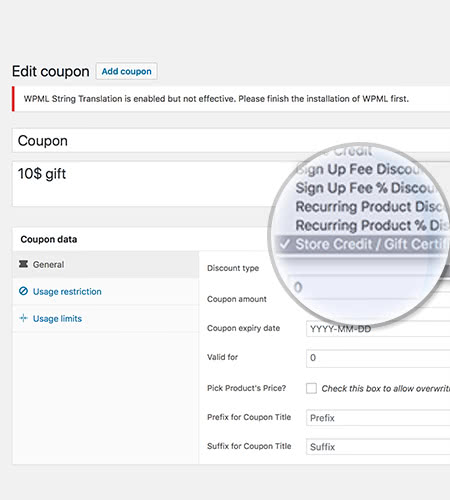
The first thing you have to do in order to add coupons is to go to WooCommerce ย > Coupons. Then, click Add new coupon. If you want a credit-based coupon, Store Credit or Gift Certificate, use Store Credit/Gift Certificate as the type. After that, you can Add other coupon details and just click Save after you finish.

If you need help or any other details, you can go to Coupon Management and set up restrictions by usage, email address or other limits.

Any coupon can be utilized as a template to auto-generate new and distinctive coupons but along with the same characteristics as the original. This function can also improve safety, because people canโ€™t share coupons since auto-generated coupons are limited to a client email address.

In order to set up auto-generation, you have to go to Add new coupon, or go to an existing coupon. After that, go to Auto Generation of Coupon and enable. Also, you can set up a prefix or a suffix if you wish. In the end, all you have to do is click save and everything is ready.

Actions you can Take on Your Store to Grow Sales

Action 1: Smartly Priced Discounted Credits

Discover your common order size, for instance $175. By using this coupon plugin, you can generate a Store Credit / Gift Certificate coupon for greater sum โ€“ $250. Produce a new item and price it at a worth a bit over typical order size. In this situation, the new item can be priced at $200. Make sure the discount is profitable enough. What youโ€™ve just done is attracted your clients with a great discount, made them pay in advance, and continue purchasing in future to diminish their credit balance.

Action 2: Offer Discount On Higher Priced Product While Purchasing Lower Priced Product

Generate a discount coupon and enable usage just on a particular higher priced item. Connect this coupon with an associated lower priced item. In this way, more people will purchase the lower priced item and many of them will change to higher priced item, too.

Action 3: Offer Multiple Credit Coupons With One Product

The more, the better! Generate several coupons of different denominations and provide them on one or more items.

Action 4: Holiday Season Gift Certificates / Time Limited Offers

Produce a discount/credit coupon that is valid between a specific time ranges. Wisely value the coupon. Advertise the offer in advance, you can even keep increasing offer cost as coupon start time comes closer. This will produce scarcity and fast people to purchase more and earlier.

Action 5: Partner with a โ€œDealsโ€ Site

Create a group of coupons with WooCommerce Smart Coupons plugin โ€“ and export them to a CSV document. Now share this CSV file with the โ€œdealsโ€ web page, so they can issue one coupon to each customer. You can import the CSV file back into your shop so when clients use the coupon, they obtain the promised deal. To make for a seamless experience, offer a direct link to the item on offer with the produced coupon in the URL.

Action 6: Create an โ€œAvailable Offersโ€ Page on your Site

Produce a new page in WordPress, link it from a known spot on your site. And use shortcodes to display coupons for offers you have presently available. You can even use images, link them to an item web site and move the coupon code in the URL.

In other words…

Meet WooCommerce Smart Coupons!

How to use WooCommerce Smart Coupons’ Settings

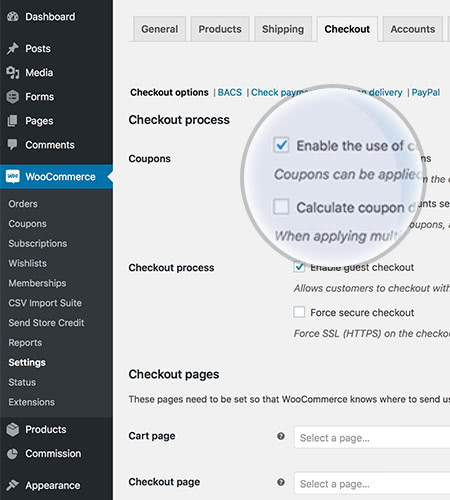
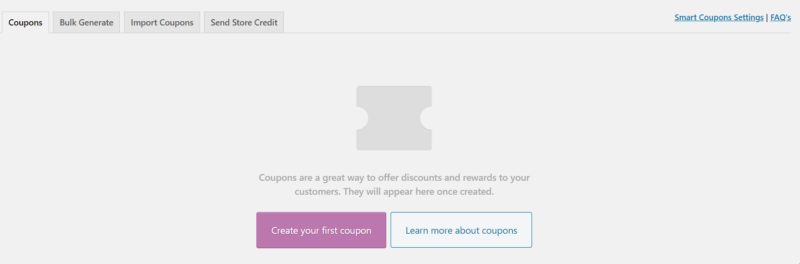
If you haven’t used this plugin before, in order to find it you have to go to Woocommerce in the left panel and click on Coupons. In the case that you have never created a coupon before, this screen will show up:
woocommerce coupons

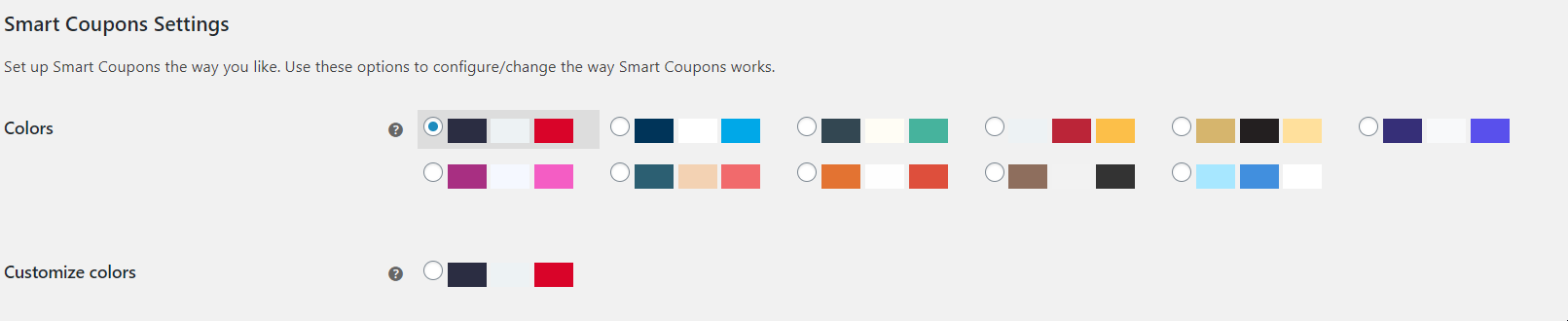
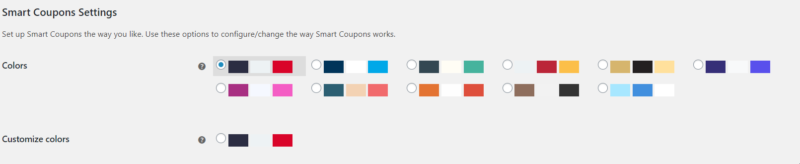
As you can see, in the top corner of the picture you can find “Smart Coupons Settings” and Frequently Asked Questions. If you click on Settings, you can set the colors, like in this picture:
colors

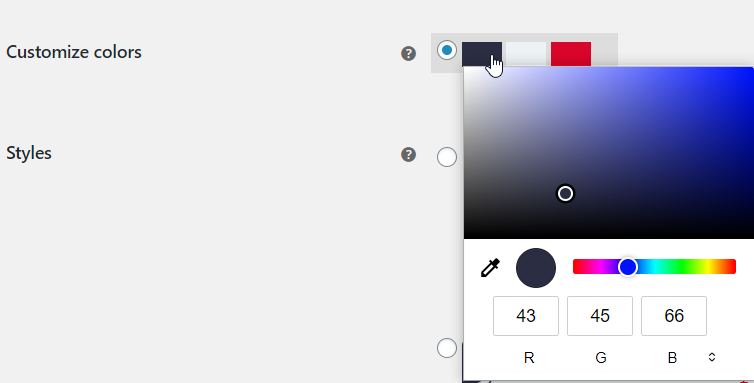
Here you can see lots of color mixtures, but you can also customize the colors as you prefer. If you click on one color from the second option, you can choose a one of your own:
customize colors

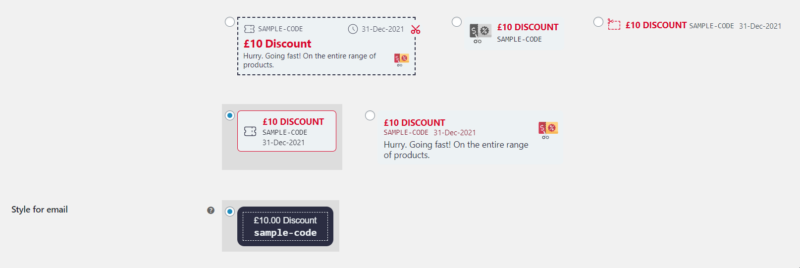
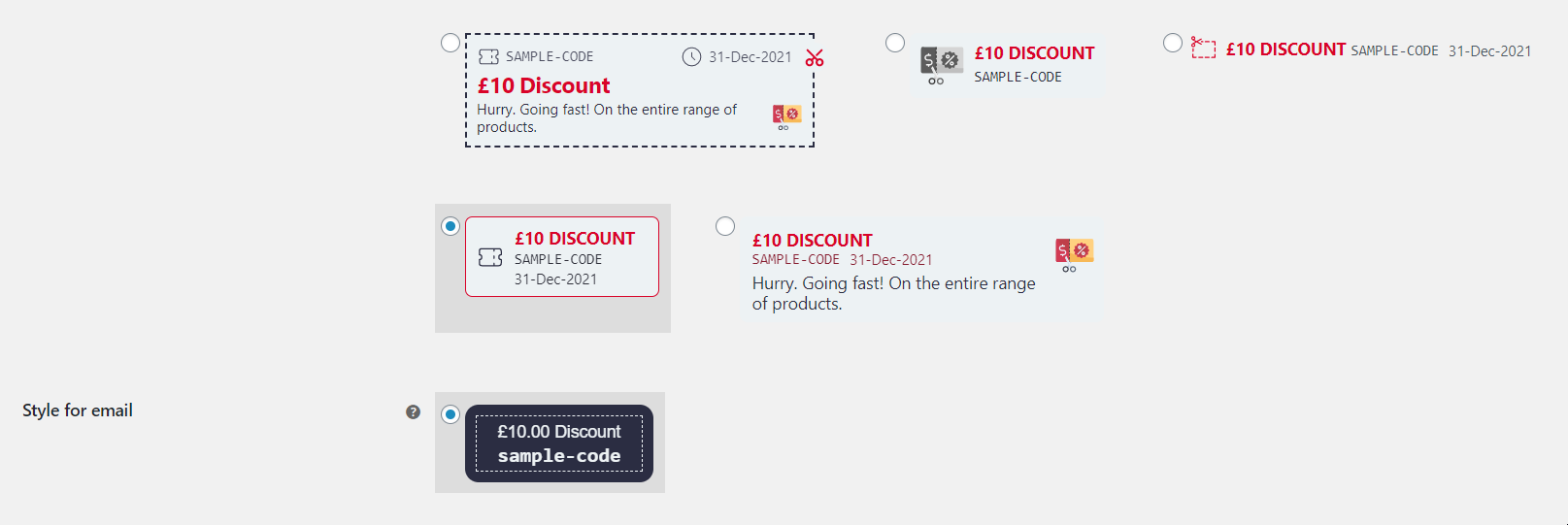
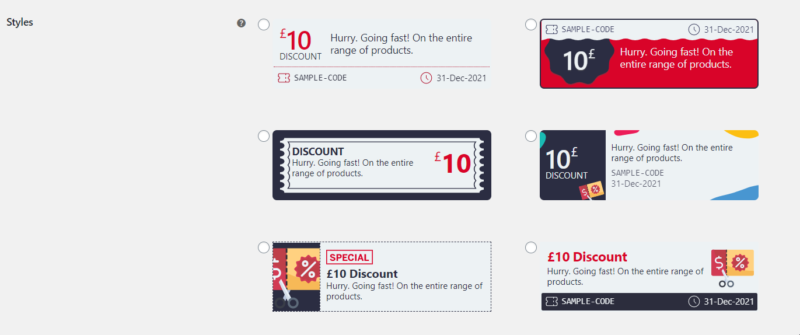
If you go below, you can choose both the style of your coupons and the email style:
woocommerce coupons style

woocommerce coupons style 2

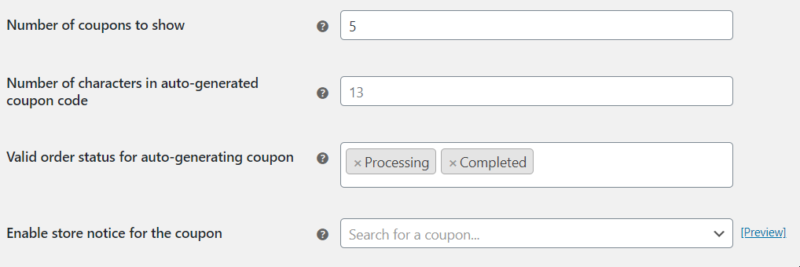
Coupons’ number, conditional field rules and more
coupons settings

In the first field, you can add the number of coupons to show on the checkout / cart page. Depending on your business, you can go up to as many as you like. You can also add the number of characters in the auto-generated coupon code.

In the third field, you can add the pages which need to be achieved so that your customers can get the coupons. Finally, enable store notice for a specific or for more specific coupons.

If you want to see how they will look like, click on “Preview”.

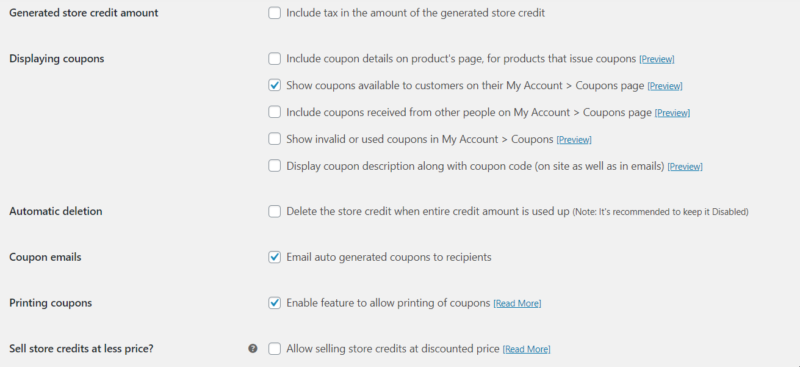
Woocommerce Smart Coupons’ display, deletion, emails, printing
woocommerce coupons more settings

The first option from this image allows you to include tax in the amount of the generated store credit. Displaying coupons has multiple options, like:

  1. Including coupon details on product’s page.
  2. Showing the available coupons in the Coupons Page, from the users’ account.
  3. Including coupons received from other people (this is especially cool if you have party articles / fashion or anything that’s going to improve your users’ share rate)
  4. You can display the coupon’s description along with the coupon code (on site and in the emails you send).

Also check the Preview if you want to see how they look like.

If you want to delete the store credit amount when the entire credit is used up by your users, you can do so. However, it’s recommended to keep it disabled and only do this if you really know what you are doing.

You can also email auto-generated coupons to recipients, and that’s a great idea, because users love to receive free things.

What is more, you can enable the feature of allowing your users to print the coupons.

Last but not least, you can sell store credits at a lower price.

To sum up

Use Woocommerce Smart Coupons in order to generate more sales and get more revenue from your site! To make sure that everything is alright, you should check the settings of your plugin and then enter the coupons on the site. May it be Christmas, Easter or any other special occasion, like a sign-up, you can generate coupons in order to celebrate it and make your customers happy.


5 reviews for EffectIO WooCommerce Smart Coupons 9.76.0

  1. edendvatri321

    This plugin link as many coupons as you like with a product,create and update coupons of a new type!!!
    The best!!

  2. lipasimone

    This is perfect plugin, thank you!

  3. martindumas8

    Never stops getting better!

  4. sekstefani

    If you want convenient and familiar coupon management interface, choose this product!!

  5. Stefani Sekovska

    Working excellent, thank you very much!!!

Add a review

WooCommerce Smart Coupons lets customers buy gift certificates, store credits or coupons easily. They can use purchased credits themselves or gift to someone else.

2026.03.27 โ€” version 9.74.1
  • Fix: Removed unsupported "IF NOT EXISTS" from CREATE TABLE query to ensure compatibility with dbDelta and prevent SQL warnings
  • Update: Translations
2026.03.26 โ€” version 9.74.0
  • New: Tested up to WordPress 6.9.4
  • New: Tested up to WooCommerce 10.6.1
  • New: Capture coupon configuration snapshot at order level in a dedicated lookup table (`wc_sc_order_coupon_meta_lookup`) for analytics and future reporting, with optimized DB version-aware table creation
  • Fix: Resolved a JavaScript error occurring when 'wp.plugins.registerPlugin' was unavailable on block based checkout
  • Fix: URL coupon handling now correctly applies each coupon instead of reusing the last code
  • Fix: Malformed logic guard affecting gift coupon amount calculation
  • Fix: Standardized precision units for coupon validation in admin orders
  • Fix: Applied correct discount for coupon action products in admin orders
  • Fix: Auto apply coupon not working as expected with product categories
  • Fix: Slow cart page and duplicate coupon notice in WPML/WCML plugin compatibility
  • Fix: Avoided unnecessary WooCommerce session creation on non-gift product pages
  • Fix: Coupon validation for product attributes now correctly applies only to matching variations instead of all variations of the same parent product
  • Developer: Introduced a new filter wc_sc_coupon_details_to_be_sent that allows developers to customize the title text of the 'Send Coupon' form
  • Update: Translations
2026.03.07 โ€” version 9.73.1
  • Fix: PHP notices for undefined 'days', 'time', 'time_taken_by_wc', 'coupon_generated', 'coupon_emailed'
  • Tweak: Make sure to include preset templates safely
  • Update: Some labels related to 'Quick Preset' feature
  • Update: Styles of drop down button of 'Quick Preset' feature
  • Update: Translations
2026.03.07 โ€” version 9.73.0
  • New: Tested up to WooCommerce 10.5.3
  • New: Added a "Revenue Insights" dashboard widget to display key performance metrics for Smart Coupons, including store credit used, orders created using store credit, and additional revenue from coupon
  • New: Added "Automation Impact" dashboard widget to display Person hours saved, number of auto-generated coupons & number of emails sent automatically by the plugin
  • New: Added a quick action to quickly setup 'BOGO' coupon
  • Fix: Product category restrictions for Store Credit were not applied correctly when creating or updating manual orders from the admin
  • Update: Improved French language translations strings
  • Update: Translations
2026.02.26 โ€” version 9.72.0
  • New: Tested up to WooCommerce 10.5.2
  • Fix: Coupons were not importing metadata correctly for translated discount types in CSV
  • Developer: Added wc_sc_cart_totals_coupon_html filter for customizing cart totals coupon HTML
  • Update: Minor CSS tweaks for the 'Welcome' page
  • Update: Translations
2026.02.12 โ€” version 9.71.0
  • New: Tested up to WordPress 6.9.1
  • New: Tested up to WooCommerce 10.5.1
  • New: Updated 'Welcome' & 'About' page on the admin side
  • Fix: Available coupons are not displaying due to inconsistent tax settings
  • Update: Added support for pretty permalinks using the 'sc-page' endpoint to accept coupons from the URL
  • Update: Compatibility for WooPayments Multi-Currency for displaying discounts & coupon amount in active store currency
  • Update: Translations
2026.01.29 โ€” version 9.70.0
  • Fix: Crossed discount and subtotal values not matching correctly in the cart
  • Fix: 'Send Coupons' form value not updating when an amount for the gift card is changed from the variable amount dropdown menu
  • Fix: Improvement in checking condition for '$receiver_details' using '! empty()' to prevent potential warnings
  • Update: WPML Compatibility prevents product discount removal when the site language is switched
  • Update: Translations
2026.01.22 โ€” version 9.69.0
  • Fix: Coupon minimum and maximum amount validation to correctly use the subtotal when prices are displayed inclusive of tax
  • Fix: Auto-generated Cashback Rewards credits not respecting the store decimal precision settings
  • Fix: Gift Card coupons not generated and emails not sent when using a block-based Cart page with a classic Checkout page
  • Fix: Safeguard WooCommerce session initialization to prevent REST API fatal errors
  • Update: Improved French language translations strings
  • Update: Translations
2026.01.15 โ€” version 9.68.0
  • Fix: Conflict with Breakdance plugin causing the 'Send Coupon' form not to appear on the product page
  • Update: Translations
2026.01.08 โ€” version 9.67.0
  • Fix: Cashback Rewards 'Combine Emails' option not sending the auto-generated email template when enabled
  • Fix: Store Credit coupons generating incorrectly for multiple quantities when paid via Apple Pay or Google Pay
  • Fix: Incorrect discount calculation in admin orders when the 'Apply Before Tax' option is enabled
  • Fix: Coupons not respecting the maximum discount limit when applied to bundle products
  • Fix: Undefined variable notice for $minimum_amount_rounded
2026.01.03 โ€” version 9.66.0
  • New: Shortcode 'smart_coupon_countdown' for displaying countdown timers about coupon expiry, also works with banners provided by the plugin
  • New: Display Store Credit balance getting used from the total balance available, alongside coupon codes on Cart and Checkout page
  • New: Display original price of the product as crossed along with discounted price of the product in the cart
  • Fix: A product that issues store credit, is not getting added to cart when it is set as gift product under a coupon's Actions tab
  • Fix: Max discount not getting applied when coupons are applied to orders from the admin side
  • Fix: Incorrectly setting the default quantity as 1 for the product that is not there in the cart
  • Developer: Added 'wc_sc_coupon_show_store_credit_balance' filter to enable or disable Store Credit balance display
  • Developer: Added 'wc_sc_store_credit_balance_label' filter to customize the Store Credit balance label
  • Update: Translations
2025.12.25 โ€” version 9.65.0
  • New: Tested up to WooCommerce 10.4.3
  • New: Customers can now enter recipient details, personalized messages, and schedule delivery of coupons directly from the product page (only for shortcode-based checkout page)
  • New: Display promotion-like messages on the product page for product-based discounts
  • Fix: Cashback Rewards not generating store credit coupons when HPOS was enabled without WP posts sync due to order meta not being detected
  • Fix: Empty lines in CSV files causing the import process to stop
  • Fix: Coupon application & discount calculation getting affected due to issue with the inclusive of tax and minimum amount
  • Developer: Added filter 'sc_gift_ignore_sanitize_receiver_message' to not avoid line break of receiver email template
  • Developer: Added filters 'wc_sc_show_product_page_gift_form' and 'wc_sc_gift_form_default_accordion_state' to enable/disable form and manage accordion default state
  • Update: Translations
2025.12.11 โ€” version 9.64.0
  • New: Tested up to WordPress 6.9.0
  • New: Tested up to WooCommerce 10.3.6
  • Fix: Gift products were not added correctly when applying coupons through custom AJAX request
  • Fix: Fatal error when modifying shipping methods with invalid value
  • Fix: Coupon error messages were being replaced unexpectedly
  • Fix: Fixed product discount coupons were not applying correctly when creating orders are created manually from admin side
  • Fix: Store Credit coupons are not generating when the order is being paid using Apple Pay or Google Pay
  • Update: Replaced deprecated 'wc_enqueue_js()' usage for compatibility with WooCommerce 10.4
  • Update: Translations
2025.11.27 โ€” version 9.63.0
  • New: Tested up to WooCommerce 10.3.5
  • Fix: Products set under 'Actions' tab is not considering tax settings, causing invalidation of coupon spend limit
  • Fix: Coupon scheduling not setting correct time when scheduled from shortcode-based checkout page
  • Fix: Coupon meta not updating
  • Fix: Coupons restricted to product, when applied via URL coupons, not applying & redirecting to home page
  • Fix: Treating everything passed in the URL as coupons, causing performance issues
  • Fix: URL coupons redirects to the same page when the page slug and coupon code are the same
  • Fix: Coupon applied via URL not showing in CheckoutWC Side Cart on first load due to timing issue
  • Update: Label & descriptions of some of the fields of Cashback Rewards settings
  • Developer: Added filter 'sc_shareable_link_url' to customize coupon URL
2025.11.07 โ€” version 9.62.0
  • New: Added REST API endpoint to retrieve detailed store credit and available coupons for authenticated users
  • Fix: Error in cart for auto apply coupon for subscription variable product
  • Fix: Product meta for image upload not saving properly
  • Developer: Added filters 'wc_sc_unused_coupon_reminder_coupon_ids' and 'wc_sc_unused_reminder_email_coupon' to modify coupon IDs and coupon object before sending unused reminder emails
  • Tweak: Some additional checks to prevent running unnecessary code on the product edit page on the admin side
  • Update: Moved shortcode 'wc_sc_balance' and 'smart_coupons_balance' to run with hook 'init'
  • Update: Moved error logging for feature of image upload from system level logging to error logging of the plugin
  • Update: Translations
2025.11.01 โ€” version 9.61.1
  • Fix: Uncaught Error: Class 'WC_SC_Email' not found
  • Update: Restricted some code execution from the places where it's not required
  • Update: Translations
2025.10.30 โ€” version 9.61.0
  • New: Tested up to WooCommerce 10.3.3
  • New: Issue a new coupon for every new order that matches a specified criteria
  • Fix: Attribute-based exclusions not working consistently with variable products
  • Fix: Excluded products added from 'Actions' tab from the calculation of subtotal for Usage restrictions 'Minimum spend' and 'Maximum spend'
  • Update: Copy email notifications settings from 'Emails' tab to 'Smart Coupons' tab under 'WooCommerce > Settings'
  • Update: Use of store credit label in email notification setting for 'Store Credit email with image'
  • Update: Translations
2025.10.23 โ€” version 9.60.0
  • New: Tested up to WooCommerce 10.3.0
  • New: Display notices on the cart & the checkout page about additional action to perform for an offer like discount or free shipping
  • Fix: Restrict guest users from viewing and applying role-restricted coupons during checkout
  • Fix: Expired coupons were being incorrectly selected in the 'Unused Coupon Reminder' query when expiry reminders were enabled or disabled
  • Update: Translations
2025.10.16 โ€” version 9.59.0
  • Fix: When 'Give to someone else' is selected on block-based checkout page, gift card emails were sent to the admin instead of the recipient's email address
  • Fix: Compatibility with CheckoutWC where 'Available Coupons' appeared on checkout despite being disabled in settings
  • Fix: URL Coupons redirecting visitors to the homepage
  • Update: Made the gift card image upload process more reliable
  • Update: Translations
2025.10.09 โ€” version 9.58.0
  • New: Coupons were not showing in the "Available Coupons" section after being removed from Auto Apply
  • Fix: Auto-generated coupon emails used the gift card template even when product image upload was disabled
  • Fix: Sender message not appearing in gift card recipient email after switching to gift-card-email.php template
  • Fix: Translation support for the word 'percent' in the coupon actions tab for products
  • Fix: Store Credit usage restriction not excluding product brands correctly
  • Fix: Attribute restrictions not working for auto-applied coupons
  • Update: Translations
2025.10.07 โ€” version 9.57.0
  • New: Tested up to WordPress 6.8.3
  • New: Feature 'Unused Coupon Reminder' email to automatically notify customers about their coupons that are unused for a specified duration
  • Fix: Fatal error in WC_SC_Gift_Card_Image::display_order_item_meta by making the 4th parameter optional when 'woocommerce_order_item_meta_end' passes only 3 arguments
  • Update: Translations
2025.10.02 โ€” version 9.56.0
  • New: Tested up to WooCommerce 10.2.2
  • New: Shortcodes 'wc_sc_balance' and 'smart_coupons_balance' to show store credit balance
  • Fix: Prevent coupon category archive pages from non-admin users by redirecting them to shop page
  • Fix: Prevent auto-generation of coupons during subscription switching to avoid granting coupons without payment
  • Fix: Unnecessary loading of some JavaScript and CSS on pages where they are not required
  • Fix: Improved plugin reliability by enhancing exception handling
  • Developer: Filters 'sc_coupon_category_should_redirect' and 'sc_coupon_category_redirect_url' added for customizing URL coupon behavior
  • Update: Accept coupon from URL even if it is passed like endpoint or pretty permalinks
  • Update: Translations
2025.09.24 โ€” version 9.55.0
  • New: Added support for gift card image uploads, allowing customers to upload an image to personalize their gift cards
  • Update: Translations
2025.09.10 โ€” version 9.54.0
  • Fix: Coupons are not auto-generating when 'Apple Pay' is used to pay for the order
  • Fix: Error in Danish translation strings that caused fatal error with unknown format specifier '&'
  • Fix: Translation issue with coupon action's gift product message so it now displays correctly in all languages
  • Fix: Coupons set to 'First Order Only' were incorrectly applied to registered users who had previously purchased as guests
  • Fix: Gift Card not added via AJAX when using 'WPC AJAX Add to Cart for WooCommerce' plugin
  • Update: Improvements in usage restriction based on number of orders like default values, arguments in filter 'wc_sc_coupons_by_order_count_statuses' and 'wc_sc_coupons_by_order_count_error_message', use of CRUD-based meta functions for better consistency
  • Update: Translations
2025.09.03 โ€” version 9.53.0
  • Fix: Validated coupon quantities to prevent automatic application under unexpected cart conditions
  • Update: Translations
2025.09.01 โ€” version 9.52.0
  • New: Coupon restrictions - 'Number of orders made' to limit coupon usage based on the customer's completed orders
  • Update: Improved file inclusion method using WordPress functions
  • Update: Migrated class 'SA_WC_Compatibility_4_4' to 'SA_WC_SC_Compatibility'
  • Update: Translations
2025.08.28 โ€” version 9.51.0
  • New: Tested up to WooCommerce 10.1.2
  • Fix: Incorrect discount amount shown in admin order email
  • Fix: Improved plugin reliability by enhancing exception handling
  • Update: Translations
2025.08.22 โ€” version 9.50.0
  • New: Tested up to WooCommerce 10.1.1
  • Fix: Coupon code case sensitivity issue causing compatibility problems with other plugins
  • Update: Translations
2025.08.18 โ€” version 9.49.0
  • Fix: Gift product not added to the cart when 'FunnelKit Cart for WooCommerce' plugin is enabled
  • Fix: Improved plugin reliability with better exception handling
  • Update: Translations
2025.08.07 โ€” version 9.48.0
  • Fix: Auto-generated coupon details were not displaying in the order confirmation email
  • Fix: Translation issue in the email header when the customer receives the email from the plugin
  • Fix: 'Generated coupons' section on order admin shows all older coupons
9.6.2
  • Developer: Filter 'wc_sc_email_coupon_description_text' to manage display for email coupon description text
  • Update: Translations
2025.07.31 โ€” version 9.47.0
  • Fix: Free product from "Actions" tab not added to cart when applying coupon causes page reload
  • Fix: Improved UI scripts for the "Available Coupons" section
  • Fix: Shortcode-based "Available Coupons" section will no longer follow hide settings of collapsible "Available coupons" section
  • Fix: Settings "Always show section" and "Open by default" are now always visible
  • Fix: "Preview email" styles no longer affect the entire admin page ["Bulk Generate" & "Send store credit" tab]
  • Update: Translations
2025.07.28 โ€” version 9.46.0
  • New: Tested up to WooCommerce 10.0.4
  • Fix: {coupon_type} merge tag doesn't work in the Acknowledgement email
  • Fix: Updated combined coupon validation to allow unspecified combinations by default
  • Fix: Improved conditional check for `$subtotal` using `! empty()` to prevent potential warnings and improve code reliability
  • Update: Translations
2025.07.23 โ€” version 9.45.2
  • Fix: Corrected SQL error caused by unset $subtotal in amount conditions
  • Update: Translations
2025.07.22 โ€” version 9.45.1
  • New: Tested up to WooCommerce 10.0.3
  • Fix: Added checks to prevent fatal errors in some cases
  • Update: Translations
2025.07.21 โ€” version 9.45.0
  • New: Tested up to WordPress 6.8.2
  • New: Tested up to WooCommerce 10.0.2
  • Fix: Sender and receiver details now visible in 'More Details' on My Account > Coupons
  • Fix: Showing coupon validation notice when not required
  • Fix: Resolved translation issue in checkout related to incorrect handling of single quotes in localized strings
  • Fix: Improved layout in the "Send Store Credit" tab
  • Fix: Discount amount in admin order email now reflects accurate value
  • Fix: Prevented JS error in French by escaping inline translations with `esc_js()`
  • Fix: On the plugin's admin setting page, footer notes are overlapping the 'Save changes' button
  • Fix: Wrong escaping function, using 'esc_attr__()' in a context outside of HTML attributes
  • Update: Improved handling of adding products to the cart via AJAX in the Coupon Action tab [Admin]
  • Update: Translations
2025.07.15 โ€” version 9.44.0
  • Update: Prevent coupon generation overlap when multiple admins run bulk generation simultaneously
  • Fix: Added CheckoutWC compatibility file to resolve integration issues
  • Fix: Auto-apply coupons no longer disappear during checkout transition
  • Fix: Optimized background AJAX call frequency to improve performance and reduce server load
  • Fix: Illegal string offset โ€˜global_couponsโ€™
2025.07.04 โ€” version 9.43.0
  • New: Settings to manage the display of 'Available coupons' section on the Cart & the Checkout page
  • Fix: Double display of coupon application success notification triggered by auto-apply coupons
  • Fix: Store Credit coupon amount not deducting correctly when coupon code case did not match
  • Fix: Case sensitivity in coupon code handling causing incorrect behavior on orders admin pages
  • Update: Improvements in 'Available coupons' section on the cart & the checkout page like smooth loading & transitions
  • Update: Improved compatibility with WooCommerce's case-sensitive coupon validation logic
  • Update: By default, store credit will not reduce line total & line taxes
  • Developer: Filter hook 'wc_sc_store_credit_reduce_line_totals' to control whether store credit will reduce the line total & line taxes or not
  • Update: Translations
2025.06.27 โ€” version 9.42.0
  • New: Tested up to WooCommerce 9.9.5
  • Fix: Improved data migration logic to ensure reliable batch processing into `wc_smart_coupons` custom table
  • Fix: Emails sent from the plugin now respects the case defined in custom label set for discount type 'Store credit' and no longer forces lowercase
  • Fix: Improved UI/UX of coupon Usage restrictions and separated multiple include/exclude settings for better clarity and control
  • Update: Replaced Chosen.js with Select2 for Usage restriction > 'Allowed locations' to improve performance and support asynchronous data loading
  • Update: Translations
2025.06.19 โ€” version 9.41.0
  • New: Tested up to WooCommerce 9.9.4
  • New: Swedish, Danish & Korean translations (AI-generated)
  • Fix: Bulk-generated coupons were imported with an incorrect author
  • Fix: Issue where multiple notices were displayed and Action tab-related products remained in the checkout after coupon removal
  • Fix: Available coupons were not displaying on the checkout page when using the CheckoutWC plugin
  • Fix: Auto Apply coupon with Individual use set is causing infinite loop
  • Update: Translation
2025.06.16 โ€” version 9.40.0
  • New: Tested up to WooCommerce 9.9.3
  • New: Polish, Turkish & Portuguese(Brazil & Portugal) translations (AI-generated)
  • Fix: Improved SQL logic to avoid partial matches in product exclusion for Auto Apply coupons
  • Fix: Persistent "Display message to user" after coupon/product removal
  • Fix: Layout issue in "Send Store Credit" tab
  • Fix: New Customer Discount not applying on guest checkout
  • Fix: Store credit not reflecting in 'Preview email'
  • Fix: Infinite loop causing max execution time errors
  • Fix: YITH Cart Messages disappeared when clicking on Available Coupons
  • Fix: Product selection popup not opening on Classic Checkout for coupons with multiple choices.
  • Fix: Prevented cart page from scrolling to top when changing shipping methods after applying a coupon via accordion UI
  • Update: [Admin] Enhanced UI/UX for new user restrictions
  • Update: [Admin] Enhanced UI/UX for Bulk Generate Coupon settings
  • Update: Translation
2025.06.06 โ€” version 9.39.0
  • New: Coupon restrictions - "Coupon(s) can be used with" and "Coupon(s) can't be used with"
  • New: Arabic, Dutch & Italian translations (AI-generated)
  • Fix: Sending emails for coupons that are about to expire, even for the coupons with zero amount
  • Fix: Fatal error for issue related to Aelia Multi-Currency plugin compatibility
  • Update: Translations
2025.05.26 โ€” version 9.38.2
  • Fix: Uncaught ReferenceError wc_sc_send_coupon_form_block_frontend is not defined on WooCommerce Checkout Block
  • Update: Translations
2025.05.23 โ€” version 9.38.1
  • Fix: Checkout page stuck on loading spinner, blocking order completion
  • Fix: Collapsible section "Available Coupons" was always visible even when no coupons were available
  • Update: Translations
2025.05.22 โ€” version 9.38.0
  • Fix: Cart total not updating when Store Credit is removed on WooCommerce Blocks-based Cart & Checkout pages
  • Update: Improved performance by removing debug_backtrace() to reduce memory usage
  • Update: Updated 'Available Coupons' section to show coupons only when needed
  • Update: Translations
2025.05.15 โ€” version 9.37.0
  • New: Tested up to WordPress 6.8.1
  • New: Tested up to WooCommerce 9.8.5
  • New: Russian & Japanese translations (AI-generated)
  • Fix: PHP Warning: Trying to access array offset on value of type null in 'save_coupon_receiver_detail_in_order' when using Block-based Checkout
  • Fix: Store Credit amount not reducing when applied to order [Admin]
  • Fix: Coupon export with email address in the search filter does not work as expected
  • Fix: Auto-apply coupon with "Usage limit per user" did not work as expected when the same guest user (identified by email) came back for a second purchase
  • Fix: Removed leftover data from deleted auto-apply coupons that is not needed anymore
  • Update: Translations
2025.05.05 โ€” version 9.36.0
  • New: Tested up to WooCommerce 9.8.3
  • New: Spanish & Chinese translations (AI-generated)
  • Fix: Store credit not detected by YITH POS resulting in 0 credit applied to cart
  • Fix: Uncaught Error: Call to a member function get_code() on null during preview of expiry reminder email
  • Fix: 'Smart Coupons restrictions' are not persisting the set restrictions like 'Product attributes'
  • Fix: Auto-apply not working for asterisk (*) based email addresses in 'Allowed emails' and 'Excluded emails'
  • Fix: PHP Warning: Trying to access array offset on value of type bool thrown when setting 'Combine emails' is not set
  • Fix: Uncaught Error: Call to a member function get_items() on null thrown when coupons are generated via REST API with parameter 'sc_is_send_email = yes' [BRW - Booking Rental Plugin WooCommerce]
  • Fix: Product quantity based restriction working as AND condition instead of OR condition
  • Fix: Replace help tip with description for two checkbox settings
  • Developer: Filter 'wc_sc_product_quantity_condition' to modify product quantity restriction condition (any or all)
  • Update: Translations
2025.04.24 โ€” version 9.35.0
  • New: Tested up to WooCommerce 9.8.2
  • Fix: Products from 'Actions (tab) > Add products to cart' are not getting added in CartFlows Checkout
  • Fix: Auto Apply Coupon does not apply with 'Product quantity based restrictions' until applied Store Credit has balance
  • Fix: Unable to checkout due to error 'No payment method provided' on WooCommerce Block based checkout, when applied store credit is fully covering the order amount
  • Update: Refactored the 'Usage restrictions' tab by showing only those fields that are configured, to reduce user interface (UI) clutter & improve clarity
  • Update: Improved performance for coupon options 'Product attributes' and 'Exclude attributes' by adding a search-based selection
  • Update: Translations
2025.04.17 โ€” version 9.34.0
  • New: Tested up to WordPress 6.8
  • New: Tested up to WooCommerce 9.8.1
  • Fix: Unable to override 'Coupon Expiry Reminder' email template
  • Fix: Duplicate Store Credit doubling in Integration with AvaTax and WooCommerce Subscriptions
  • Fix: PHP Notice: Undefined index in custom taxonomy
  • Fix: PHP Fatal error: Uncaught TypeError: Unsupported operand types: string * string
  • Update: Translations
2025.04.10 โ€” version 9.33.0
  • New: Support for custom taxonomies under 'Usage restrictions'
  • Fix: Aelia multi-currency values no longer storing in the postmeta table
  • Fix: Auto apply coupon is not working with payment method restrictions
  • Fix: Resolved an issue where coupons imported via CSV and scheduled for future publishing, did not appear on the front end after being published
  • Fix: Optimized ajax request on cart and checkout page to reduce server strain and improve performance
  • Fix: 'Cheapest Product Discount' promotion did not apply correctly to the lowest-priced product when a new item was added to the cart
  • Fix: Incorrect refund amount displayed on the admin order edit page when decimal separator is other than dot (.)
  • Update: Store Credit validation has been improved to apply only to the relevant line item(s) in the cart, rather than all items, when Store Credit has a taxonomy restriction
  • Update: Translations

Testimonials

Benny O'Brien@benny_obie

The quick response from a friendly team member at @effectioshop honestly caught me off guard.
Nice work!


Stuart Boyle@stuart_boyle

@effectioshop As an eCommerce developer, effectio.org has enabled me to reach higher expectations and my clients are very happy.


22,000+ Users ยท 180 Countries
Trusted by freelancers, agencies & store owners worldwide

How It Works

Install the free EffectIO Dashboard plugin on your WordPress site. It connects to the EffectIO catalog, detects every premium plugin and theme you own, and gives you a single hub to manage licenses, run updates, and keep your admin panel clean โ€” all from one screen.

โšก

One-Click Updates
Update any premium plugin or theme instantly. No manual downloads, no FTP โ€” just click "Update Now."

๐Ÿ”‘

License Manager
View, activate, and manage all your license keys in one place. No hunting through emails or vendor dashboards.

๐Ÿ”‡

Notification Blocker
Blocks intrusive admin nag screens, upsell banners, and ads that clutter your dashboard. Re-enable anytime.

๐Ÿ›ก๏ธ

Vendor Request Control
Prevents redundant license-check pings to third-party servers for items you already manage through EffectIO.

๐Ÿ“ฆ

Bulk Activation
Club members can activate all eligible plugins and themes at once โ€” one button, zero hassle.

๐Ÿ†“

100% Free
The Dashboard itself costs nothing. Install it and it auto-activates on your domain โ€” no key required.

Get Started in 3 Steps

1

Download & Install

Download the EffectIO Dashboard zip and install it via Plugins โ†’ Add New โ†’ Upload.

2

Browse & Activate

Open EffectIO โ†’ Catalog in your admin panel. The dashboard auto-detects your installed items and matches them to your licenses.

3

Update & Manage

Keep everything current with one-click updates. Manage licenses, block nag notices, and enjoy a cleaner WordPress experience.

Licenses

All WordPress derivative work is GPL-licensed. Most items are pre-activated and ready to use. Some require an activation key โ€” we provide it with your purchase, and the Dashboard lets you apply it in seconds.

Club members enjoy bulk activation: activate every eligible item at once with a single click. No more entering keys one by one.

โœ… Money-Back Guarantee

Every item is tested and ships with full features. If something doesn't work and we can't fix it, you get a full refund. We believe premium tools should be accessible โ€” that's why we offer a low-cost subscription so freelancers, small businesses, and agencies can grow without a large upfront investment.

Manage and Update all your sites

17.99 $ / Month Membership

2900 Plugins and Themes. Install, Update, Activate and Delete any plugin. Unlimited Sites. Best WP Agency Deal.

Clean Items

NGO Mission

Always Updated

SSL Connection