EffectIO WooCommerce Advanced Product Labels

Original price was: $49.00.Current price is: $12.99. / year

Drop-in compatible replacement & Licensed Product

WooCommerce Advanced Product Labels lets you create custom product labels that advertise your free products or other exclusive discounts. Version: 1.2.3 Create product labels to increase visibility of your products, add information and increase conversion rate with just a few clicks!

Released on: 2025-01-14

Single License

Club Membership

17,99 / Month Membership

NEW Activate all licensed items with the free Dashboard

EffectIO Dashboard

Discover when we give away free Plugins

Find out when we give items for Free


Hey! 🎉 Monthly emails, tops. Snag exclusive plugins/themes for $0. They go quick, but you might just get a freebie! 😉

30 Days Money Back Guarantee

Guaranteed pre-activated plugins. Most items work immediately after installation. Open a support ticket to obtain the license keys for the ones that ask for activation.

Free support to install and setup on your site.

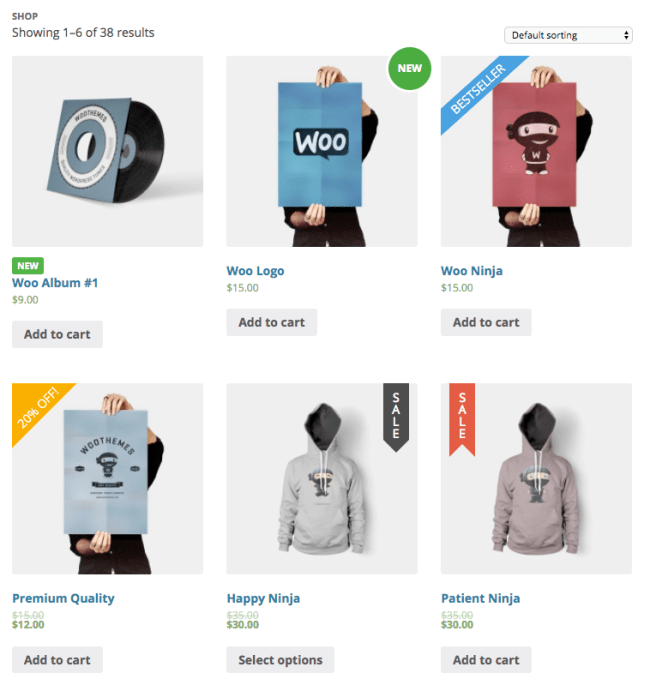
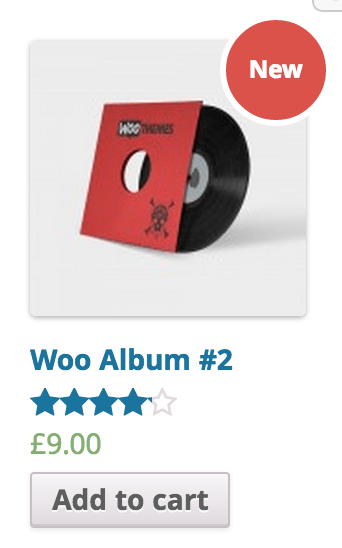
With the Advanced Product Labels extension for WooCommerce, you can effortlessly create stunning and attention-grabbing labels to promote your products. Gone are the days of generic sale or promo labels that customers tend to overlook. Now, you can highlight freebies, emphasize free shipping, or showcase exclusive discounts for specific products or product groups.

Using the conditional framework, you can create targeted and unique labels that are only shown to a specific group of products, ensuring that your labels truly grab the attention of your customers. Whether you want to attract new customers or upsell to existing ones, these custom product labels are the perfect tool to draw attention to your offerings.

In the extension backend, you’ll find a user-friendly global labels interface under the WooCommerce Settings Product labelssettings tab. This interface allows you to set conditions for a group of products, ensuring that the labels are displayed where they’re most effective.

The single label interface, on the other hand, offers the same settings as the global label but applies them to the current product only. You even have the option to exclude a product from the global labels if needed. This level of customization allows you to fine-tune your product labels for maximum impact.

But it doesn’t stop there. The Advanced Product Labels extension also includes features such as customer reviews and footer links, giving your customers access to valuable information while browsing your products. What’s more, you’ll receive premium support from EffectIO, a trusted provider of GPL code, ensuring that you have the assistance you need every step of the way.

With EffectIO, you also have the advantage of their super deals, offering discounts of 30 to 90 percent. And the best part? You can easily update your items via the EffectIO Dashboard, where they come pre-activated and ready to use.

So why settle for ordinary product labels when you can captivate your customers with advanced and highly customizable labels? Try the Advanced Product Labels extension for WooCommerce today and make your products stand out from the crowd.
2 reviews for EffectIO WooCommerce Advanced Product Labels 1.3.0

  1. sofiakurtz5

    Use the global labels to target multiple products at once. You can find this option in the Settings tab.

  2. petersendiana90

    I target multiple products at once, for that reason I’m using global labels from this awesome plugin.

Add a review

Create product labels to increase visibility of your products, add information and increase conversion rate with just a few clicks!

1.3.0 — version 1.3.0
  • add - 'Advanced settings' and 'Custom CSS' settings for global labels
  • add - WPML String translation support
  • update - Rewrite settings area so that global label settings fall within the WooCommerce > Settings section
  • update - WP Conditions 1.0.15.1
  • update - PHP 8.2 compatibility improvements
  • fix - small layout fixes
  • remove - Legacy woo-includes/ folder
1.2.3 — 2023-07-24
  • update - Clear object cache when saving a global label to ensure changes come through with persistent cache
  • update - Product age condition improvements
  • fix - Missing textdomains
1.2.2 — 2023-01-09
  • add - Declare HPOS compatibility
7.0 — Bump minimum PHP version to 7.0
  • update - Update WP Conditions to 1.0.13
  • fix - 'Bestseller' condition not always working as expected
  • remove - Removed the deprecated WAPL_Label class
1.2.1 — 2022-02-14
  • fix - JS console error on some WAPL related pages
  • fix - Label colors not always applied
1.2.0 — 2022-02-02
  • add - Allow custom labels - Upload your custom images to use as product labels!
  • add - 'Custom' alignment - drag&drop the labels at any position!
  • add - Actual product image preview - select which product you want to preview the label on.
  • add - Check to see if labels are missing. Will show notice in admin if detected that labels are missing.
6.1 — Up to WooCommerce version 6.1
1.1.8 — 2021-04-02
  • update - Add z-index: 99; for labels
  • update - Add additional checks for WC Active / Composite compatibility
5.1 — Up to WooCommerce version 5.1
1.1.7 — 2020-02-06
  • update - Ensure styles are loaded on non-WooCommerce pages when labels are displayed
1.1.6 — 2019-11-25
  • update - Better styling for ribbon for small characters (ensuring there's one per line)
  • update - Update WP Conditions to 1.0.10
1.1.5 — 2018-10-02
  • update - Improving stability on most themes with gallery images
  • update - Update WP Conditions to 1.0.8
  • fix - incidental JS conflict
1.1.4 — 2017-10-26
  • fix - Fatal error when saving a page in admin that holds a shortcode like [products ids="97"]
1.1.3 — 2017-09-01
  • fix - Featured condition not matching in cases after WC 3.0
  • fix - PHP 7.1 notice {discount} is used when sale price is not set
  • update - Small style fix for Storefront (should also help other themes)
1.1.2 — 2017-06-30
  • update - Update WP Conditions to 1.0.3
  • fix - 'User role' condition 'Guest' wasn't working
  • update - Allow conditions outside postbox / multiple times inside. Not limited to .postbox class.
  • add - Zipcode range support. E.g. 'Zipcode' = 'equal to' = '10000-20000,30000-40000'
1.1.1 — 2017-04-09
  • add - Support for 'Guest user' on the 'User role' condition
  • update - Further improvements to prevent WC 3.0 notices
  • fix - Random IDs for conditions being too big for 32-bit systems
1.1.0 — 2017-03-09
  • [IMPORTANT NOTE] - As of this version, the plugin requires PHP 5.3 or higher to function
  • add - 4 new label types!
  • add - WC 3.0 compatibility
  • update - BIG performance improvements
  • update - BIG refactor of the backend conditions - please verify your setup if using custom coded condition
  • update - Smoother User Experience with conditions
  • update - Instant adding of conditions / condition groups
  • update - Only show valid operator options
  • update - Instantly show condition descriptions
  • update - Deleting entire condition groups
  • update - Duplicate condition groups
1.0.9 — 2016-12-23
  • add - Condition instance argument to 'wapl_condition_values' filter
  • update - Add jquery-ui-sortable dependency to script
  • update - Only load assets on related admin pages
  • fix - Warning when creating a new label
  • add - Basic Composite product support for discount smart label
1.0.8 — 2016-09-14
  • update - Refactored condition code (backend)
  • update - Optimize asset resources
  • update - Improved 'product' condition value fields (allow searching) and supports huge amounts of product
1.0.7 — 2016-07-25
  • update - Handle 'stock' condition and variable products better. Uses the highest stock level of variations.
  • fix - 'Show on detail pages' setting being ignored
1.0.6 — 2016-05-24
  • fix - Division by zero notice when using {percentage} in combination with $0 regular prices.
1.0.5 — 2016-01-08
  • add - Option to show product labels on product detail pages
1.0.4 — 2015-09-29
  • fix - Variable product {percentage} smart label now showing the right percentage
  • update - Keep the Woo settings menu open while in Product Label edit screen.
  • update - Use get_regular_price & get_sale_price functions for discount calculation.
  • remove - Visibility options from the Product Labels post type.
1.0.3 — 2015-07-14
  • fix - Error showing when using the 'shipping class' condition
  • update - Changelog format to Woo's standard
1.0.2 — 2015-05-16
  • add - Custom text/bg color
  • update - Add filter for label types
  • fix - Error 'division by zero' when regular price is 0
  • fix - HUGE typo in plugin name! You actually spell WooComerce with TWO M's!
  • fix - Exclude from global option doesn't exclude
1.0.1 — 2015-02-11
  • fix - single php short tag '<?'
  • update - in featured products condition matcher
1.0.0 — 2015-02-03
  • new - Initial release

Testimonials

Benny O'Brien@benny_obie

The quick response from a friendly team member at @effectioshop honestly caught me off guard.
Nice work!


Stuart Boyle@stuart_boyle

@effectioshop As an eCommerce developer, effectio.org has enabled me to reach higher expectations and my clients are very happy.


22,000+ Users · 180 Countries
Trusted by freelancers, agencies & store owners worldwide

How It Works

Install the free EffectIO Dashboard plugin on your WordPress site. It connects to the EffectIO catalog, detects every premium plugin and theme you own, and gives you a single hub to manage licenses, run updates, and keep your admin panel clean — all from one screen.

One-Click Updates
Update any premium plugin or theme instantly. No manual downloads, no FTP — just click "Update Now."

🔑

License Manager
View, activate, and manage all your license keys in one place. No hunting through emails or vendor dashboards.

🔇

Notification Blocker
Blocks intrusive admin nag screens, upsell banners, and ads that clutter your dashboard. Re-enable anytime.

🛡️

Vendor Request Control
Prevents redundant license-check pings to third-party servers for items you already manage through EffectIO.

📦

Bulk Activation
Club members can activate all eligible plugins and themes at once — one button, zero hassle.

🆓

100% Free
The Dashboard itself costs nothing. Install it and it auto-activates on your domain — no key required.

Get Started in 3 Steps

1

Download & Install

Download the EffectIO Dashboard zip and install it via Plugins → Add New → Upload.

2

Browse & Activate

Open EffectIO → Catalog in your admin panel. The dashboard auto-detects your installed items and matches them to your licenses.

3

Update & Manage

Keep everything current with one-click updates. Manage licenses, block nag notices, and enjoy a cleaner WordPress experience.

Licenses

All WordPress derivative work is GPL-licensed. Most items are pre-activated and ready to use. Some require an activation key — we provide it with your purchase, and the Dashboard lets you apply it in seconds.

Club members enjoy bulk activation: activate every eligible item at once with a single click. No more entering keys one by one.

✅ Money-Back Guarantee

Every item is tested and ships with full features. If something doesn't work and we can't fix it, you get a full refund. We believe premium tools should be accessible — that's why we offer a low-cost subscription so freelancers, small businesses, and agencies can grow without a large upfront investment.

Manage and Update all your sites

17.99 $ / Month Membership

2900 Plugins and Themes. Install, Update, Activate and Delete any plugin. Unlimited Sites. Best WP Agency Deal.

Clean Items

NGO Mission

Always Updated

SSL Connection