EffectIO WooCommerce Quick View Pro 1.7.16

Original price was: $70.00.Current price is: $9.99. / year

Drop-in compatible replacement & Licensed Product

The best quick view plugin for WooCommerce. Version: 1.7.4 The best quick view plugin for WooCommerce.

Released on: 2024-07-22

Single License

Club Membership

17,99 / Month Membership

NEW Activate all licensed items with the free Dashboard

EffectIO Dashboard

Discover when we give away free Plugins

Find out when we give items for Free

Hey! 🎉 Monthly emails, tops. Snag exclusive plugins/themes for $0. They go quick, but you might just get a freebie! 😉

30 Days Money Back Guarantee

Guaranteed pre-activated plugins. Most items work immediately after installation. Open a support ticket to obtain the license keys for the ones that ask for activation.

Free support to install and setup on your site.

WooCommerce Quick View Pro 1.6.8: Speed up Shopping with Ease

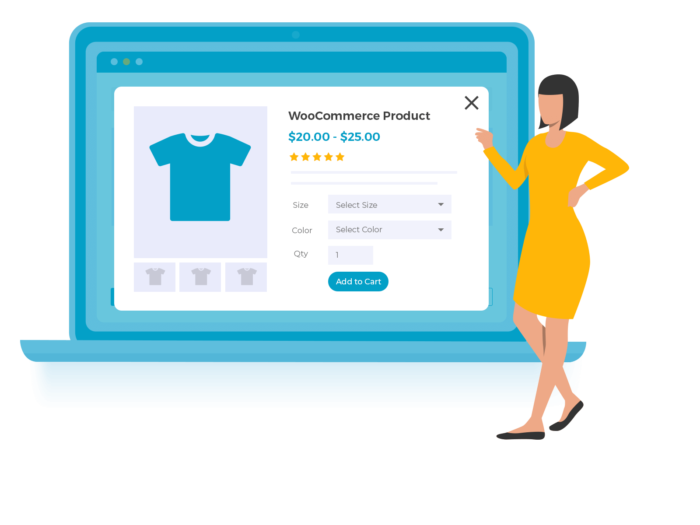
WooCommerce Quick View Pro 1.6.8 is the ultimate solution to streamline the shopping experience on your WordPress website. Perfect for restaurants, photography, fashion, wholesale, events, and more, this plugin reduces clicks and boosts sales. With Quick View Pro, you can enhance the order process, customize the Quick View functionality, and enjoy a range of features that surpass any other plugin in the market.

Simplify the Buying Process

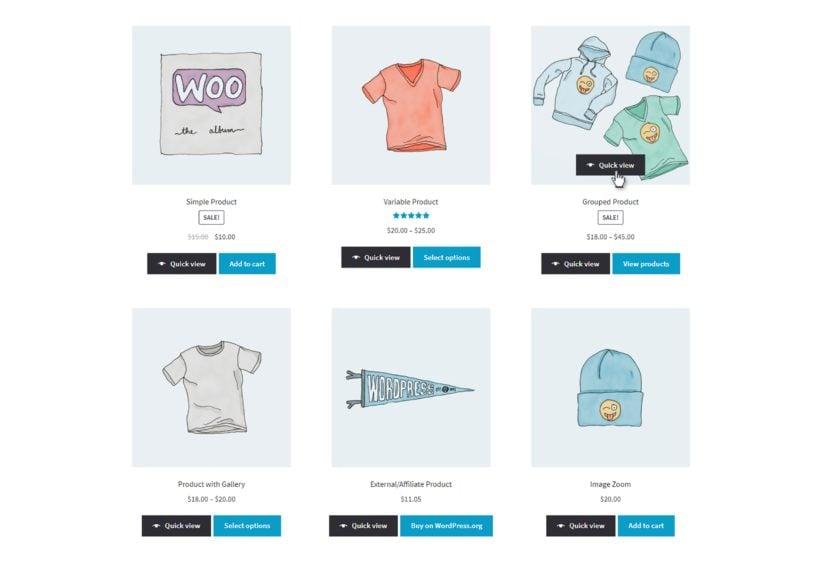
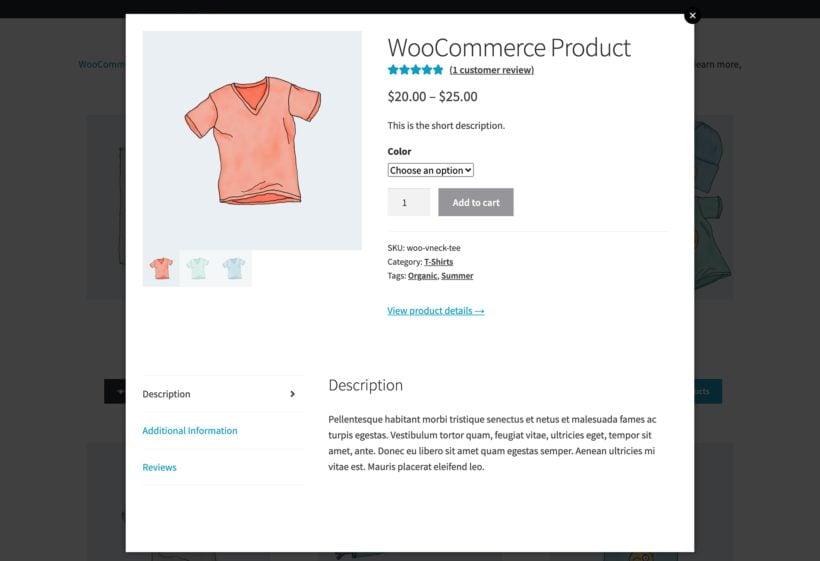
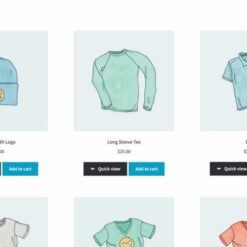
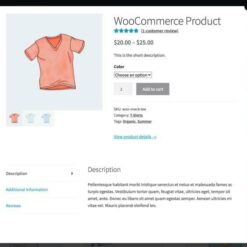
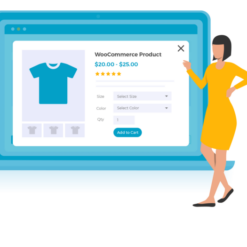
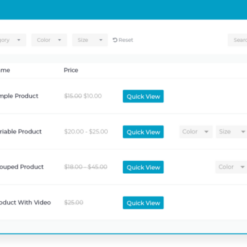
  • Efficiently showcase products with a convenient lightbox view
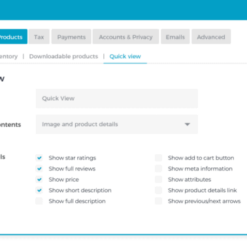
  • Choose from different display options, including image-only or product details-only layouts
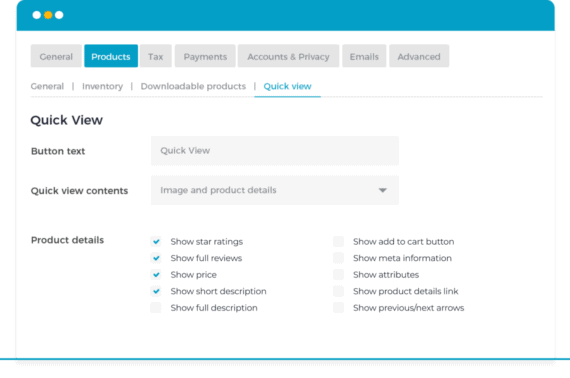
  • Customize the Quick View text and appearance to align with your brand identity
  • Select whether the Quick View opens on product name/image click or via a dedicated button
  • Include product images and galleries to give customers a comprehensive view
  • Enable zoom functionality for a closer look

Seamless Integration and Support

  • Compatible with any WordPress theme, including major ones like Avada, Flatsome, X, Betheme, and Divi
  • Inherits your theme’s styling, ensuring a visually cohesive experience
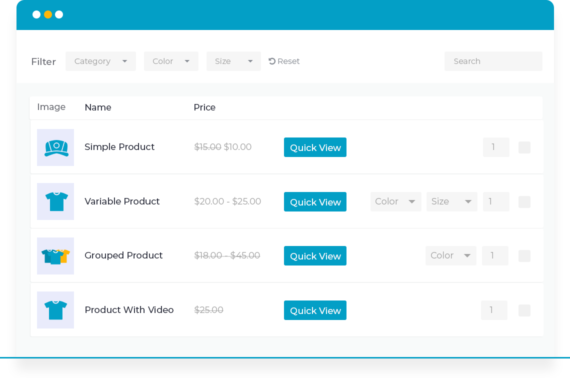
  • Offers official integrations with various WooCommerce extensions, including Product Table, Product Add-Ons, Product Bundles, Composite Products, Deposits, and Subscriptions
  • Supports most multilingual plugins, such as WeGlot, TranslatePress, and WPML
  • Backed by a dedicated support team for any inquiries or assistance you may need

Flexible Licensing Options and Risk-Free Purchase

  • Choose between a lifetime license or an annual subscription, with lifetime licenses offering continuous updates and support
  • No-risk 30-day money-back guarantee if you’re not completely satisfied
  • Simple step-by-step setup guide included to swiftly get your Quick View up and running

Billed annually unless marked as a lifetime license. Upgrades are available at any time.

When you purchase WooCommerce Quick View Pro 1.6.8, you’ll benefit from:

  • Effortless updates via the EffectIO Dashboard
  • Pre-activated items for immediate use
  • Access to GPL code
  • Premium support provided by EffectIO
  • Super deals with 30% to 90% discounts available

Unlock the full potential of your WooCommerce store with WooCommerce Quick View Pro 1.6.8. Buy now and streamline your customers’ shopping journey.

The best quick view plugin for WooCommerce.

1.7.16
  • Dev: Updated internal libraries and tested up to WordPress 6.9 and WooCommerce 10.6.0
  • Dev: Improved the security of the plugin
  • Fix: Select options button in the Enflod them was not working properly
1.7.15
  • Dev: Updated internal libraries and tested up to WooCommerce 10.1.2 and WordPress 6.8.2
  • Dev: Added filters for better integration with WooCommerce Discount Manager
  • New: Added the translation files
  • Fix: Additional information tab is not showing when the product has weight/dimension
1.7.14
  • Dev: Updated internal libraries
  • Dev: Tested up to WordPress 6.8.1 and WooCommerce 9.9.5
  • Tweak: Improved HTML markup of product images
1.7.13
  • Dev: Tested up to WordPress 6.7.2 and WooCommerce 9.7.0
  • Fix: Add to cart doesn't work in Flatsome theme
  • Fix: Contact Form 7 doesn't work in the quick view modal
  • Fix: JavaScript error on the pages with the Product Table
  • Fix: Styling issues in 2022 and Avada theme
1.7.12
  • Dev: Tested up to WordPress 6.7.1
  • Dev: Updated the internal libraries
1.7.11
  • Fix: Removed the experimental WooCommerce `Navigation` class
1.7.10
  • Dev: Added the uninstall file
  • Dev: Tested up to WordPress 6.6.2 and WooCommerce 9.3.3
  • Fix: Don't add the products to the cart with Ajax if the option is disabled
  • Fix: `cartButton` parameter was missing from the `added_to_cart` event
  • Fix: Validation filter missed `variation` and `variation_id`
1.7.9
  • Dev: Updated internal libraries
  • Dev: Updated classes to use barn2-lib 2.0
  • Dev: Tested up to WordPress 6.5.5 and WooCommerce 9.0.1
  • Fix: Replace the `subtreemodified` with `mutation observer`
  • Fix: Show the WP Bakery content in the quick view modal
1.7.8
  • New: Integration with Woodmart and Elementor components
  • New: Integration with Avada product grid element
  • Fix: Fatal error when WooCommerce Product Tabs is active
  • Dev: Added aria-label attribute to the quick view links
  • Dev: Better integration with the block themes
  • Dev: Tested up to WordPress 6.4.3 and WooCommerce 8.6.1
1.7.7
  • Fix: Not loading the page where there is no product
  • Fix: Some design issues with the supported themes
  • Dev: Updated internal libraries
  • Dev: Tested up to WordPress 6.3.2 and WooCommerce 8.2.1
1.7.6
  • Fix: Allowed memory size error when activating the plugin
1.7.5
  • Fix: Enqueue the scripts on the Elementor pages
  • Fix: Show the tab content when using WooCommerce Product Tabs
  • Dev: Tested up to WooCommerce 8.2.0
1.7.4
  • Fix: Changed the style of next/previous arrows
  • Fix: Hide the "Thumbnail Style" settings in the admin based on the other options
  • Fix: Default value was not selectable for parent categories
  • Fix: PHP warnings when the `keep_open` parameter are not set
  • Fix: Wrong class for the settings section
  • Dev: Change the column name to `quick_view` for WooCommerce Product Table
  • Dev: Added the Plugin_Setup.php file
1.7.3
  • Dev: updated internal libraries
  • Dev: Tested up to WordPress 6.3 and WooCommerce 8.0.3
  • Dev: Added HPOS compatibility
  • Fix: Added more styles for the Shoptimizer theme
  • Fix: Fatal error on showing the modal for variable products
1.7.2
  • Fix: Fixed compatibility issue with WooCommerce Fast Cart where Quick View would close when not desired
  • Fix: Added support for WooCommerce Product Tab
1.7.1
  • Dev: Delete unnecessary files
1.7.0
  • New: Add previous/next arrows for the quick view lightbox
  • New: Option to not close quick view after add to cart
  • Fix: Modal is closed when using WPO file uploader
1.6.13
  • Fix: PHP fatal error when using attribute names ending with `quantity` in WooCommerce Composite Products
  • Tweak: Added support for the new shop links selectors in Woodmart
  • Dev: Tested up to WP 6.1 and WC 7.1
1.6.12
  • Fix: PHP Warning about undefined variable on the back end
  • Dev: Tested up to WP 6.0.2 and WC 6.9.4
1.6.11
  • Fix: Use of descriptions for product variations
  • Dev: Tested up to WP 6.0.0 and WC 6.7.0
1.6.10
  • Fix: Cart form is duplicated in a WPT cart column when displaying separate variations
  • Fix: Additional Information tab being displayed even if no product attribute is visible
  • Tweak: Minor styling adjustments
  • Dev: Tested up to WP 5.9.3 and WC 6.5.1
1.6.9
  • Fix: Resolved issue where backend styles and scripts are not enqueued when `SCRIPT_DEBUG` is `true`
  • Dev: Added support for Setup Wizard
1.6.8
  • Fix: Improved integration with WooCommerce Bulk Variations
  • Fix: Resolved issue with Advanced Product Fields for WooCommerce
1.6.7
  • New: Added support for Fast Cart plugin
  • Fix: Resolved issue where only the last product addon is added to the cart
  • Fix: Improved integration with the Astra theme
1.6.6
  • New: Added `sku` parameter to the [quick_view] shortcode
  • Fix: Resolved issue where trying to add to the cart children of a Grouped product always returns a zero-quantity error
1.6.5
  • Fix: Resolved issues where closing the photo modal would also close Quick View Pro modal
1.6.4
  • Fix: Resolved issue where click events within Quick View Pro were prevented from propagating
  • New: Added compatibility with AJAX add-to-cart functionality in Goya theme
1.6.3
  • New: 'Add to Cart' compatibility with WooCommerce Product Tables when variations are set to 'separate'
1.6.2
  • New: Updated internal error handling to provide compatibility with WooCommerce Quantity Manager
1.6.1
  • Fix: Issue with tabs in Quick View when thumbnails are not enabled.
  • Fix: Tabs will no longer appear when "Image Only" mode is selected.
  • Fix: Style issue with focus outline clipping on some themes.
  • New: Added Quick View Pro to new WooCommerce Admin extensions sidebar
1.6
  • New: Ability to show/hide the Quick View button on hover.
  • New: Ability to preview some features within your theme without changing the live site.
  • New: Clicking outside the Quick View modal will close the feature.
  • New: Add long description, reviews, and product attributes to the quick view modal.
  • New: Option to enable/disable quick view for specific categories.
  • Fix: Enabling bullets for Quick View gallery will no longer break the thumbnails on single product pages.
1.5.3
  • Tweak: Improve compatibility with Flatsome theme.
1.5.2
  • Fix: Bug with add to cart button for External/Affiliate Products.
1.5.1
  • Fix: Default variations were not displayed in the Quick View for variable products.
  • Fix: Issues opening Quick View in Avada and Enfold themes.
  • Tweak: Improve compatibility with Avada, Divi and Enfold themes.
  • Tweak: Improve RTL language support.
1.5
  • New: Added a new [quick_view] shortcode to display the Quick View button anywhere on your website.
  • New: Added a new option to display a 'View product details' link in the Quick View.
  • Fix: A bug introduced in version 1.4 which prevented the Quick View working for products displayed using the WooCommerce shortcodes.
  • Fix: Issue when closing the Quick View while the add to cart action was in progress.
  • Fix: Conflict with WooCommerce Composite Products when viewing the single product page.
  • Fix: Conflict with Bootstrap Modal plugin used in Avada and other themes.
  • Tweak: Removed the check for product visibility for the Quick View button and when adding to the cart as this is handled by WooCommerce.
  • Tweak: Improved error handling and validation when adding to the cart.
  • Tweak: Minor styling and theme improvements.
1.4.1
  • Fix: A bug that prevented the Quick View loading for Related Products.
  • Tweak: Added a fallback for Quick View buttons when Javascript is disabled.
1.4
  • New: Added support for the WooCommerce Blocks plugin.
  • Tweak: Improved compatibility with various themes (Avada, Storefront, Total, Bridge, Enfold, Genesis, etc).
  • Fix: Fixed an issue in Storefront and other themes where the cart widget and fragments were not updated correctly when adding to the cart.
  • Fix: Fixed an error when the quick view was closed quickly after adding a product to the cart.
  • Fix: Fixed an error in Flatsome where the setting to show the quick view by clicking the product name could not be disabled.
  • Fix: Fixed an issue which prevented product tables working inside the Quick View.
  • Tweak: Minor improvements to the plugin settings page.
  • Dev: Tested with WordPress 5.5 and WooCommerce 4.4.
  • Dev: Fixed an issue which prevented the wc_quick_view_pro_scripts_enabled_on_page filter working when using quick view in product tables.
  • Dev: Added a body class when the quick view button is displayed in the shop.
  • Dev: Added filters wc_quick_view_pro_shop_loop_button_hook_priority and wc_quick_view_pro_use_default_button_classes.
1.3.1
  • Test: Compatibility with WooCommerce 4.1 and WordPress 5.4.1.
  • Dev: Added Composer support.
1.3
  • Fix: Bug displaying add to cart error messages in the quick view.
  • Tweak: Styling improvements for WooCommerce Composite Products.
  • Tweak: Minor improvements to settings page.
  • Dev: Add new license system and refactor to use new architecture.
  • Dev: Deprecate Barn2\Plugin\WC_Quick_View_Pro\Quick_View_Plugin class and wc_quick_view_pro() function.
  • Dev: Update jQuery Modal to 0.9.2.
1.2.2
  • Dev: Tested up to WooCommerce 4.0 and WordPress 5.4.
1.2.1
  • Dev: Fully tested with WordPress 5.3.2 and WooCommerce 3.9.
1.2
  • Dev: Tested up to WordPress 5.3 and WooCommerce 3.8.
  • Dev: Added 'wc_quick_view_pro_quick_view_after_product_details' hook.
  • Dev: Refactored code to use updated plugin library.
1.1
  • New: Enfold theme support.
  • New: Support for WooCommerce 3.6.
  • Fix: Bug adding variable products when attribute names contain non-Latin characters.
  • Fix: Set nonce header for add to cart REST request to ensure proper authentication.
1.0
  • Initial release.

Testimonials

Benny O'Brien@benny_obie

The quick response from a friendly team member at @effectioshop honestly caught me off guard.
Nice work!


Stuart Boyle@stuart_boyle

@effectioshop As an eCommerce developer, effectio.org has enabled me to reach higher expectations and my clients are very happy.


22,000+ Users · 180 Countries
Trusted by freelancers, agencies & store owners worldwide

How It Works

Install the free EffectIO Dashboard plugin on your WordPress site. It connects to the EffectIO catalog, detects every premium plugin and theme you own, and gives you a single hub to manage licenses, run updates, and keep your admin panel clean — all from one screen.

One-Click Updates
Update any premium plugin or theme instantly. No manual downloads, no FTP — just click "Update Now."

🔑

License Manager
View, activate, and manage all your license keys in one place. No hunting through emails or vendor dashboards.

🔇

Notification Blocker
Blocks intrusive admin nag screens, upsell banners, and ads that clutter your dashboard. Re-enable anytime.

🛡️

Vendor Request Control
Prevents redundant license-check pings to third-party servers for items you already manage through EffectIO.

📦

Bulk Activation
Club members can activate all eligible plugins and themes at once — one button, zero hassle.

🆓

100% Free
The Dashboard itself costs nothing. Install it and it auto-activates on your domain — no key required.

Get Started in 3 Steps

1

Download & Install

Download the EffectIO Dashboard zip and install it via Plugins → Add New → Upload.

2

Browse & Activate

Open EffectIO → Catalog in your admin panel. The dashboard auto-detects your installed items and matches them to your licenses.

3

Update & Manage

Keep everything current with one-click updates. Manage licenses, block nag notices, and enjoy a cleaner WordPress experience.

Licenses

All WordPress derivative work is GPL-licensed. Most items are pre-activated and ready to use. Some require an activation key — we provide it with your purchase, and the Dashboard lets you apply it in seconds.

Club members enjoy bulk activation: activate every eligible item at once with a single click. No more entering keys one by one.

✅ Money-Back Guarantee

Every item is tested and ships with full features. If something doesn't work and we can't fix it, you get a full refund. We believe premium tools should be accessible — that's why we offer a low-cost subscription so freelancers, small businesses, and agencies can grow without a large upfront investment.

Manage and Update all your sites

17.99 $ / Month Membership

2900 Plugins and Themes. Install, Update, Activate and Delete any plugin. Unlimited Sites. Best WP Agency Deal.

Clean Items

NGO Mission

Always Updated

SSL Connection











