EffectIO WooCommerce Cart Notices

Original price was: $49.00.Current price is: $12.99. / year

Drop-in compatible replacement & Licensed Product

Woocommerce Cart Notices allows you to display dynamic, actionable messages to your customers as they check out. Convert more sales! Version: 1.15.0 Add dynamic notices above the cart and checkout to help increase your sales!

Released on: 2025-12-19

Single License

Club Membership

17,99 / Month Membership

NEW Activate all licensed items with the free Dashboard

EffectIO Dashboard

Discover when we give away free Plugins

Find out when we give items for Free


Hey! 🎉 Monthly emails, tops. Snag exclusive plugins/themes for $0. They go quick, but you might just get a freebie! 😉

30 Days Money Back Guarantee

Guaranteed pre-activated plugins. Most items work immediately after installation. Open a support ticket to obtain the license keys for the ones that ask for activation.

Free support to install and setup on your site.

Woocommerce Cart Notices allows you to display dynamic, actionable messages to your customers as they check out. You can easily and effectively increase sales and customer satisfaction by displaying dynamic messages to your customers as they check out. Easily create as many notices as you’d like based on a particular product or product category in the cart, or using other criteria.

Leverage proven tactics to increase conversions so that you earn more from customers you already have, and let them know of sales and promotions to improve the shopping experience.

Woocommerce Cart Notices Features

  • Display custom messages to your customers on the cart and checkout pages.
  • Add messages anywhere on your site shortcodes are allowed (for example, display promotion notices at the top of a shop or category page).
  • Improve sales by encouraging spending to receive benefits.
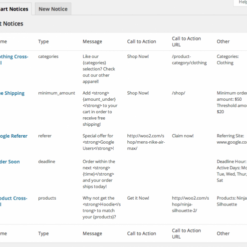
  • Display dynamic notices with the use of message variables (for example, you can set a minimum amount for free shipping, and the message dynamically displays the difference the customer needs to add to their total to qualify).
  • Set minimum and maximum quantities for discounts using the “Product in Cart” notice.
  • Optionally add a call to action button/URL to encourage your customers to perform the desired action.

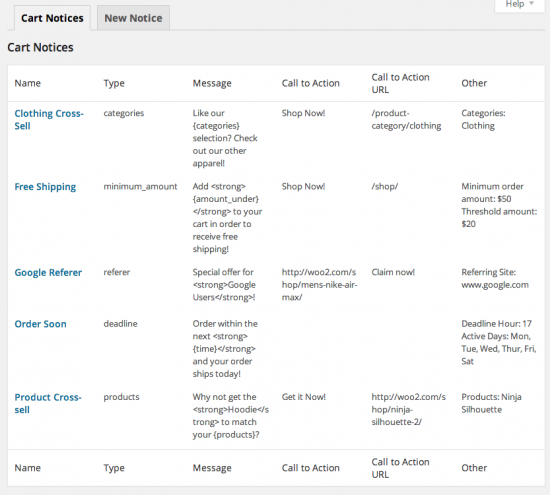
Five Different Notice Types

Current order amount

Useful for encouraging additional purchases to qualify for free shipping or to receive a free gift. Set any minimum amount you want, and find a way to encourage customers to hit it!

Deadline

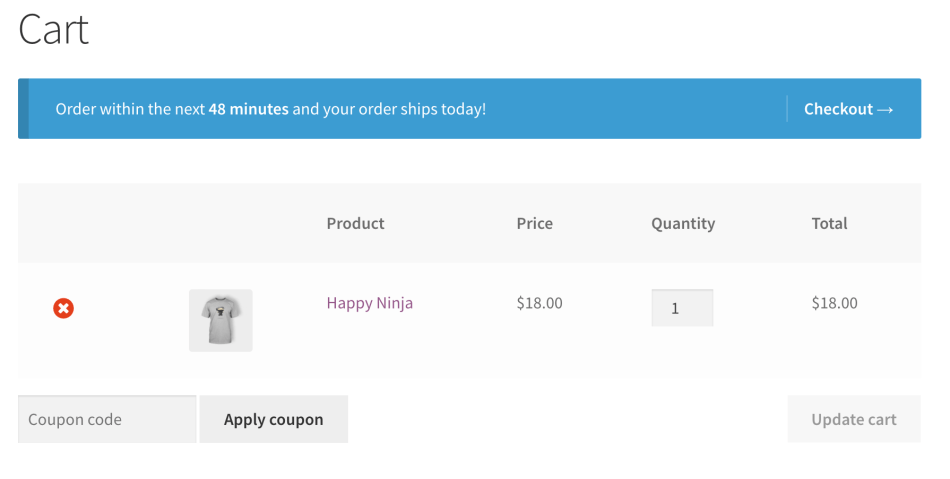
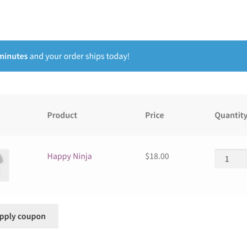
Great for encouraging customers to checkout within the next X minutes to have their order ship today or purchase before a sale expires. Setting deadlines creates a sense of urgency that will help you close sales.

Referer

Display a notice based on the site the customer came from to personalize the shopping experience.

Products in Cart

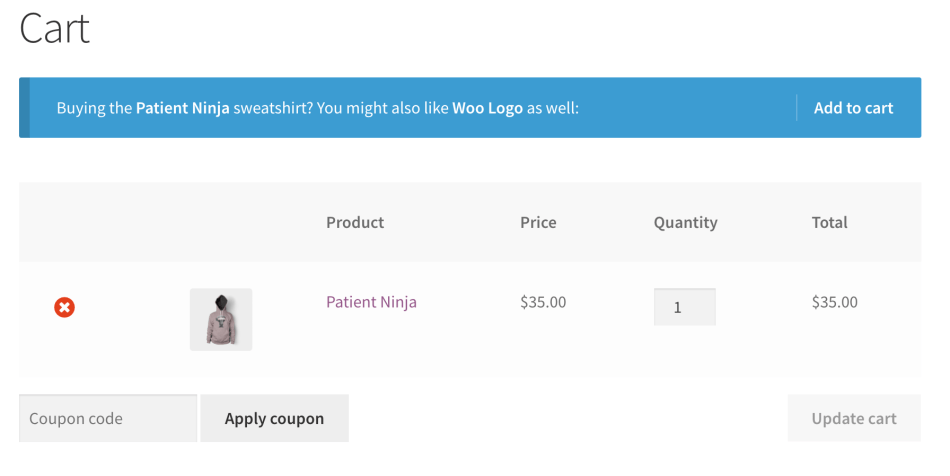
Display a notice based on the products in the cart. Cross-sell your related products and appear helpful to customers at the same time.

Product Categories in Cart

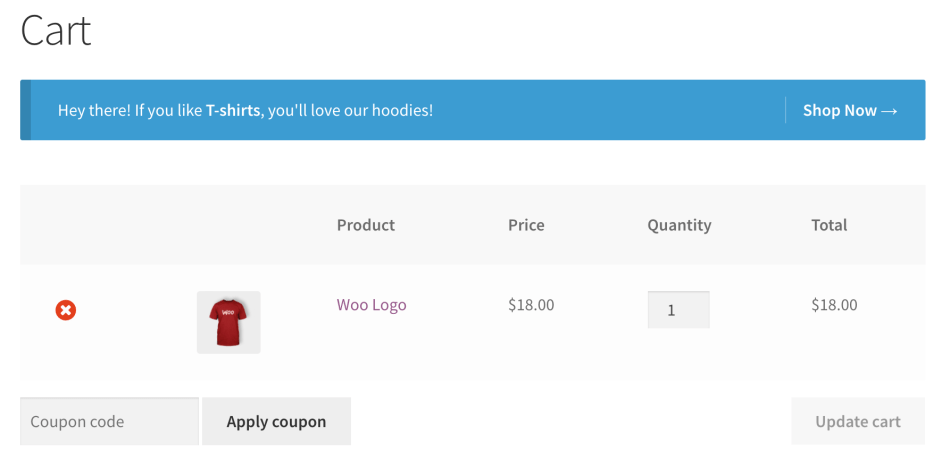
Display a notice based on the product categories contained in the cart. Recommend similar items to improve the shopping experience.

2 reviews for EffectIO WooCommerce Cart Notices 1.16.3

  1. slouizana

    Recommended! Displays custom messages to your customers on the cart and checkout pages.

  2. kleindaniel138

    Useful plugin for encouraging additional purchases to qualify for free shipping or to receive a free gift.

Add a review

Add dynamic notices above the cart and checkout to help increase your sales!

2025.12.17 — version 1.16.3
  • Security - Add nonce checks
  • Fix - HTML being unintentionally stripped from cart notice messages upon save
2025.10.21 — version 1.16.2
  • Fix - "Translations loaded too early" error
  • Fix - Remove support for deprecated navigation feature
  • Misc - Tested up to WooCommerce 10.2
  • Misc - Improve escaping and sanitizing throughout codebase
  • Misc - Update the SkyVerge Plugin Framework to v5.15.12
2024.03.27 — version 1.16.1
  • Fix - Ensure notices are displayed on the Cart page when the Cart Block is not in use due to a WooCommerce bug
2024.01.29 — version 1.16.0
  • Feature - Add compatibility with the Cart and Checkout blocks
2023.11.17 — version 1.15.1
  • Misc - Add admin notices to help merchants reverting to the cart or checkout shortcodes if the corresponding blocks are used instead
2023.06.28 — version 1.15.0
  • Misc - Add compatibility for WooCommerce High Performance Order Storage (HPOS)
2022.11.22 — version 1.14.0
  • Misc - Require PHP 7.4 and WordPress 5.6
2022.02.07 — version 1.13.3
  • Fix - Replace deprecated `is_ajax()` calls with `wp_doing_ajax()`
  • Misc - Require WooCommerce 3.9.4 or newer
2021.04.07 — version 1.13.2
  • Tweak - Update the Target Amount field description
2021.03.16 — version 1.13.1
  • Tweak - Add support for the WooCommerce Navigation admin feature
2020.12.07 — version 1.13.0
  • Misc - Add compatibility for WooCommerce 4.7
  • Misc - Require PHP 7.0 or newer
2020.10.16 — version 1.12.2
  • Fix - Address a possible PHP error while editing content that includes the shortcode for the minimum amount notice
2020.09.29 — version 1.12.1
  • Misc - Remove the SkyVerge help menu item as part of the plugin assets
2020.08.13 — version 1.12.0
  • Misc - Add SkyVerge help menu for support on WooCommerce.com connected sites
2020.04.29 — version 1.11.4
  • Misc - Add support for WooCommerce 4.1
2020.04.16 — version 1.11.3
  • Fix - Fix cart subtotal calculation when displaying prices with taxes
2020.03.04 — version 1.11.2
  • Misc - Add support for WooCommerce 4.0
2020.01.02 — version 1.11.1
  • Fix - Ensure that cart notice types can be translated
  • Misc - Add support for WooCommerce 3.9
  • Localization - Add Italian translation
2019.10.21 — version 1.11.0
  • Misc - Add support for WooCommerce 3.8
2019.08.09 — version 1.10.0
  • Misc - Add support for WooCommerce 3.7
  • Misc - Remove support for WooCommerce 2.6
  • Misc - Require PHP 5.6+
2019.04.04 — version 1.9.1
  • Misc - Add support to WooCommerce 3.6
  • Misc - Require PHP 5.4+
2019.02.06 — version 1.9.0
  • Misc - Drop support for PHP 5.2: PHP 5.3 is now the minimum supported version
5.3 — Update SkyVerge plugin framework to version 5.3
2019.01.02 — version 1.8.6
  • Dev - Introduce `wc_cart_notices_notice_message` filter
2018.10.16 — version 1.8.5
  • Misc - Add support for WooCommerce 3.5
2018.05.23 — version 1.8.4
  • Misc - Add support for WooCommerce 3.4
2018.03.15 — version 1.8.3
  • Fix - Minimum amount notice no longer ignores the cent value of the "Minimum order amount" set on the free shipping method
  • Misc - Introduce `wc_cart_notices_get_cart_total` filter
2018.01.23 — version 1.8.2
  • Misc - Add support for WooCommerce 3.3
2017.12.20 — version 1.8.1
  • Fix - PHP warning when items to hide product in cart and category in cart notices were not set
2017.12.12 — version 1.8.0
  • Feature - Hide product and category notices when particular items are in the cart
  • Tweak - Search for categories with only 2 characters instead of 3
  • Misc - Removed support for WooCommerce 2.5
  • Localization - Add Slovakian translation (thanks Karol Vörös!)
2017.08.15 — version 1.7.1
  • Fix - Ensure minimum amount notices are only shown if free shipping is actively using them
2017.03.28 — version 1.7.0
  • Fix - Ensure styles & scripts are loaded where needed when "WooCommerce" string is translated
  • Misc - Added support for WooCommerce 3.0
  • Misc - Removed support for WooCommerce 2.4
2016.12.20 — version 1.6.1
  • Fix - Minimum amount not properly pulling in free shipping value for a shipping zone
  • Fix - PHP Notices when editing notice title
2016.06.02 — version 1.6.0
  • Misc - Added support for WooCommerce 2.6
  • Misc - Removed support for WooCommerce 2.3
2016.01.14 — version 1.5.0
  • Misc - Added support for WooCommerce 2.5
  • Misc - Removed support for WooCommerce 2.2
2015.10.27 — version 1.4.1
  • Fix - Minimum Amount notice showing incorrect remaining amount when a coupon is applied to the order.
2015.07.28 — version 1.4.0
  • Fix - Header warning on cart notice toggle/delete
  • Misc - WooCommerce 2.4 Compatibility
2015.04.21 — version 1.3.2
  • Fix - Escape all instances of add_query_arg and remove_query_arg to avoid a potential XSS attack
2015.03.17 — version 1.3.1
  • Fix - JS variable `wc_select_params` undefined in WC 2.3.6+
2015.02.09 — version 1.3.0
  • Misc - WooCommerce 2.3 Compatibility
2015.01.27 — version 1.2.4
  • Fix - Disable Minimum Amount notice if a minimum order amount is not set on the notice and the Free Shipping method is disabled
2014.12.30 — version 1.2.3
  • Fix - Ensure plugin data is not deleted on uninstall unless specified
2014.09.07 — version 1.2.2
  • Misc - WooCommerce 2.2 Compatibility
  • Fix - Use cart subtotal rather than total for minimum_amount notice type
2014.08.19 — version 1.2.1
  • Tweak - new filter for the products notice: wc_cart_notices_products_notice_all_products
2014.01.20 — version 1.2
  • Misc - WooCommerce 2.1 Compatibility
  • Misc - Uses SkyVerge Plugin Framework
  • Localization - Text domain changed from `wc-cart-notices` to `woocommerce-cart-notices`
  • Localization - Languages path changed from `languages` to `i18n/languages`
2013.10.18 — version 1.1.1
  • Fix - Fixed bug with referer notices not working properly
2013.09.06 — version 1.1
  • Feature - Added "Minimum quantity" and "Maximum quantity" to the "Products in Cart" notice type
  • Tweak - Notices now display properly when IE9/10 is rendering in Quirks Mode
  • Tweak - Changed cart notice element from

    to

    for improved theme styling compatibility
  • Tweak - Added action/filter wc_cart_notices_process_notice_before and wc_cart_notices_order_thresholds for improved 3rd party plugin compatibility (Thanks D.Zanella!)
  • Tweak - Update WP Admin Message Handler to 1.0.1
  • Fix - Remove WPML compatibility as it was breaking notice messages when more than one were displayed
2013.06.24 — version 1.0.8
  • Fix - WP Message Handler utility class conditionally loaded to avoid conflicts with other plugins
2013.05.03 — version 1.0.7
  • Fix - Shortcode notice by name
  • Fix - Improved WPML compatibility for translating notice message
  • Fix - Admin messaging, which was broken by WC 2.0
  • Tweak - Improved the cart notice CSS id/class names for easier styling
2012.12.17 — version 1.0.6
  • Feature - filters available for all cart notice messages, for improved customizability
  • Feature - shortcodes supported within cart notice messages
  • Feature - shipping country condition for products message
  • Fix - deadline notice works properly without {time} variable in message string
  • Fix - slashes stripped from notice data
  • Fix - WordPress 3.5 compatibility fix (prepare)
  • Localization - added German translation by Christian Münch
  • WC 2.0 compatibility

Testimonials

Benny O'Brien@benny_obie

The quick response from a friendly team member at @effectioshop honestly caught me off guard.
Nice work!


Stuart Boyle@stuart_boyle

@effectioshop As an eCommerce developer, effectio.org has enabled me to reach higher expectations and my clients are very happy.


22,000+ Users · 180 Countries
Trusted by freelancers, agencies & store owners worldwide

How It Works

Install the free EffectIO Dashboard plugin on your WordPress site. It connects to the EffectIO catalog, detects every premium plugin and theme you own, and gives you a single hub to manage licenses, run updates, and keep your admin panel clean — all from one screen.

One-Click Updates
Update any premium plugin or theme instantly. No manual downloads, no FTP — just click "Update Now."

🔑

License Manager
View, activate, and manage all your license keys in one place. No hunting through emails or vendor dashboards.

🔇

Notification Blocker
Blocks intrusive admin nag screens, upsell banners, and ads that clutter your dashboard. Re-enable anytime.

🛡️

Vendor Request Control
Prevents redundant license-check pings to third-party servers for items you already manage through EffectIO.

📦

Bulk Activation
Club members can activate all eligible plugins and themes at once — one button, zero hassle.

🆓

100% Free
The Dashboard itself costs nothing. Install it and it auto-activates on your domain — no key required.

Get Started in 3 Steps

1

Download & Install

Download the EffectIO Dashboard zip and install it via Plugins → Add New → Upload.

2

Browse & Activate

Open EffectIO → Catalog in your admin panel. The dashboard auto-detects your installed items and matches them to your licenses.

3

Update & Manage

Keep everything current with one-click updates. Manage licenses, block nag notices, and enjoy a cleaner WordPress experience.

Licenses

All WordPress derivative work is GPL-licensed. Most items are pre-activated and ready to use. Some require an activation key — we provide it with your purchase, and the Dashboard lets you apply it in seconds.

Club members enjoy bulk activation: activate every eligible item at once with a single click. No more entering keys one by one.

✅ Money-Back Guarantee

Every item is tested and ships with full features. If something doesn't work and we can't fix it, you get a full refund. We believe premium tools should be accessible — that's why we offer a low-cost subscription so freelancers, small businesses, and agencies can grow without a large upfront investment.

Manage and Update all your sites

17.99 $ / Month Membership

2900 Plugins and Themes. Install, Update, Activate and Delete any plugin. Unlimited Sites. Best WP Agency Deal.

Clean Items

NGO Mission

Always Updated

SSL Connection











