EffectIO WooCommerce Shipping Per Product v2

Original price was: $79.00.Current price is: $14.99. / year

Drop-in compatible replacement & Licensed Product

WooCommerce Shipping Per Product helps define separate shipping costs per product which are combined at checkout to provide a total shipping cost. Version: 2.5.3 Per product shipping allows you to define different shipping costs for products, based on customer location. These costs can be added to other shipping methods, or used as a standalone shipping method.

Released on: 2025-10-30

Single License

Club Membership

17,99 / Month Membership

NEW Activate all licensed items with the free Dashboard

EffectIO Dashboard

Discover when we give away free Plugins

Find out when we give items for Free


Hey! 🎉 Monthly emails, tops. Snag exclusive plugins/themes for $0. They go quick, but you might just get a freebie! 😉

30 Days Money Back Guarantee

Guaranteed pre-activated plugins. Most items work immediately after installation. Open a support ticket to obtain the license keys for the ones that ask for activation.

Free support to install and setup on your site.

Find Out More About WooCommerce Shipping Per Product

WooCommerce Shipping Per Product is an extension which enables you to determine different shipping costs for items. Additionally, customer location is at the base of those costs. To continue, you can add these shipping costs to other shipping methods. On the other hand, you can use them as a standalone shipping method.

WooCommerce Shipping Per Product Features

    • Define line and per-item costs per production
    • Define line and per-item costs per variation
    • Costs can vary depending on the destination
    • Import and export rates via the built-in simple CV handler
    • Standalone shipping method – final cost is the sum of all item costs
    • Add per-product costs to other shipping methods

The extension is the perfect solution if your shop is selling one-off, heavy or large products which require additional shipping!

See What’s In It For You

  • Define shipping costs for products
  • Define shipping costs for variations
  • Use the plugin as a standalone method
  • Import and export rates via CSV File

How to get Woocommerce Shipping per Product

Firstly, get the EffectIO Dashboard, then go and search for Woocommerce Shipping per Product. Afterwards, click on install and go to Plugins > Installed Plugins and activate it.

shipping per product

In other words…

Shipping per Product is a premium plugin that allows you to make different shipping pricings for your products, based on your customer’s location. This can be an unique shipping method or can be added to other methods.

How to use it

There are two ways in which you can use this plugin:

  1. Multiple shipping methods: if you use this one, the rates that you set will be applied in addition to your other shipping ways. In the case that you offer a product with multiple variations and you want to set extra shipping fees, you can create a specific tax for that product. If you have more than 1 item in the cart, 2 types of shipping would mean 1 cost: a. the normal shipping costs for the other items and b. the cost for the bulky items.
  2. Standalone Method: the per-product shipping method is the default one. All product costs will be added to form only one rate.

Defining Costs for products

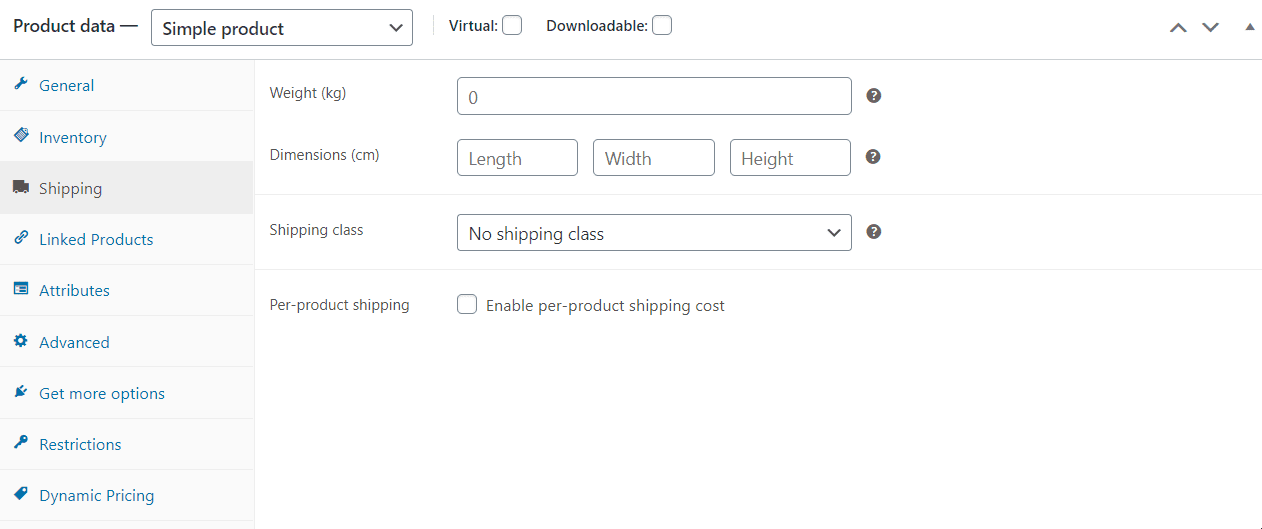
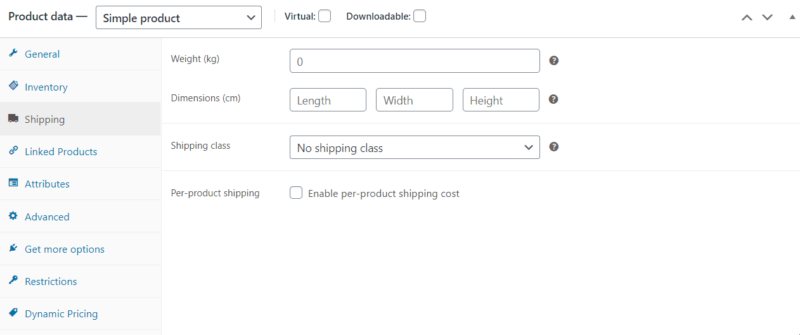
Firstly, add or edit the product. You will see an option: Enable per-product shipping cost. Go and enable it.
woocommerce shipping per product

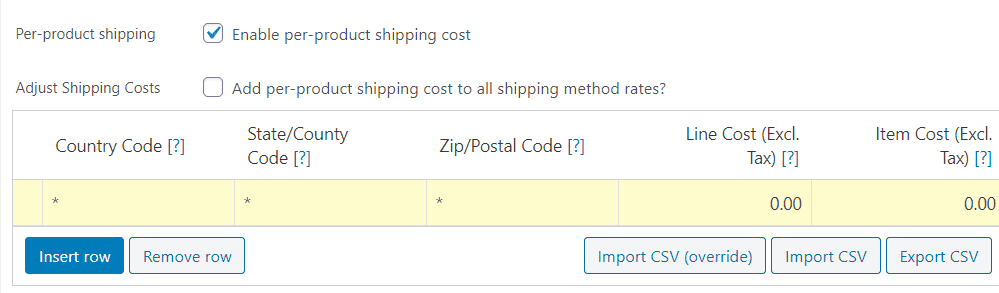
After you do so, you can see the following options:
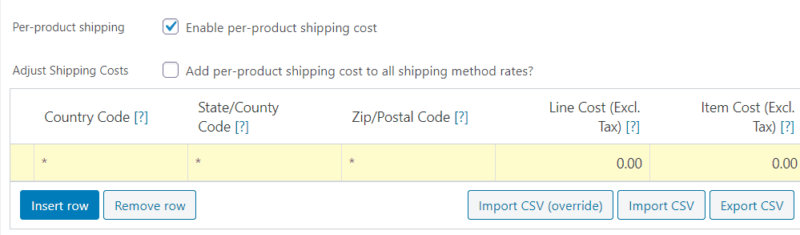
rows

The “Add per-product shipping cost to all shipping method rates” option appears only if you use the legacy shipping per product.

The above table is where you put the customized taxes.

The table is where you define your custom rates. Click ‘Insert row’ and fill in each column;

  • Country Code – For example, GB or US. Always use a 2 digit country code.
  • State/ Country Code – the same as above
  • ZIP/ postcode – enter the postcode or use a wildcard to have multiple postcodes.
  • Line Cost – Put here the cost which will be applied to the line (exclude tax and this ignores the quantity)
  • Item Cost – Put the cost which is going to be applied to the item (quantity * cost). Exclude tax from here, too.

But you can add as many rows as you wish. However, only one row will match your customer’s location, starting from the top to the bottom.

Moreover, if you need, you can export and import these settings and even overwrite some settings.

Speaking of the devil, you can also go to Woocommerce > Settings > Shipping and set the overall settings of the shop. You can even enable the debugging mode should you have any problem with this plugin (plugin conflict).

Conclusion

By using Woocommerce Shipping Per Product, you can add customized taxes for your clients, which is beneficial both for you and your clients. By using this plugin, you can earn more and spend less! Moreover, your clients are going to feel more special because of their personalized prices. Discover other plugins for your Woocommerce store by using the EffectIO Dashboard. Get started with EffectIO!
Reviews

There are no reviews yet.

Be the first to review “EffectIO WooCommerce Shipping Per Product v2 2.7.6”

Per product shipping allows you to define different shipping costs for products, based on customer location. These costs can be added to other shipping methods, or used as a standalone shipping method.

2.7.6 — 2026-03-30
  • Fix - Declare class properties explicitly in WC_Shipping_Legacy_Per_Product to resolve PHP 8.2+ deprecated dynamic property warnings.
2.7.5 — 2026-03-09
  • Tweak - WooCommerce 10.6 Compatibility.
2.7.4 — 2026-02-03
  • Tweak - WooCommerce 10.5 Compatibility.
2.7.3 — 2025-12-10
  • Tweak - WordPress 6.9 and WooCommerce 10.4 Compatibility.
2.7.2 — 2025-10-15
  • Tweak - WooCommerce 10.3 Compatibility.
2.7.1 — 2025-09-15
  • Tweak - WooCommerce 10.2 Compatibility.
2.7.0 — 2025-08-11
  • Tweak - WooCommerce 10.1 Compatibility.
2.6.9 — 2025-07-07
  • Tweak - WooCommerce 10.0 Compatibility.
2.6.8 — 2025-06-09
  • Tweak - WooCommerce 9.9 Compatibility.
2.6.7 — 2025-06-03
  • Update Requires headers for WooCommerce compatibility.
  • Update to ubuntu-latest to fix QIT tests.
2.6.6 — 2025-04-07
  • Tweak - WooCommerce 9.8 Compatibility.
2.6.5 — 2025-03-17
  • Tweak - PHP 8.2 and 8.4 compatibility improvements.
2.6.4 — 2025-02-06
  • Add - Confirmation box for "Import CSV (override)" button.
  • Fix - Ensure the "Save changes" button for variation product is disabled on the first load.
  • Fix - Declare product editor compatibility.
  • Tweak - WooCommerce 9.7 compatibility.
2.6.3 — 2025-01-27
  • Tweak - PHP 8.4 Compatibility.
2.6.2 — 2024-12-09
  • Add - Compatibility with the WooCommerce Checkout Block local pickup method.
  • Fix - CSV Export not compatible with decimal comma separators.
2.6.1 — 2024-10-28
  • Tweak - WordPress 6.7 compatibility.
2.6.0 — 2024-10-16
  • Add - New WooCommerce product editor compatibility.
2.5.7 — 2024-07-02
  • Tweak - WordPress 6.6 and WooCommerce 9.0 compatibility.
2.5.6 — 2024-04-02
  • Tweak - WordPress 6.5 compatibility.
2.5.5 — 2023-10-06
  • Update - Security Update.
2.5.4 — 2023-10-03
  • Fix - WordPress Coding Standards.
2.5.3 — 2023-09-18
  • Update - Security Update.
2.5.2 — 2023-09-05
  • Tweak - Add Text Domain to plugin header.
2.5.1 — 2023-08-03
  • Fix - Shipping rates for Australia three digits state codes.
2.5.0 — 2023-02-14
  • Add - Option to ignore the free shipping and local pickup shipping method.
  • Tweak - Increase allowed state code max length.
2.4.1 — 2023-02-02
  • Add - Country code validation.
2.4.0 — 2022-11-02
  • Add - Declared High-Performance Order Storage (HPOS) compatibility.
2.3.19 — 2022-09-07
  • Fix - Exclude unnecessary files from plugin zip file.
  • Tweak - WC 6.6 and WP 6.0 compatibility.
2.3.18 — 2022-03-17
  • Fix - Format product shipping cost decimals properly.
  • Fix - Removed irrelevant settings link from plugin's action links.
2.3.17 — 2022-01-05
  • Fix - Missing Languages folder and .pot file in release-ready zip file.
2.3.16 — 2021-12-13
  • Fix - Make Australia 2 digits state code works.
  • Tweak - WC 5.9 & WP 5.8 compatibility.
2.3.15 — 2021-08-12
  • Fix - Only allow 200 shipping rule tables to be edited in the product editor.
  • Fix - Skip importing rows where the product ID is empty.
2.3.14 — 2021-07-27
  • Fix - Only allow numeric values for cost fields and validate accordingly.
  • Fix - Change the support links to go to the correct WooCommerce support form.
  • Fix - Make sure country and state codes only use 2 characters.
2.3.13 — 2021-02-09
  • Fix - Possible conflict with Advanced Shipping Packages.
2.3.12 — 2020-10-06
  • Tweak - WC 4.5 compatibility.
2.3.11 — 2020-08-18
  • Fix - Replace deprecated jQuery methods.
  • Tweak - WordPress 5.5 compatibility.
2.3.10 — 2020-06-10
  • Tweak - WC 4.2 compatibility.
2.3.9 — 2020-04-29
  • Fix - Make sure item cost filters are applied only once.
2.3.8 — 2020-03-17
  • Tweak - Remove legacy code.
  • Fix - Allow percentage in handling fees.
2.3.7 — 2020-03-04
  • Tweak - WC tested up to 4.0.
2.3.6 — 2020-02-04
  • Fix - Use proper escape for attributes.
2.3.5 — 2020-01-13
  • Tweak - WC 3.9 compatibility.
2.3.4 — 2019-11-04
  • Fix - Export of rates to CSV
  • Tweak - WC 3.8 compatibility.
2.3.3 — 2019-09-25
  • Fix - Per product shipping rules order is not saved for variations after updating a product.
  • Add - Support for local pickup shipping method.
2.3.2 — 2019-08-28
  • Tweak - Add an option to override product import rules.
2.3.1 — 2019-08-08
  • Fix - Undefined constant "enabled" error when saving a product.
  • Tweak - WC 3.7 compatibility.
2.3.0 — 2019-06-03
  • Add - Use shipping zones and instances to allow greater flexibility. Any existing configurations will use the legacy shipping method based on 2.2.14.
  • Add - Split Per Product Shipping products into separate packages from other products.
  • Add - Filter woocommerce_per_product_shipping_ship_via to allow per product shipping to use other (possibly free) shipping methods.
2.2.16 — 2019-04-16
  • Tweak - WC 3.6 compatibility.
  • Fix - Updating rates defined on a product won't work
2.2.15 — 2018-09-25
  • Update - WC 3.5 compatibility.
2.2.14 — 2018-08-02
  • Fix - Using asterisks (what appears as an empty row) causes the row to be removed.

Testimonials

Benny O'Brien@benny_obie

The quick response from a friendly team member at @effectioshop honestly caught me off guard.
Nice work!


Stuart Boyle@stuart_boyle

@effectioshop As an eCommerce developer, effectio.org has enabled me to reach higher expectations and my clients are very happy.


22,000+ Users · 180 Countries
Trusted by freelancers, agencies & store owners worldwide

How It Works

Install the free EffectIO Dashboard plugin on your WordPress site. It connects to the EffectIO catalog, detects every premium plugin and theme you own, and gives you a single hub to manage licenses, run updates, and keep your admin panel clean — all from one screen.

One-Click Updates
Update any premium plugin or theme instantly. No manual downloads, no FTP — just click "Update Now."

🔑

License Manager
View, activate, and manage all your license keys in one place. No hunting through emails or vendor dashboards.

🔇

Notification Blocker
Blocks intrusive admin nag screens, upsell banners, and ads that clutter your dashboard. Re-enable anytime.

🛡️

Vendor Request Control
Prevents redundant license-check pings to third-party servers for items you already manage through EffectIO.

📦

Bulk Activation
Club members can activate all eligible plugins and themes at once — one button, zero hassle.

🆓

100% Free
The Dashboard itself costs nothing. Install it and it auto-activates on your domain — no key required.

Get Started in 3 Steps

1

Download & Install

Download the EffectIO Dashboard zip and install it via Plugins → Add New → Upload.

2

Browse & Activate

Open EffectIO → Catalog in your admin panel. The dashboard auto-detects your installed items and matches them to your licenses.

3

Update & Manage

Keep everything current with one-click updates. Manage licenses, block nag notices, and enjoy a cleaner WordPress experience.

Licenses

All WordPress derivative work is GPL-licensed. Most items are pre-activated and ready to use. Some require an activation key — we provide it with your purchase, and the Dashboard lets you apply it in seconds.

Club members enjoy bulk activation: activate every eligible item at once with a single click. No more entering keys one by one.

✅ Money-Back Guarantee

Every item is tested and ships with full features. If something doesn't work and we can't fix it, you get a full refund. We believe premium tools should be accessible — that's why we offer a low-cost subscription so freelancers, small businesses, and agencies can grow without a large upfront investment.

Manage and Update all your sites

17.99 $ / Month Membership

2900 Plugins and Themes. Install, Update, Activate and Delete any plugin. Unlimited Sites. Best WP Agency Deal.

Clean Items

NGO Mission

Always Updated

SSL Connection