EffectIO WP Job Manager - Alerts

Original price was: $70.00.Current price is: $9.99. / year

Drop-in compatible replacement & Licensed Product

Allow users to subscribe to job alerts for their searches. Once registered, users can access a 'My Alerts' page which you can create with the shortcode [job_alerts]. Version: 2.0.0 Allow users to subscribe to job alerts for their searches. Once registered, users can access a 'My Alerts' page which you can create with the shortcode [job_alerts].

Released on: 2024-05-07

Single License

Club Membership

17,99 / Month Membership

NEW Activate all licensed items with the free Dashboard

EffectIO Dashboard

Discover when we give away free Plugins

Find out when we give items for Free


Hey! 🎉 Monthly emails, tops. Snag exclusive plugins/themes for $0. They go quick, but you might just get a freebie! 😉

30 Days Money Back Guarantee

Guaranteed pre-activated plugins. Most items work immediately after installation. Open a support ticket to obtain the license keys for the ones that ask for activation.

Free support to install and setup on your site.

WP Job Manager – Alerts 2.0.0 is a powerful tool that allows users to create custom job alerts and receive email notifications based on their specific job searches. With this plugin, you can easily customize and manage alerts, giving your users the ability to add, preview, enable, disable, edit, and delete their email alerts directly from their account pages.

Users are able to configure their alerts by specifying keywords, job types, and even filter by tags if the Job Tags plugin is installed. By using the job filters to search for jobs, users can conveniently save their search criteria as an alert by simply clicking the “add alert” button.

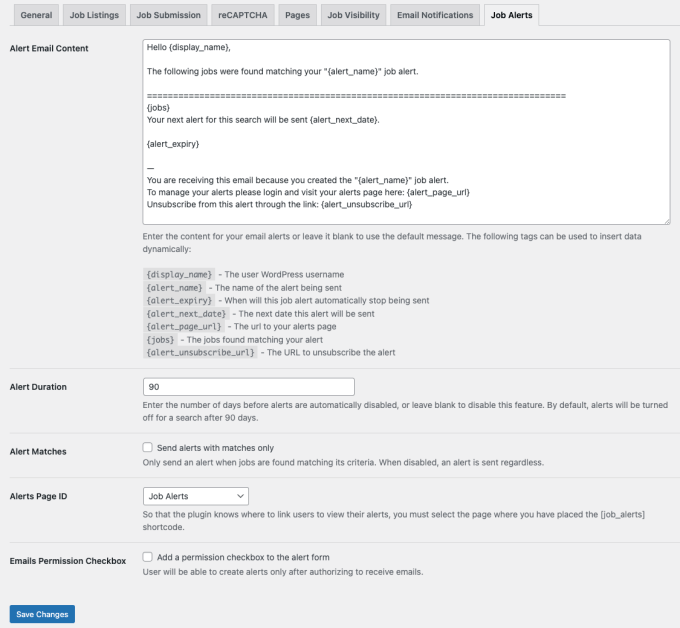
As a site administrator, you have full control over the email settings and can customize the content of the alert emails. To ensure compliance with privacy laws, you can include a consent checkbox for users to explicitly give their permission to receive email notifications. Additionally, an unsubscribe link is automatically included in the alert emails, allowing users to opt-out if desired.

WP Job Manager – Alerts 2.0.0 is available through EffectIO, offering an alternative, cost-saving update channel for plugins. With the EffectIO Dashboard, you can easily update and manage your plugins, and rest assured that they come pre-activated for your convenience.

Key Features:
1. Create custom job alerts based on specific search criteria
2. Receive email notifications with new job listings daily, weekly, fortnightly, or monthly
3. Manage alerts through a user-friendly alerts management page
4. Customize and personalize the content of alert emails
5. Filter alerts by keywords, job types, and tags (with Job Tags plugin)
6. Comply with privacy laws by adding a consent checkbox and unsubscribe link
7. Access GPL code and premium support from EffectIO
8. Enjoy super deals from EffectIO with discounts ranging from 30 to 90 percent

Update your WP Job Manager – Alerts plugin today via the EffectIO Dashboard and take advantage of its robust features and seamless management. Your users will appreciate the convenience of receiving personalized job alerts, while you enjoy the flexibility and support from EffectIO.
Allow users to subscribe to job alerts for their searches. Once registered, users can access a ‘My Alerts’ page which you can create with the shortcode [job_alerts].

1.5.0
  • Adds compatibility with WP Job Manager 1.29.0 and requires it for future updates.
  • Periodically check for and reschedule alert cron events if they are lost.
  • Fix issue with deprecated usage of `get_the_job_type()`.
  • Verifies the owner of an alert before showing it.
  • Fixes issue with HTML entities appearing in email "From" name.
  • Dev: Adds `job_manager_alerts_single_listing_link` filter for single job listing links.
1.4.2
  • Pass the $alert variable through the job_manager_alerts_get_job_listings_args filter.
1.4.1
  • Improved appearance of listings in emails.
  • Fix text domain.
1.4.0
  • Setup alerts for job tags (if installed). Requires tags 1.3.7+.
  • New job_manager_alerts_alert_schedules filer to control and add custom schedules.
  • Use ob_get_clean() for add/edit alert forms.
  • Changed columns displayed on My Alerts screen for clarity.
1.3.14
  • Fix alert_location notice.
1.3.13
  • Fix conflict with regions.
1.3.12
  • Fix job_manager_alerts_matches_only option check.
1.3.11
  • Leave form URL when using ajax.
  • Support region hierarchy.
1.3.10
  • Don't hide empty regions.
1.3.9
  • Fix job_manager_alerts_matches_only option check.
  • Improved from email.
1.3.8
  • Fix alert_page_url
1.3.7
  • fortnightly typo.
1.3.6
  • Signin link when logged out with job_manager_alerts_login_url filter.
  • Updated POT
1.3.5
  • Don't show alert button during job_preview.
1.3.4
  • "Alert me to jobs like this" link shown on single listings.
  • Reset loop after emailing jobs.
1.3.3
  • Fix region selection.
1.3.2
  • Preserve spaces in search_location on add alert button.
  • Switched page slug option to dropdown.
1.3.1
  • Load translation files from the WP_LANG directory.
  • Updated the updater class.
1.3.0
  • Send alerts from [email protected]
  • Show nested categories on alerts form (please note, you will need to update your alert-form.php template if you've used an override.)
1.2.5
  • Uninstaller.
1.2.4
  • Don't enqueue chosen.
1.2.3
  • Add a filter to the notifications query. job_manager_alerts_get_job_listings_args
1.2.2
  • Use wp_schedule_event instead of wp_schedule_single_event.
  • Correctly reschedule on edit.
1.2.1
  • Fix wp_localize_script
1.2.0
  • Ability to trigger an email alert from the job alerts shortcode.
  • Added support for job regions plugin.
1.1.2
  • Preserve spaces in search_keywords on add alert button
1.1.1
  • Added POT file
  • Fixed textdomain
1.1.0
  • Added new updater - This requires a licence key which should be emailed to you after purchase. Past customers (via Gumroad) will also be emailed a key - if you don't recieve one, email me.
1.0.9
  • Update textdomain
1.0.8
  • Another fix to ensure the range filters are applied.
1.0.7
  • Fix method_exists check
1.0.6
  • Fix saving of taxonomies
1.0.5
  • Missing localisation
1.0.4
  • Fix issue when cats are disabled
1.0.3
  • Fix found alerts check
1.0.2
  • Added an option to disable alerts when no jobs are found.
1.0.1
  • Only add alert link when page is set.
1.0.0
  • First release.

Testimonials

Benny O'Brien@benny_obie

The quick response from a friendly team member at @effectioshop honestly caught me off guard.
Nice work!


Stuart Boyle@stuart_boyle

@effectioshop As an eCommerce developer, effectio.org has enabled me to reach higher expectations and my clients are very happy.


22,000+ Users · 180 Countries
Trusted by freelancers, agencies & store owners worldwide

How It Works

Install the free EffectIO Dashboard plugin on your WordPress site. It connects to the EffectIO catalog, detects every premium plugin and theme you own, and gives you a single hub to manage licenses, run updates, and keep your admin panel clean — all from one screen.

One-Click Updates
Update any premium plugin or theme instantly. No manual downloads, no FTP — just click "Update Now."

🔑

License Manager
View, activate, and manage all your license keys in one place. No hunting through emails or vendor dashboards.

🔇

Notification Blocker
Blocks intrusive admin nag screens, upsell banners, and ads that clutter your dashboard. Re-enable anytime.

🛡️

Vendor Request Control
Prevents redundant license-check pings to third-party servers for items you already manage through EffectIO.

📦

Bulk Activation
Club members can activate all eligible plugins and themes at once — one button, zero hassle.

🆓

100% Free
The Dashboard itself costs nothing. Install it and it auto-activates on your domain — no key required.

Get Started in 3 Steps

1

Download & Install

Download the EffectIO Dashboard zip and install it via Plugins → Add New → Upload.

2

Browse & Activate

Open EffectIO → Catalog in your admin panel. The dashboard auto-detects your installed items and matches them to your licenses.

3

Update & Manage

Keep everything current with one-click updates. Manage licenses, block nag notices, and enjoy a cleaner WordPress experience.

Licenses

All WordPress derivative work is GPL-licensed. Most items are pre-activated and ready to use. Some require an activation key — we provide it with your purchase, and the Dashboard lets you apply it in seconds.

Club members enjoy bulk activation: activate every eligible item at once with a single click. No more entering keys one by one.

✅ Money-Back Guarantee

Every item is tested and ships with full features. If something doesn't work and we can't fix it, you get a full refund. We believe premium tools should be accessible — that's why we offer a low-cost subscription so freelancers, small businesses, and agencies can grow without a large upfront investment.

Manage and Update all your sites

17.99 $ / Month Membership

2900 Plugins and Themes. Install, Update, Activate and Delete any plugin. Unlimited Sites. Best WP Agency Deal.

Clean Items

NGO Mission

Always Updated

SSL Connection